
App reviews are one of the strongest signals of trust in the app stores: they shape how users perceive your app, influence whether they download it, and feed directly into your App Store and Google Play rankings. Around 79% of users check an app’s ratings and reviews before downloading (Google Play), so a steady flow of recent, positive reviews is now essential to growth.
So, how do you get more app reviews?
To get more app reviews, prompt users immediately after a positive moment, remove friction from the submission flow, and target satisfied, engaged users. Reinforce with well-timed email, push, and multichannel reminders, offer ethical (non-rating-contingent) incentives, and respond to existing reviews to encourage more.
This guide gives you a clear, repeatable system to get more app reviews, ethically and at scale.
Key takeaways
- App reviews drive trust, visibility, conversion, and retention.
- Smart timing of in-app review prompts significantly boosts review volume and sentiment.
- Filter feedback before prompting and respond fast to complaints to limit negative reviews.
- Ethical incentives and gamification are great strategies to sustainably get more app reviews from satisfied users, leading to higher credibility and user retention.
- App review management tools like AppTweak’s App Reviews Manager make it easier to collect, respond to, and analyze reviews at scale.
- Reviews fuel more than ASO: reuse them in ads, onboarding, lifecycle marketing, and PR.
What is an app review?
An app review is feedback provided by users on app store listings, usually accompanied by a star rating between 1 and 5. App reviews range from brief comments to detailed reports on user experience, providing crucial qualitative insights for both potential users as well as developers and marketers looking to get app reviews that reflect real-world use.

App reviews are not simply a reflection of user satisfaction; they serve as a direct communication channel between users and developers. They help identify pain points, fix bugs faster, highlight popular features, and uncover opportunities for enhancements. Actively monitoring and analyzing reviews to better understand user expectations will help you to know how to improve your app, increase app reviews, and ultimately drive app performance and growth.

To get app reviews that truly benefit your app, you must first understand how they improve app quality, usability, and overall user satisfaction. Beyond pleasing algorithms, good reviews reveal the importance you give to building relationships with your users.
Keep in mind: app reviews influence discoverability, conversion rates, and perceived app quality across the entire user journey. App ratings and reviews are key elements of successful app store optimization.
Why app reviews matter more than ever
Understanding why app reviews are vital to your growth strategy helps you prioritize their role in product development, app visibility, user engagement, and retention.
And with recent updates like Apple’s review summaries rolling out, the importance of managing and working to get more app reviews is only going to grow.
Impact on user perception and conversion
User reviews significantly influence user behavior, directly impacting app downloads and user retention. According to recent surveys, approximately 79% of users check ratings and reviews before downloading an app. App reviews shape user perception of your app, and influence their decision to download your app, ultimately deeply affecting your app’s success.

Given their power, strategically working to get more app reviews (positive ones, especially) is critical. Good reviews boost credibility, while negative or limited reviews cast doubt. You want volume and quality review to boost your app.
Reviews are key to app store success
App reviews create a sense of community around an app, driving user loyalty and engagement. Positive reviews amplify trust and credibility, attracting new users and reassuring existing ones.
On the other side, negative or fake reviews can damage your app’s credibility and deter new users. That’s why it’s essential to get more app reviews and strengthen your review management processes. It’s vital to your app growth strategy.

Another reason for boosting your app’s review volume and quality: higher ratings can help boost your chances of getting featured in top placements on both the App Store and Google Play.
Apple’s App Store uses a manual editorial process featuring apps that are new, high-quality, well-designed, or backed by a strong brand story. These features appear in the Today tab, Apps tab, and editorial stories.
Google Play, on the other hand, takes a more algorithmic approach, surfacing apps in Top Charts, Editor’s Choice, and personalized suggestions based on user behavior and metadata.
In both ecosystems, your app’s review quality and volume remain essential—they help determine whether your app is worthy of being showcased to millions of users.
Read more about getting featured on the app stores
Why are app reviews important for ASO?
App Store Optimization (ASO) heavily relies on user reviews. The App Store’s and Google Play’s algorithms factor in reviews when ranking apps in search results.
Both quantity and quality influence your ranking and discoverability.
Reviews will therefore boost your visibility, while low or limited reviews can harm discoverability and overall app store ranking.
Apple’s upcoming AI review summaries (rolling out globally late 2025) further reinforce the importance of reviews. These summaries use AI to extract the most commonly occurring themes and sentiments across all user reviews into a concise paragraph displayed on app product pages. That means apps with a higher volume of reviews will be better positioned to benefit from this added layer of trust and transparency.
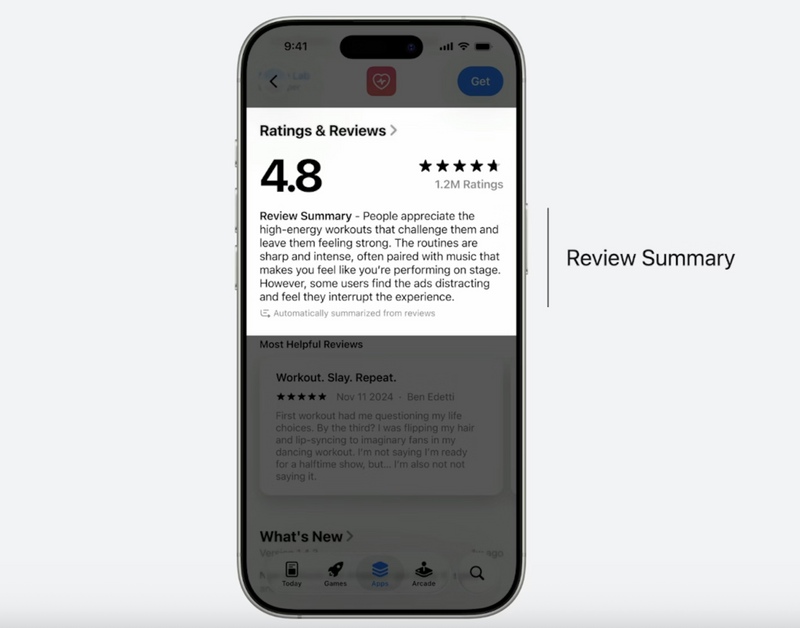
Apple also announced that developers can monitor these summaries in App Store Connect and report concerns if the generated content feels misleading. While the visual design of summaries may currently limit their impact on conversion, their very existence should raise the priority of app reviews. The more positive reviews your app receives, the more likely Apple’s review summaries will highlight favorable sentiments, offering a clearer and more nuanced reflection of user feedback.
Review quantity and quality are gaining greater importance and will continue to shape the way your app is perceived.
This means app reviews will be an even bigger part of your ASO as App Store and Google Play algorithms factor in reviews when ranking apps in search results, with both quantity and quality influencing your ranking and discoverability.
Impact of reviews on your ranking
AppTweak’s ASO trends & benchmarks report highlight that:
- A minimum of 3.5 stars is necessary for apps to maintain strong visibility on their keyword on the App Store.

- Regular positive app reviews significantly enhance discoverability and rankings. You need a sustained influx of positive reviews to increase your visibility rather than sporadic, one-off good reviews. Regularly sending review prompts to your app users is key to growing your app’s discoverability over time.

- Negative app reviews can lead to lower rankings, visibility, and conversion rates.
Your ASO efforts should aim to increase app reviews organically and regularly, especially post-feature releases or bug fixes.
So, carefully managing app reviews and implementing processes that promote positive reviews is even more crucial on Google Play.
Expert Tip
Don’t rely on passive feedback. Encourage and guide users to leave reviews after positive interactions. Use app store review prompts at smart moments (not randomly) to boost satisfaction-based reviews.
How to get more app reviews: 6 proven strategies
Here are 6 strategies to effectively increase your number of app reviews and improve your app’s discoverability, credibility, and ASO performance:
1. Use in-app review prompts at the right moment
Timing is crucial when asking for reviews. To get app reviews, you should ideally prompt users when they’re happy with your app: immediately after positive experiences such as achieving a milestone, completing significant tasks, or enjoying key features.
Don’t ask for reviews post-crash or during technical issues to mitigate negative reviews. You should also avoid asking for reviews on first launch or during onboarding. Wait until you know your app is functional and users have experienced your value.
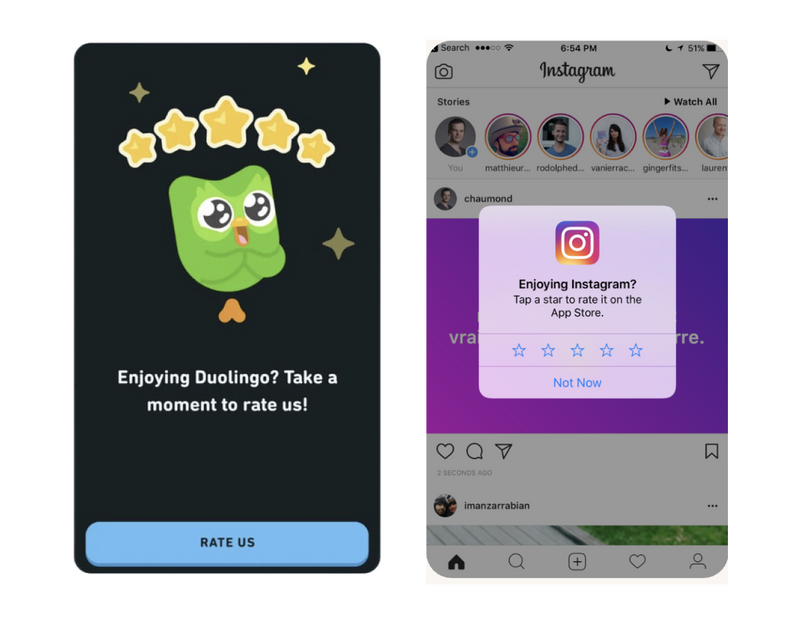
When to ask for an app review
| Do prompt | Don’t prompt |
| After a completed task, goal, or purchase | Immediately after a crash or error |
| After a positive milestone or streak | During first launch or onboarding |
| After a resolved support ticket | During a time-sensitive task |
| When usage signals satisfaction | Repeatedly / after a recent prompt |
2. Simplify the review process
Simplifying your feedback process is a proven way to increase app reviews. If users need to jump through hoops or leave the app, most won’t bother.
Use built-in tools like Apple’s StoreKit or Google Play’s In-App Review API, allowing users to submit reviews without exiting your app, which reduces user friction, dramatically improving response rates.

3. Leverage email and push notification campaigns to get more app reviews
Some users won’t respond in-app. For them, well-timed email and push campaigns can help to increase app reviews.
Personalization is key, so work on crafting personalized, time-relevant messages that follow user successes or notable updates.
Make sure your messaging:
- Reflects user activity
- Feels personal
- Avoids spamming
4. Consider multichannel reminders to re-engage users
Once you’ve nailed in-app prompts, multichannel outreach can help you tap into quieter user segments.
Channels like WhatsApp, SMS, Facebook Messenger, and even in-app chat support can be powerful for collecting reviews. These channels often have higher open rates and feel more conversational, especially for mobile-first users.
For example, following up via SMS after resolving a support ticket or sending a quick “How did we do?” link in live chat can capture reviews at just the right moment.
5. Use smart incentives to increase app reviews
Incentivizing reviews can work, but it must be ethical. Don’t buy fake reviews or demand 5-star ratings.
Gamify the process: Offer rewards, achievements, or access to exclusive content for users who rate or review.

Keep in mind: App Store and Google Play prohibit offering rewards in exchange for positive reviews. However, asking for honest reviews after rewarding engagement (like completing a level or hitting a streak) is generally acceptable. For instance, offering a free sticker pack, in-app currency, or early access to new features works well—as long as it isn’t contingent on the star rating.
6. Engage power users and brand advocates
Identify your most loyal users or brand advocates and encourage them to share genuine feedback.
Your most engaged users are more likely to:
- Leave detailed, authentic reviews
- Return to your app
- Spread positive word-of-mouth
How to avoid negative reviews and encourage positive ones
Even the best review acquisition strategy can fall apart if negative feedback dominates your app store page. Here’s how to proactively reduce negative reviews while increasing positive sentiment.
Monitor friction points in the user journey
Use in-app analytics and session recordings to identify bugs, crashes, confusing UX elements, or slow load times.
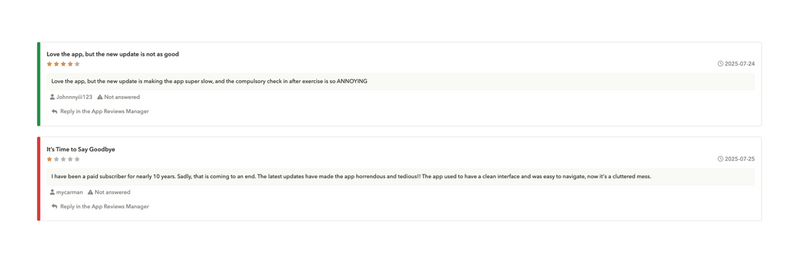
These are common triggers for negative reviews. Fixing issues flagged in low-star reviews should be a priority. Updates should be tested thoroughly before release to avoid introducing new frustrations.
Use pre-review feedback filters
Instead of asking users for a review outright, consider prompting them first with a short feedback form. If a user expresses frustration or signals a poor experience, redirect them to support or help content instead of the app store. This allows you to resolve issues before they become public.

Communicate clearly and set expectations
A common reason behind negative reviews is unmet expectations. Make sure your app store listing, screenshots, and feature descriptions are accurate and up to date. Clarify what’s free, what’s paid, and any limitations upfront to avoid misunderstandings.
Respond quickly and politely to complaints
When users do leave negative reviews, acknowledge them quickly and empathetically. Offer help or guidance, and let them know when an issue has been resolved. Many users are willing to update their reviews if they feel heard and see a genuine effort to improve.
Reinforce positive experiences
Happy users often need a nudge to leave a review. Trigger review requests right after meaningful achievements or positive milestones, like completing a goal or reaching a usage streak. Use warm and appreciative language to highlight how much their support matters to your team and the app’s improvement.
Avoid common review prompt mistakes
Don’t ask for reviews during onboarding or while users are focused on time-sensitive tasks. Repeated or poorly timed prompts can be frustrating. Make sure your timing respects the user’s flow and reflects a natural moment of satisfaction.
By focusing on thoughtful communication, smart prompting, and helpful support, you can steer the majority of your users toward positive reviews while minimizing the risk of negative ones.
Advanced tactics to increase app reviews at scale
Here are some additional strategies to improve your review strategies and get more app reviews.
Optimize metadata for trust and relevance
App store users often scan metadata and reviews. When your app description, screenshots, and keywords mirror the language found in your top positive reviews, it reinforces trust.
Analyze reviews for:
- Positive keywords (e.g., “smooth,” “easy to use”)
- Commonly praised features
- Top benefits named
Then, use those insights to refine your product page. This strategy will get more app reviews indirectly by improving conversion and keyword alignment.
Regular updates highlighting “what’s new”
Highlighting changes in your “What’s New” section reminds users that you listen and act on feedback. This not only increases retention but also encourages more users to leave updated reviews after improvements.
Automate review collection
Managing a high volume of app reviews manually can quickly become overwhelming, especially during peak events, feature launches, or unexpected bugs.
Reviews are also a goldmine for finding popular user opinions and product feedback. A poor review management strategy can deprive you of precious insights.
This is where an app review management tool like AppTweak’s App Reviews Manager becomes invaluable. Use AppTweak’s App Review Manager to:
- Centralize all reviews from multiple app stores in one place, and avoid constantly logging into separate consoles.
- Analyze topics automatically and stay on top of feedback.

- Reply in bulk to multiple reviews by selecting them by topic, language, rating, etc.

- Use GPT-4 to generate personalized reply suggestions in multiple languages.
- Set up automation rules to trigger replies based on criteria like language, rating, or topic.

- Integrate with your CRM tools like Salesforce, Zendesk, or Slack.

The impact of automation is undeniable. Look at Treepla: Treeplla is a game developer focused on casual tycoon games that uses App Reviews Manager to efficiently get more app reviews and improve response rate.

By implementing AppTweak’s automation, Treeplla set up topic tagging rules and used bulk reply functionality to address multiple reviews at once. This strategy helped them triple their review response rate in just three weeks, while also improving the quality and tone of their reviews.
Ethical ways to get app reviews
Fake or paid reviews can severely damage your app’s reputation.
Unethical practices can also result in severe penalties from the app stores and damage user trust.
Focus instead on authentic, ethical engagement practices (such as in-app surveys, in-app prompt usage, and app updates).
Common signs of fake reviews include:
- Repetitive text
- Excessive punctuation
- Suspicious links
- Off-topic rants
Report them via the app store consoles or use AppTweak’s bulk reporting tool.
If you want to get more app reviews that genuinely help your app grow, focus on ethical methods. Remember: for every 1-star review, you may need 7 five-star ones to maintain a 4.5+ rating. That’s a steep climb, so ensure you prevent negative and report fake reviews.
Key tools and platforms to increase app reviews
To scale your review strategy and protect your brand reputation, you need the right tools.
App review management platforms
Platforms like AppTweak’s App Reviews Manager consolidate review processes, automate replies, and offer AI-powered sentiment analysis, simplifying effective review management.

AppTweak’s App Reviews Manager allows you to:
- Automate replies: With custom rules based on language, star rating, or topic, AppTweak can automatically generate and send responses to reviews, saving your team time and ensuring no feedback goes unanswered.
- Monitor sentiment and topics: Our review platform helps you detect emerging themes and tones in user reviews, so you quickly understand what’s working and what’s frustrating users in each region or app version.
- Integrate with CRMs like Zendesk and Salesforce: Once connected, AppTweak transforms reviews into actionable support tickets within your existing CRM, so your team can respond without switching platforms.
- Bulk reply across multiple languages: Using GPT-4, AppTweak helps you generate localized replies in the appropriate tone and language, then reply to batches of reviews at once.
In-app SDKs for feedback collection
Tools like SurveyMonkey and Braze SDKs make it easy to collect structured feedback before it and proactively resolve issues before they become negative reviews.
These tools are essential for consistently increasing app reviews and managing feedback loops effectively.
Read more on the best app review management tools in 2026.
How to leverage app reviews to market your app and build trust
App reviews aren’t just for boosting rankings; they’re also one of the most powerful forms of marketing. Authentic feedback from real users builds trust, validates your app’s value, and can directly influence prospective users to install and engage. If you’re only using reviews for ASO purposes, you’re missing out on their full potential.
Here are smart ways to leverage your best app reviews beyond the app stores:
Feature reviews in your ads and landing pages
Highlight standout 4- and 5-star reviews in paid social campaigns, video ads, or landing pages. Choose quotes that showcase emotional reactions (“I use this every day!”), specific features (“Best budget tracker I’ve tried”), or time-saved outcomes. This adds credibility and acts as immediate social proof.
Add testimonials in onboarding flows
Reinforce trust with new users by including selected review snippets in onboarding screens or intro carousels. This shows early adopters that your app is loved and reliable, reducing churn in the first sessions. Bonus: You can localize testimonials by region or language using review filters.
Use reviews in lifecycle marketing
Integrate strong user quotes into your email sequences, especially win-back flows, referral campaigns, or product updates. A well-placed review in a “We miss you” email or post-update announcement can re-engage dormant users or motivate referrals with minimal effort.
Turn reviews into social media gold
If someone posts a glowing review or funny comment in the App Store or Play Store, screenshot and share it on your social platforms. Add design elements or use a UGC-style post to keep it authentic. This works particularly well for Twitter, Instagram Stories, or LinkedIn product announcements.
Showcase reviews in marketing materials
When pitching your app to investors or potential partners, include a few standout user quotes. It’s one of the most compelling ways to show traction and product-market fit without cherry-picked data. Real users advocating for your product speak louder than slides.
Expert Tip
With AppTweak’s App Reviews Manager, you can easily filter, tag, and export reviews by keyword, sentiment, or location, making it much faster to find testimonials tailored to each campaign.Conclusion
Boosting your app reviews requires more than just clever prompts: it takes strategic planning, ethical incentives, active engagement, and smart automation tools.
But the real long-term engine of growth? Building and nurturing a community of vocal, satisfied users. Their ongoing feedback fuels not just reviews, but stronger features, better retention, and sustainable visibility.
Now it’s your turn. Start implementing these tactics and watch your discoverability, visibility, and credibility improve.
Ready to take your app reviews to the next level?
Explore AppTweak’s App Reviews Manager to better manage and respond to reviews at scale!
FAQ
How do I get more app reviews?
To get more app reviews, prompt users with native in-app review APIs right after a positive moment, simplify the submission flow, and target satisfied, engaged users. Reinforce with timed email and push campaigns, ethical incentives that aren’t tied to star ratings, and fast replies to existing reviews. Automating collection and responses with a tool like AppTweak’s App Reviews Manager scales the process.
What is the best time to ask for app reviews?
The best time to ask for an app review is immediately after a positive experience — completing a task, reaching a milestone, or finishing a successful purchase. Avoid prompting after crashes, errors, during onboarding, or while users are mid-task. Well-timed prompts capture satisfied users and produce higher ratings and more detailed reviews.
Can I incentivize users to leave reviews?
Yes, you can offer ethical incentives such as in-app currency, achievements, or early access — but only for leaving an honest review, never for a positive or 5-star rating. Both the App Store and Google Play prohibit rewards contingent on rating value, and violations can trigger penalties.
Are app reviews important for ASO?
Yes, both App Store and Google Play algorithms factor app review volume and quality into search rankings. According to AppTweak research data, apps rated above 3.5 stars consistently rank for more keywords, while those under 3 barely get seen. Our data shows that ratings directly influence keyword visibility and featuring: 95% of featured apps on the App Store and ~96% on Google Play have ratings of 4.0 or higher.
How many reviews does my app need?
There is no fixed minimum, but volume and recency matter more than a one-time total. App store algorithms reward a sustained, recent flow of positive reviews over occasional spikes. As a guideline, expect to offset roughly seven 5-star reviews for every 1-star review to hold a 4.5+ rating, so consistent collection is essential.
How can I automate app review collection?
To automate app review collection, use an app review management platform such as AppTweak’s App Reviews Manager. It centralizes reviews across stores, auto-tags topics, generates AI-powered reply suggestions, supports bulk and rule-based replies, and integrates with CRMs like Salesforce, Zendesk, and Slack — scaling collection and response without manual console-switching.
How do I deal with fake app reviews?
To deal with fake app reviews, report them through the official App Store or Google Play consoles, or use a bulk reporting tool such as AppTweak’s. Fake app reviews often show repetitive text, excessive punctuation, suspicious links, or off-topic content. Responding to and reporting fake reviews protects your rating and user trust.
[\faq]


More articles in Reviews and Ratings

 Georgia Shepherd

 Oriane Ineza

 Natalia Kryukova
