Why is Android Vitals Important for ASO?
On November 02, 2022, Google published an article announcing its decision to give more visibility to quality apps on the Play Store. Google wants to base itself on the technical quality of apps to know which apps shouldn’t be highlighted on the Play Store. As Google believes – improving the technical quality of an app improves its user experience and makes the app overall more qualitative.
This is not a novelty on Google Play – Google is already known to be looking at the technical performance of apps to rank them in the search results. This effectively means the 10technical quality of your app has a direct impact on your App Store Optimization (ASO) efforts. This renewed emphasis on technical quality means you’ll now have to pay more attention to Android vitals and its set of “vitals” metrics.
In this article, we explain what Android vitals is and why it’s important to ASO. Alongside looking at the recent changes made to Android vitals by Google, we’ll also explore how you can leverage the tool to spot and fix the technical issues of your app, with the goal of improving your app’s retention rate.
What is Android vitals?
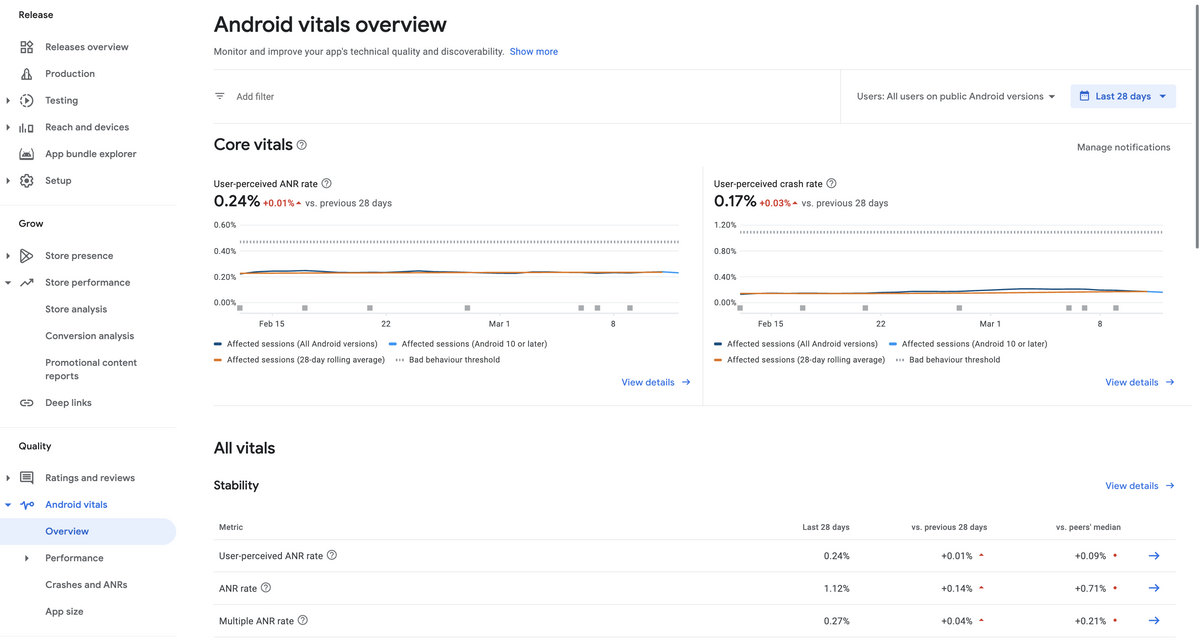
Android vitals is the name of the dashboard available on the Google Play Console. It gives you an overview of the technical performance of your app. This dashboard tracks several important elements such as app battery usage, app stability (e.g. crash rate), app start-up and loading times, etc. It then breaks down this data into several “vitals” metrics that can help you fix your app’s technical issues. It also gives you industry benchmarks and allows you to compare your app to your competitors.

Importance of Android vitals in ASO
The purpose of Android vitals is to track all the technical defects that make your app’s user experience frustrating. It can help you identify technical issues which, when fixed, can improve your user experience.
- When your user experience improves, your app’s retention rate is likely to increase as well as disruptions diminish. This has a positive impact on your ASO efforts as retention rate is one of the factors used by Google to position your app in the search results of the Play Store.
- An app with a good user experience is also more likely to get positive ratings and reviews. Users unhappy with an app are quick to go to the Play Store and leave a negative rating and/or review. As a majority of store visitors look at ratings and reviews before deciding to install an app, any method that reduces the number of negative reviews and ratings may increase your store listing’s conversion rate. As of February 2023, Google Play requires apps and games to have a minimum of 3.0 star ratings to be featured in the top charts.
- Finally, failure to meet the new technical standards of Google can lead to a possible punishment by Google. This will result in a lower discoverability of your app on the Play Store. This can take the form of exclusion from recommendations, a drop in keyword rankings, and/or a warning to users displayed on your store listing.
The technical quality of your app and your ASO efforts are, therefore, intrinsically linked. Work first on fixing your app’s technical issues until you’re certain it meets Google’s standards. Otherwise, you might see your downloads increase, thanks to ASO, but fail to retain these new users due to a poor user experience ridden with technical issues. This will, in turn, negatively affect your ASO performance.
Expert Tip
Android Vitals is one way to discover what are the technical issues that interfere with your users’ in-app experience. Reviews are another way to do so. Many dissatisfied users leave negative reviews on your app when they face bugs or find the user interface (UI) not intuitive. This is the chance for you to learn what you can do to improve your app’s user experience and address your users’ issues. Once you have fixed the issue, leave a comment on the negative reviews and store visitors might even change their negative review to a positive one.What are the (core) vitals metrics?
Google uses several vitals metrics related to the user experience to judge the technical performance of an app. App start time, slow rendering, frozen frames, and stuck wake locks are some of the vitals metrics tracked by Google. Google made a detailed and explanatory list of the different metrics in a dedicated article.
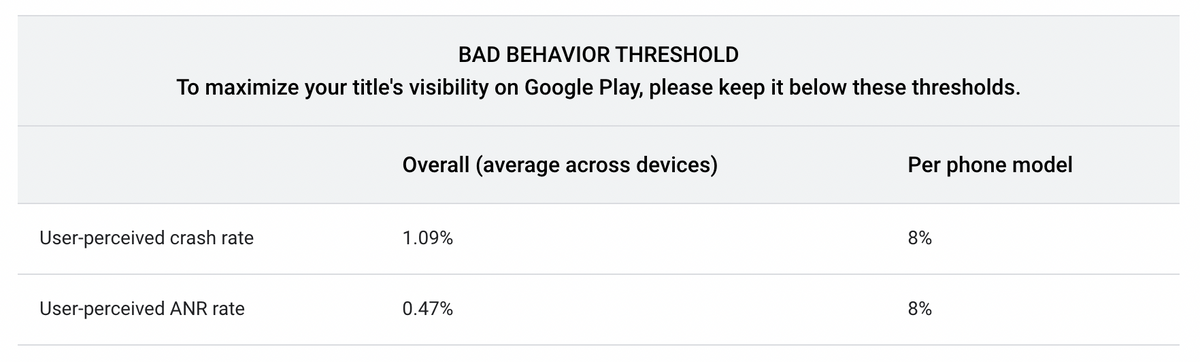
Google recently changed the importance it assigns to each vitals metric. Two new “core” vitals metrics have been added – user-perceived crash rate and user-perceived ANR rate. They are considered the most important by Google (Android Developers Blog). As such, these two core vitals metrics should be your top priority when it comes to technical issues, and you should closely and regularly monitor them.

Expert Tip
Google measures the technical performance of your app on each device. If you are below the standards set by Google on a specific device, Google will penalize that device. So make sure you test your app on different devices to avoid any bad surprises. If the threshold across all devices is reached, your app will be punished on all devices, even if only one device is at fault.User-perceived crash rate
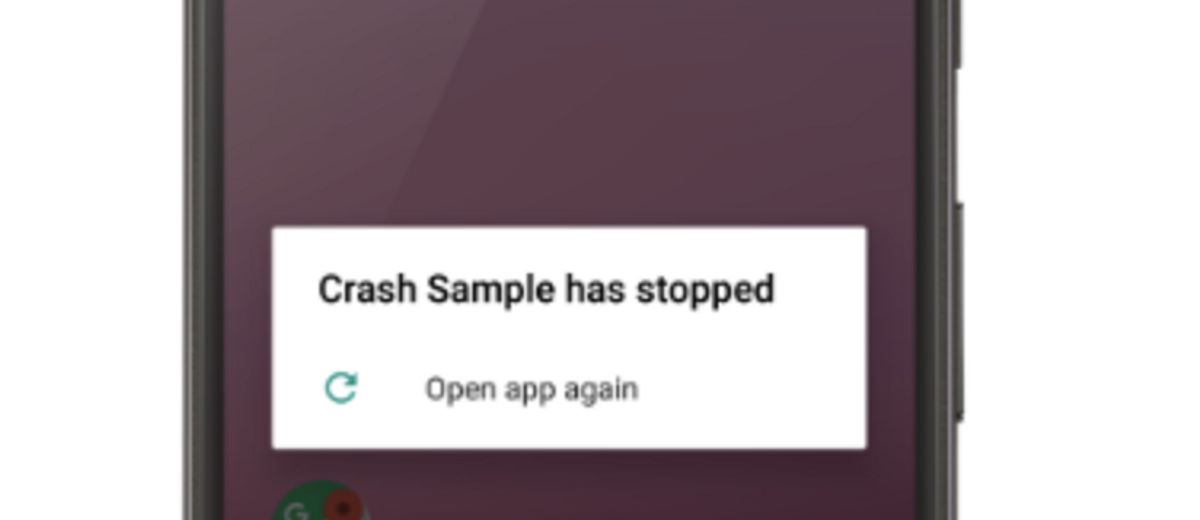
The two new core vitals metrics are designed to improve your app’s user experience. The user-perceived crash rate tracks the number of daily active users (implying the metric is calculated on a daily basis) who experienced at least one crash while they were actively using your app.
Be aware that crashes that occur while your app is running in the background might still be counted in this crash rate. Google considers your app as active when it uses any system resources. If a user browses the web while downloading a movie on your movie streaming app and your app crashes, this will be counted in your user-perceived crash rate.

How to reduce your user-perceived crash rate
The first step is to identify where crashes come from and then reproduce them to understand them. On this subject, Google provides a set of tips and tricks to fix crashes and reduce their frequency.
Among other tips, make sure that:
- Third-party tools do not interfere with your app and cause crashes
- Keep your app up to date with the latest version of Android.
User-perceived ANR rate
ANR stands for “Application Not Responding.” This refers to when the user interface freezes and a message pops up, asking us to wait or close the app. The user-perceived ANR rate measures the percentage of your daily active users who experienced at least one “App Not Responding”.
There are many causes for ANRs. The user-perceived ANR rate tracks only those that are labeled as “Input dispatching timed out.” These occur if your app has not responded to an input made by the user within 5 seconds.

How to reduce your user-perceived ANR rate
Once again, Google provides documentation on how to fix ANRs. Among the things that can lead to an app not responding are tasks that consume many resources – expensive database calls to files, heavy view rendering, CPU-heavy loads, etc.
It is therefore necessary to find the right balance between maximizing performance and minimizing system resource usage. This balance, which is difficult to achieve, requires good communication between your product and your technical team, and realistic expectations for your app from a technical perspective.
Other Android vitals metrics to monitor
Core vitals metrics aren’t the only metrics that can lead to a decrease in keyword rankings on the Play Store. Some other metrics to closely monitor to reduce the negative experience of users include:
- Slow rendering: Users may experience “stutters” in your app
- Frozen frames: When your app appears to be stuck and becomes unresponsive to user input
- App startup time: Users are generally disappointed with apps that have a slow start time
Permission denials are also important. Asking too many data permissions doesn’t correlate with data security and is negatively perceived by Google.
Tips to improve your app’s technical performance
1. Avoid excessive battery usage
We use our phones on the go every day. So we know how short-lived a phone’s battery can be, especially when playing games or when the phone is a few years old. Make sure that your app isn’t doing any unnecessary work in the background and use JobScheduler if necessary to reduce excessive battery usage.
2. Use the tools and libraries provided by Google
Google provides multiple tools to help you optimize the performance of your app, among which Baseline Profiles and App Startup Library. Baseline Profiles can help you optimize your app startup time and reduce slow rendering. App Startup Library, as its name suggests, optimizes app startup time. This is only a glimpse of Google’s app (technical) performance guide.
3. Make sure the right person(s) have access to Android vitals
Giving access to Android vitals to the right person(s) can help you spot and fix the technical issues of your app. By right persons, we mean the developers who are familiar with Android software development and who are the most likely to understand and solve the technical issues of your app.
4. Test your app on multiple Android devices
The fact that an app works well on one device does not guarantee that it will work on other devices. Test your app on multiple devices to avoid reaching the “across devices” thresholds set by Google and ensure a pleasant experience for all your users.
Conclusion
Android vitals is a really useful tool to help you easily track when you are meeting or not meeting Google’s quality standards. Failure to comply with these standards can lead to a loss of visibility on the Play Store and, therefore, a negative impact on your ASO efforts.
If you are short on time, prioritize your efforts. Make sure to minimize your user-perceived crash rate and user-perceived ANR rate, as these two rates are perceived as the most important (core) vitals metrics in Google’s eyes.
Solving your app’s technical problems is therefore not just about showing off to Google – it’s also about improving the user experience of your app to increase its retention rate. This will have a direct impact on the performance of your keywords on the Play Store.
Android vitals 对应用商店优化为何重要?
2022 年 11 月 2 日,Google 发布了一篇文章,宣布决定在 Play 商店中为优质应用提供更多曝光。Google 希望根据应用的技术质量来判断哪些应用不应在 Play 商店中突出显示。Google 认为,提高应用的技术质量可以改善用户体验,并使应用整体更具质量。
这在 Google Play 上并非新鲜事——Google 已知会通过应用的技术表现来对其进行搜索结果排名。这意味着您的应用的技术质量直接影响您的应用商店优化 (ASO) 工作。这种对技术质量的重新强调意味着您现在必须更加关注 Android vitals 及其一套“vitals”指标。
在本文中,我们将解释什么是 Android vitals 以及它为何对应用商店优化很重要。除了查看 Google 对 Android vitals 所做的最新更改外,我们还将探讨如何利用该工具发现并修复应用的技术问题,以提高应用的留存率。
什么是 Android vitals?
Android vitals 是 Google Play控制台 上可用的仪表板名称。它为您提供应用的技术表现概览。此仪表板跟踪几个重要元素,例如应用电池使用情况、应用稳定性(例如崩溃率)、应用启动和加载时间等。然后,它将这些数据分解为几个“vitals”指标,可以帮助您修复应用的技术问题。它还提供行业基准,并允许您将您的应用与竞争对手进行比较。

Android vitals 在应用商店优化中的重要性
Android vitals 的目的是跟踪所有导致应用用户体验不佳的技术缺陷。它可以帮助您识别技术问题,这些问题在修复后可以改善您的用户体验。
- 当您的用户体验改善时,您的应用的 留存率也可能随之提高,并且中断情况减少。这对您的应用商店优化工作产生积极影响,因为留存率是 Google 用于在 Play 商店搜索结果中定位您的应用的关键因素之一。
- 拥有良好用户体验的应用也更有可能获得积极的评分和评论。对应用不满意的用户会迅速前往 Play 商店留下负面评分和/或评论。由于大多数商店访问者在决定安装应用之前都会查看评分和评论,因此任何减少负面评论和评分数量的方法都可能
提高您的商店列表的转化率 。截至 2月 2023 日,Google Play 要求应用和游戏必须拥有至少 3.0 星的评分才能在热门排行榜中显示。
- 最后,未能达到 Google 的新技术标准可能会导致 Google 的惩罚。这将导致您的应用在 Play 商店中的可发现性降低。这可能表现为被排除在推荐之外、关键词排名下降和/或在您的商店列表中向用户显示警告。
因此,您的应用的技术质量与您的应用商店优化工作是内在关联的。 首先着手修复您的应用的技术问题,直到您确定它符合 Google 的标准。否则,您可能会看到您的下载量因应用商店优化而增加,但由于充满技术问题的糟糕用户体验而未能留住这些新用户。这反过来又会对您的应用商店优化表现产生负面影响。
Expert Tip
Android Vitals 是发现干扰用户应用内体验的技术问题的一种方式。评论是另一种方式。许多不满意的用户在遇到错误或发现用户界面 (UI) 不直观时,会在您的应用上留下负面评论。这是您了解如何改善应用用户体验并解决用户问题的机会。一旦您修复了问题,请在负面评论上留言,商店访问者甚至可能会将他们的负面评论改为正面评论。什么是(核心)vitals 指标?
Google 使用多个与用户体验相关的 vitals 指标来判断应用的技术表现。应用启动时间、慢渲染、冻结帧和卡住的唤醒锁是 Google 跟踪的一些 vitals 指标。Google 在一篇专门文章中详细解释了这些不同的指标。
Google 最近更改了其对每个 vitals 指标的重视程度。两个新的“核心”vitals 指标 已添加——用户感知崩溃率和用户感知 ANR 率。Google 认为它们是最重要的(Android 开发者博客)。因此,在技术问题方面,这两个核心 vitals 指标应是您的首要任务,您应密切并定期监控它们。

Expert Tip
Google 会衡量您的应用在每个设备上的技术表现。如果您在特定设备上低于 Google 设定的标准,Google 将惩罚该设备。因此,请确保您用户感知崩溃率
这两个新的核心 vitals 指标旨在改善您的应用用户体验。用户感知崩溃率跟踪每日活跃用户数量(意味着该指标是每日计算的),这些用户在积极使用您的应用时至少经历了一次崩溃。
请注意,当您的应用在后台运行时发生的崩溃仍可能计入此崩溃率。Google 认为当您的应用使用任何系统资源时,它就是活跃的。如果用户在您的电影流媒体应用上下载电影时浏览网页,并且您的应用崩溃,这将被计入您的用户感知崩溃率。

如何降低用户感知崩溃率
第一步是识别崩溃的来源,然后重现它们以理解它们。关于这一点,Google 提供了一套技巧和窍门来修复崩溃并降低其频率。
除其他提示外,请确保:
- 第三方工具不会干扰您的应用并导致崩溃
- 确保您的应用与最新版本的 Android 保持同步。
用户感知 ANR 率
ANR 代表“应用程序无响应”。这指的是用户界面冻结并弹出一条消息,要求我们等待或关闭应用。用户感知 ANR 率衡量的是至少经历过一次“应用程序无响应”的每日活跃用户百分比。
ANR 有许多原因。用户感知 ANR 率仅跟踪那些被标记为“输入分发超时”的情况。如果您的应用在 5 秒内未响应用户输入,就会发生这种情况。

如何降低用户感知 ANR 率
再次,Google 提供了关于如何修复 ANR 的文档。可能导致应用无响应的因素包括消耗大量资源的任务——昂贵的文件数据库调用、繁重的视图渲染、CPU 密集型负载等。
因此,有必要在最大化性能和最小化系统资源使用之间找到适当的平衡。这种难以实现的平衡需要您的产品团队和技术团队之间良好的沟通,以及从技术角度对您的应用抱有切合实际的期望。
其他要监控的 Android vitals 指标
核心 vitals 指标并非唯一可能导致 Play 商店关键词排名下降的指标。其他需要密切监控以减少用户负面体验的指标包括:
- 慢渲染:用户可能会在您的应用中遇到“卡顿”现象
- 冻结帧:当您的应用似乎卡住并对用户输入无响应时
- 应用启动时间:用户通常对启动时间慢的应用感到失望
权限拒绝也很重要。请求过多的数据权限与数据安全无关,并且会受到 Google 的负面评价。
了解如何保持您的 Android vitals 健康,以增加在 Google Play 上获得推荐的机会
改善应用技术表现的技巧
1. 避免过度耗电
我们每天都在外出时使用手机。因此我们知道手机电池的寿命有多短,尤其是在玩游戏或手机使用几年后。确保您的应用不在后台执行任何不必要的工作,并在必要时使用JobScheduler 来减少过度耗电。
2. 使用 Google 提供的工具和库
Google 提供了多种工具来帮助您优化应用的性能,其中包括基线配置文件 (Baseline Profiles) 和应用启动库 (App Startup Library)。基线配置文件可以帮助您优化应用启动时间并减少慢渲染。
3. 确保合适的人员可以访问 Android vitals
授予合适的人员访问 Android vitals 的权限可以帮助您发现并修复应用的技术问题。我们所说的合适人员是指熟悉 Android 软件开发的开发人员,他们最有可能理解并解决应用的技术问题。
4. 在多个 Android 设备上测试您的应用
应用在一个设备上运行良好并不保证它能在其他设备上运行。在多个设备上测试您的应用,以避免达到 Google 设定的“跨设备”阈值,并确保所有用户都能获得愉快的体验。
结论
Android vitals 是一个非常有用的工具,可以帮助您轻松跟踪是否符合 Google 的质量标准。未能遵守这些标准可能导致在 Play 商店中的可见性下降,从而对您的应用商店优化工作产生负面影响。
如果时间有限,请优先处理您的工作。确保最大限度地降低您的用户感知崩溃率和用户感知 ANR 率,因为在 Google 看来,这两个比率是最重要的(核心)vitals 指标。
因此,解决您的应用的技术问题不仅仅是为了向 Google 展示——它也是为了改善您的应用的用户体验,以提高其留存率。这将直接影响您的关键词在 Play 商店中的表现。
アプリストア最適化(ASO)にとってAndroid vitalsが重要な理由は?
2022年11月2日、Googleは記事を公開し、Play Storeで質の高いアプリにより多くの可視性を与える決定を発表しました。Googleは、Play Storeで強調すべきでないアプリを知るために、
これはGoogle Playにとって目新しいことではありません – Googleは既に、検索結果でアプリをランク付けする際にアプリの技術的パフォーマンスを考慮していることで知られています。これは実質的に、アプリの技術的品質がアプリストア最適化(ASO)の取り組みに直接影響することを意味します。この技術的品質への renewed emphasis は、Android vitalsとその「vitals」指標セットにより多くの注意を払う必要があることを意味します。
この記事では、Android vitalsとは何か、そしてASOにとってなぜ重要なのかを説明します。GoogleによるAndroid vitalsの最近の変更を見ていくとともに、このツールを活用してアプリの技術的問題を発見し修正する方法も探ります。その目的は、アプリの継続率を向上させることです。
Android vitalsとは何か?
Android vitalsは、Google Play コンソールで利用可能なダッシュボードの名称です。アプリの技術的パフォーマンスの概要を提供します。このダッシュボードは、アプリのバッテリー使用量、アプリの安定性(例:クラッシュ率)、アプリの起動時間とロード時間などの重要な要素を追跡します。そして、これらのデータをいくつかの「vitals」指標に分解し、アプリの技術的問題を修正するのに役立ちます。また、業界のベンチマークを提供し、アプリを競合他社と比較することができます。
ASOにおけるAndroid vitalsの重要性
Android vitalsの目的は、アプリのユーザー体験を悪化させるすべての技術的欠陥を追跡することです。修正することでユーザー体験を向上させることができる技術的問題を特定するのに役立ちます。
- ユーザー体験が向上すると、アプリの継続率が向上する可能性が高く、中断も減少します。これはASOの取り組みにプラスの影響を与えます。なぜなら、継続率はGoogleがPlay Storeの検索結果でアプリの位置を決定する際に使用する要因の1つだからです。
- 良好なユーザー体験を持つアプリは、肯定的な評価とレビューを得る可能性も高くなります。不満を持つユーザーは、すぐにPlay Storeに行って否定的な評価やレビューを残します。ストア訪問者の大多数がアプリをインストールする前に評価とレビューを確認するため、否定的なレビューと評価の数を減らす方法は
ストアリスティングのコンバージョン率を向上させる 可能性があります。2023年2月現在、Google Playでは、アプリやゲームがトップチャートに掲載されるためには最低3.0星の評価が必要です。
- 最後に、Googleの新しい技術基準を満たさないと、Googleによる罰則を受ける可能性があります。これにより、Play Storeでのアプリの発見可能性が低下します。これは、おすすめからの除外、キーワードランキングの低下、および/またはストアリスティングにユーザーへの警告表示という形で現れる可能性があります。
したがって、アプリの技術的品質とASOの取り組みは本質的に結びついています。 まず、アプリの技術的問題の修正に取り組み、Googleの基準を確実に満たすようにしてください。そうしないと、ASOのおかげでダウンロード数が増加しても、技術的問題に満ちた貧弱なユーザー体験のために、これらの新規ユーザーを維持できない可能性があります。これは、結果的にASOのパフォーマンスにも悪影響を与えます。
Expert Tip
Android Vitalsは、ユーザーのアプリ内体験を妨げる技術的問題を発見する一つの方法です。レビューは別の方法です。多くの不満を持つユーザーは、バグに遭遇したり、ユーザーインターフェース(UI)が直感的でないと感じたりした場合、アプリに否定的なレビューを残します。これは、アプリのユーザー体験を改善し、ユーザーの問題に対処するために何ができるかを学ぶチャンスです。問題を修正したら、否定的なレビューにコメントを残してください。ストア訪問者が否定的なレビューを肯定的なものに変更する可能性もあります。(コア)vitals指標とは何か?
Googleは、アプリの技術的パフォーマンスを判断するために、ユーザー体験に関連するいくつかのvitals指標を使用しています。アプリの起動時間、遅いレンダリング、フリーズしたフレーム、スタックしたウェイクロックなどは、Googleが追跡するvitals指標の一部です。Googleは専用の記事で、さまざまな指標の詳細な説明リストを作成しています。
Googleは最近、各vitals指標に割り当てる重要性を変更しました。2つの新しい「コア」vitals指標が 追加されました – ユーザーが認識するクラッシュ率とユーザーが認識するANR率です。これらはGoogleによって最も重要とみなされています(Android Developers Blog)。そのため、これら2つのコアvitals指標は、技術的問題に関して最優先事項とすべきであり、定期的に密接に監視する必要があります。
Expert Tip
Googleは各デバイスでアプリの技術的パフォーマンスを測定します。特定のデバイスでGoogleが設定した基準を下回っている場合、Googleはそのデバイスにペナルティを与えます。そのため、予期せぬ悪い結果を避けるために、アプリを異なるデバイスでテストするようにしてください。すべてのデバイスにわたるしきい値に達した場合、たとえ1つのデバイスだけが問題であっても、アプリはすべてのデバイスで罰則を受けることになります。ユーザーが認識するクラッシュ率
2つの新しいコアvitals指標は、アプリのユーザー体験を改善するように設計されています。ユーザーが認識するクラッシュ率は、デイリーアクティブユーザー数(つまり、指標は日単位で計算される)のうち、アプリを積極的に使用している間に少なくとも1回のクラッシュを経験したユーザーの数を追跡します。
アプリがバックグラウンドで実行されている間に発生するクラッシュも、このクラッシュ率にカウントされる可能性があることに注意してください。Googleは、アプリがシステムリソースを使用している場合、そのアプリをアクティブとみなします。ユーザーが映画ストリーミングアプリで映画をダウンロードしている間にウェブを閲覧し、アプリがクラッシュした場合、これはユーザーが認識するクラッシュ率にカウントされます。
ユーザーが認識するクラッシュ率を減らす方法
最初のステップは、クラッシュの原因を特定し、それを再現することで理解することです。この点について、Googleはクラッシュを修正し、その頻度を減らすためのヒントとコツのセットを提供しています。
その他のヒントとして、以下を確認してください:
- サードパーティツールがアプリを妨害してクラッシュを引き起こさないようにする
- アプリを最新のAndroidバージョンに更新する。
ユーザーが認識するANR率
ANRは「Application Not Responding(アプリケーションが応答していない)」の略です。これは、ユーザーインターフェースがフリーズし、待機するかアプリを閉じるかを尋ねるメッセージがポップアップする状況を指します。ユーザーが認識するANR率は、少なくとも1回の「App Not Responding」を経験したデイリーアクティブユーザーの割合を測定します。
ANRには多くの原因があります。ユーザーが認識するANR率は、「Input dispatching timed out」とラベル付けされたものだけを追跡します。これらは、アプリがユーザーによる入力に5秒以内に応答しなかった場合に発生します。

ユーザーが認識するANR率を減らす方法
ここでも、GoogleはANRを修正する方法に関するドキュメントを提供しています。アプリが応答しない原因となる可能性があるものの中には、多くのリソースを消費するタスク – ファイルへの高コストなデータベース呼び出し、重いビューのレンダリング、CPUに負荷のかかる処理などがあります。
したがって、パフォーマンスの最大化とシステムリソース使用量の最小化の適切なバランスを見つけることが必要です。この達成困難なバランスには、プロダクトチームと技術チームの良好なコミュニケーション、そして技術的観点からアプリに対する現実的な期待が必要です。
監視すべきその他のAndroid vitalsメトリクス
コアバイタルメトリクスは、Play Storeでのキーワードランキング低下を引き起こす唯一のメトリクスではありません。ユーザーのネガティブな体験を減らすために密接に監視すべきその他のメトリクスには以下があります:
- レンダリングの遅延:ユーザーがアプリで「カクつき」を体験する可能性があります
- フリーズフレーム:アプリが停止したように見え、ユーザー入力に応答しなくなる場合
- アプリ起動時間:ユーザーは一般的に起動時間が遅いアプリに失望します
権限拒否も重要です。過度にデータ権限を求めることはデータセキュリティと相関せず、Googleによってネガティブに認識されます。
Google Playでフィーチャーされる可能性を高めるためにAndroid vitalsを健全に保つ方法をご確認ください
アプリの技術的パフォーマンスを向上させるためのヒント
1. 過度なバッテリー使用を避ける
私たちは毎日外出先でスマートフォンを使用しています。そのため、特にゲームをプレイしているときや、スマートフォンが数年経過している場合、バッテリーがいかに短時間で消耗するかを知っています。アプリがバックグラウンドで不要な処理を行っていないことを確認し、必要に応じてJobSchedulerを使用して過度なバッテリー使用を削減してください。
2. Googleが提供するツールとライブラリを使用する
Googleは、Baseline ProfilesとApp Startup Libraryをはじめとする、アプリのパフォーマンス最適化に役立つ複数のツールを提供しています。
3. 適切な担当者がAndroid vitalsにアクセスできるようにする
適切な担当者にAndroid vitalsへのアクセスを提供することで、アプリの技術的問題を発見し修正することができます。適切な担当者とは、Androidソフトウェア開発に精通した開発者で、アプリの技術的問題を理解し解決する可能性が最も高い人を意味します。
4. 複数のAndroidデバイスでアプリをテストする
あるデバイスでアプリが正常に動作するからといって、他のデバイスでも動作することは保証されません。複数のデバイスでアプリをテストして、Googleが設定した「デバイス間」の閾値に達することを避け、すべてのユーザーに快適な体験を提供してください。
結論
Android vitalsは、Googleの品質基準を満たしているかどうかを簡単に追跡するのに非常に有用なツールです。これらの基準に準拠しないと、Play Storeでの可視性が低下し、結果としてASOの取り組みにネガティブな影響を与える可能性があります。
時間が限られている場合は、取り組みの優先順位を付けてください。ユーザー認識クラッシュ率とユーザー認識ANR率を最小化することを確実に行ってください。これら2つの率は、Googleの観点から最も重要な(コア)バイタルメトリクスとして認識されています。
したがって、アプリの技術的問題を解決することは、単にGoogleに良い印象を与えるためだけではありません。アプリのユーザーエクスペリエンスを向上させて定着率を高めることでもあります。これは、Play Storeでのキーワードのパフォーマンスに直接的な影響を与えます。
Oriane Ineza
Alexandra De Clerck
Simon Thillay