Apple Ads is one of the most powerful ways to grow your app on the App Store. It helps you reach users who are actively searching for apps like yours and drive downloads with high intent. But as soon as your campaigns scale beyond a few ad groups and keywords, managing everything manually becomes a full-time job.
Bids need adjusting. Budgets hit their limits. CPAs fluctuate. If you’re running campaigns across multiple countries and apps, these challenges multiply overnight as we discuss in our blog about Apple Ads campaign structure.
That’s where Apple Ads automation steps in. By applying rules, keyword discovery automation, and AI-driven optimization, you can let automation handle the repetitive tasks while you focus on strategy.
In this complete guide, we’ll explain what Apple Ads automation is, why it matters, and how to use AppTweak’s Campaign Manager to build automation workflows that save time, improve efficiency, and scale your results sustainably.
Key takeaways
- Apple Ads automation helps marketers save time, reduce manual errors, and scale efficiently.
- AppTweak’s Campaign Manager offers smart bidding by AI, presets and custom rules to fit any automation strategy.
- Exact Discovery Experiments turn manual keyword testing into an AI-driven workflow that continuously uncovers, validates, and scales high-value keywords with less effort.
- The most impactful workflows include optimizing bids, protecting high-value keywords, monitoring budgets, and automating keyword discovery.
- Automation isn’t “set and forget”—monitoring and refinement are critical for long-term success.
What is Apple Ads automation?
Apple Ads automation is the use of rules, workflows, and AI to manage advertising campaigns without constant manual intervention. Instead of adjusting bids keyword by keyword, you define conditions and actions that run automatically.
For example:
- If a keyword’s CPA is higher than $10, reduce its bid by 10%.
- If a brand keyword’s impression share drops below 90%, raise the bid until visibility is restored.
- If a campaign budget hits its daily cap, send an alert so you can increase spend or reallocate to high performers.
- If a discovery campaign surfaces high-performing keywords, automatically move them into your core campaigns.
Once rules are live, they continuously monitor your campaigns and take action when needed. This keeps performance optimized day and night, without you having to manually check every metric.
Automation also ensures consistency. While a marketer might forget to adjust bids during a busy week, automation executes rules relentlessly and without bias.
Why is Apple Ads automation important?
Managing Apple Ads across multiple regions, placements, and KPIs is a lot to handle. You’re tracking daily spend, monitoring CPIs, keeping CPAs in check, and making sure you don’t lose impression share on critical keywords. Doing all of that manually takes time—and it’s easy to miss key signals.
Automation solves this by making your campaigns more predictable and efficient. It adjusts bids and budgets as performance changes, not hours or days later when you finally catch up. It also alerts you when something goes off track, so you can step in before budgets are wasted.
The result is more consistency. Instead of relying on ad hoc decisions, rules apply your strategy across every campaign, every day. And as your account grows to cover new markets or more apps, automation gives you scalability without multiplying your workload.
From our audits, we’ve seen that advertisers who rely on automation often achieve lower CPAs and stronger visibility. By letting rules handle repetitive tasks, you can spend more time on higher-impact work like testing creatives or planning market expansion.
How do I automate my Apple Ads campaigns?
Apple’s native tools are useful for campaign setup but limited when it comes to automation. That’s why most marketers turn to third-party platforms. AppTweak’s Campaign Manager gives you three different ways to automate, each designed for a different level of control and complexity.
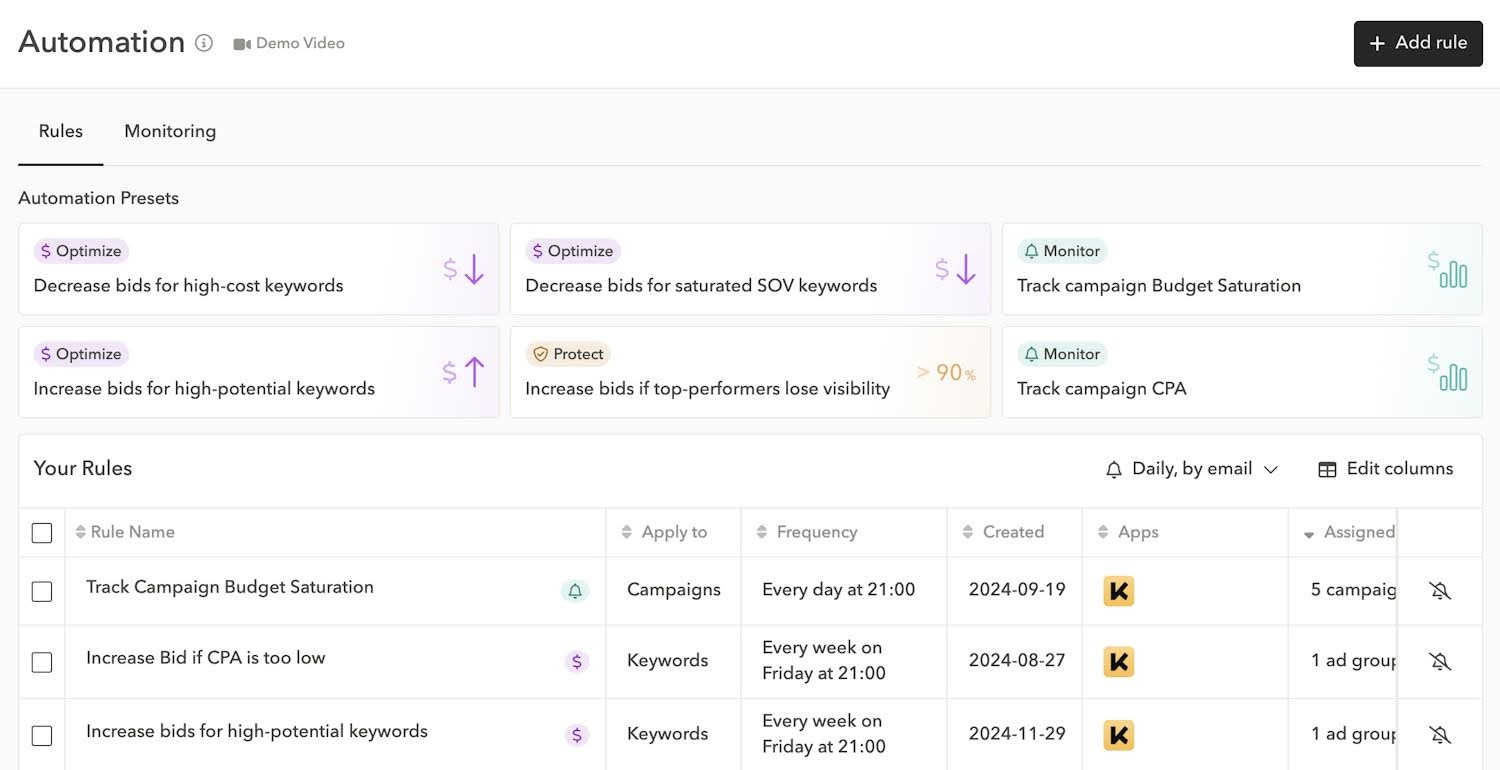
1. Presets
Presets are ready-made templates designed by AppTweak’s data science team. They cover common scenarios—like reducing bids for costly keywords or boosting bids for low-CPA terms—so you can start automating immediately. Presets are perfect if you’re new to automation or want to test without committing to a fully custom setup.
2. Custom rules
Custom rules let you create your own conditions and actions. You decide exactly what to monitor (CPA, impression share, taps, installs) and how the system should respond. Advanced users can integrate Mobile Measurement Partner (MMP) data, such as post-install events, to optimize for long-term value rather than just installs.
Example: if a keyword generates installs but zero purchase events, you could pause it automatically. This ensures spend flows to keywords that actually drive revenue.
3. Smart bidding powered by AI
For marketers who want speed above all else, AppTweak’s smart bidding uses AI to optimize bids automatically. You define a single performance goal—like a target CPA or ROAS—and the system automatically adjusts bids to match it. This is the fastest and easiest option, though it offers less manual control compared to presets and custom rules.
This option is particularly helpful if you manage large or fast-moving campaigns where manual adjustments or rule-based setups become time-consuming. It delivers speed and consistency without requiring daily input from your team.
That said, AI isn’t always the best fit for every situation. If your campaigns involve very specific KPIs or require strict guardrails around spend and visibility, you may get better results with presets or custom rules. The advantage with AppTweak is that you can choose the right level of automation for your needs—AI for efficiency, or rules when you want more control.
The type of automation you choose depends on your expertise, available time, and the complexity of your campaigns. Some marketers prefer the simplicity of presets, others value the flexibility of custom rules, and some lean on AI to save time in large-scale accounts. The best approach is the one that fits your workflow and comfort level.
Bonus: Exact Discovery Experiments Powered by AI
One of the biggest challenges in Apple Ads is that discovery campaigns often surface more noise than opportunity. Apple’s native tools—Search Match and broad match—are powerful starting points, but they work by casting a wide net. Search Match automatically matches your ads to terms pulled from your metadata, category, and user behavior, while broad match expands your seed keywords into related variations. The problem is that Apple only reveals which keywords your ads is showing for after they have passed an impression threshold which can lead to wasted budget.
AppTweak’s Exact Discovery Experiments solve this by using Atlas AI to prefill campaigns with thousands of carefully selected exact match keywords, tailored to your app and market. Each keyword is tracked individually, giving you full visibility into performance from the start. Automation then takes over: underperforming keywords can be paused automatically, while strong performers are flagged or transferred directly into your core campaigns with a click. This creates a structured, AI-driven process where discovery isn’t trial and error but a scalable workflow that continuously feeds your account with high-intent, validated terms. By tying AI powered keyword exploration to automation, Exact Discovery Experiments ensure you’re not just finding more keywords—you’re finding the right ones, faster, and at a lower cost.
What types of automation rules should you use?
When you want to keep more control over your campaigns instead of relying on AI smart bidding, AppTweak gives you two solid options: presets and custom rules. The presets are developed by our data-science team. They are ready-made templates built on Apple Ads best practices—to make it easy to get started. We organize these presets into three categories based on their goals: Optimize, Protect, and Monitor.
Optimize rules focus on profitability. They increase bids for low-CPA, high-potential keywords and reduce bids for costly or saturated terms. We have three presets ready to use:
- Optimize – Decrease bids for high-cost keywords: This rule reduces keyword bids by 10% if the keyword’s CPA significantly exceeds the campaign average.
Why use it? To avoid skewing your budget to a handful of keywords that cost too much, this rule identifies high-cost keywords and decreases their bids if the cost-per-acquisition (CPA) is too high.
- Optimize – Increase bids for high-potential keywords: This rule increases keyword bids by 10% for cost-efficient keywords with a low CPA, and strong potential for visibility (impression share) growth.
Why use it? This automation rule optimizes your profitability by increasing bids for high-opportunity keywords that could help to scale your campaigns.
- Optimize – Decrease bids for saturated impression share keywords: This automation preset gradually reduces bids on keywords where your impression share is above 90%.
Why use it? This rule prevents overspending on keywords for which you already have the maximum impression share, allowing you to invest more into discovering new keywords that expand your reach.
Protect rules defend your most important search terms; they step in to maintain a high impression share when competitors start bidding on them.
- Protect – Increase bids if top performers lose visibility: This preset ensures that your impression share on important keywords remains above 90%. If your impression share drops below that threshold, the bid is gradually increased.
Why use it? In Apple Ads, it’s crucial to protect important search terms like your brand name by maintaining the highest impression share possible. This rule helps keep your visibility high for top performers, ensuring competitors can’t take your spot.
Monitor rules keep you informed. They trigger alerts if a campaign reaches budget limits or if CPA spikes beyond your target. These rules don’t change campaigns directly but give you the visibility you need to react quickly.
- Monitor – Track campaign budget saturation: This rule notifies you when your campaign spend has reached its daily budget, preventing unnecessary disruptions to campaigns and allowing you to adjust them accordingly.
Why to use it? When your campaign is saturated, high-performing keywords are not exploited to their full potential. This automation rule helps you monitor budget saturation to reach the full potential of your campaigns.
- Monitor – Track campaign CPA: This rule alerts you when your CPA rises beyond a certain threshold (double the average campaign CPA over the last 30 days).
Why use it? If you don’t want to use automated systems to update your bids, you certainly want to be notified when your performance is dropping. Monitoring CPA across multiple campaigns takes time, so this rule helps you track performance efficiently and take action when needed.
Expert Tip
Start safe by applying Monitor presets to all your campaigns—they’ll only notify you of issues. Once you’re comfortable, apply all three Optimize rules together—this builds a smart bidding system that maximizes opportunities, cuts waste, and guides your campaigns toward an optimal CPA. For more tips check out our Apple Ads best practices.Custom rules give you complete flexibility. You define the conditions, thresholds, and actions. At the keyword level, for example, you might pause a term if it generates more than five installs but no in-app purchases in the past week. At the budget level, you could set a rule to raise daily spend by 5% whenever a campaign consistently hits its cap, ensuring top performers aren’t cut short. By connecting Mobile Measurement Partner (MMP) data, you can take it even further—optimizing not just for installs, but for deeper events like registrations, subscriptions, or purchases that drive long-term growth. You can also set rules to transfer keywords from discovery campaigns to core campaigns when they have reached a certain threshold of installs for example.
How to get started with Apple Ads automation
There are two main ways to get started with automation in AppTweak: AI-powered smart bidding or rules-based automation.
To begin with smart bidding, simply set your performance goal (such as a target CPA). The system will automatically adjust bids in real time to help you reach it. There’s no need to configure conditions or actions—once your goal is defined, the AI takes care of the optimization.
If you prefer more control, you can start with rules using either presets or custom setups. Presets let you apply best-practice automation instantly, while custom rules give you the freedom to design your own logic.
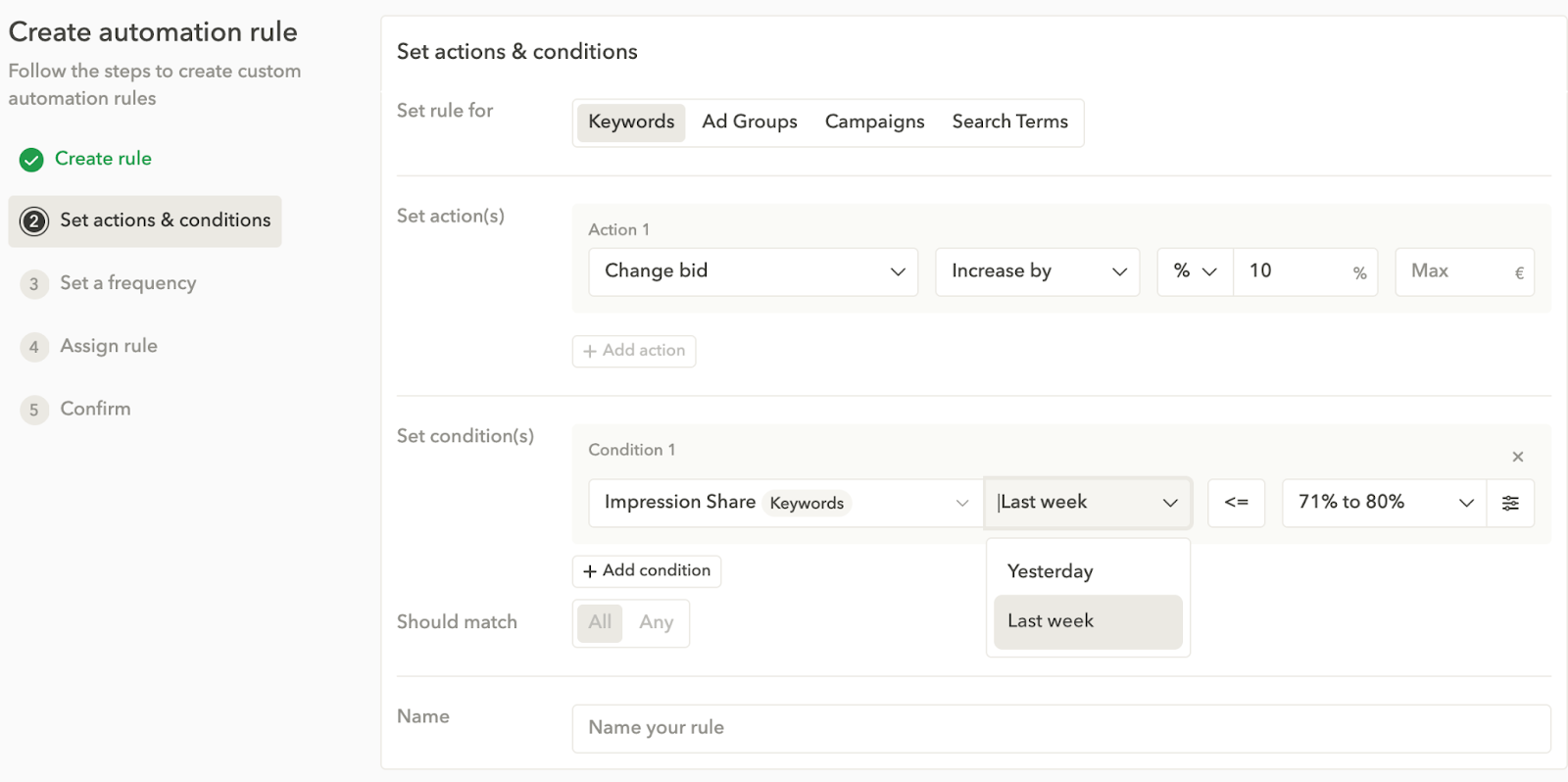
Here’s a step-by-step process for setting up custom automation rules for your Apple Ads campaigns in AppTweak:
- Define your goal: Decide what success looks like. Are you optimizing for CPI, ROAS, or impression share?
- Choose your rule level: Apply rules at the campaign, ad group, or keyword level depending on how granular you want to go.
- Define actions: Tell the system what to do—lower or raise bids and budgets, pause keywords or campaigns, transfer keywords or send alerts.
- Set conditions: Examples include “CPA > $10 over the last 7 days” or “Impression share < 90%.”
- Set frequency: Weekly checks are often best for stability, while daily checks suit more aggressive campaigns.
- Review results: Use AppTweak’s monitoring feed to see which rules triggered and whether the actions aligned with your goals.
Expert Tip
base your rules on statistically significant data. For example, don’t make bid decisions on keywords with fewer than 20 taps, or you risk reacting to noise.Best practices for automating Apple Ads
Automation is most effective when it’s applied with structure and oversight. These best practices will help you set it up for long-term success.
- Start simple with presets. Presets are built on proven Apple Ads strategies and are the fastest way to see automation in action. A good first move is to apply Monitor presets across your active campaigns. They don’t make changes but send alerts when budgets run out or CPAs climb, giving you a safe way to learn how automation behaves.
- Base rules on meaningful data. Don’t let noise drive your decisions. Set conditions on 7–30 days of performance and require enough taps before a rule acts (20+ is a good benchmark). This ensures changes are based on real trends, not short-term spikes.
- Combine rules to balance growth and efficiency. Automation works best when rules complement each other. For example, one rule can raise bids if impression share drops below 90%, while another lowers bids once share stabilizes. Used together, they keep brand visibility high without overspending.
- Use the monitoring feed. AppTweak records every action automation takes. Reviewing this feed regularly confirms rules are working as intended and helps you adjust thresholds if actions trigger too often—or not enough.
- Stay proactive with notifications. Email or in-platform alerts keep you informed about budget caps or sudden performance shifts. With alerts in place, you don’t need to check dashboards constantly.
- Control action frequency. Rules that run too often can destabilize campaigns. Weekly execution usually works best, while daily checks suit more aggressive strategies. AppTweak’s limit-action-frequency setting makes sure changes don’t happen more often than you want.
- Address budget saturation. One of the most overlooked opportunities is when a campaign hits its daily budget too early. Use Monitor presets to flag this or set custom rules that increase daily budget when saturation happens consistently. This ensures high-performing campaigns aren’t cut short.
Advanced automation strategies for Apple Ads
If you’re ready to really dig in, take on some of our data scientists’ more advanced automation strategies for Apple Ads.
1. Bid optimization for critical keywords
Some keywords—like your brand name or high-intent generic terms—are too important to leave unchecked. You want to stay visible, but you also don’t want to overspend when you already dominate impression share.
Here’s how to set it up:
- Rule 1: Increase bids if impression share drops below 90%. This ensures you hold visibility when competition intensifies.
- Rule 2: Decrease bids if impression share rises above 90%. This prevents you from overspending once visibility is secure.
Why it works: This two-rule loop finds the “sweet spot” bid where you keep strong visibility at the lowest possible cost. AI alone often just raises bids to maintain dominance—our approach fine-tunes spend with guardrails you control.
2. CPA-based smart bidding with rules
Another strategy focuses on profitability across multiple keywords. Instead of one-size-fits-all bidding, you let rules push spend toward what works and cut back on what doesn’t.
Here’s how to set it up:
- Rule 1: Decrease bids for high-cost keywords (CPA well above the campaign average).
- Rule 2: Increase bids for high-performing keywords (CPA significantly below the average).
- Rule 3: Decrease bids on saturated keywords (impression share already >90%).
Why it works: these three rules together act like a self-correcting system. Expensive keywords lose priority, profitable ones get more budget, and you avoid wasting money on terms you already dominate. Over time, the system converges toward the optimal bid for each keyword.
3. Budget saturation management
Setting a daily budget is a good way to control spend. But when a campaign consistently maxes out its budget, it usually means you’re leaving growth on the table. Either there is room to scale high-performing keywords, or you could refine your bids on low-performing keywords to increase campaign performance.
- Preset: Use the Track campaign budget saturation rule to get notified when a campaign hits its cap. You can then decide whether to increase the budget or adjust bids.
- Custom rule: Define saturation (e.g., spend in the last 7 days > $500) and set an action, such as increasing the daily budget by 5%.
Our data science team has found budget saturation to be one of the most overlooked opportunities in Apple Ads. Addressing it with automation is often a significant source of incremental installs and profitability.
Conclusion
Managing Apple Ads manually doesn’t scale. As campaigns grow, automation becomes the key to staying efficient, consistent, and profitable. With AppTweak, you can choose the level of automation that fits your needs—whether that’s starting quickly with presets, designing custom rules around your KPIs, or letting AI handle bid adjustments in real time.
The real value lies in flexibility: automation takes care of the repetitive tasks so you can focus on strategy, creative testing, and new market opportunities. Whatever your level of expertise or available time, AppTweak gives you the tools to run Apple Ads campaigns with more confidence and control.
Ready to see what automation can do for your campaigns? Start your free trial of AppTweak’s Campaign Manager today!
FAQs
Here are the answers to the most frequently asked questions we get about Apple Ads automation.
What is Apple Ads automation?
It’s the use of custom, or AI-driven rules to automatically manage bids, budgets, and keywords.
How do I automate my Apple Ads campaigns?
With AppTweak’s Campaign Manager, one of the best Apple Ads tools, you can start with presets, build custom rules, or let AI optimize through smart bidding.
What are the benefits of automation?
Automation saves time, ensures consistent optimizations, and helps scale campaigns profitably.
When should I start using Apple Ads automation?
You should consider Apple Ads automation once manual management starts to slow you down or introduce inconsistencies. This usually happens when you manage multiple campaigns, countries, or keyword sets and need to adjust bids and budgets regularly. If you are running only a few brand or exact match campaigns with stable performance, automation may not be necessary yet. However, as soon as you expand discovery campaigns, test new markets, or need to protect impression share across many keywords, automation becomes essential to maintain performance without increasing workload.
What data do I need for Apple Ads automation to work effectively?
Apple Ads automation works best when it is based on statistically meaningful data. At a minimum, you need enough taps and installs to avoid reacting to short-term noise. As a rule of thumb, keywords should have at least 20 taps and several installs before automation rules take action. For more advanced setups, connecting Mobile Measurement Partner (MMP) data allows automation to optimize toward post-install events like subscriptions or purchases, rather than just app installs. Without sufficient volume or reliable conversion tracking, automation can still run, but results will be less stable and harder to scale.
Can I use automation with Apple Ads Basic?
No. Automation requires advanced campaign management beyond Apple Ads Basic. You also need to sign up for a campaign management tool like AppTweak to automate your Apple Ads campaigns.
What types of rules can I create with AppTweak?
You can optimize bids, protect impression share, monitor budgets and CPA, or create advanced rules tied to in-app events.
How often should I review Apple Ads automation settings?
At least weekly, though daily checks may be needed for aggressive campaigns.
Can AI-powered bidding replace human marketers?
AI handles repetitive optimization efficiently, but human oversight is crucial for strategy, creative testing, and setting the right goals.
Do I need a tool to manage Apple Ads?
Apple’s native platform allows you to create campaigns, set bids, manage budgets, and access core performance metrics. This can be sufficient if you are running a limited number of campaigns in one market with a small keyword set.
However, as soon as accounts grow in complexity, Apple Ads tools like AppTweak become essential. Apple Ads campaign management tools are built to offer automation, rule-based optimizations, AI-powered bidding, keyword discovery workflows, and more advanced reporting. They are especially valuable when Apple Ads becomes a core growth lever rather than a small test channel.


More articles in Apple Ads, Product Updates

 Georgia Shepherd

 Micah Motta