Do you care what users think of your app? You should, because even if profit is your ultimate goal, your app’s success depends entirely on its users. They’re your audience, your critics, and the ones who decide if your app sinks or thrives.
If you’re still not replying to reviews in 2026, you’re behind the competition and missing growth opportunities. In this article, we’ll cover how to respond to app store reviews and share best practices for crafting a thoughtful, effective app reply to reviews.
Key takeaways
- User reviews are a goldmine. They offer honest feedback, bug reports, feature requests, and even ASO keyword ideas. Don’t ignore them.
- Replying to app store reviews matters. It builds trust, improves retention, impacts store rankings, and shapes public perception.
- Negative reviews are a priority. Respond quickly and respectfully. For critical bugs and issues, within the first few hours.
- Positive feedback deserves attention too. Say thank you, keep the good energy going, and turn happy users into loyal supporters.
- Keep replies consistent and human. Your tone should reflect your brand. Avoid sounding robotic, even when automating replies.
- Use the right tools. Platforms like AppTweak help you centralize, automate, and analyze reviews and responses to them while keeping the human touch.
- Be clear, timely, and informative. Reply within 24 hours, especially to urgent feedback. Let users know when issues are fixed.
- Avoid common pitfalls. No copy-paste replies, no external links, no defensive responses, and never ignore users.
- Leverage reviews for growth. Use patterns in user feedback to shape keyword strategies and custom product pages.
- Reply like a human who cares. Because users notice, and it makes all the difference.
What are app store reviews?
App store reviews are public ratings and optional written feedback left by users who have downloaded and used an app from platforms like the App Store or Google Play. These reviews typically include a star rating from 1 to 5, written comments with feedback about the user’s experience, and sometimes, version numbers and dates.
App store reviews matter for several important reasons:
- For users, they serve as a valuable source of information, helping them decide whether an app is worth downloading based on the experiences of others.
- For app developers, reviews offer direct feedback that can highlight user satisfaction, reveal bugs, or suggest new features, making them a crucial tool for improving the app.
- For app store algorithms, positive reviews and high ratings indicate user satisfaction and can significantly boost an app’s visibility and ranking within the store, influencing its overall discoverability and conversion.
Why replying to app store reviews matters
Responding to app store reviews plays a key role in shaping the reputation and success of your app. It cultivates user trust, showing customers that you value their feedback and take them seriously. It also may influence app store algorithms and rankings, potentially improving visibility in search results and featured sections. A decent app reply to reviews is essential for the following reasons:
Builds user trust and transparency
Responding to app reviews shows users you’re listening and care about their experience. Need more app reviews? How to increase app reviews: Proven strategies for success.
Increases retention and loyalty
Users are more likely to stay and keep using your app when they feel supported and know their interests are taken into account.
Impacts app store algorithms and rankings
A high overall rating, positive reviews, and active engagement through replies can signal credibility and quality to app store algorithms, helping improve your app’s visibility and ranking. You can read more on the impact of app reviews on ratings and rankings.
Public perception: prospective users read reviews
Potential users often read both the reviews and developer responses before deciding to download. Thoughtful, respectful replies not only help the original reviewer but also influence others who are still considering your app. Keep this in mind when thinking how to reply to app store reviews, as this shapes your app’s public image. But if you’re receiving a lot of false reviews, check out our article on How to respond to fake reviews for help.
Gain valuable product feedback
Reviews often reveal bugs, usability issues, and feature requests you might not catch through internal testing. We have an entire guide dedicated to help you know how to analyze app reviews.
Mine ideas for keywords and custom product pages
If you’re noticing patterns in user reviews, for example, people mentioning home workouts, use that insight to build custom product pages tailored to those specific user interests. When you align your custom product page (CPP) messaging with what users actually care about and mention in reviews, you’re more likely to connect with the right audience and boost your conversion rates.
Use the same language your users do: it feels more natural and matches their search intent better. If users keep saying “perfect for home workouts,” don’t just talk about “fitness tracking” in description and on the screenshots. Lean into exactly what they’re loving and use that phrase.
Expert Tip
Link CPPs to specific keywords and markets.Now you can connect CPPs to keyword-level targeting in organic search. That means your CPPs don’t just show up in Apple Ads anymore, they can also appear in App Store search results organically when users search those keywords. Don’t forget to localize your custom product pages for each target market.
Turn negative experiences into positive ones
No app is safe from negative reviews, but that’s not always a bad thing. They give you a chance to make things right. If you respond quickly, address the issues, and answer any questions the user has, you might just turn an unhappy reviewer into a loyal customer. It’s all about how you handle the situation.
Where and how you can reply to app reviews
Replying to user reviews directly within app stores is a simple way to engage with your audience and improve your brand’s reputation and app popularity. Both the App Store and Google Play offer built-in tools for developers to view and respond to user feedback. Here is how to respond to app store reviews:
Replying to reviews on the App Store
To reply to reviews on the App Store, go through App Store Connect. Just head to My Apps, pick your app, then open the Ratings and Reviews section. Find the review you want to respond to and click Reply. All set and done: your message will be public, and you can always come back to edit it later if needed.
Replying to reviews on Google Play
For Google Play, log in to the Play Console. Choose your app, then navigate to User Feedback and then, Reviews. Click Reply under any review to respond directly and publicly. You can also filter reviews by star rating, language, or whether you’ve already replied, which makes it easier to manage everything.
Best practices for replying to app store reviews
Responding to user reviews is part of your app growth strategy. The way you handle reviews can shape user perception, drive loyalty and retention, and even influence your app store rankings. Below are best practices on how to respond to app store reviews right.
Always reply to negative reviews first
Start with the frustrated users, they’re not only the ones most at risk of churning, but also they can spread negative word of mouth about your app. A prompt, respectful reply can help you recover from a bad first impression and show you’re taking user concerns seriously.
Some studies show that 45% of users consider a response to a negative comment as a key factor in their perception of an app’s reliability. Prioritize their feedback and make it clear you’re actively working on a fix or ready to support them.
Thank users for positive feedback
Being appreciative of user feedback is just as important as replying to negative reviews. A simple “thank you” and a few sincere words of appreciation can go a long way. Happy users are much more likely to become loyal ones when they feel acknowledged. Apart from that, when users get an app reply to reviews, it keeps the conversation going and reinforces positive feelings toward your brand. Don’t miss the chance to build that relationship.
Use a consistent, brand-aligned tone
Make sure your replies reflect your brand’s personality. Whether your tone is casual, professional, friendly, or witty, keep it consistent across all replies. Users should feel like they’re hearing from you, not a bot. A mismatched tone can come across as impersonal or off-brand, especially when users are emotionally invested in their experience with your app.
Personalize your responses
Avoid copy-pasting the same reply to everyone. Use the reviewer’s name if available, mention something specific from their comment, and tailor your response to their concern, question, or compliment. Personal touches make your reply feel human, and users appreciate that.
Be concise and timely
Get to the point, but don’t rush it. Keep your replies short, clear, and genuinely helpful. Aim to respond within 24-48 hours, and for bug-related or critical reviews, ideally within the first few hours. The faster you respond, the more users trust that you’re paying attention. Quick replies also increase the chance users will share more details that can help you fix the issue.
That said, conciseness has its limits. If a user leaves a long, detailed positive review highlighting the value of your app, meet them with the same approach. A short “thanks” might come across as dismissive in that context. A thoughtful response shows appreciation and reinforces their positive experience.
Inform your users about app updates and bug fixes
If a review mentions a bug and you’ve already fixed it, let them know! Something like: “Thanks for the feedback! We fixed this in version 3.3, so feel free to update and let us know how it goes.” It shows you’re keeping your finger on the pulse and improving the app.
Provide reviewers with additional support resources
Some issues are too complex for a quick reply. In those cases, guide users to your support channels: email or in-app chat. Example: “Sorry to hear about that. Could you please reach out to support(Replace this parenthesis with the @ sign)app.com so we can look into it further?” This also helps keep sensitive issues out of the public eye.
Encourage dialogue
Invite users to continue the conversation. Ask follow-up questions or let them know you’re open to more feedback. This helps build a community around your app and may even increase the chance they’ll update their review after the issue is resolved.
Expert Tip
AI-generated review summaries appeared on the App Store. Apple has started showing AI-generated review summaries on the App Store. These summaries highlight key themes and feedback trends based on real user comments from the Ratings and Reviews section.This means your users’ words, and how you respond, can shape how your app is perceived at a glance. Keep your feedback loop active, and make sure both your product and replies reflect the quality you want showcased.
Tools & workflows to manage app replies to reviews
Handling app reviews manually works in the early days, but once your app starts growing, you’ll need some automation in place. Here are solutions that can help you stay efficient without losing the human touch.
Review management platforms
App marketing platforms such as AppTweak, make it much easier to monitor, filter, and respond to reviews across different countries and platforms, all from one place. They also provide insights like sentiment analysis and trending keywords to help you prioritize which reviews need your attention first. This saves you time and resources. No need to hire an additional team or shift the burden onto the shoulders of marketing or customer facing teams.
Get 3x more reviews responded to, just like Treepla did, by using efficient response automation and management with AppTweak.
“I found the App Reviews Manager beneficial to respond to mass amounts of reviews and also to analyze them for sentiment and topics. Additionally, the team actively provided feedback and suggestions, which was very helpful.” – An Dahyun, CS Manager at Treeplla
Want to achieve similar results with AppTweak?
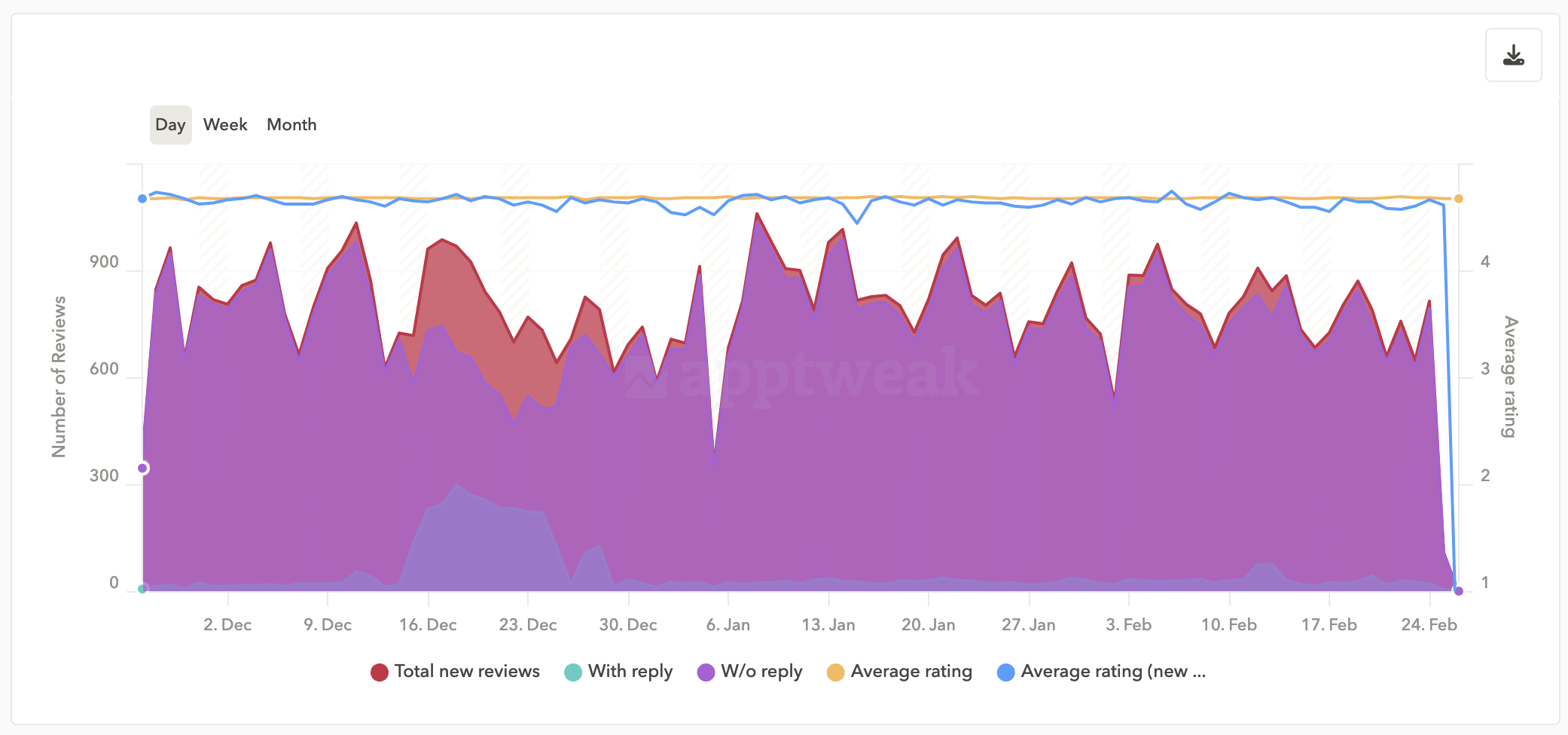
But don’t forget what we said about how to reply to app store reviews: sounding human still matters. Even with automation, you can reply in a way that feels personal and professional, not like a bot. Set up smart templates for common scenarios, but always tweak your response before hitting send. A little personal touch makes a big difference.
Integrations with support systems
Connecting your review management tool with your customer support platforms, like Zendesk or Intercom, creates a smoother workflow. You can escalate complex issues directly to your support team, track resolutions, and keep everything in one place. This is especially useful for turning unhappy reviewers into supported, satisfied customers.
Integrate AppTweak’s App Reviews Manager with Zendesk, Salesforce, or Slack to centralize your work. You can receive app store reviews in these platforms, filter and reply directly from the chosen CRMs.
Using review management platforms for app reply to reviews enhances and automates the entire process, while still keeping you in control. These tools help you stay efficient, respond faster, and maintain consistency without sacrificing the personal touch users expect. Check out further tips on managing app reviews.
Examples of good and bad app review responses
Before we wrap up, let’s look at a few examples that show how to respond to app store reviews the right and the wrong way, because how you say something is just as important as what you say.
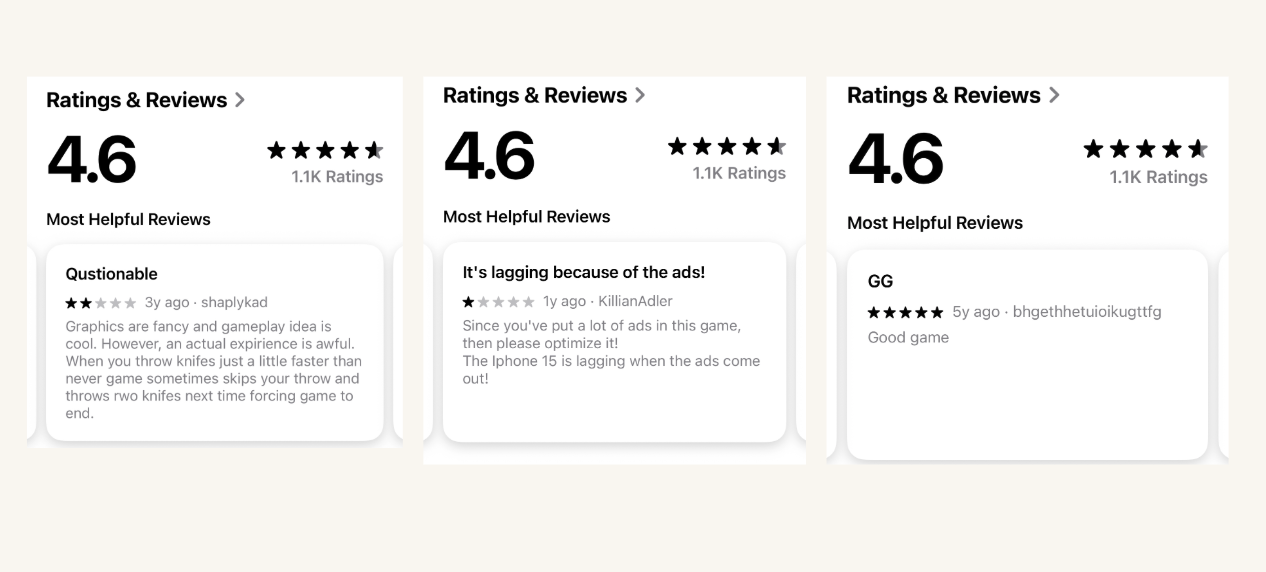
Let’s start with a mobile game example. The first game chose not to reply to user reviews at all: not to negative ones, not even to the positive. This leaves a mixed impression, almost like the developer doesn’t care. Over time, that silence frustrates users, and eventually, they’ll move on to a game that makes them feel heard. Even if your app started out with many great reviews and ratings, you can’t ignore bad reviews as they do affect your overall image.
Another mobile game takes the opposite approach and replies thoroughly to user reviews. This type of app reply to user reviews feels genuinely personal. It shows that the developer truly cares, is committed to open communication, and is actively working to improve the product based on user feedback.
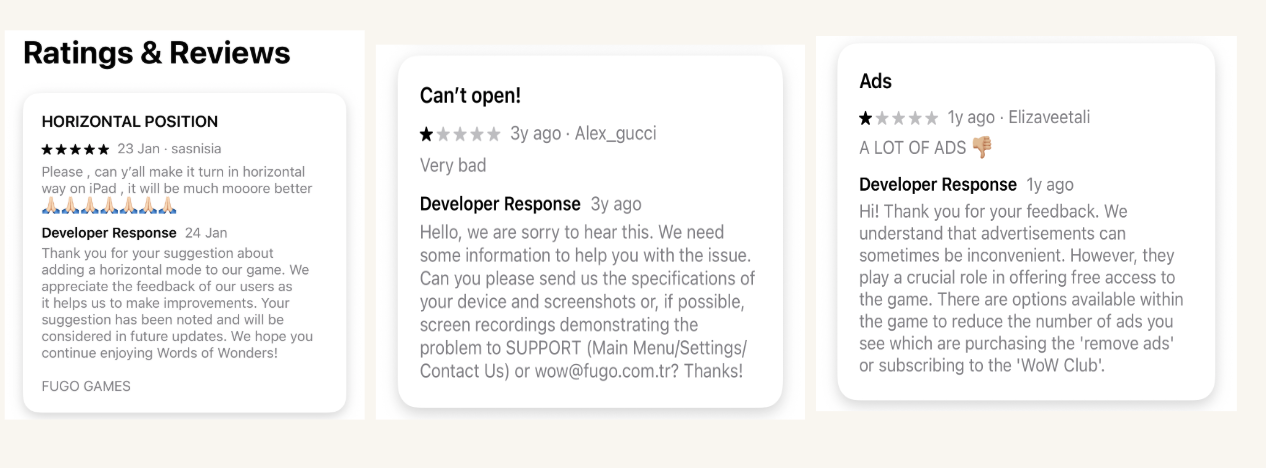
Some app developers on Google Play are completely ignoring bad reviews, while other users find this lack of response helpful in their decision making to not download the app.
And as we can see in the example image below, others are doing their best to inform the user about upcoming updates that actually address the issue:
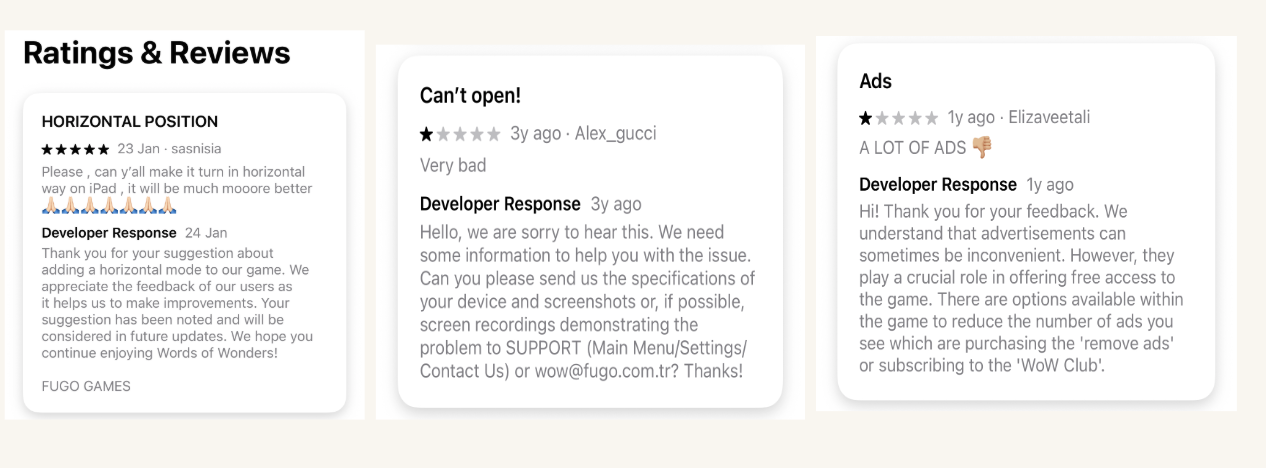
And now, take a look at this example of a bad app review response on the App Store:
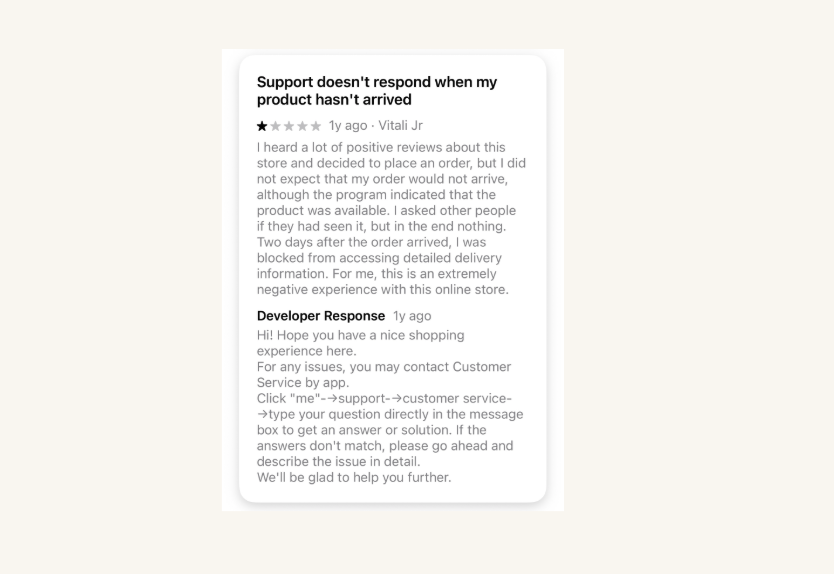
In the review above, the user points out a specific issue: their order didn’t arrive on time, and they weren’t informed about the delivery date. But the developer replies with a generic message about providing a “nice shopping experience,” completely ignoring the actual problem. That kind of response feels dismissive and out of touch.
Finally, let’s look at good app review responses from a developer:
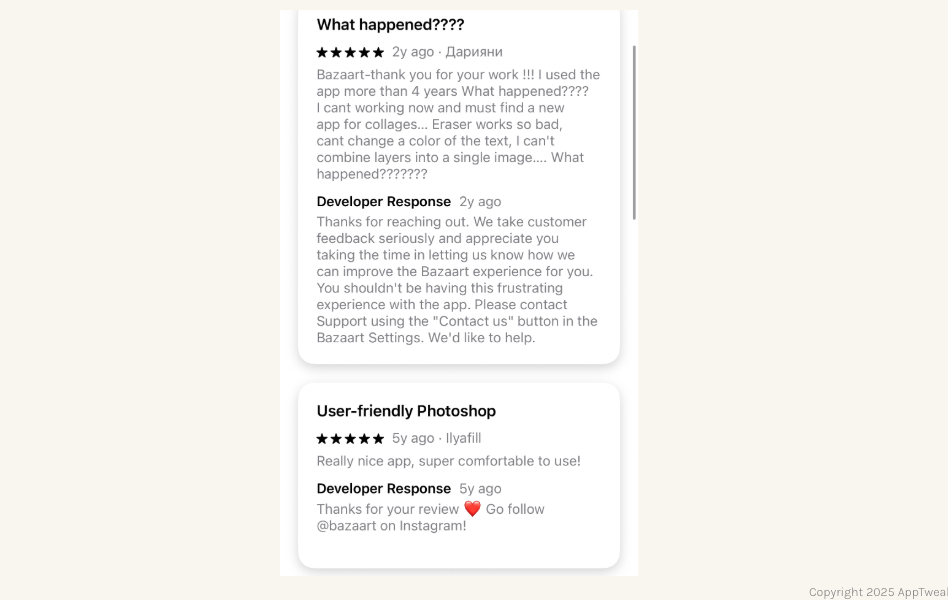
The replies read like they’re coming from a supportive, understanding friend, which can make users feel part of the app’s community. Even better, the developer invites a happy user to join their community on social media, which is a great move.
What not to do when replying to app store reviews
Just like there are best practices, there are also a few common mistakes you should avoid when responding to users’ app store reviews. These can damage your reputation, frustrate users further, or even get your replies flagged.
Ignoring negative feedback
Silence doesn’t help. Ignoring a bad review sends the message that you don’t care, or worse, that you’re not maintaining the app. Even if you don’t have an immediate fix, a quick acknowledgement shows that you’re paying attention and working on it.
Copy-paste responses
Using the same canned reply over and over makes you look lazy or robotic. Users can spot it immediately, and it hurts your credibility. Templates are fine for efficiency—but always tailor your message to fit the review.
Being emotional or accusatory
Don’t take criticism personally, even if the review is unfair or rude. Stay calm, professional, and helpful. Getting defensive or blaming the user will only escalate the situation and damage your app’s public image. Public arguments make you look unprofessional, and other users are watching, too.
Using jargon or overly technical language
Unless your audience is made up of developers, avoid replies full of technical terms or internal lingo. Users just want clear, understandable answers. Keep it simple and user-friendly.
Making promises you can’t keep
Don’t say “We’ll fix this in the next update” unless you’re absolutely sure it’s happening. Overpromising and underdelivering can frustrate users and damage trust. Better keep users posted and let them know once the fix is actually implemented.
Replying too late
Late responses (especially to critical reviews) often miss the window to make a real impact. If it’s been weeks, the user has likely churned, or worse, told others about the bad experience. Set up a workflow to respond within 24 hours whenever possible.
Ignoring language or cultural differences
If your app is available globally, be mindful of how you reply to users from different regions. Use localized responses when possible, and avoid tone or phrases that could be misunderstood across cultures.
Not following app store policies
Always stay within the platform’s guidelines when replying to reviews. One common mistake is linking out to external websites or resources. Some stores, like the App Store, discourage or block replies that include external links. If you need to guide users elsewhere, keep it simple: suggest they contact your support team via email or use the in-app help center. Staying compliant helps avoid having your responses hidden or flagged.
Conclusion
If you’re still treating app store reviews as an afterthought, it’s time to shift your mindset. Your users are giving you free feedback, valuable insights, and even keyword opportunities. You just need to engage with them. Whether it’s a glowing five-star review or a harsh one-star complaint, every review is a chance to strengthen your brand, improve your product, turn unsatisfied users into loyal ones, and build trust.
By learning how to reply to app store reviews thoughtfully and efficiently and using app marketing tools like AppTweak to scale the process without losing the human touch, you’ll not only improve your app’s reputation but also boost retention, life-time value, ASO, and ultimately, downloads.
Reply smart, politely, fast, and most importantly, like a real human behind the brand who genuinely cares.
FAQs
Here we answer the top frequently asked questions about how to reply to app store reviews.
Why should I reply to app store reviews?
Responding to reviews shows users that you care about their feedback. It helps build trust, encourages user retention, and improves your app’s public image. Timely replies can also turn a negative experience into a positive one.
How do I respond to negative app reviews?
Stay calm, professional, and respectful. Acknowledge the issue, apologize if necessary, and offer a solution or direct the user to support. Avoid being defensive: constructive replies can even lead users to update their reviews positively.
Does replying to reviews help ASO?
In short, yes. Active engagement through replies can signal to app store algorithms that your app is well-maintained and responsive, potentially boosting visibility and conversion. That might improve your app ranking in search.
Where do app store replies to reviews appear?
Replies appear publicly beneath the user’s original review on both the App Store and Google Play. Prospective users can see these communication between you and users, which influence their perception of your app.
Can developers edit their app replies to reviews?
Yes. Both the App Store and Google Play allow developers to edit their replies after posting. This is useful if you need to correct information or follow up with additional details.
How can I automate replies to app reviews?
You can use tools like AppTweak or Google Play Console’s integrations to automate or streamline replies. These tools help filter reviews, suggest templates, track trends and engagement over time.


More articles in Reviews and Ratings

 Oriane Ineza

 Georgia Shepherd