App ratings and reviews directly impact your app’s visibility, downloads, and credibility. App Store reputation management isn’t just about replying to users, it’s about building trust, uncovering insights, and optimizing for long-term growth. In this guide, we’ll walk you through 7 proven tips to improve your app store review management strategy, supported by the latest industry data and real-world examples.
Key takeaways
- Reviews and ratings directly influence downloads, visibility, and user trust.
- Apps rated below 3.5 stars rank for 3x fewer top keywords, while those improving to 4.4 stars can see ~25% more downloads.
- Apple’s iOS 18.4 now generates AI-powered review summaries, making fresh positive reviews more visible.
- Managing reviews isn’t just support, it’s an ASO growth lever tied to rankings and conversions.
- With the right workflows and tools, reviews can become a powerful competitive advantage.
What is app store reputation?
Your app store reputation is the overall perception of your app in the eyes of potential and existing users. It’s shaped by your average rating, user reviews, and how actively you engage with feedback. Strong app store reputation management signals reliability, builds trust, and helps you stand out in crowded app stores.
Why does app store reputation matter?
App store reputation impacts every step of the user journey:
- Visibility and rankings: Apps with higher ratings appear in more top keyword results, improving organic discovery .
- Conversion: Star ratings and recent reviews are often the first thing users check before installing. A steady flow of positive reviews increases trust and conversion rates.
- Long-term growth: Reputation influences whether your app is recommended, featured, or surfaced more often in store algorithms.
With AI-generated summaries highlighting common review themes, your most recent feedback is now even more prominent to potential users.
Reviews impact app downloads, ASO and visibility
On the App Store, apps rated below 3.5 stars rank lower for keywords, according to AppTweak’s 2025 ASO Benchmark Report, while on Google Play a lower app rating can negatively influence the category rank. On the other hand, we’ve observed that apps that raise their average rating from 3.8 to 4.0 stars see up to a 20% increase in downloads.
User trust and perception are shaped by app reviews
Ratings are often the first thing users check before downloading. A high volume of recent, positive reviews reassures users that the app is active, reliable, and well-supported.
Reputation directly influences app store conversion rates
Your star rating and recent reviews play a big role in turning store visitors into users. With the stores introducing AI-generated review summaries on app pages, positive feedback is now even more visible.
Starting with iOS 18.4, Apple will use LLMs to create AI-generated summaries of user reviews, shown directly on the app page. These summaries refresh weekly and highlight recurring themes.
Tip: Ensure your latest reviews are consistently positive and highlight key selling points, they’re now much more visible to potential users.
7 proven tips to manage your app store reviews effectively
After helping hundreds of apps, these are the top tips we recommend to implement in your app store reputation management.
Tip 1. Monitor your app store reviews consistently and inform your roadmap
Stay on top of your user feedback by using real-time monitoring tools. If your goal is to find actionable topics from a set of reviews, you need an AI-powered Topics Analysis that transforms hundreds of reviews into the most important themes.
This is where AppTweak steps in. With a click of a button, our App Reviews Manager summarizes the main topics from all your reviews in your chosen store, country, and language. This is the fastest way to find insights that can help improve your product, marketing, and customer support:

Additionally, tracking review trends post-release also helps detect issues early. Topics Analysis can help teams identify bugs, prioritize features, and understand regional differences.
AI-powered sentiment analysis goes further by automatically classifying reviews as positive, negative, or neutral, and surfacing the underlying emotions behind user feedback. This enables faster prioritization of critical issues and helps teams see shifts in user mood before they affect star ratings. Tracking review trends post-release is also crucial for early issue detection.
Check out our blog on using review sentiment analysis to make product decisions.
Expert Tip
Tag reviews to speed up your workflowTo organize user feedback, you can also tag reviews based on custom filters like star rating, keyword, and more.
For example, imagine a music app that now wants to work on its Playlists feature. Tagging all reviews about “playlists,” would allow the correct team to instantly view/reply to customers’ likes and dislikes in one place.

Tip 2. Reply to app reviews, both good and bad
Responding to user feedback shows that you care. Even short replies can make a difference. Fast response times matter, and we recommend responding within 3 hours.
With Apple’s review summary feature, your replies (especially to featured reviews) are more visible than ever.
And don’t ignore your happy users, replying to positive reviews shows appreciation and builds community. A simple “thanks” or “glad you enjoyed it!” can go a long way.
Learn more in our blog on how and why to reply to reviews.
Use AI for reply suggestions across languages
Using tools like AppTweak’s GPT-powered reply assistant, you can draft responses in multiple tones (formal, casual, neutral) and across languages. This speeds up workflows while keeping replies on-brand and culturally relevant.
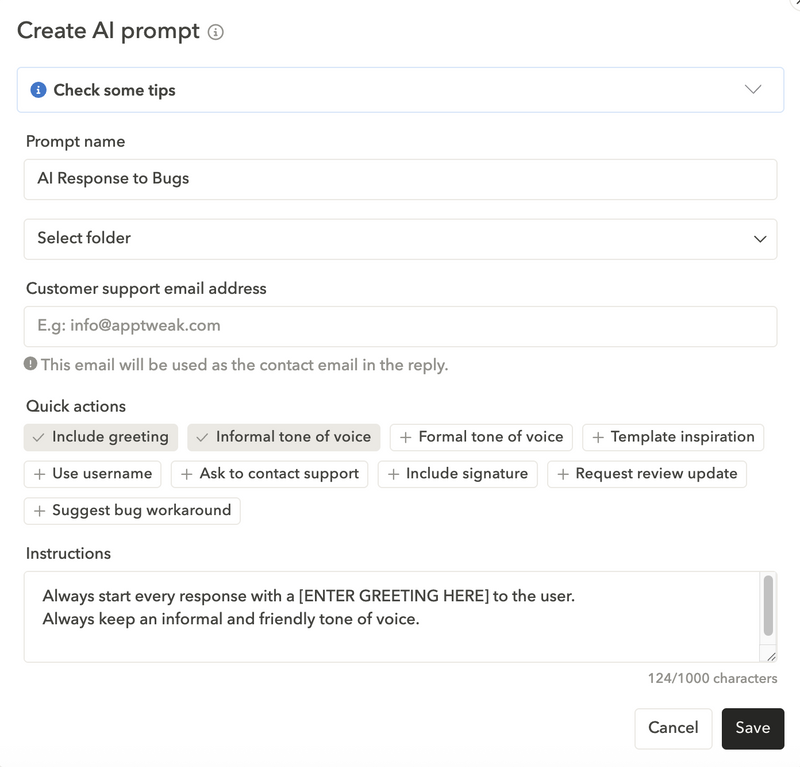
Use bulk reply to scale safely
For recurring themes (e.g., a known bug or subscription question), create saved templates and apply bulk replies with safeguards. Always personalize the opening/closing and update templates regularly.
In our App Reviews Manager, just prepare a single reply or template, select the relevant reviews (i.e. segmented by topic, rating, or language), and hit “reply all”.

Tip 3. Encourage satisfied users to leave app reviews
Use in-app prompts at the right time, e.g., after a successful booking, a completed task, or a positive milestone. Avoid review gating and follow platform guidelines.
Case study: The North Face implemented a prompt after checkout and increased their iOS rating from 3.68 to 4.23 stars. Conversion rates also improved by 59% in just 3 months.
[Could include an image of a rating prompt]
Need more ideas? Read our guide on how to get more app reviews.
Tip 4. Set custom automation rules to reply to app store reviews
To save even more time when replying to your reviews, automation is key. Create rules by rating, language, keyword/topic, or country to route reviews to the right owners, triage urgent 1-star feedback, and trigger pre-approved templates. Combine automation with human checks for sensitive cases.
First, tell AppTweak which reviews to reply to (based on their star ratings, language, topics, and more). Then, sit back while our automation instantly replies. All you have to do is monitor the system.
You can then reply with your own templates or by using AI, which is a great way to reply to reviews in foreign languages.
Learn more about automation in App Reviews Manager

Tip 5. Integrate your CRM (Zendesk, Salesforce, or Slack)
If you’re managing a lot of user reviews, it’s also likely you’re receiving reviews from different platforms like Google Business Profile or Trustpilot, for example.
If you’re taking care of these reviews, it is also important to add your app store reviews to the mix.
In AppTweak, simply integrate App Reviews Manager with your preferred CRM platform to receive reviews from your consoles directly in Salesforce, Zendesk, or Slack.
These reviews will be shown in the same way as any other ticket, also helping to minimize platform adoption time.

Tip 6. Make app store review management part of your growth strategy
Build review workflows into your regular product and support cycles. Collaborate across support, product, and marketing teams to align goals and messaging.
Add review insights to sprint retrospectives or Q&A sessions to surface recurring bugs or UX gaps before your next release.
Track performance and close the loop
Measure reply rate, reply speed, unreplied reviews, reviews updated after response, and topic resolution time. Share trends with Product and Support so fixes are reflected in release notes and future prompts; and measure the impact of your replies on reviews, and on the AI-generated review summaries on app pages.

Case study: Treeplla used AppTweak’s App Reviews Manager to automate and scale their responses. In just 3 weeks, the brand’s review response rate tripled, with one agent now handling 3,000+ reviews monthly across 10+ countries.
For more examples, see how other brands integrated reviews into growth in our ASO strategy guide.
Tip 7. Flag fake or abusive app reviews
Fake, spammy, or abusive reviews can distort your rating and damage user trust. They may come from bots, competitors, or frustrated users leaving irrelevant feedback. Report suspicious or harmful reviews directly through App Store Connect, Google Play Console, or with the help of AppTweak.
Report suspicious or harmful reviews directly through Apptweak, App Store Connect, or the Play Console. This helps maintain a fair and honest review environment for your app.
What tools can help with app store review management?
The following tools, particularly AppTweak’s App Reviews Manager, can help you succeed in app review management.
AppTweak’s App Reviews Manager
AppTweak’s App Reviews Manager is built to save time and uncover insights:
- Analyze and share insights: Topic Analysis automatically clusters reviews into themes like bugs, pricing, or UX. What used to take days of manual reading now takes minutes. These insights can be exported and shared across product and marketing teams, ensuring user feedback drives roadmap decisions.
- Save time with automation: AI-powered reply suggestions, bulk reply, and templates help scale responses. Human-in-the-loop workflows let teams approve critical replies before going live. Integrations with Zendesk and Slack reduce workload and centralize support.
- Reply globally without multilingual support: AI-powered localized reply suggestions and multilingual templates allow one team member to respond across multiple countries. This ensures brand-consistent, high-quality replies even without native speakers.
In-app prompt tools
Apple’s SKStoreReviewController and Google Play’s In-App Review API make it possible to trigger rating prompts at the right time, such as after a successful purchase or completed milestone. These help capture positive feedback when user satisfaction is highest.
Support tools
Zendesk, Intercom, Salesforce, and Slack connect reviews to existing workflows. This ensures fast response times, reduces context switching, and helps customer support teams triage urgent 1★ reviews. That’s why AppTweak’s App Review Manager integrates with these support tools to provide you with a robust, centralized review management platform.
Use cases
- Share review insights directly with product teams to prioritize features.
- Automate responses and track reply rates over time.
- Manage global reviews without needing native speakers in every market.
- Spot negative trends early and prevent rating crashes.
Read more about the best tools in our ASO tool comparison.
Fresh, high-quality reviews play an increasing role in store algorithms. Apps that regularly receive positive reviews tend to:
- Rank for more keywords
- See higher conversion from page views to installs
- Benefit from being recommended or featured
Learn more in our guide to the impact of app ratings and reviews on visibility.
How does app review management impact ASO and rankings?
Reviews and ratings are now a direct app store ranking factor, making app store reputation management all the more important.
Higher rankings
According to AppTweak’s ASO & Apple Ads trends and benchmark report, ~95% of featured apps have a rating of 4.0 stars or higher, and apps rated below 3.5 stars rank for three times fewer top-10 keywords. Improving ratings also has a clear growth effect, apps raising their score from 3.2 stars to 4.4 stars often see download growth of around 25%.

Greater app visibility
Recency and velocity also matter, as frequent, positive reviews carry more weight than older ones, so staying engaged helps algorithms surface your app more often.
Better conversion
Positive reviews not only boost conversion rates but also drive installs, creating a cycle that strengthens rankings over time. For example, apps with an average rating above 4.5★ often dominate category rankings, while those under 4 stars struggle to gain traction. This highlights the long-term impact of strong reputation management on app growth.
More likely to get featured
Strong reviews don’t just influence rankings, they also increase your chances of being featured in the App Store or Google Play. Both Apple and Google prioritize apps with high ratings, steady review velocity, and positive sentiment when selecting apps for editorial collections or recommendation slots.
A well-managed reputation not only improves visibility in search but also opens the door to valuable featured placements that can drive a surge in organic installs.

Common mistakes in app review management
Ignoring negative feedback
Leaving 1-star reviews unanswered signals neglect. Users assume their issues won’t be addressed and may churn faster. Proactively addressing them shows care and can often lead to users updating their reviews once issues are resolved.
Using overly generic responses
Copy-paste answers feel robotic. Personalized, empathetic replies improve trust. Use templates as a baseline, but always adapt them to context.
Asking users to remove bad reviews
This is against Apple and Google’s policies and may trigger penalties. Instead, focus on resolving issues and encouraging users to update their reviews voluntarily. Transparency and clear changelogs in your updates also help rebuild trust.
Responding inconsistently or too late
Delays in replies harm user trust. Set clear goals, like replying to 90% of reviews within 24 hours, and use automation rules to keep your process consistent.
Not managing reviews in other languages
Neglecting non-English reviews alienates global users. Use multilingual reply tools or AI suggestions to cover all markets. Localized responses make international users feel valued and strengthen global brand reputation.
Not flagging fake reviews
Failing to flag suspicious reviews allows them to distort your average rating and mislead both users and algorithms. Fake reviews, whether spammy 1-star attacks or irrelevant 5-star comments, can damage credibility. Report them consistently through App Store Connect or Google Play Console to keep your rating a fair reflection of genuine user experience.
The future of app reviews and ratings management
App reviews are no longer just static user comments, they’re becoming dynamic growth signals. Apple’s rollout of AI-generated review summaries in iOS 18.4 shows how feedback is now front and center on every app page. This means fresh, positive reviews are more visible than ever.
Predictive analytics is also starting to play a role. By looking at historical data, teams can anticipate when ratings might dip, for example, right after a major update, and prepare fixes or communication plans in advance.
Meanwhile, AI-powered sentiment analysis continues to evolve, allowing developers to capture not just what users say, but how they feel. This provides a more nuanced view of reputation and helps teams prioritize issues with the biggest emotional impact on users.
In the coming years, managing reviews will be about more than reacting. The future lies in using reviews to inform product decisions, guide marketing, and strengthen ASO performance at every stage.
Conclusion
App store reputation management isn’t just a support task, it’s a core part of your ASO and growth strategy. With the right tools, clear workflows, and a proactive mindset, your team can turn reviews into a driver of visibility, downloads, and user trust.
Effective app review management is crucial. Use tools like AppTweak, integrate support, and prompt in-app reviews. Avoid ignoring negative feedback, generic responses, or single-language replies. Well-managed reviews boost keyword rankings, conversion, recommendations, visibility, and growth. Try AppTweak for free to see how we can help bolster your app reviews.
FAQs
Here are the most frequently asked questions about app store review management, answered.
What is app store reputation management?
App store reputation management is the process of maintaining a strong app store presence through ratings, reviews, and developer responses. It is no longer optional, it’s a growth lever for ASO.
How can I manage app store reviews effectively?
Start by monitoring reviews daily, replying quickly, and using tools to scale your process. Automation and AI can save hours of manual work. Explore how AppTweak’s App Reviews Manager helps teams stay on top of every review without burning resources.
Why are app reviews important for ASO?
They influence keyword rankings, conversion rates, and whether your app gets featured. According to our Benchmark Report, apps below 3.5 stars rank for 3x fewer top keywords. Learn more in our ASO benchmarks guide.
How do I manage app store reviews at scale?
Use automation to triage reviews, AI to generate multilingual replies, and CRM integrations to centralize responses. This allows small teams to handle thousands of reviews across multiple countries efficiently.
How do I manage response templates for app reviews at scale?
Managing response templates at scale is all about creating a system that keeps your app replies consistent, organized, and easy for your team to use across every app and market. AppTweak’s App Reviews Manager makes this simple by centralizing templates and giving you tools to categorize, reuse, and automate them.
What is the impact of ratings prompts on CVR and app rankings?
Well-timed in-app prompts can significantly boost your average rating. Higher ratings improve conversion rates on the app store page, which in turn drives more installs and supports stronger keyword rankings. Check out our blog on getting more app reviews for practical tips.
What’s the best way to respond to negative app reviews?
Be quick, empathetic, and solution-oriented. Never get defensive. A good app reply can turn a critic into an advocate, and often results in users updating their rating. Use AppTweak’s AI-powered reply suggestions to draft helpful answers in seconds.
How do I remove fake reviews from the App Store?
You can’t remove them directly, but you can flag them via App Store Connect or Google Play Console. Document patterns and report consistently. For a step-by-step process, see our blog on how to deal with fake app reviews.
What tools can help manage app store reviews?
AppTweak’s App Reviews Manager helps you monitor reviews, automate replies, analyze sentiment, and manage localization. Alternatives like AppFollow or Appbot also offer review dashboards. Check out AppTweak to see all the ways we help you with your app store review management.


More articles in Product Updates, Reviews and Ratings

 Georgia Shepherd

 Antoine Bentin