
The ultimate 2025 guide to app store reviews
 by Oriane Ineza
Content Marketing Specialist
— 17 min read
When searching for a new app, the first thing most people look at before making a decision is the app’s ratings and reviews. These app reviews are written by real users who share their experiences, opinions, and feedback about an app.
App store platforms such as the App Store and Google Play Store display app reviews on each app’s listing page. App store reviews are typically listed alongside a star rating, often ranging from one to five stars. Over time, these reviews can help shape an app’s reputation and impact search rankings within the store.
Key takeaways
- App reviews and ratings drive discovery and conversion. Low scores tank visibility; consistent positive reviews lift ranking, trust, and installs.
- Recency + response speed matter: prioritize fresh reviews, reply fast, and thoughtfully to improve app reviews and ratings over time.
- Treat reviews as data: analyze sentiment, topics, and keywords in your reviews to inform your roadmap, messaging, and ASO strategy.
- Scale with smart tooling: centralize multi-store feedback, use bulk replies, automation rules, and CRM integrations (all present in AppTweak’s App Reviews Manager) to maximize productivity and efficiency.
- Play by the rules: follow store policies and report fake reviews.
What are app store reviews?
App store reviews are user-generated feedback posted on app distribution platforms like Apple’s App Store and Google’s Play Store. Users write these app reviews after downloading and using an app to share their experience with other potential users. Together, app reviews and ratings form the clearest public signal of an app’s quality and reliability.
Each review typically includes two components: a star rating (usually 1-5 stars) and written feedback. The star rating provides a quick visual indicator of user satisfaction, while the written part offers insights into an app’s performance, features, and user experience.
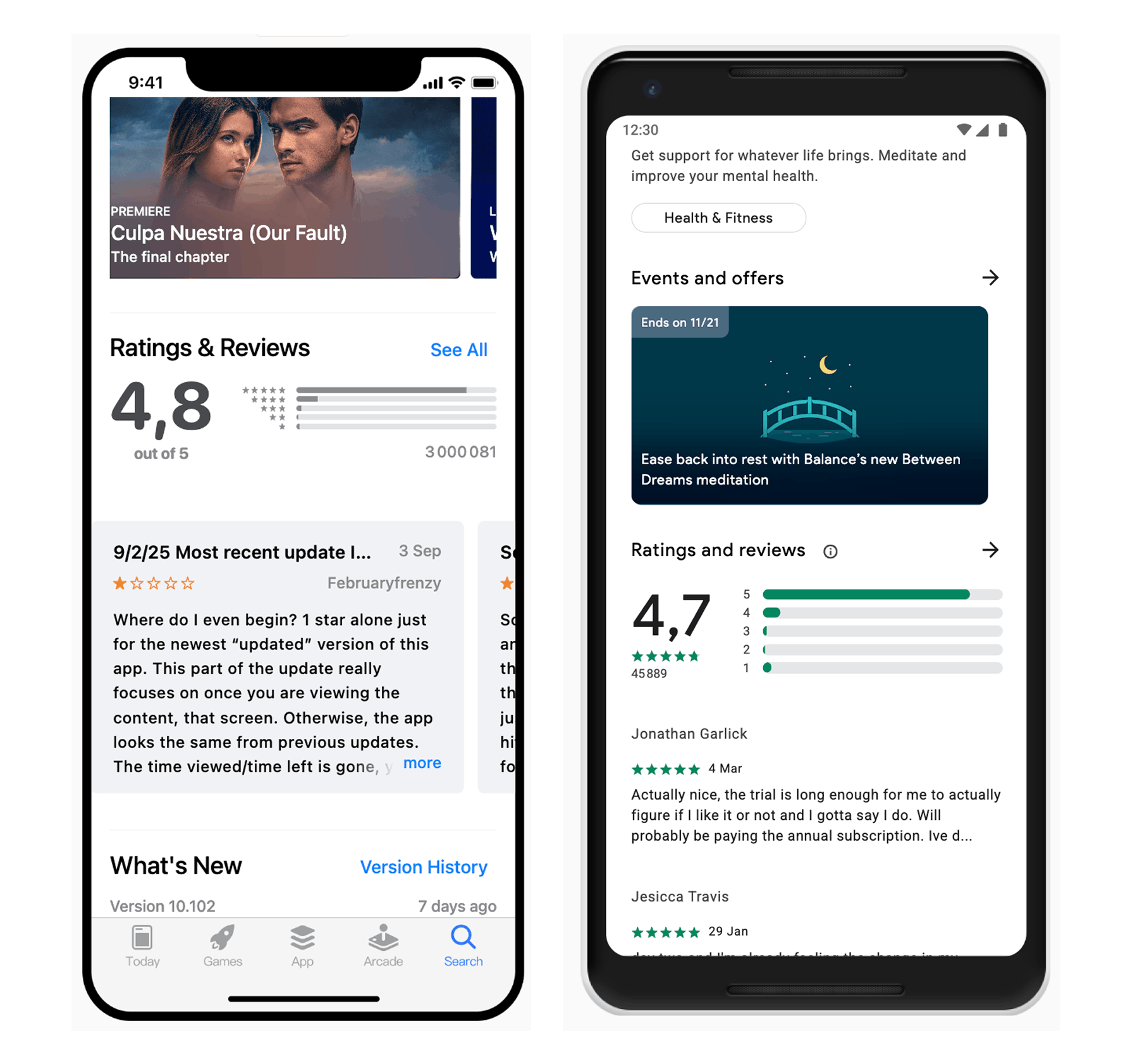
App reviews appear on an app’s store listing page, where they’re visible to anyone. The most recent app reviews often appear first, though some stores allow users to sort app reviews by factors like helpfulness or rating level.
Key elements of app store reviews include:
- Star ratings: Numerical scores that reflect overall user satisfaction
- Written feedback: Detailed comments about app functionality, bugs, or features
- Review dates: Timestamps showing when feedback was submitted
- User information: Basic details about the reviewer (often anonymized)
- Developer responses: Replies from app creators addressing user feedback
How do app store reviews work?
App store reviews act as a two-way communication system between app users and developers. Users can submit reviews at any time after downloading an app, and developers can respond to these app reviews to address concerns or thank users for positive feedback.
The review system varies slightly between platforms. On the App Store, users can rate apps without writing a review, but written app reviews require both a rating and text. Google Play Store follows a similar structure but allows users to edit their app reviews and ratings over time.
App stores use various algorithms to determine which reviews are highlighted. Factors that influence review visibility include:
- Recency: Newer app reviews often appear first
- Helpfulness votes: App reviews that other users mark as helpful may rank higher
- Review quality: Detailed, well-written app reviews may receive better positioning
- Rating distribution: A mix of different star ratings provides balanced representation
App store reviews contribute to an app’s overall rating, which is calculated as an average of all submitted ratings. That rating sits front and center on the app page and influences its discoverability in search results. Because app reviews and ratings are so prominent on listing pages, even small shifts can significantly impact visibility and conversion.
Types of app store reviews
App store reviews generally fall into several distinct categories based on their content and purpose. Understanding these types helps both users and developers navigate the review ecosystem more effectively.
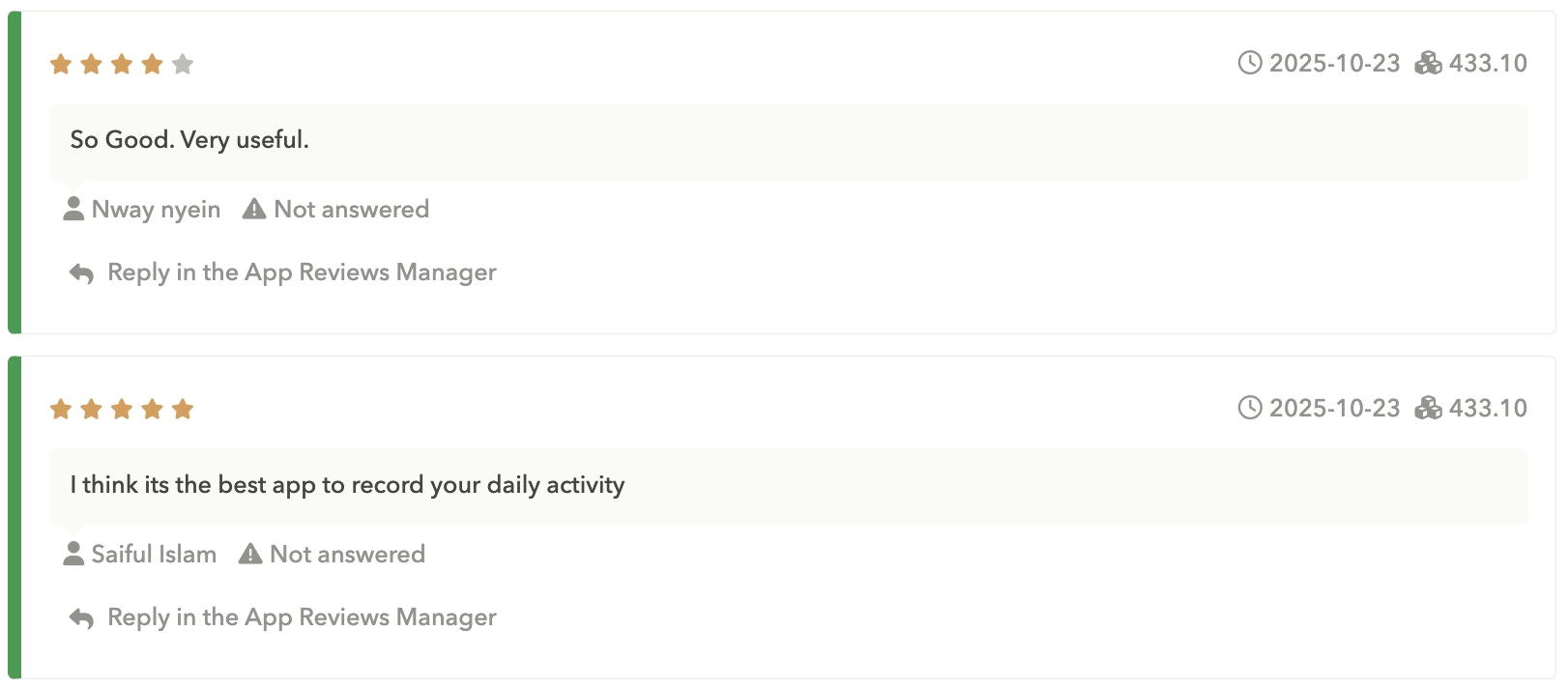
- Positive app reviews highlight what users appreciate about an app. These app store reviews often mention specific features, smooth functionality, or excellent customer service. Positive app reviews with ratings of 4-5 stars can significantly boost an app’s credibility.
- Negative app reviews express dissatisfaction with various aspects of an app. Common complaints may include bugs, crashes, poor user interface design, or missing features. These app reviews usually carry 1-2 star ratings and can negatively impact download decisions.
- Feature request reviews suggest improvements or additional functionality. Users often write these app reviews when they enjoy an app but want specific enhancements. These reviews can provide valuable product development insights for developers.
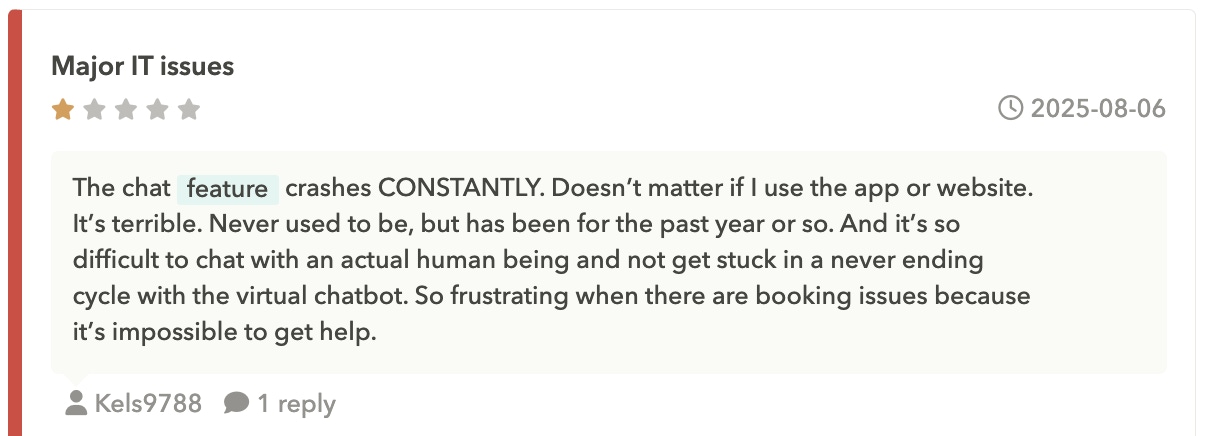
- Bug report reviews document the technical issues users encounter while using an app. These reviews serve as informal bug reports and can help developers identify and fix problems affecting user experience.
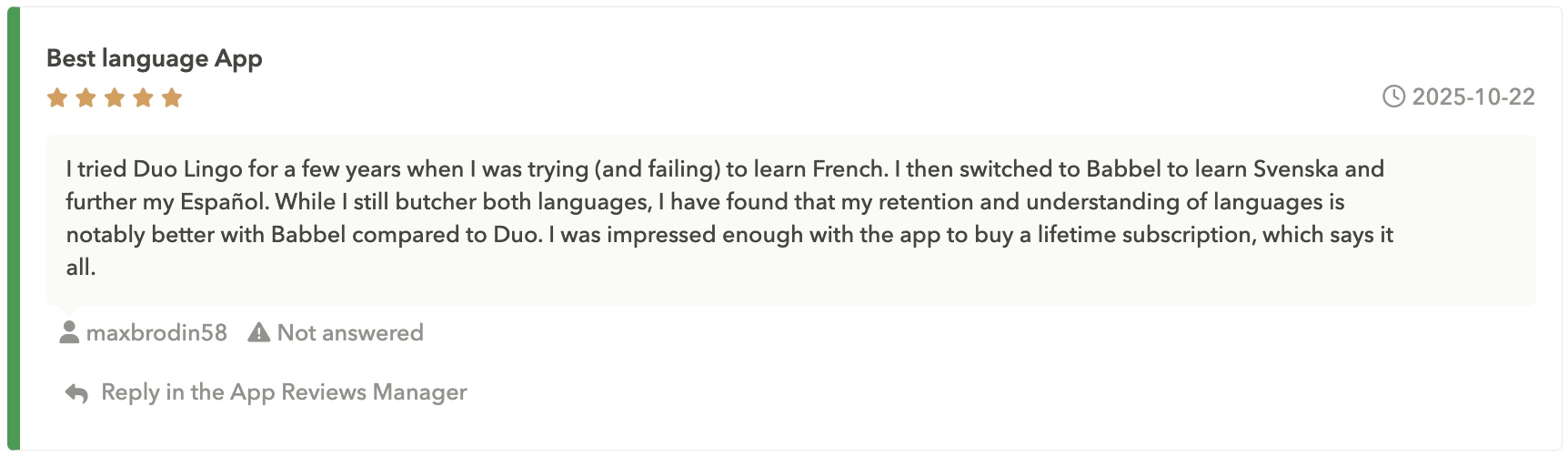
- Comparison reviews evaluate an app against competitors or similar alternatives. Users might mention why they prefer one app over another or how features compare across different applications.
- Update-related app reviews respond to recent app updates, either praising improvements or criticizing changes. These app reviews often spike immediately after major app releases or significant feature modifications.
App store review policies and guidelines
Both major app stores have specific policies outlining what users can and cannot include in app reviews. These guidelines help maintain review quality and prevent abuse of the review system.
App Store review policies
The App Store prohibits reviews that contain offensive language, spam, or content unrelated to the app being reviewed. Reviews cannot include personal information about developers or other users, and they cannot be used for advertising other products or services.
Play Store review policies
Play Store has similar restrictions but also prohibits reviews that violate intellectual property rights or contain misleading information. Both platforms actively moderate app reviews and may remove content that violates their policies.
Common review policy violations on both stores include:
- Spam or fake app reviews: Multiple reviews from the same user or coordinated review campaigns
- Inappropriate content: Offensive language, hate speech, or adult content in app reviews
- Off-topic content: App store reviews discussing unrelated topics or competing products
- Personal attacks: App reviews targeting individual developers or company employees rather than the app itself
- Misleading information: False claims about app functionality or pricing
App marketers can report reviews that violate platform policies, and app stores may remove problematic content after investigation. However, the review removal process can take time, and platforms generally err on the side of preserving user expression.
Impact of app store reviews on app performance
App reviews significantly influence multiple aspects of app performance, from initial discovery to long-term user retention.
Download decisions
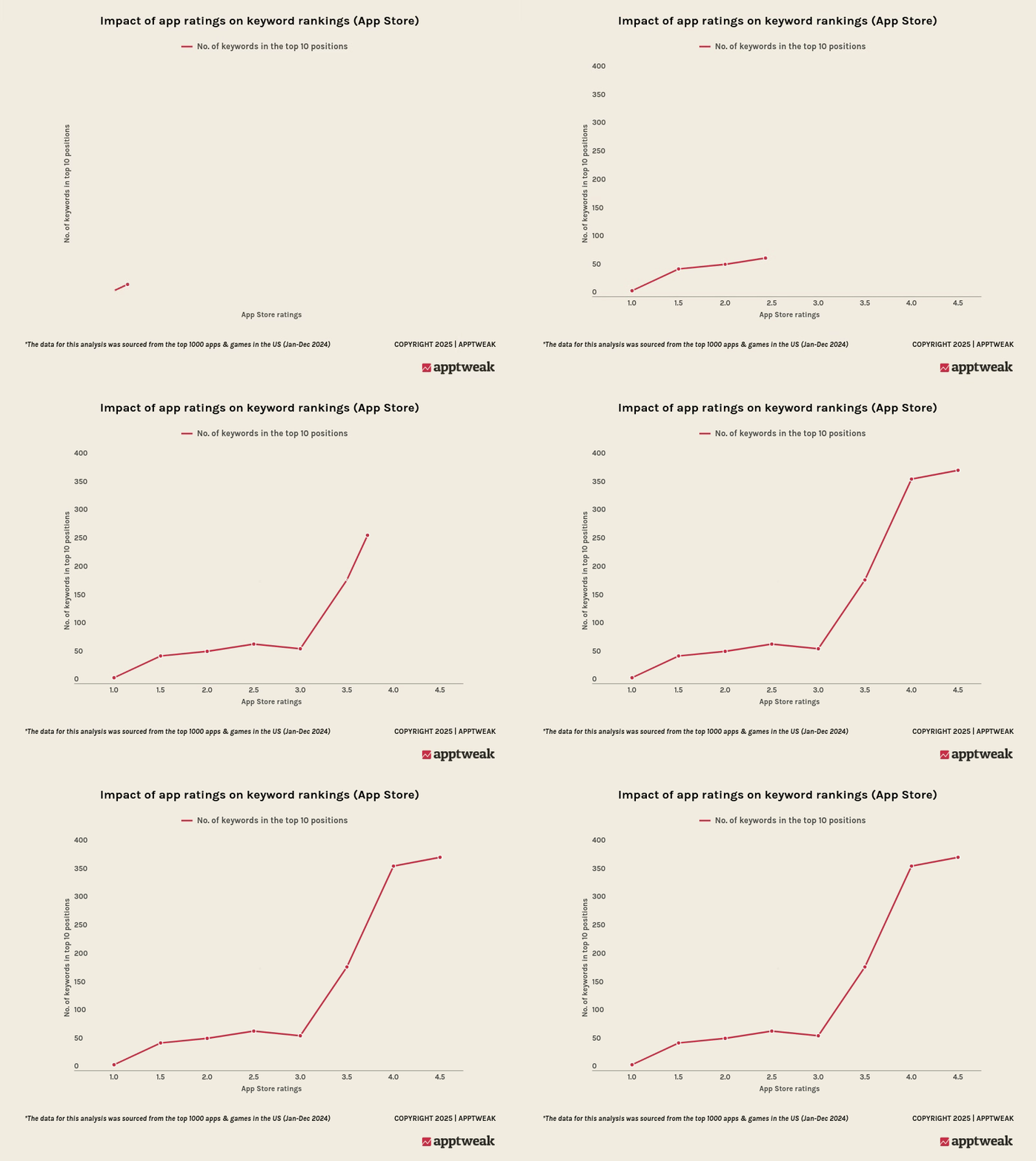
App downloads are heavily influenced by app reviews and ratings. Data shows that apps with ratings below 3.5 stars see sharply reduced visibility on their keyword on the App Store, while apps maintaining 4+ star ratings see substantially higher conversion rates from store visits to downloads.
Get the 2025 ASO trends & benchmarks report
Search rankings
Rankings in app stores factor in reviews. Both the App Store and Google Play Store algorithms consider overall ratings, review velocity, and review sentiment when determining where apps appear in search results for relevant keywords.
App store featurings
Featuring opportunities often require strong review profiles. Apps with consistently high ratings and positive user feedback are more likely to be selected for featurings, or category highlights within app stores.
The relation between app reviews and app performance creates a feedback loop where better reviews lead to improved visibility, which generates more downloads and potentially more app reviews.
AppTweak helped The North Face strengthen its global app presence. By closely monitoring reviews and optimizing ASO for local markets, The North Face improved its category rankings and user trust across multiple regions, showing how a strong review strategy directly drives growth.
How to read and evaluate app store reviews
Reading app store reviews effectively requires understanding how to identify useful information while filtering out less relevant content. Not all app reviews provide equal value for making download decisions.
- Recent app reviews typically offer the most relevant insights about an app’s current state. Apps change frequently through updates, so app reviews from several months ago may not accurately reflect the current user experience.
- Detailed app reviews that mention specific features, use cases, or problems provide more valuable information than brief comments like “great app” or “doesn’t work.” Look for app reviews that explain what the user was trying to accomplish and how the app performed.
- Review patterns across multiple app reviews can reveal consistent strengths or weaknesses. If several recent reviews mention the same bug or praise the same feature, this information is likely more reliable than isolated comments.
- Responses to app reviews can indicate how actively the development team addresses user concerns. Apps with thoughtful, helpful responses demonstrate ongoing commitment to user satisfaction.
When evaluating reviews, consider the reviewer’s apparent use case and whether it matches your intended use of the app. A review criticizing a productivity app for lacking gaming features may not be relevant to your needs.
Managing app store reviews as an app marketer
You can actively engage with app store reviews through response features available on both major platforms. These responses appear publicly beneath user app reviews and provide opportunities to address concerns, thank users, or clarify misunderstandings.
- Response strategies vary depending on review content and tone. For positive app reviews, brief thank-you messages can strengthen user relationships and demonstrate appreciation. For negative app reviews, responses work best when they acknowledge specific concerns and offer concrete solutions.
- Timing of responses can influence their effectiveness. Responding quickly to negative app reviews shows attentiveness to user concerns, while delayed responses may suggest indifference to user feedback.
- Professional tone in all responses helps maintain brand reputation and demonstrates respect for user feedback. Even when addressing unfair or harsh criticism, maintaining courtesy and professionalism protects the publisher’s public image.
Expert Tip
Many app marketers use app store review management tools to monitor new app reviews across multiple platforms and coordinate response efforts. These tools can send notifications when new app reviews appear and help track response rates and user sentiment over time. More about this in this section.App store review analytics and insights
App store reviews generate valuable data that can inform product development, marketing strategies, and user experience improvements. Analyzing review content systematically reveals patterns that might not be obvious from reading individual app reviews.
- Sentiment analysis can process large volumes of review text to identify overall user satisfaction trends and track how sentiment changes over time. This analysis helps you understand whether recent updates improved or worsened user experience.
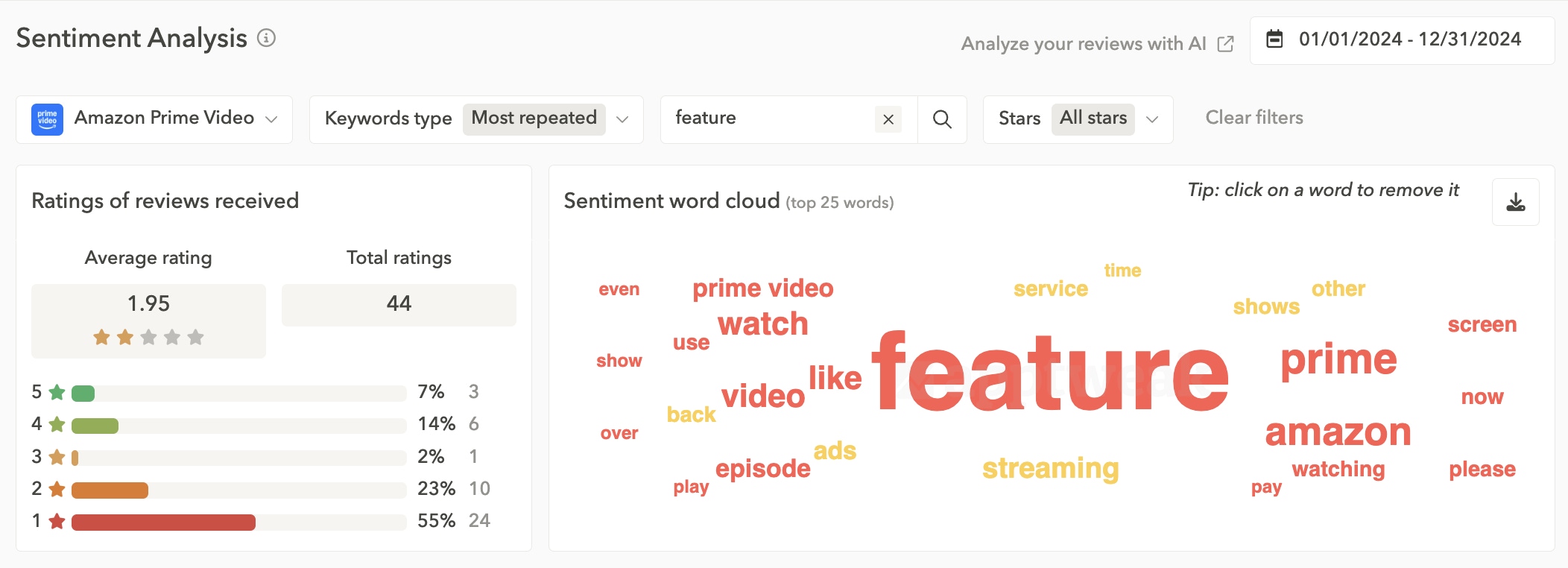
- Feature mentions in app reviews provide insights into which app components users value most and which cause the most problems. Tracking how often specific features appear in positive versus negative app reviews guides development priorities.
- Keyword analysis of review content can reveal how users describe app functionality in their own words. This information proves valuable for app store optimization efforts and marketing copy development.
- Review volume trends help identify the relationship between app updates, marketing campaigns, and user engagement. Spikes in review activity often correlate with major app releases or promotional activities.
Tools like AppTweak provide comprehensive review analytics that aggregate data across multiple platforms and offer insights into competitor review performance for benchmarking purposes.
Game studio Treeplla used AppTweak’s topic and sentiment analysis to spot recurring issues and prioritize fixes.
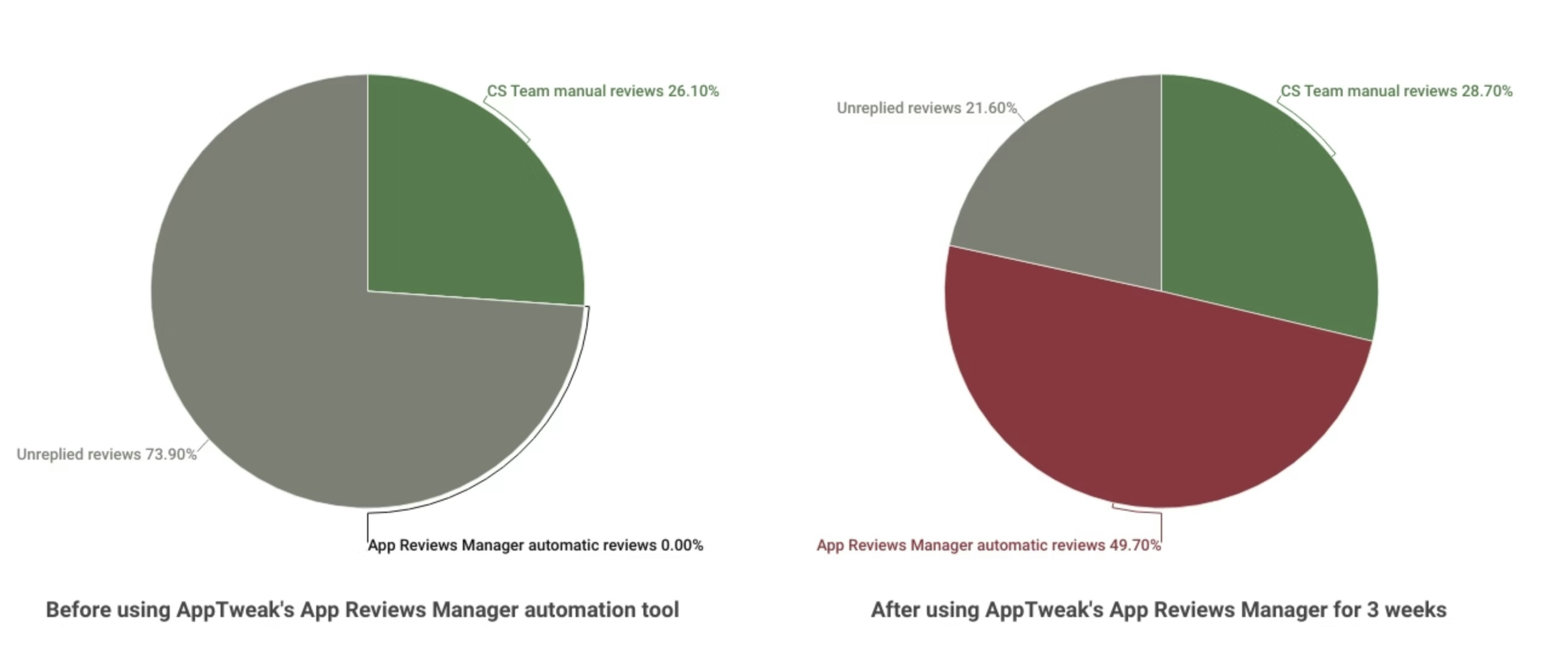
By pairing those insights with automation, they tripled their review response rate in just 3 weeks across thousands of reviews in 10+ countries.
Best practices for encouraging app store reviews
Encouraging users to leave app store reviews requires balancing the desire for feedback with respect for user experience. Overly aggressive review requests can annoy users and potentially lead to negative app reviews.
Timing review requests strategically improves response rates and review quality. The best moments to ask for app reviews occur after users complete positive actions within the app, such as finishing a level in a game or completing a successful transaction.
In-app prompts work more effectively when they feel natural rather than intrusive. Many successful apps wait until users have demonstrated engagement over multiple sessions before requesting app reviews.
Making the process easy increases the likelihood that users will follow through with review requests. Both iOS and Android offer native review prompts that allow users to rate apps without leaving the current app interface.
Providing value first before requesting app reviews helps establish goodwill with users. Apps that solve user problems effectively or provide entertainment value naturally generate more positive review responses.
Some developers implement review request logic that only prompts satisfied users (based on in-app behavior or feedback) to leave public app reviews, while directing dissatisfied users to private feedback channels where issues can be resolved before they become public complaints.
Expert tips to increase app reviews
Common issues with app store reviews
App store review systems face several recurring challenges that affect both users and developers. Understanding these issues helps set appropriate expectations for the review process.
Fake or manipulated app reviews represent a persistent problem across both major app stores. Some developers attempt to artificially inflate ratings through purchased app reviews or coordinated campaigns, while competitors may submit negative app reviews to damage rival apps.
Review bombing occurs when large numbers of users leave negative app reviews in response to issues unrelated to app functionality, such as political controversies or business decisions. These coordinated negative review campaigns can severely impact app ratings despite the app itself working properly.
Outdated app reviews may not reflect current app performance, especially for apps that receive frequent updates. Users rarely update their reviews after initial submission, so old negative app reviews about fixed bugs can continue affecting an app’s reputation.
Platform differences in review systems can create inconsistencies in how feedback appears across different app stores. An app might have excellent app reviews on one platform while struggling with negative feedback on another.
Language barriers can affect review usefulness when users write app reviews in languages that other potential users cannot understand, or when translation tools provide unclear interpretations of review content.
Tools for app store review management
Various tools and platforms help app marketers monitor, analyze, and respond to app store reviews more efficiently than manual management allows. These solutions range from simple notification systems to comprehensive analytics platforms.
Review monitoring tools send alerts when new app reviews appear, allowing you to respond quickly to user feedback. Many of these tools aggregate app reviews from multiple app stores into single dashboards for easier management.
Analytics platforms like AppTweak provide detailed insights into review sentiment, keyword mentions, and competitive benchmarking. These tools help you understand app review trends and identify areas for improvement.
Response management systems streamline the process of replying to app reviews by providing templates, translation services, and workflow management features. Some tools can even suggest appropriate responses based on review content analysis.
Integration capabilities allow review management tools to connect with customer support systems, product management platforms, and marketing automation tools. This integration helps ensure that insights from app reviews inform broader business decisions.
When selecting review management tools, you should typically consider factors like platform coverage, analytics depth, response features, and integration capabilities with existing workflows.
Best all-in-one app review management tool
ASO efforts can be extremely time-consuming. An app review management tool is essential to centralize feedback, reply to reviews efficiently, and automate repetitive work, all in one tool to maximize productivity.
AppTweak’s App Reviews Manager streamlines the often grueling process of managing user reviews across multiple regions and app stores. With real-time, AI-powered replies, your team can monitor, respond, and analyze reviews at speed to uncover insights that can help you improve your app and drive app reviews and ratings.
Automate review collection
Centralize every country and store in one dashboard, and automatically analyze app store reviews by topic and sentiment – no more manual sifting.
Review in bulk, safely
Filter reviews by topic, language, star rating, or country, and leverage GPT-4-powered suggestions to personalize and reply to several reviews in a single action.
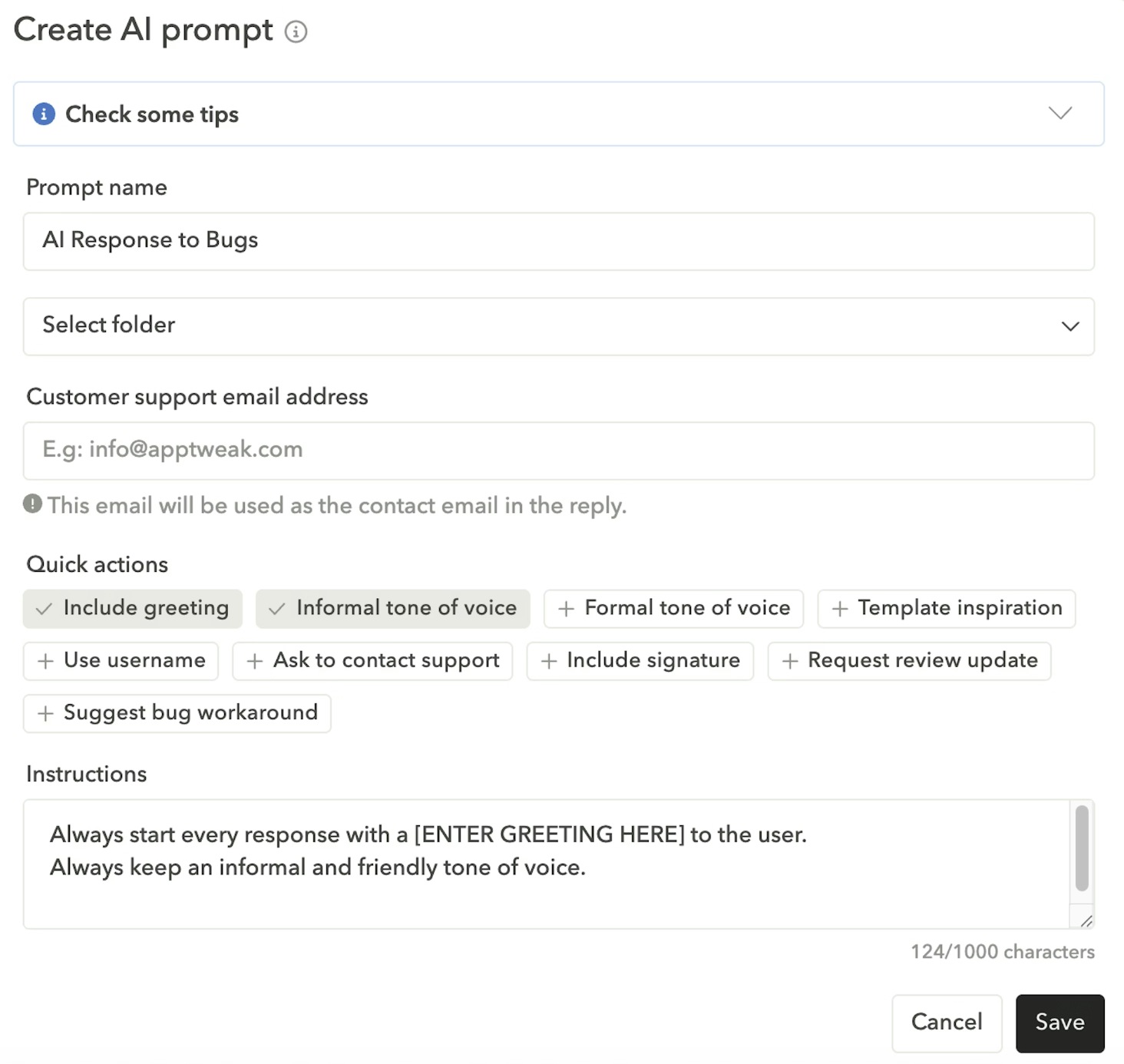
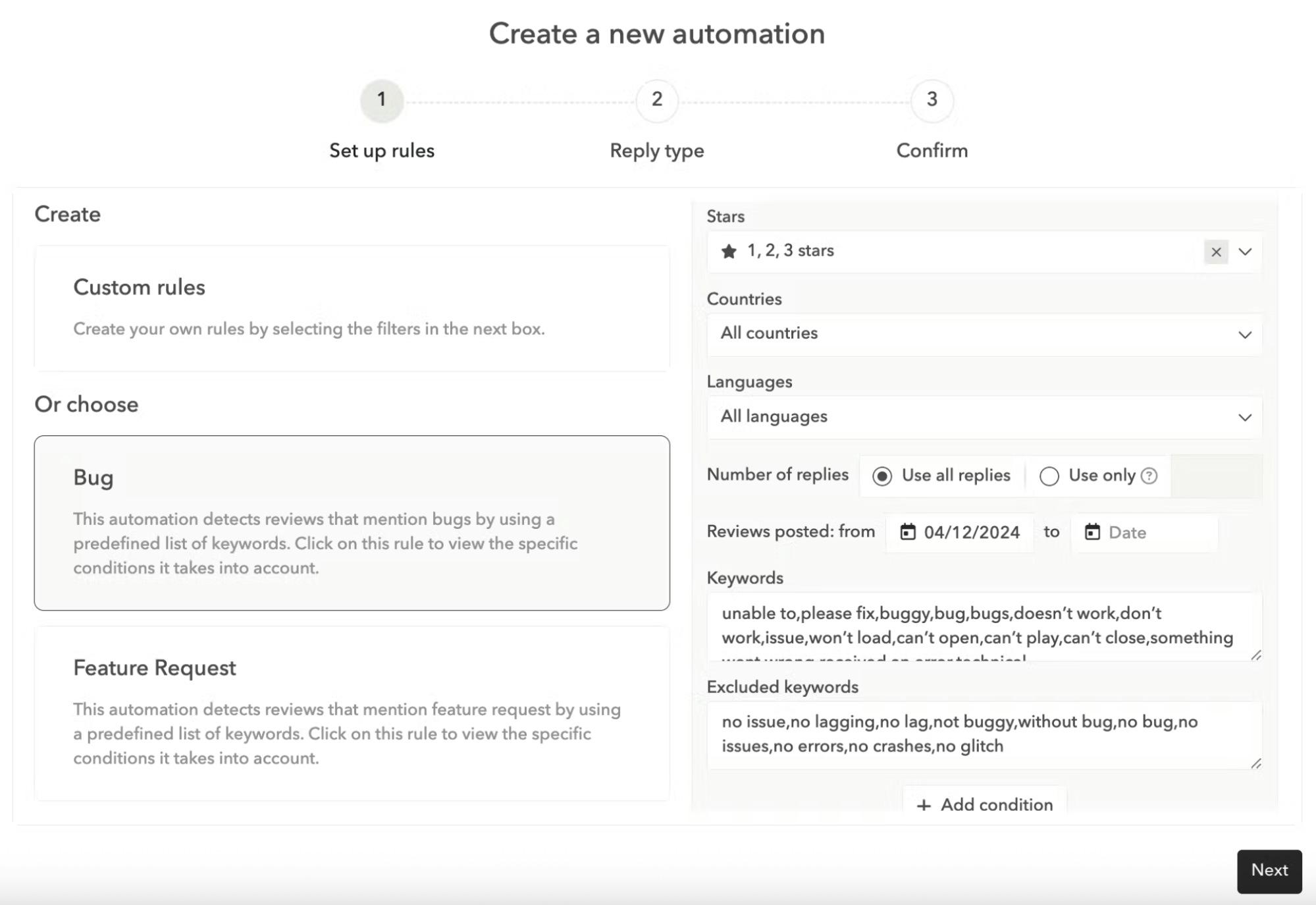
Set up automation rules
Create automation rules that trigger replies based on criteria like language, rating, or topic.
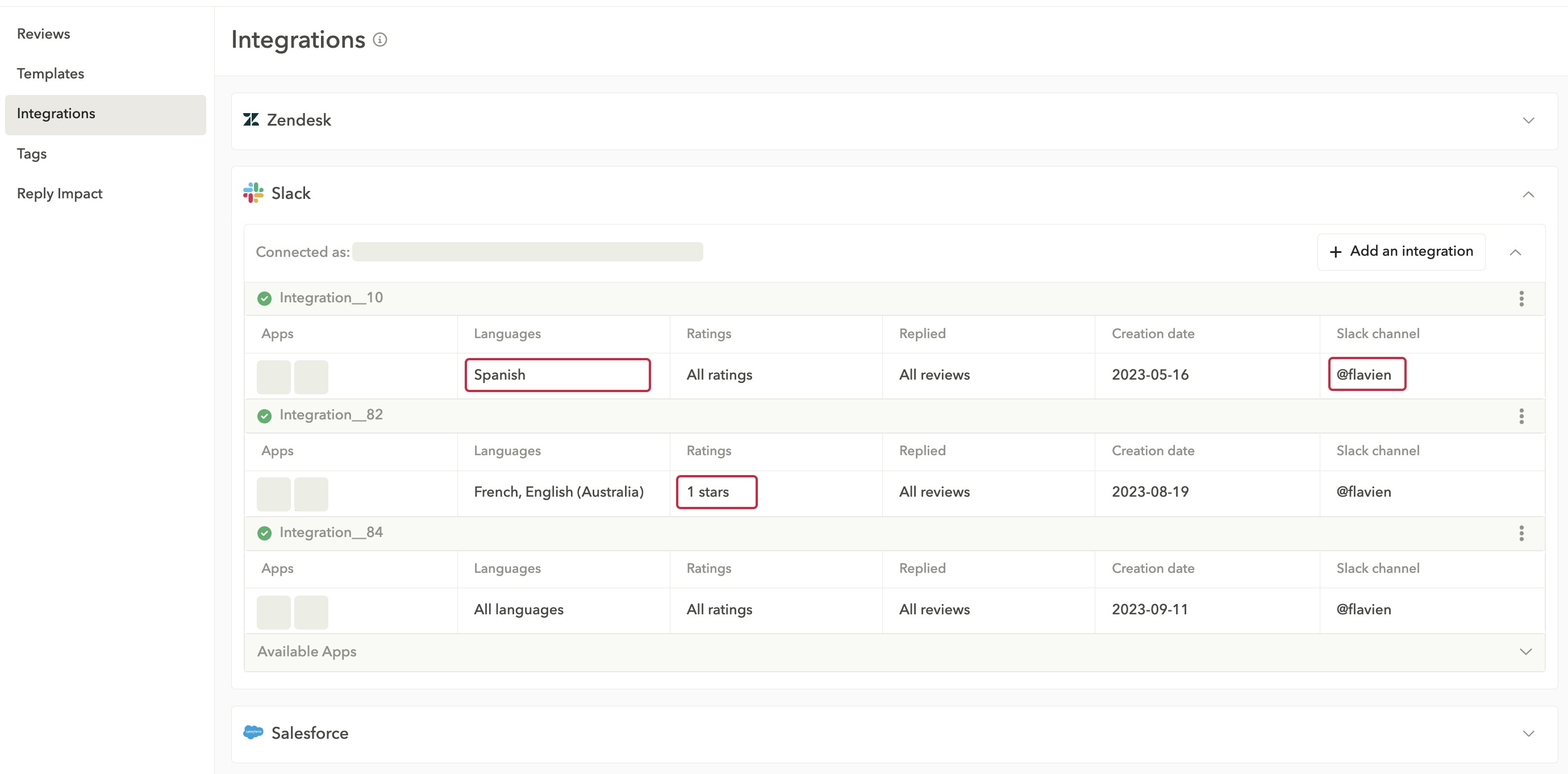
Integrate with your CRM
Make your team’s life easier by integrating your CRM into your review management platform.
Measure impact that matters
Track reply rate/speed and see how your responses move app reviews and ratings over time; spot recurring bugs/UX gaps and feed them into your roadmap.
App Reviews Manager supports managing and replying to app store reviews across regions with AI-powered replies and templates that keep your brand voice consistent. Learn more in our guide to the best app review management tools.
Conclusion
Your app reviews are your reputation. Winning in the stores means working smarter: centralize feedback, prioritize recent reviews, automate replies with AI, and integrate everything into your CRM for increased productivity. This will help you boost efficiency, shorten response times, and turn feedback into fixes. That is how you lift visibility, conversion, and trust.
Frequently asked questions about app store reviews
These are the most frequently asked questions about app store reviews.
What are app store reviews?
App store reviews are ratings and feedback users leave on the App Store and Google Play. These reviews influence rankings, downloads, and user trust.
Can users change their app store reviews after posting them?
Yes, users can edit both their star ratings and written app reviews on most app store platforms. Google Play Store allows users to modify their app reviews at any time, while the App Store also permits review updates. However, many users are unaware of this capability and rarely return to update their original app reviews.
How long do app store reviews stay visible on app listings?
App store reviews remain visible indefinitely unless they violate platform policies or the user deletes them voluntarily. However, the prominence of individual app reviews changes over time as newer reviews typically appear higher in the listing. Some platforms may archive very old app reviews or reduce their visibility in search algorithms.
Do app store reviews affect search rankings within the stores?
App store reviews and ratings significantly influence search rankings on both major platforms. Apps with higher overall ratings and more recent positive app reviews tend to rank better in search results for relevant keywords. The review velocity and sentiment also factor into algorithmic decisions about app visibility.
Can you remove negative app store reviews from your listings?
You cannot directly remove negative app reviews unless those reviews violate specific platform policies. However, you can report app store reviews that contain spam, inappropriate content, or policy violations to the respective app store for potential removal. The review removal process varies by platform and success is not guaranteed.
What happens when you respond to app store reviews?
App replies to reviews appear publicly below the original user review and are visible to all users viewing the app listing. These responses can help address user concerns, clarify misunderstandings, or thank users for positive feedback. Thoughtful app responses often improve overall user perception of the app and its support quality.
Ready to take control of your app store reviews? Try AppTweak’s App Reviews Manager to monitor, analyze, and respond to reviews across iOS and Android.

More articles in Reviews and Ratings


 Natalia Kryukova

 Lina Danilchik
