Your app’s reputation lives in its reviews. Every day, thousands of users share their experiences, complaints, feature requests, and praise across the App Store and Google Play. Those reviews shape whether new users hit “install” or keep scrolling.
But managing reviews at scale is overwhelming and time-consuming. If you’re monitoring multiple apps, countries, and languages, trying to extract actionable insights from thousands of reviews, manual processes won’t cut it.
That’s where app review tools come in. The right app review platforms don’t just help you reply faster. They unveil insights to help you protect and improve your app reputation, ratings, conversion, and feed real user input into ASO (App Store Optimization) and product.
This guide on the best app review tools will help gain a clear understanding of what these tools actually do (and don’t), who needs them, how to evaluate vendors, and which platforms to consider in 2026.
Key takeaways
- App review tools go far beyond replying; they help teams analyze sentiment, identify trends, and set up reply workflows.
- Native consoles cover the basics, but fast-growing apps outgrow them and need automation, templates, multilingual workflows, and richer insights.
- AI features are now essential: tagging, topic analysis, translation, and AI-generated replies help teams handle volume without sacrificing quality.
- Look for integrations and reporting so you can streamline workflows and track impact through rating trends, re-rating rate, and response coverage.
What is an app review tool?
An app review tool is software designed to help app developers, marketers, and support teams monitor, analyze, manage, and respond to user reviews across app stores.
Rather than logging into multiple consoles and manually sifting through feedback, these platforms centralize reviews in one place and often add layers of intelligence like sentiment analysis, automated replies, competitive benchmarking, and trend tracking.
The best tools go beyond simple inbox management. They help you:
- Understand what users are saying through AI-powered topic analysis and sentiment tracking
- Reply efficiently with templates, bulk actions, and multilingual support
- Extract strategic insights to inform product roadmaps, marketing messaging, and ASO decisions
- Monitor competitors to identify gaps and opportunities in your category
Who needs an app review tool and why?
Different teams use app review tools for different reasons. Here’s how each role leverages them:
Product Managers
Product teams need to understand what people are saying about their app (and their competitors) to prioritize their roadmap effectively. Reviews reveal which features users love, which ones frustrate them, and what’s missing entirely. They also serve as warning systems for bugs or performance issues.
ASO & User Acquisition (UA) teams
For ASO and UA professionals, reviews are a goldmine of keyword ideas and insights into how to position your app’s benefits. Understanding which features users highlight most, and the exact language they use helps you craft more effective app store metadata, screenshots, and custom product pages.
Support and Community Teams
Customer support teams need speed and consistency when replying to reviews. With the right tool, they can reduce response time, standardize tone across multiple languages, and automate prioritization so urgent issues get prioritized.
Expert Tip
We’ve seen that apps that respond to every single review can expect around 3% of users to update their review. That might sound small, but at scale, it’s significant. If you’re getting hundreds or thousands of reviews per month, even a few percentage points can meaningfully improve your average rating.Engaging with your users isn’t just about addressing concerns; it’s about improving perception and building trust. And trust leads to better ratings. Fast, empathetic replies show that your team cares—and can even turn critics into advocates.
Competitive Intelligence Analysts
Competitive analysts use review tools to track sentiment shifts across competitor apps, identify gaps in your product features, and spot emerging trends in user expectations. If a competitor’s users suddenly start complaining about a specific issue, that’s an opportunity for your team to capitalize on.
Learn why replying to reviews matters
How should you evaluate an app store reviews tool?
Not all review tools are created equal. When evaluating platforms, consider these critical factors:
1. Store coverage and data recency
Does the tool support both App Store and Google Play? How is the data refreshed — hourly, daily, or even less frequently? Tools that fetch reviews every 6 hours ensure you’re always working with the latest feedback.
2. AI analysis quality (sentiment, topics, clustering)
Can the platform automatically identify themes/topics in your reviews? Does it accurately detect sentiment (positive, negative, neutral)? The best tools use advanced AI to cluster feedback into actionable topics without requiring manual tagging.
3. Translation accuracy and multilingual replies
If your app serves global markets, you need accurate translations and the ability to reply in multiple languages. Some tools offer AI-powered suggestions that adapt tone and language.
4. Reply workflows (templates, approvals, bulk actions)
Can you save templates for common scenarios? Reply to multiple reviews at once? Set up approval workflows for sensitive responses? Efficient workflows are essential for teams managing high-volume reviews.
5. Integrations
Does the tool integrate with your existing CRM (Zendesk, Salesforce, Slack)? Seamless integrations reduce context switching and help support teams stay in their preferred platforms.
6. Competitive monitoring
Can you track competitors’ reviews and sentiment trends? Competitive intelligence is often overlooked but extremely valuable for strategic planning.
7. Reporting depth and ease of use
Are insights presented clearly? Can you export data for stakeholder presentations? The best tools balance depth with simplicity, making it easy to spot trends without drowning in noise.
8. Security, permissions, SSO, audit logs
For enterprise teams, security features like single sign-on (SSO), role-based permissions, and audit trails are non-negotiable.
9. Pricing transparency and scalability
Is pricing clearly stated, or do you need to contact sales for every tier? Does the platform scale affordably as your review volume grows?
10. Onboarding and support quality
Does the vendor offer dedicated onboarding? Responsive customer support? A tool is only as good as your ability to use it effectively.
What are the best app review tools in 2026?
Let’s explore the leading platforms, starting with native options and then diving into specialized third-party tools.
1.Native app store review tools
Google Play Console
The Google Play Console provides a native interface to monitor, filter, and respond to reviews directly from your developer account. You can sort feedback by rating, language, device type, app version, or country, which helps surface trends and pinpoint issues affecting specific user segments. The console also highlights commonly used keywords and topics, giving you a quick sense of overall sentiment and areas that may need attention.
When it comes to replying, however, Google Play limits you to manual, individual responses—there’s no bulk reply option, no automation, and no saved templates. This makes the console perfectly suitable for teams with a moderate review volume, but larger teams or fast-growing apps often need dedicated review management tools to streamline workflows, collaborate efficiently, and maintain consistent, timely responses at scale.
App Store Connect
Apple’s App Store Connect includes built-in tools to read, filter, and reply to customer reviews across all your app versions and storefronts. You can sort reviews by rating, territory, and app version, making it easier to spot localized issues or understand how changes in a recent release impact user sentiment. The platform also allows you to edit responses after publishing, which is useful when updating messaging or correcting a misunderstanding.
However, similar to Google Play, App Store Connect only supports manual, one-by-one replies—there’s no bulk replying, automation, or advanced workflow features. For teams managing a high volume of reviews or collaborating across multiple stakeholders, dedicated review management platforms usually offer more flexibility, efficiency, and richer insights.
Native consoles are essential to getting started in the reviews and cover the basics. But teams requiring in-depth review analysis and management outgrow them fast.
2. All-in-one app review & sentiment analysis and app review management tools
AppTweak’s App Reviews Manager
Best for: AppTweak’s App Reviews Manager is ideal for app marketers, ASO specialists, UA/growth teams, product managers or agencies who treat user reviews not merely as feedback — but as a strategic asset that can influence store visibility, conversion rates, and overall growth. If you manage multiple apps or markets and want a unified, data-driven way to track, reply to, and analyse reviews (and tie them to ASO or paid acquisition performance), AppTweak is built for you.
Key features: AppTweak centralizes reviews and ratings from all major app stores and regions into a single, unified dashboard. It provides sentiment analysis, tagging, and filtering, enabling teams to quickly identify trends such as common complaints, feature requests, or recurring bugs. The platform supports AI-powered reply workflows, so teams can respond directly to reviews and streamline support or product follow-up. Because AppTweak combines review insight with ASO, market intelligence, and paid-ads data, it enables a comprehensive, end-to-end view of how reviews impact your app’s performance and growth trajectory.
Price snapshot: Pricing grows with you based on usage — transparent and scalable
Pros: AppTweak stands out for offering a holistic review-management system that goes beyond simple aggregation. Its sentiment and tagging tools make it easy to turn unstructured reviews into actionable insights. By integrating reviews with ASO data, it helps teams understand the why: why conversions or rankings moved, or why user sentiment dropped. That integrated view is rare among review tools. For multi-app or multi-market setups, the unified dashboard and filtering capabilities make review management scalable and organized.
Cons: Because AppTweak is more comprehensive, teams that only need basic review aggregation or occasional replies might find it more complex than necessary. For apps with low volume of reviews or limited store-marketing activity, the depth might feel like overkill.
Appbot
Best for: Appbot is best suited for product managers and support teams who want to understand the meaning behind user feedback. It’s ideal for companies that receive a high volume of reviews and need to see topics, themes, sentiment, and patterns without spending hours manually reading through everything.
Key features: The platform brings all your reviews into one place and applies natural language processing to categorize them into topics and sentiment buckets. Appbot automatically surfaces recurring issues such as crashes or feature gaps, making it easier for product and engineering teams to prioritize. It also offers review routing to tools like Slack or Zendesk, with basic replying options built in.
Price snapshot: Tiered subscription based on volume
Pros: Appbot is powerful at identifying patterns that might otherwise go unnoticed, and the interface makes it easy to share those insights across teams. For companies that want reviews to inform product decisions, Appbot delivers strong analytical value without much setup.
Cons: Where Appbot falls short is in its depth as an operational review management tool. The reply workflows are serviceable but not robust, and they don’t tie reviews to broader app store performance. It also lacks competitive context and ASO capabilities, meaning insights remain somewhat siloed from the rest of your app store strategy.
AppFollow
Best for: AppFollow is a solid choice for companies that treat app reviews as part of their customer support workflow. It’s especially well-suited for support teams and CS organizations that rely on tools like Zendesk, Intercom, or Salesforce and want to route reviews directly into those systems.
Key features: AppFollow brings reviews from all major app stores into one interface and syncs them with your existing support stack. The platform offers automation rules for routing and replying, lets teams manage reviews as if they were support tickets, and supports multi-language handling. It includes sentiment analysis and some categorization, and it can push reviews into support queues to ensure timely responses.
Pros: Teams with high review volume and established support processes benefit from AppFollow’s operational strength. Its integrations are comprehensive, the routing and assignment system is robust, and it scales well across large teams or multiple markets. For organizations that prioritize response speed and structured workflows, it performs reliably.
Cons: For smaller teams, product managers and marketing managers, AppFollow can feel heavy and overly complex. Its ASO and competitive data are helpful but limited compared to dedicated app store platforms. And while it handles workflows well, it doesn’t connect reviews to your growth strategy the way more holistic app store tools do.
Appfigures
Best for: Appfigures works well for indie developers, small studios, and early-stage teams who want a cost-effective, “all-in-one” dashboard for app performance. It’s great when you want analytics, ASO insights, and review monitoring consolidated into a single tool without overwhelming complexity.
Key features: Appfigures pulls all your ratings and reviews from the major app stores into one dashboard so you don’t have to check each store manually. You can reply to reviews directly from the platform, set up alerts to get notified when new reviews arrive, and use basic filters to track rating trends or review volume over time.
Price snapshot: Freemium model with affordable paid tiers
Pros: Appfigures stands out thanks to its simplicity and price point. You can quickly understand how your app is performing and where reviews may be affecting ratings or momentum. For light ASO work and basic review monitoring, it offers everything a smaller team needs without the learning curve of larger platforms.
Cons: However, Appfigures isn’t designed for deep review operations or teams requiring AI capabilities. It lacks advanced workflows, sentiment analysis, tagging, and automation. For teams that rely heavily on reviews to shape product strategy, or that manage large multi-market apps, its review layer often feels limited. Larger teams outgrow it once they need more than basic visibility.
AppReply
Best for: AppReply is ideal for solo developers or very lean teams whose main challenge is simply keeping up with review replies.
Key features: AppReply uses AI to automatically generate responses to user reviews in your chosen tone of voice. It can reply in multiple languages, learn from your historic responses, and handle the vast majority of replies with minimal intervention. You define the rules, and the system does the rest.
Pros: The biggest advantage of AppReply is efficiency. It can reduce the time spent replying to reviews and ensures consistency across languages and app versions. For developers who aren’t trying to build large operational workflows, it solves a very specific, painful problem.
Cons: The trade-off is that AppReply does almost nothing beyond generating replies. There’s no sentiment analysis, no insights, no competitive context, and no connection between reviews and broader store performance. It’s the right tool when replying is the job to be done, but it doesn’t help you understand what reviews mean or how they impact growth.
Why AppTweak stands out
AppTweak’s App Reviews Manager isn’t just a review management tool, it’s a strategic command center for your app’s reputation. Here’s what makes it truly stand out:
Centralization at scale: AppTweak centralizes every review from the App Store & Google Play across all storefronts, languages and app versions into one unified interface. No more toggling between consoles or losing track of feedback.
Understand user feedback at a glance: AppTweak’s Topic Analysis automatically groups reviews into broader themes so you can quickly see what users are talking about without reading every comment. By clustering feedback into high-level topics like performance, pricing, UX, or reactions to recent updates, the tool gives you a clear and organized view of what’s driving user sentiment. It’s a simple way to get a big-picture view of user feedback in just a few seconds.

Automated tags to surface what matters most: AppTweak’s Tag Analysis & Automation feature automatically organizes reviews into meaningful categories using AI and customizable rules. This lets you instantly categorize feedback into clear themes such as crashes, payment issues, onboarding friction, or feature requests. Because each review is tagged individually, you can monitor how these issues trend over time and across countries, making it easy to pinpoint where problems are happening and how they evolve.

Sentiment analysis that informs strategy: AppTweak’s Keyword Sentiment Analysis scans review text to identify frequently mentioned keywords and shows the sentiment behind each one, highlighting which topics spark positive reactions and which trigger frustration.

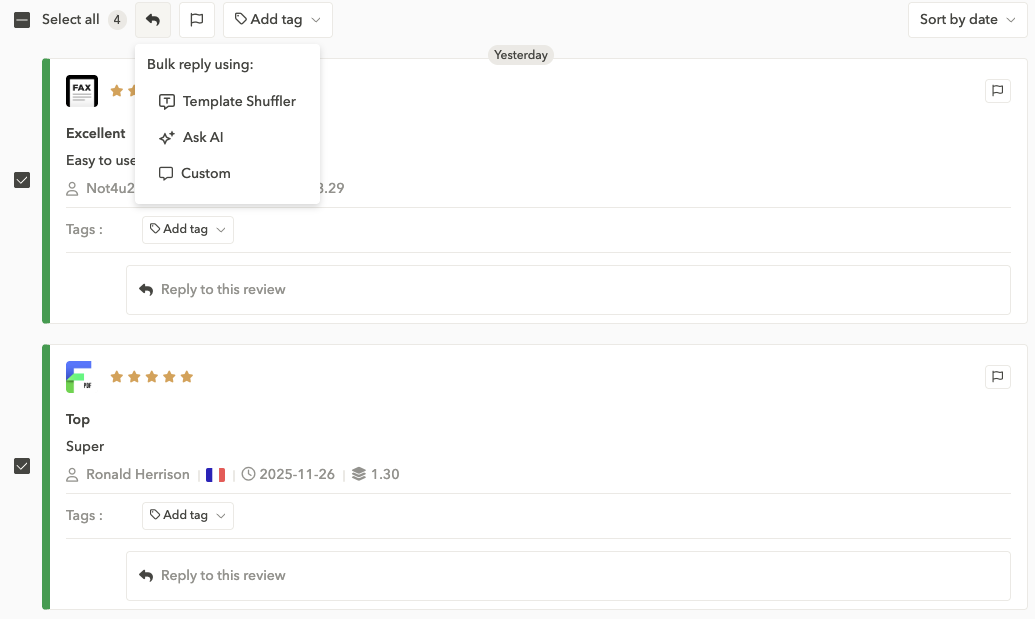
Reply at scale with bulk actions: AppTweak’s Bulk Reply feature lets teams handle large volumes of reviews more efficiently by selecting multiple reviews and replying to them all at once. You can choose from three reply options: write a custom message and apply it to similar reviews, use the template shuffler to rotate through pre-written responses for more variation, or generate a draft with AI-powered replies to speed things up. This helps teams process recurring feedback more quickly and keep response times manageable during busy periods or major releases.
Multilingual replies: AppTweak’s multilingual reply feature makes it easier to manage reviews from global audiences by letting you write responses in one language and automatically translate them into the user’s language.
Automate without losing the human touch: AppTweak’s reply automation features allow you to set rules that trigger responses when specific types of reviews come in, for example, certain star ratings, keywords, topics, or countries. Once a rule is active, the platform can automatically send a predefined template or prepare an AI-generated draft for your review, reducing the amount of manual work required for recurring or predictable feedback.

Integration with support tools: AppTweak integrates with support platforms like Zendesk, Salesforce, and Slack so your team can manage app store reviews within the workflows they already use. New reviews can be pushed directly into your support systems or channels, making it easier to triage feedback, assign ownership, and collaborate across teams.
Track team performance: AppTweak’s team performance feature gives you clear visibility into how your team contributes to review management. You can see who replied to which reviews, how many responses each team member handled, and how work is distributed across the team. The dashboard also shows how many reviews were updated after a reply, helping you understand the impact of your team’s responses.

Bring review insights into your ASO workflow: AppTweak helps you use review insights to inform your ASO work by showing how users naturally describe your app and what they comment on most. By looking at common keywords, recurring issues, and sentiment patterns in reviews, you can spot new keyword ideas, adjust your messaging, and make sure your store listing reflects what users actually experience.
Competitive intelligence built-in: Monitor your competitors’ review sentiment and themes to identify gaps and opportunities. If users love a feature your competitor offers, you’ll know about it.
Case Study: How one team tripled review response rate with AppTweak’s App Review Manager
Treeplla, a mobile game developer, faced the challenge of managing user feedback at scale while maintaining quality and personalization. Before using automation, Treeplla’s CS team struggled to respond to the high volume of reviews across multiple countries simultaneously. The manual workload became unsustainable.

Treeplla implemented AppTweak’s App Reviews Manager automation feature. Instead of manually replying to each review, they set up intelligent automation rules based on rating, language, topic, and game title. Results? In 3 weeks, Treeplla managed to triple their review response.
How do you analyze App Store and Google Play reviews efficiently?
Analyzing thousands of reviews manually is impractical. Here’s how the best app review management platforms transform overwhelming feedback into actionable intelligence:
1. Centralize all feedback in one workspace
Efficient review analysis starts with bringing all App Store and Google Play reviews into a single dashboard. Jumping between App Store Connect and Google Play Console slows teams down and makes it easy to miss important patterns — especially if you manage multiple apps or operate in several countries. A unified view ensures you see the full picture of user feedback across platforms, versions, devices, and markets.
2. Use AI-powered Tagging & Topic Analysis to surface insights
Reading every review manually isn’t realistic for teams dealing with high review volume. Automated tagging helps categorize reviews based on issues like crashes, payment problems, feature requests, or onboarding friction. Topic analysis goes a level higher and groups feedback into broader themes, giving you quick visibility into the main areas users talk about. Together, these tools highlight trends that would otherwise take hours to uncover.
3. Track sentiment and trends over time
Understanding how user sentiment evolves is just as important as identifying issues in the moment. Trend analysis shows whether core topics — like performance, pricing, or onboarding — are improving or declining over time. Tracking sentiment across countries also reveals how different markets react to the same update, helping teams spot region-specific problems or opportunities.
4. Set up automation rules to reply instantly and at scale
Manual replies don’t scale when you’re managing hundreds or thousands of reviews monthly. Advanced platforms like AppTweak let you create custom automation rules based on criteria like star rating, language, keyword, or topic.
For instance, you can automatically send a thank-you message to all 5-star reviews in Spanish, or immediately route 1-star reviews mentioning “crash” to your support team. Automation features ensure no review goes unanswered while freeing your team to focus on complex cases that require human judgment.
5. Maintain brand consistency across all responses
With multiple people (and AI) handling replies, it’s easy for tone and messaging to drift. A good app review tool should help teams keep replies consistent and on-brand. Features like shared templates ensure everyone follows the same tone and structure, while template shuffling adds natural variation so responses don’t feel identical. Tools like AppTweak that allow customizable AI prompts can also help guide AI-generated drafts toward the style and voice your brand prefers.
6. Measure reply impact and track review updates
The best platforms don’t just help you reply—they show you whether your replies actually work. Look for tools that track when users update their review text or rating after receiving a response.
7. Turn insights into product, ASO, and support improvements
The real value of review analysis comes from applying what you learn. Insights from reviews can guide product decisions, shape ASO keyword strategies, refine messaging, and highlight areas where support processes can improve. Reviews offer a direct line to user sentiment — using that feedback across teams helps you make more informed decisions and build a better app.
How to implement AI workflows for app review management
AI-powered workflows are becoming standard in modern app review tools, helping teams manage large volumes of feedback more efficiently. Here’s how to set up effective AI workflows to make your review management faster and more scalable.
Start by automating review categorization
The first step in building AI-driven workflows is using automation to sort and classify incoming reviews. AI can tag reviews based on keywords, topics, sentiment, or recurring issues, helping you understand what users are talking about without reading each comment manually. This creates a structured foundation that makes all downstream workflows faster and more reliable.
Use AI to draft faster, consistent replies
AI-generated drafts can significantly reduce the time spent writing responses, especially when dealing with repetitive feedback. Start by setting clear prompt guidelines that reflect your brand’s tone and preferred style. You can then build a workflow where AI drafts the reply, and a team member quickly reviews and edits it before publishing. This keeps communication human and accurate while cutting response time.
Leverage templates and prompt customization
Templates ensure consistency, but AI becomes much more powerful when you tailor prompts to specific scenarios like crash-related complaints, feature requests, or user frustration. Create a small library of targeted prompts that AI can use to produce more relevant drafts. Paired with templates or shufflers, this helps balance speed with personalisation.
Set up automation rules for predictable cases
Many reviews follow predictable patterns like password reset issues, login problems, unavailability in certain regions, or confusion about subscriptions. For these situations, automation rules can send or prepare replies using predefined templates or AI drafts. This keeps response times low and ensures important feedback doesn’t get overlooked during busy periods.
Measure, refine, and keep a human in the Loop
AI workflows are most effective when reviewed regularly. Evaluate how often AI suggestions are accepted, whether automated rules catch the right cases, and whether your tone remains consistent. Always keep a human reviewer in the loop to ensure accuracy and empathy remain intact.
Common mistakes to avoid when choosing an app review tool
Avoiding common mistakes when choosing an app review tool starts with aligning the tool to the real job: centralize reviews, reply fast with solid reply workflows, support global teams, and surface insights you can act on.
Here are the most common mistakes teams make and how to avoid them:
1. Underestimating translation and localization needs
International apps live or die by language quality. Many teams choose a tool without proper multilingual translation, locale-specific templates, or tone controls. The result is replies that feel machine-generated or off-brand. A strong review tool should support natural, accurate responses across all markets.
2. Skipping built-in controls that keep replies consistent
When multiple people are replying, consistency becomes a challenge. Tools without roles, permissions, approval flows, or audit logs make it easy for tone and quality to drift. Solid governance is essential to avoid mistakes, especially during high-volume periods.
3. Ignoring competitive reviews and missing positioning insights
Review tools shouldn’t limit you to your own feedback. Competitor reviews reveal user expectations, feature gaps, objections, and opportunities to differentiate. Skipping this view means missing valuable signals your product and ASO teams could act on.
4. Overlooking cross-team collaboration needs
Support, product, marketing, and ASO teams all rely on review insights. Without shared workspaces, clear ownership, and performance tracking, collaboration becomes messy, leading to duplicated work and missed insights.
5. Forgetting to look at scalability and automation
A lightweight tool may work early on but fall apart once review volume grows. Look for tagging automation, AI replies, and structured reply workflows so your team can scale without burning time on repetitive tasks.
6. Not measuring outcomes to prove ROI
If you don’t track KPIs like average rating, review velocity, response rate, and re-rating rate, it becomes hard to show impact. Choose a tool that makes these metrics easy to monitor from day one.
Conclusion
App store reviews aren’t just a support channel anymore — they’re a growth lever, a product feedback loop, and a key part of your ASO strategy. The right app review tool helps you move from reacting to individual comments to understanding patterns, prioritizing issues, and replying at scale with confidence. Whether you’re improving ratings, supporting global users, or feeding insights into product and ASO, the value lies in choosing a platform that can grow with you.
If you want ASO context plus serious reply analysis and automation in one place, AppTweak’s App Reviews Manager delivers exactly that.
FAQs
Here are some of the most frequently asked questions on app review tools.
What are app store reviews?
App store reviews are user ratings and written feedback on the App Store and Google Play. These reviews influence app visibility, conversion rates, and user trust. Managing app store reviews is key to improving app performance and growing installs. Learn more in our app store reviews guide.
What is the difference between an app review tool and a generic review software?
An app review tool is built for the App Store and Google Play, offering API integrations, sentiment analysis, the possibility to review in bulk, and reply workflows. Generic review software tracks websites like Yelp or Trustpilot but lacks mobile features. For mobile app growth, an app review tool is essential.
Which app review management tool is best in 2026?
There’s no one-size-fits-all “best” tool. The right choice depends on your app’s size, review volume, markets, and team structure. For small apps with low review volume, native tools like Google Play Console or App Store Connect might be enough. For growing or global apps needing automation, sentiment analysis, multilingual support, bulk replies, and collaboration features, a dedicated platform like AppTweak App Reviews Manager will likely offer more long-term value.
How do app review tools impact ASO and keyword rankings?
App review tools indirectly boost ASO by helping you maintain higher ratings, respond faster, and extract useful keywords from user feedback. Higher ratings improve conversion and are a known ranking signal on both stores. Review insights also reveal the language users naturally use to describe your app, which you can incorporate into metadata and screenshots to strengthen keyword relevance. Together, better ratings and more relevant messaging lead to stronger rankings and higher conversion.
What features should I prioritize if I have a global user base?
For global apps, the best app review management tools offer multilingual replies, translations, and localization workflows. These features ensure app store reviews are managed consistently across markets, helping brands maintain trust and improve global ASO performance.
What’s the most affordable way to start managing app reviews?
The most affordable way to manage app store reviews is by using free tools like App Store Connect or Google Play Console. For growing apps, the best option is starting with app review management tools with advanced features like AppTeak.


More articles in Reviews and Ratings

 Oriane Ineza

 Georgia Shepherd