On the App Store, visibility is only half the battle—relevance is what wins installs. Even when users search specifically for your app, competing ads can still appear alongside your listing. In those high-intent moments, the experience you deliver—both on your App Store page and inside your app—can make or break a conversion.
That’s where custom product pages and deep linking come in. Used together, they give you the power to align what users see, what they expect, and where they land. From the first tap to the first in-app action, every element can be tailored to reinforce your brand, reduce friction, and boost conversion rates.
This blog explores how to use custom product pages and deep linking strategically to defend your brand, create more consistent user journeys, and unlock scalable performance.
Key Takeaways
- Custom product page: an App Store landing page variation tailored with unique visuals and messaging to highlight specific features, audiences etc. designed to improve relevance and boost conversion rates.
- Why they matter: On the App Store, searches for your brand may also surface competitor ads. Without tailored messaging, it becomes harder to reinforce your brand’s unique value—potentially leading users to explore alternatives.
- Deep linking: a method that takes users directly to a specific page or feature within an app instead of just opening the home screen.
- Gaming example: an ad for extra lives in Candy Crush deep links players straight into the in-app store’s “buy lives” section.
- Shopping app example: an ad for “running shoes” in Amazon deep links users directly to the running shoes product listing page.
- Why combine custom product page + deep linking: together, they create a stronger brand defense strategy:
- Align ad copy, visuals, and in-app experiences for consistency.
- Reduce friction by eliminating generic landing pages, leading users directly to take an action with a cohesive journey.
- Help ensure your audience connects with your app first, especially when other ads may appear alongside yours.
- Scale more easily across markets, features, and user segments.
Understanding the importance of protecting your brand identity
When someone searches for your app on the App Store, it’s usually a sign of strong intent; they’ve already heard of your brand and are considering downloading your app.
But it’s important to remember that search results don’t always show just your app. Other apps may also appear, especially if competitors are running ads on your brand keywords. This means the way you present your app plays a big role in making sure those high-intent users connect with you first.
What brand protection looks like on the App Store
Brand protection on the App Store is about guiding users to an experience that feels relevant and reinforces why they were interested in your app to begin with.
Without that reinforcement, a few common scenarios can happen:
- Competitor ads can appear on your branded searches, giving users additional options to consider.
- Generic product pages may feel less aligned with what users were expecting, which can make it harder for your app’s unique strengths to stand out.
Here’s why brand protection matters:
- Missed installs: high-intent traffic doesn’t always convert if users are drawn to another option.
- Unclear messaging: if your product page doesn’t highlight what sets your app apart, users may hesitate or explore alternatives.
- Weaker brand visibility: over time, if these moments add up, your app may not be as top-of-mind in the category as it could be.
Leveraging custom product pages, and deep linking can give you more control over the user journey and allow you to showcase your brand in the most relevant and compelling way, right from the very first interaction.
The role of a custom product page
A custom product page is an App Store landing page variation designed to better match what users are looking for. Instead of showing the same default page to everyone, you can create tailored versions that highlight specific features, audiences, or promotions. This flexibility helps ensure your app feels relevant in the exact moment a user is considering downloading.
3 ways custom product pages elevate your brand
1. Tailor creatives to match intent
Highlight your app’s most popular feature, a seasonal promotion, or a benefit that resonates with a specific audience.
2. Differentiate from competitors
Even when other apps appear in the same search results, your customized page can make your app feel more aligned and relevant with the user’s needs.
3. Reinforce brand identity
By spotlighting what makes your app unique, you create a stronger impression that carries through from the ad to the download.
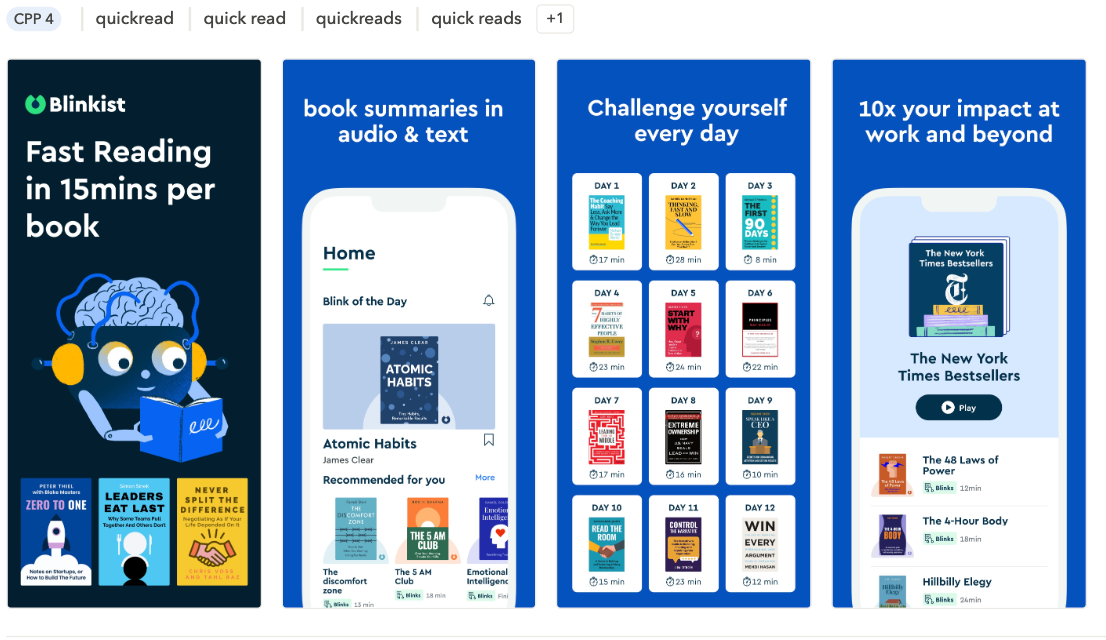
Examples of brand-focused custom product pages
- Testimonials: showcase positive reviews or ratings that build trust.
- Feature highlights: demonstrate specific tools, modes, or benefits of your app.
- Trust elements: communicate safety, reliability, or expertise.
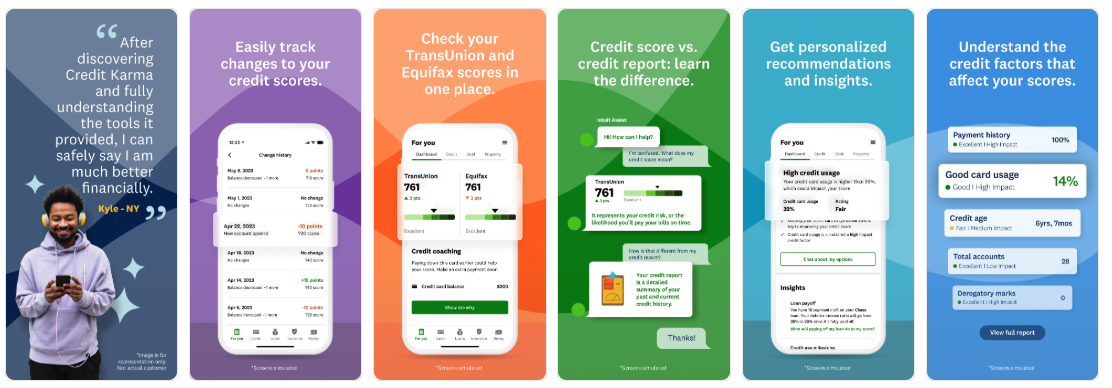
Meeting users with a custom product page that feels personalized and intentional doesn’t just mean boosting conversion rates—it also means strengthening your app’s identity within the App Store.
Why deep linking takes custom product pages to the next level
Custom product pages enhance your App Store presence, but deep linking ensures that relevance extends within your app. Deep linking guides users directly to the most relevant in-app content—like a feature or promotion, or offer—rather than a generic home screen.
How deep linking works
Think of deep linking as a shortcut. Instead of asking users to navigate through menus or search for what they saw in an ad, deep linking takes them directly to the right spot.
- Gaming example: an ad for extra lives in Candy Crush deep links players straight into the in-app store’s “buy lives” section.
- Shopping example: an add for “running shoes” in Amazon deep links users directly to the running shoes product listing page.
| Without deep linking | With deep linking |
| Campaign traffic will land on the default App Store page, leading to weaker alignment. | Traffic from brand campaigns leads straight to the most relevant custom product page, leading to higher conversion rates and stronger brand defense. |
When paired with custom product pages, deep linking makes campaigns more seamless, engaging, and effective, helping you connect with users at the right place and the right time.
Strategic benefits of custom product page and deep linking for brand visibility
When custom product pages and deep linking work together, they do more than improve conversion rates; they strengthen how your brand appears on the App Store and beyond. This combination creates a consistent, seamless journey that helps your app stand out, even in a competitive space.
- Consistency across user journey: with ad copy, visuals, and landing pages all aligned, users experience a clear and cohesive story from the moment they see your ad to the moment they open your app. This reinforces your brand identity and makes it easier for users to recognize what makes your app special.
- Higher conversion potential: By reducing friction- such as landing users on a generic page or forcing them to search for the right feature- you create smoother pathways to install and engagement. The result is often a noticeable lift in conversion rates, since users feel their expectations are met right away.
- Competitive advantage: when your product page and in-app experience are tailor-made, it becomes harder for competitors to win over your audience. Even if their ads appear alongside yours, your app feels more relevant and trustworthy because the experience matches exactly what users were looking for.
- Scalability: once you set up a framework with custom product pages and deep links, it becomes easier to replicate for different regions, features, or audience segments.
In short, bringing custom product pages together with deep linking not only improves performance metrics, it also builds a stronger, more visible brand presence on the App Store.
Expert Tip
Did you know? Custom product pages aren’t just for Apple Ads anymore!Since July 2025, Apple can surface CPPs directly in organic App Store keyword search results, meaning your brand defense strategy isn’t confined to only paid placements. Check out our step-by-step guide to CPP to learn about visibility opportunities with organic CPPs.
How to implement deep links in your custom product page
If you’re new to custom product pages and deep linking, setting them up doesn’t have to feel overwhelming. By breaking the process down, you can quickly create a strategy that protects your brand and improves campaign performance.
1. Identify your brand defense keywords
Start by looking at the keywords more closely tied to your app’s brand. These are the searches where you want to make sure your app appears first and feels most relevant. Protecting these terms helps you capture high-intent users who are already seeking you out.
2. Create custom product pages emphasizing differentiation vs. competitors
Design custom product pages that highlight what makes your app stand out compared to competitors.
Differentiators could include:
- Core features your users love most
- Seasonal offers or promotions
- Trust signals like reviews, ratings, or security benefits
3. Map campaigns/ad groups to custom product pages with deep links
Connect your Apple Ads campaigns directly to the most relevant product page using deep links. Popular mobile measurement platforms (MMPs) like AppsFlyer, Adjust, Branch, and Singular make it easier to create deep links that match ad intent with the right landing experience.
Expert Tip
By connecting your MMP to AppTweak, you can get all your data in one place. AppTweak provides integrations with Adjust, AppsFlyer, and Singular.5. Monitor and optimize performance.
Once your setup is live, keep an eye on the following key performance metrics using AppTweak’s Campaign Manager:
Conversion Rate (CVR): are more users installing after tapping your ads?
Cost per Tap (CPT): how efficient are your campaigns at driving interest?
Return on Ad Spend (ROAS): are deep linked custom product pages improving the value of your installs?
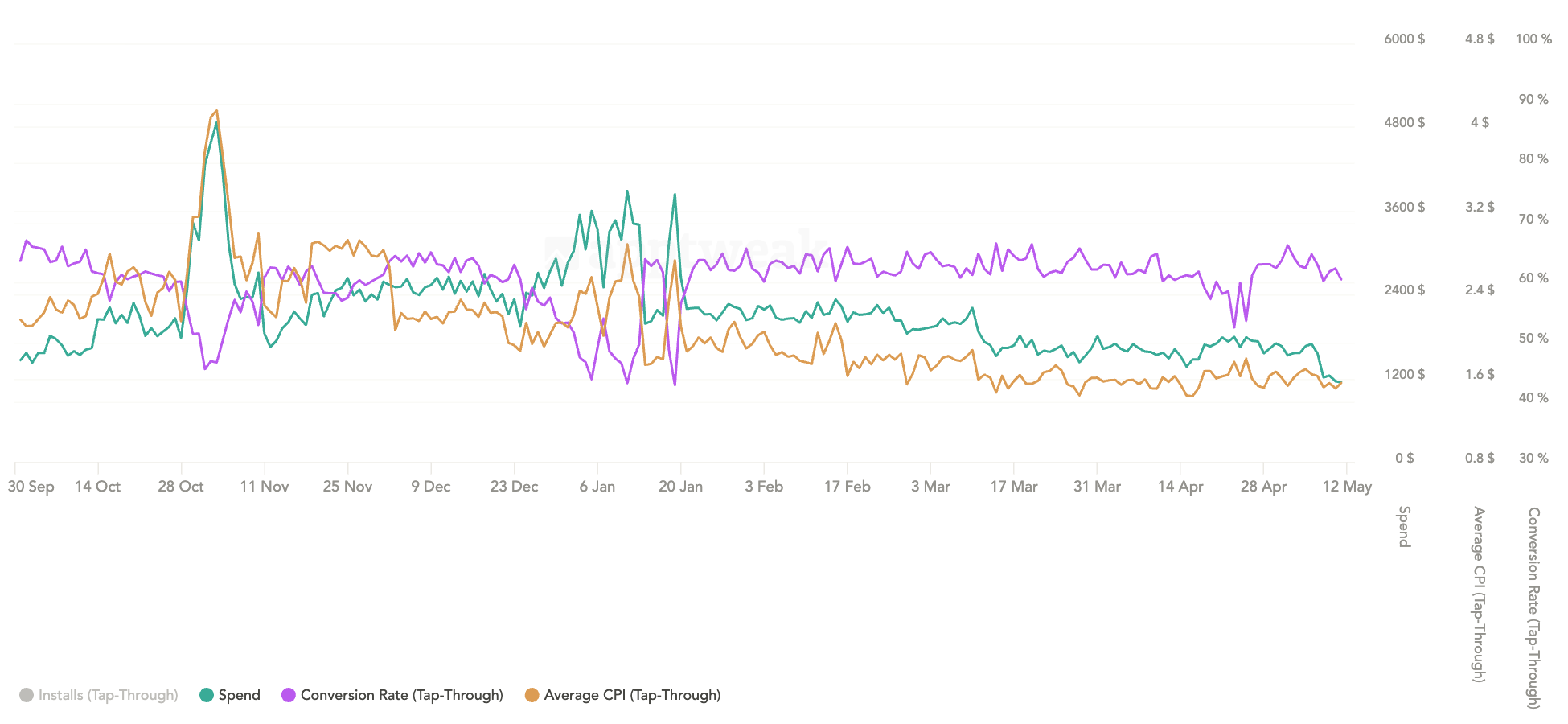
By following these steps, you’ll not only create stronger brand defense campaigns, but also set a foundation for scaling more advanced strategies in the future.
Common mistakes and best practices
Custom product pages and deep linking can be powerful tools, but like any strategy they work best when set up thoughtfully. Here are a few pitfalls to watch out for, along with best practices to keep your campaigns on track.
Common mistakes with custom product pages and deep links
- Using generic custom product pages: if your custom product page looks too similar to your default page, it may not feel tailored enough to capture user intent.
- Skipping deep link setup: if links aren’t implemented correctly, users may end up on your main page instead of the feature or offer they expected—leading to frustration and drop-off.
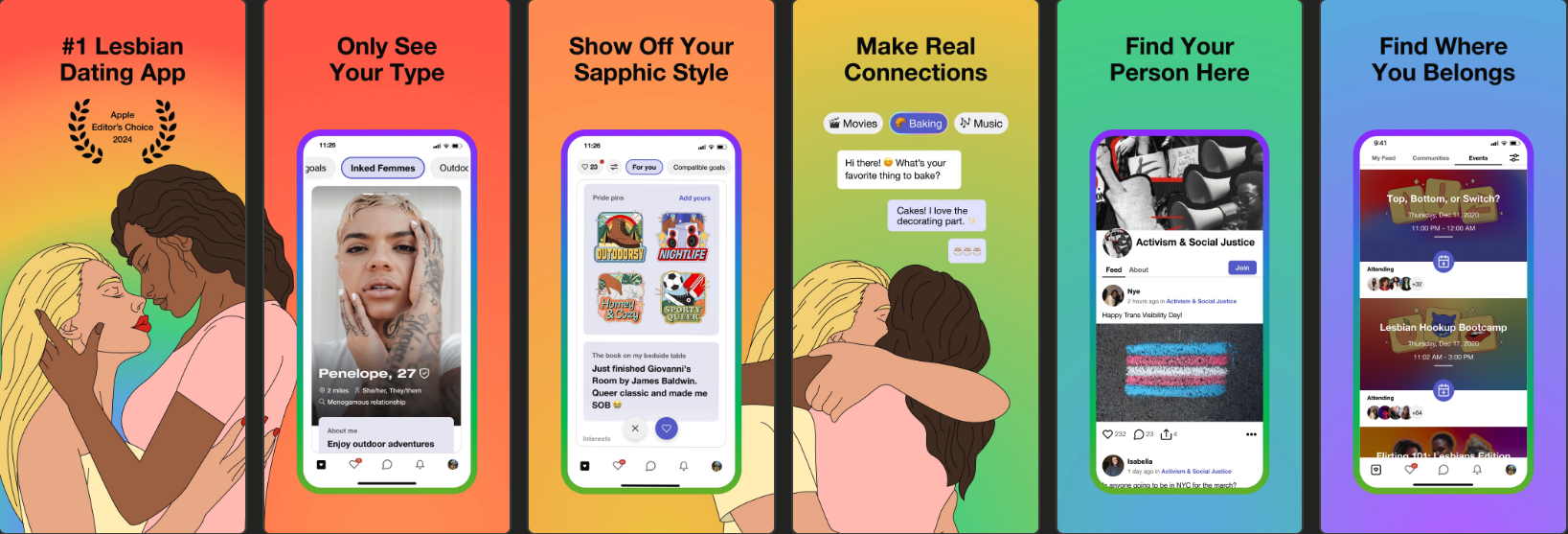
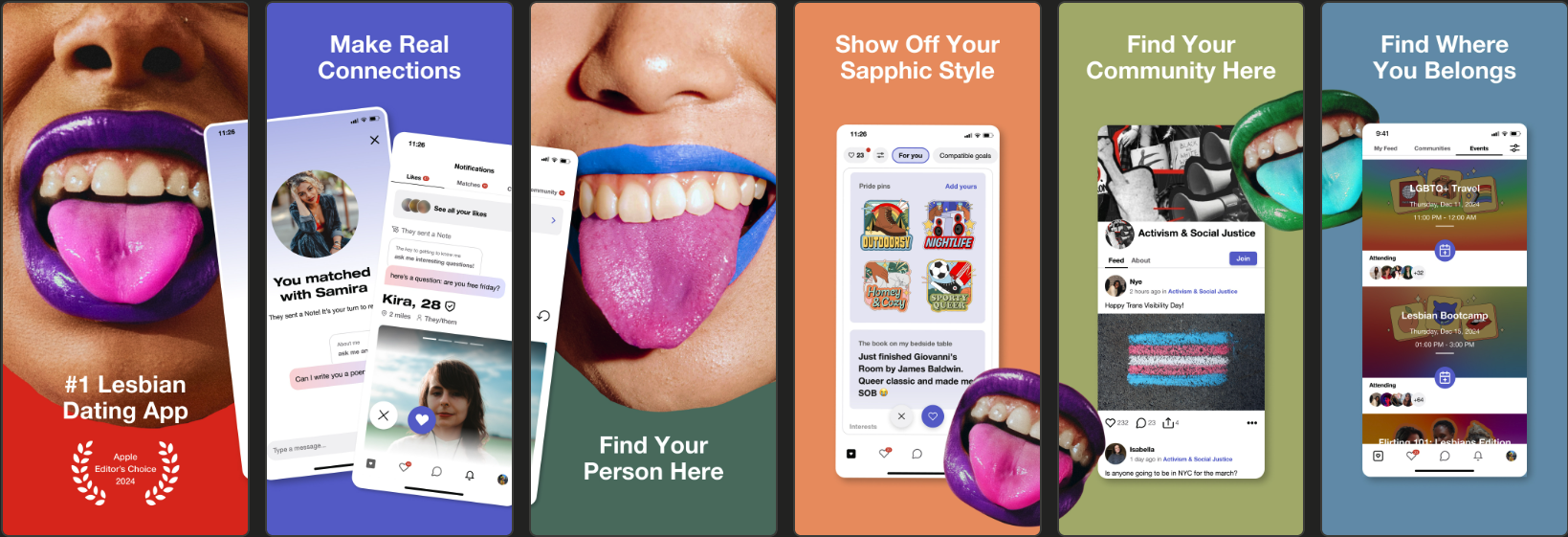
- Not testing different creative angles: sticking with a single design or message limits what you learn about your audience and may keep you from finding higher-performing variations.
For example, HER ran several custom product pages testing a variety of creative angles:
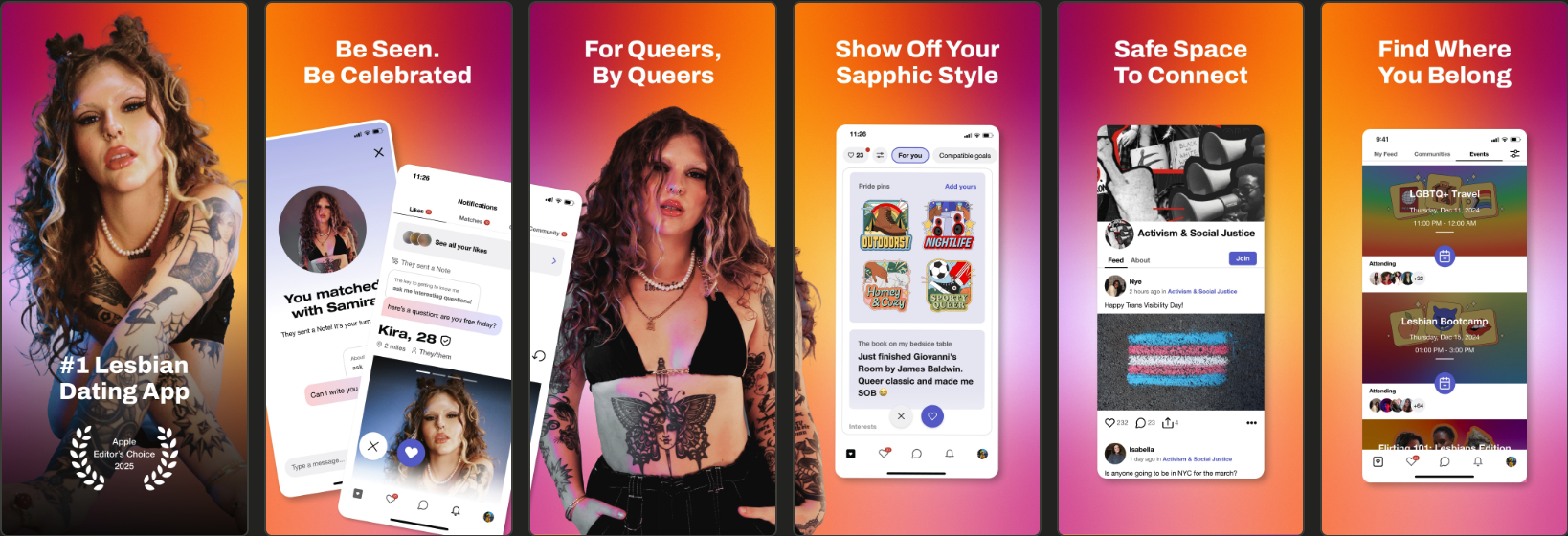
Best practices to maximize your custom product page and deep linking strategy
- Test multiple custom product page variants: experiment with feature-led, trust-led, or promotion-led product pages to see which approach resonates most.
- Keep visuals and messaging consistent: align ad creatives with the product page to help create a smooth and trustworthy experience.
- Use custom product page data to inform broader strategy: the data you collect here can highlight which features or messages to emphasize not only in Apple Ads, but also in your ASO efforts and wider marketing campaigns.
By avoiding common mistakes and leaning into best practices, you’ll be able to get more from your investment in custom product pages and deep linking, creating a user journey that feels clear, relevant, and engaging from start to finish.
Conclusion
Custom product pages and deep linking are more than just advanced Apple Ads features—they’re tools that give you greater control over how your brand is experienced on the App Store. By tailoring product pages to match user intent, and using deep linking to guide users straight to the content they expect, you create a seamless journey that builds trust, reduces friction, and strengthens brand visibility.
The takeaway is simple: custom product pages with deep linking don’t just improve performance metrics like CVR or ROAS, they help reinforce your app’s identity in the moments that matter most. If you haven’t already, now is the time to audit your brand defense campaigns and start building deep-linked custom product pages that showcase your app at its best.


More articles in Advanced ASO, Apple Ads

 Alexandra De Clerck

 Micah Motta

 Anthony Ansuncion