2026 is shaping up to be a milestone year for sports. The Winter Olympics just started, the World Cup is coming, and for sports betting apps, these moments represent massive opportunities for growth.
Apple Ads helps sports books reach high-intent users when demand is highest. The challenge is showing the right creatives at the right moment – especially for events happening outside working hours and across time zones.
Now in AppTweak, CPP Scheduling allows sports betting apps to scale more efficiently by automating when custom product pages (known as ad variants) turn on and off in Apple Ads campaigns.
Key takeaways
- CPP Scheduling in AppTweak automates the activation and deactivation of custom product pages in Apple Ads campaigns.
- CPP Scheduling allows sports betting apps to align creatives inside a single ad group with defined time windows, improving relevance during time-sensitive search spikes.
- Effective use of CPP Scheduling requires structured Apple Ads campaigns, unified MMP performance reporting, and clear keyword segmentation.
-
AppTweak supports paid sports betting app growth with CPP scheduling, CPP intelligence, advanced keyword discovery, automation rules, and Ad Agent.
Why CPP Scheduling matters for time-sensitive campaigns
Custom product pages (CPPs) are essential for Apple Ads performance. When you match the right creative to user intent – like showing a Patriots vs. Seahawks creative to someone searching “Super Bowl” – you can dramatically improve conversion rates.
But event-driven campaigns often require manual intervention. You’d either:
- Duplicate ad groups to run CPPs at different times
- Set reminders to manually switch CPPs on and off
- Miss the timing window entirely
Poor timing can mean wasted spend. You end up paying for traffic that doesn’t convert as well, because your creative no longer matches the moment.
How CPP Scheduling works
Instead of managing multiple ad groups, you can now schedule variants within a single ad group in AppTweak:
- Before: Create Ad Group 1 with CPP 1, duplicate to Ad Group 2 with CPP 2, manually activate/deactivate each.
- Now: Run Ad Group 1 with CPP 1, schedule CPP 2 in the same ad group to automatically activate/deactivate for the event window.
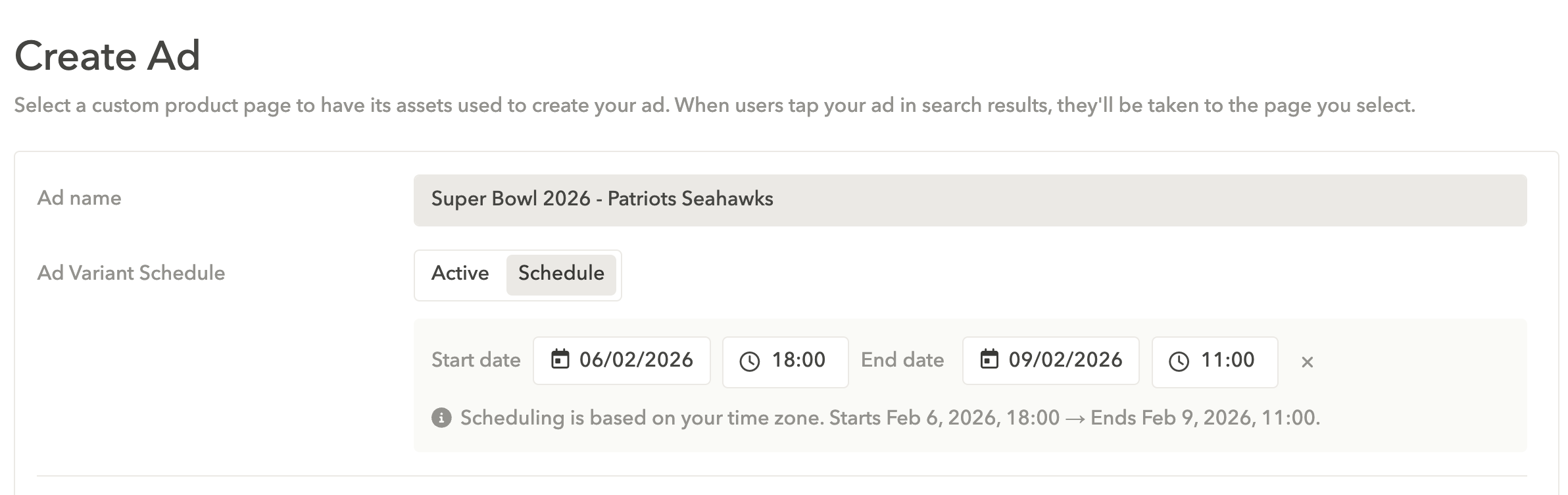
Let’s say you’re running campaigns targeting “NFL” (currently 62 search popularity in the US). Your default CPP focuses on general NFL betting, but for Super Bowl weekend, you want a Patriots vs. Seahawks-specific page.
Learn how sports betting apps maximize App Store visibility during major events
With CPP Scheduling, you can set your Super Bowl variant to go live Friday evening and revert to your original ad Monday morning, all without giving up your weekend.
Getting maximum impact: Your pre-scheduling checklist
CPP Scheduling won’t save poorly structured campaigns. Before you schedule CPPs, ensure these Apple Ads fundamentals are in place:
1. Connect your MMP to AppTweak
Without post-install data, you end up optimizing blind. Connecting your MMP to AppTweak provides visibility into post-install metrics, such as first-time deposits, from your campaigns. This data is essential for understanding which keywords and campaigns actually drive business value.
2. Clean up campaign structure
Mixing different keyword types in the same campaign makes it hard to scale effectively. Separate brand, competitor, and category keywords into distinct campaigns, and then:
- Set appropriate bids for each keyword type
- Monitor competitor keywords to identify high-intent search terms you’re missing
- Track impression share (SOV) trends over time
Discover best practices to structure your Apple Ads campaigns
3. Expand your keyword coverage
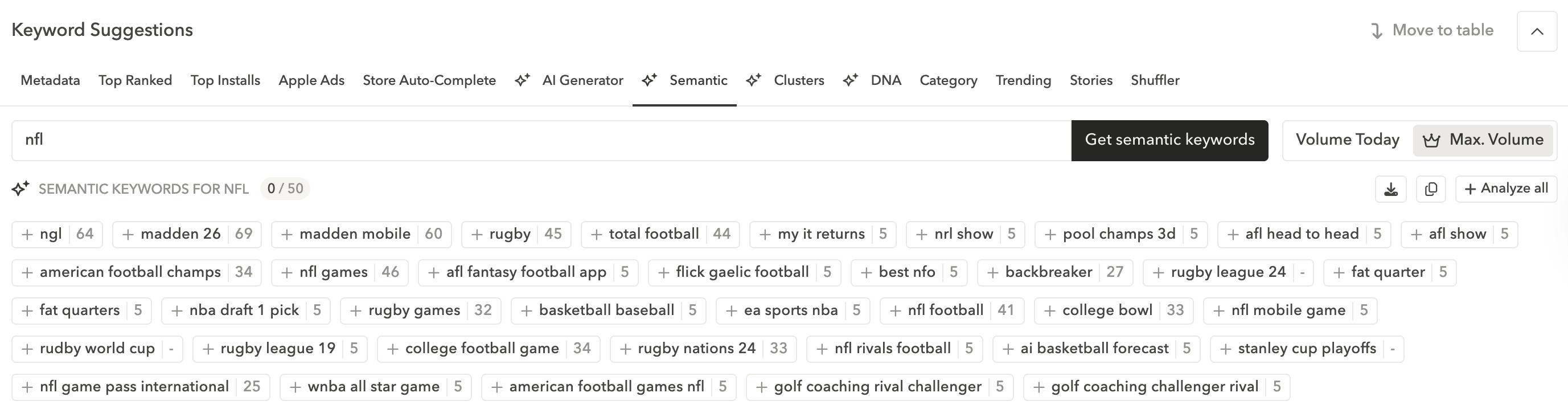
Most sports betting apps are competing for the same obvious terms. In Apple Ads, you get the most bang for your buck if you look beyond them. Use AppTweak’s keyword discovery tools to find keywords around:
- Specific events (World Cup, Grand National, etc.)
- Semantically related keywords in the “sports betting” subcategory
- Terms competitors are getting organic installs from
You can also use AppTweak’s Exact Discovery Experiments for a controlled keyword discovery process, powered by Atlas AI.
4. Research creatives that work
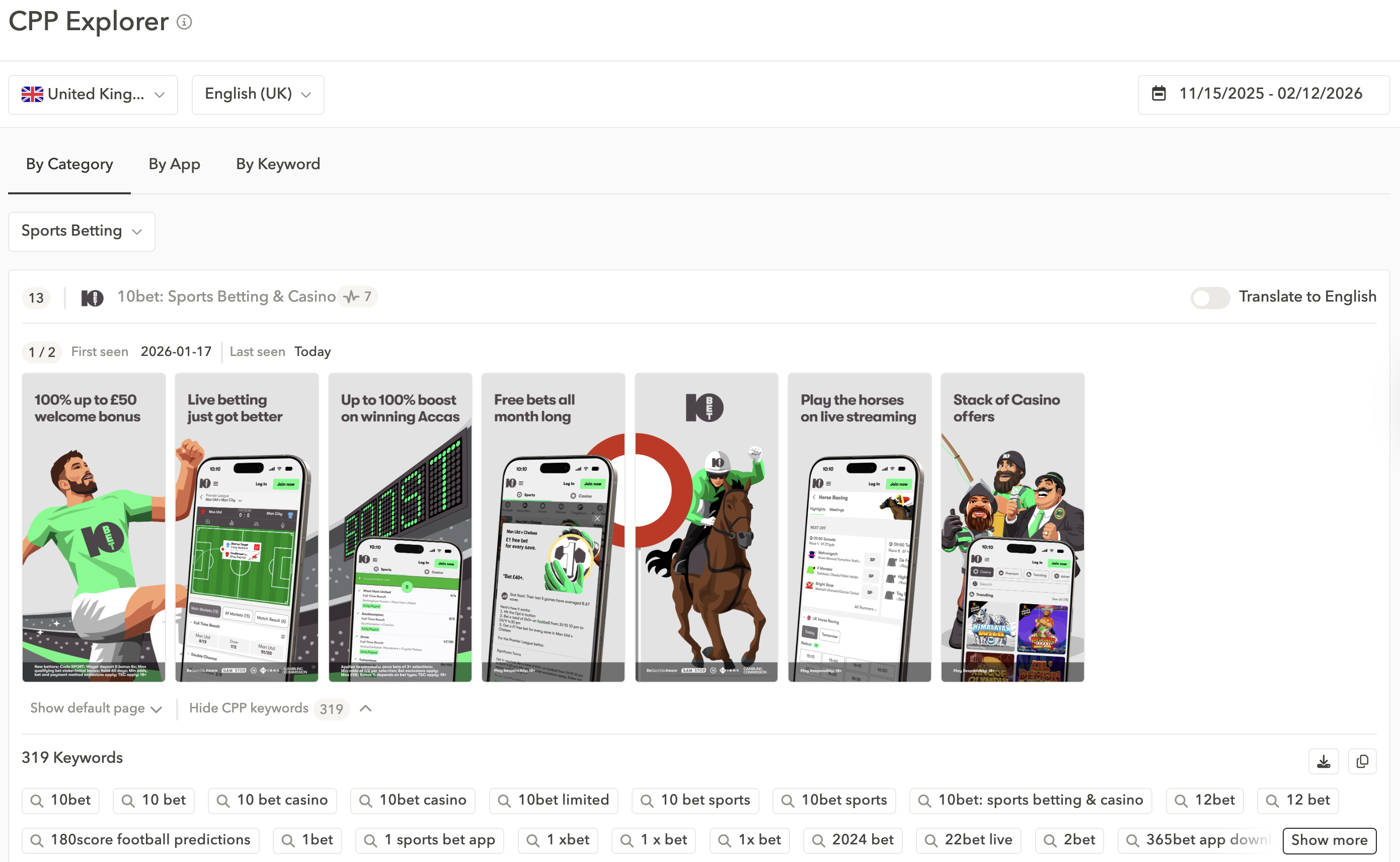
Before building and scheduling CPPs, understand what’s already working in your market. See which custom pages competitors are running (and the Apple Ads keywords they target) with CPP Explorer.
5. Implement smart automation rules
Once you have the right structure and keywords, automation rules keep campaigns optimized without constant monitoring. Set bid rules that automatically respond to performance:
- Increase bids when you exceed KPI targets (e.g., first-time deposits) on key terms
- Protect visibility by raising bids if impression share drops on top performers
- Enable Smart Bidding for a hands-off way to optimize toward cost-per-install targets
Read the complete guide to automation for Apple Ads
Expert Tip
Ask Ad Agent to analyze your campaigns and recommend optimization opportunities. It works 24/7 and can identify bid adjustments and budget reallocation strategies based on your real Apple Ads performance.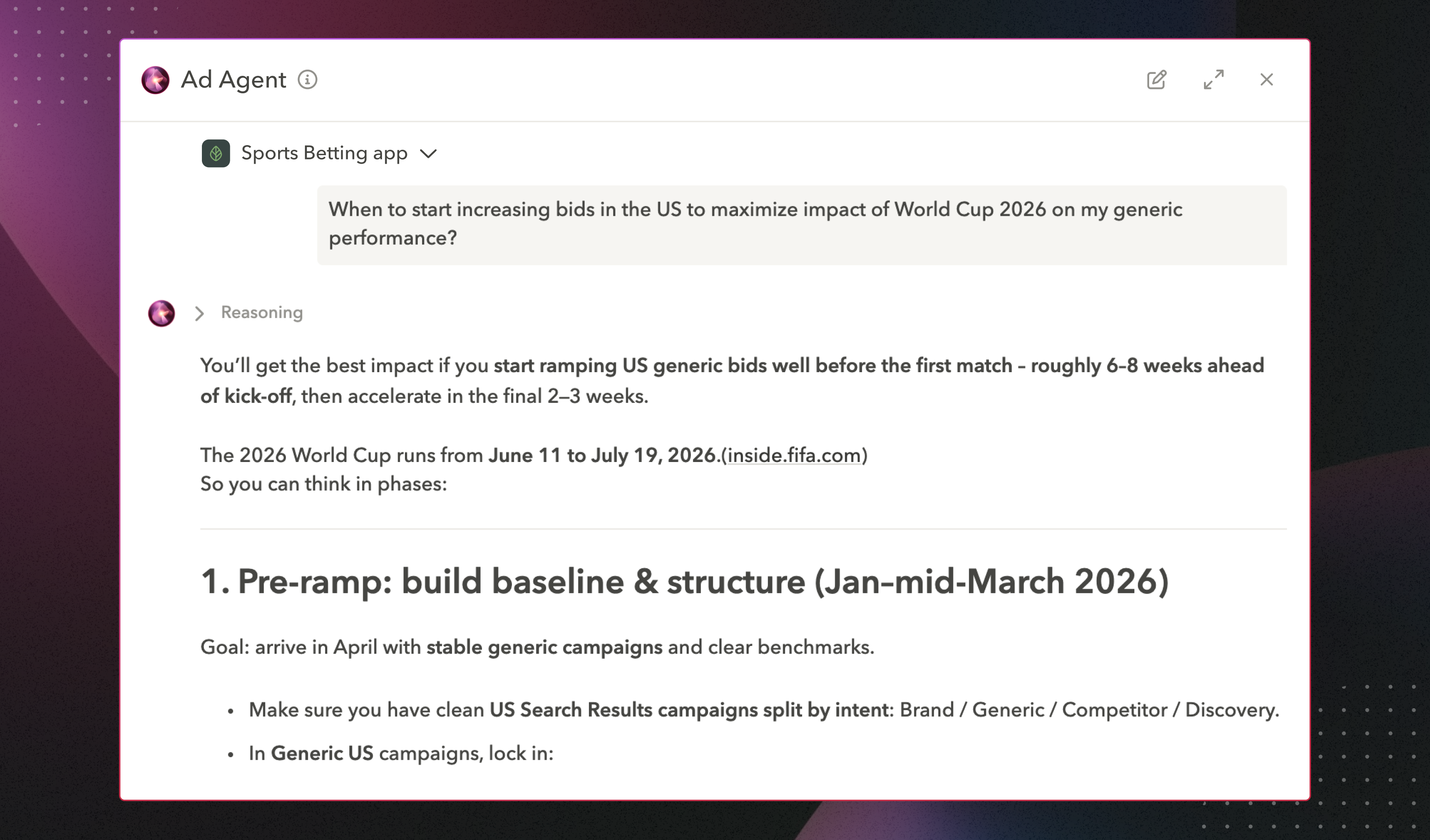
How sports betting apps grow with AppTweak
Capitalize on ASO-Apple Ads synergies
You’ll get the best impact if your ASO and Apple Ads strategies reinforce the same goals. When you drive a lot of paid traffic to a keyword, and the traffic converts well, you signal relevance to the App Store algorithm. The burst in downloads and improved conversion rates can improve your organic ranking for that term. At the same time, a well-optimized product page makes your paid campaigns more efficient, helping you get more installs from the same budget. The two channels amplify each other significantly. Run them in isolation and you risk leaving money on the table.
Learn more about the ASO and Apple Ads growth loop
Build targeted campaigns for seasonal events
Major sporting events create massive spikes in search volume and user intent. Use AppTweak to:
- Create effective CPPs for specific matches, teams, or tournaments
- Schedule variants around high-traffic event windows
- Set up brand protection campaigns to defend against competitor targeting
Measure what matters
Sports books use AppTweak to build custom dashboards tracking Apple Ads, ASO, and MMP performance in one place. You can share live links with stakeholders so everyone stays aligned on campaign impact.
Benchmark against competitors
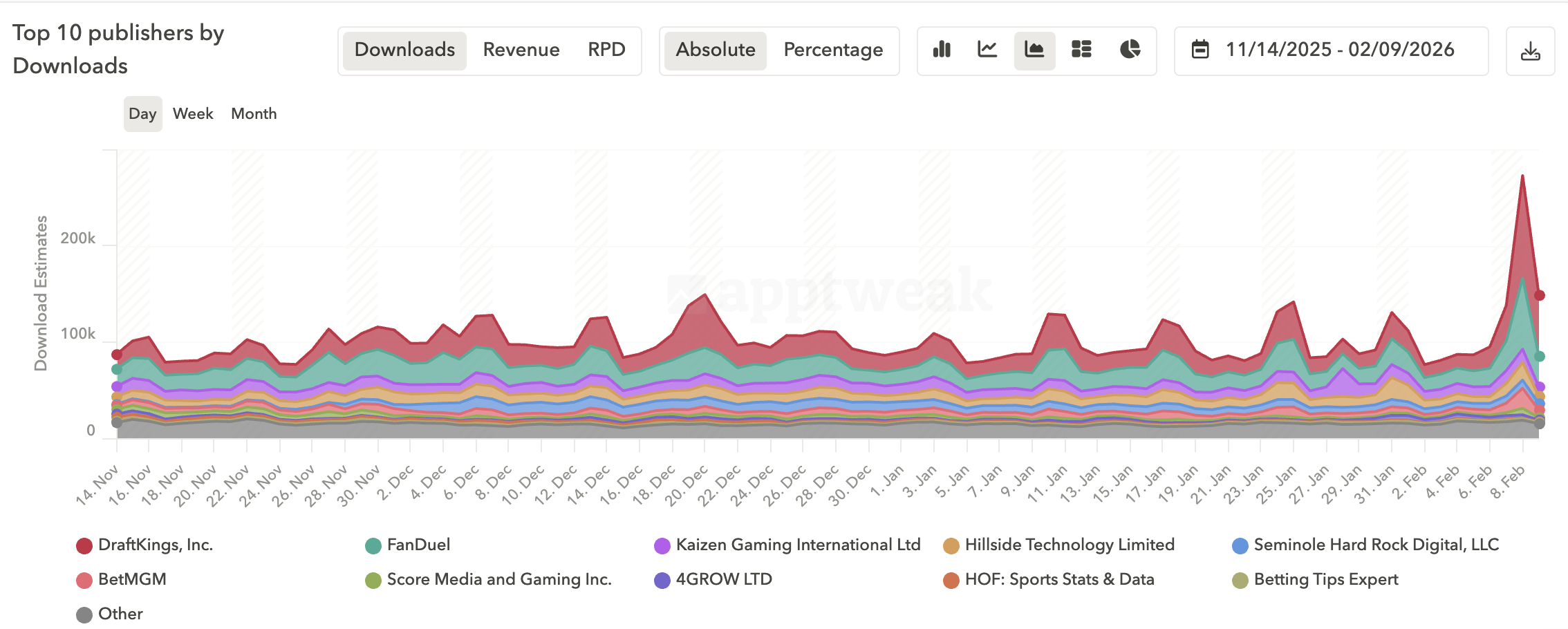
Market Intelligence lets you compare your download and revenue performance against competitors after peak periods. You can identify who won market share, spot new entrants climbing the ranks, and adjust your strategy accordingly.
Leverage reviews and ratings
Brand trust drives conversions in sports betting. With AppTweak’s review analysis tools, you can identify the specific issues impacting your ratings and prioritize fixes that keep your rating competitive.
Get started with CPP Scheduling
CPP Scheduling is now available in AppTweak. To configure ad variants:
- Navigate to an existing ad group
- Go to Ad Variants
- Select the variant you want to schedule and set your activation window
You can also configure variants when creating new campaigns or ad groups.
2026’s sports calendar creates huge opportunities for sports betting apps. CPP Scheduling takes the manual work out of optimized, time-sensitive Apple Ads campaigns.
FAQ
What is CPP Scheduling in AppTweak?
CPP Scheduling is an AppTweak feature that automates when custom product pages are activated within Apple Ads campaigns. It allows advertisers to define start and end times for specific ad variants inside an ad group.
CPP Scheduling allows sports betting apps to schedule event-driven creatives, such as pages tailored to specific matches or tournaments, without manual intervention. The feature ensures that the correct custom product page is displayed during defined time windows and automatically reverts after the event period ends.
How does CPP Scheduling work in AppTweak?
CPP Scheduling allows multiple ad variants to run in the same Apple Ads ad group with predefined activation windows. Each custom product page can be assigned a specific timeframe.
Instead of duplicating ad groups for each event, advertisers can:
- Select an existing ad group
- Navigate to Ad Variants
- Choose a custom product page
- Schedule the activation and deactivation window
Why is CPP Scheduling useful for sports betting apps?
CPP Scheduling helps sports betting apps align creatives with short, high-intent event windows. Major sports events generate spikes in search demand that require precise timing.
By scheduling custom product pages around specific matches or tournaments, advertisers can ensure that creatives reflect current user intent to maximize installs. Automated activation prevents missed timing windows, especially across time zones or outside business hours.
How does AppTweak help sports betting apps grow during major sports events?
AppTweak enables sports betting apps to coordinate ASO, Apple Ads, and performance measurement in one platform.
AppTweak’s growth support includes:
- Aligning paid Apple Ads campaigns with ASO strategy to reinforce keyword relevance
- Automating campaign management with custom automation rules and Smart Bidding
- Reporting on incremental impact with united Apple Ads, ASO, and MMP data in dashboards
- Benchmarking downloads and revenue against competitors with Market Intelligence
- Managing ratings and reviews to protect conversion rates
This integrated approach allows sports betting apps to scale efficiently during high-impact sports periods such as the Super Bowl or World Cup.


More articles in Product Updates

 Antoine Bentin

 Georgia Shepherd