Keyword discovery is the foundation of every successful Apple Ads campaign.
If you rely too heavily on a narrow set of high-performing keywords, you risk inflated costs when competitors start bidding on the same terms. A strong Apple Ads discovery campaign ensures you’re always uncovering new, relevant opportunities, helping you scale efficiently, lower CPIs, and reach high-intent users before your competitors.
Apple Ads provides powerful tools like Search Match and Broad Match to fuel keyword discovery. While these are excellent starting points, they work best when paired with a strategic layer of app store intelligence. That’s where AppTweak comes in: adding depth, precision, and efficiency to every stage of discovery.
Key Takeaways
- Apple Ads discovery campaigns are critical for finding high-performing keywords and optimizing your overall Apple Ads strategy.
- Discovery campaigns help you find effective keywords to add to your brand, category, or competitor campaigns.
- Use Search Match and Broad Match to uncover new keywords and expand your reach.
- Bid on specific keywords, targeting users with high intent, by leveraging Exact Match campaigns.
- Use automation to control spend: automatically pause bidding on underperformers, promote winners, and maintain a steady budget share of 10-20% depending on maturity.
The role of keyword discovery in Apple Ads
Apple Ads’ native discovery tools are designed to broaden your reach:
- Search Match automatically matches your ads to relevant search terms based on your app metadata, category, and user behavior.
- Broad Match expands on seed keywords to capture related variations and adjacent search intent.
These are essential levers for uncovering new traffic sources. Because they cast a wide net, Search Match and Broad Match often surface both highly relevant keywords and less relevant ones. What sets effective Apple Ads campaigns apart is being able to quickly separate high-intent opportunities from low-value noise.
AppTweak complements Apple Ads by turning broad exploration into precise, actionable keyword sets. With AI-driven pickers, competitor intelligence, and advanced exact match experiments, AppTweak helps you focus on the right keywords – not just more keywords.
Expert Tip
Even if you think your category is niche, new apps and search intents appear all the time. Prioritizing keyword discovery for Apple Ads helps you catch and leverage market shifts early, before your competitors do.Smarter keyword discovery with AppTweak
AppTweak enhances Apple Ads discovery with tools designed to make exploration faster, more targeted, and more impactful. Instead of treating discovery as trial and error, AppTweak gives you the intelligence and structure to:
- Spot emerging keyword opportunities before competitors do
- Uncover competitive blind spots in every market
- Test and validate new terms with full control
- Automate repetitive tasks so you can focus on strategy
Here are a few ways you can make your Apple Ads discovery more strategic with AppTweak.
Keyword pickers powered by Atlas AI and ASO
AppTweak’s proprietary model, Atlas AI, analyzes over a decade of app store data to surface the most relevant and impactful keywords for your app. Instead of starting from scratch, you can immediately build strong discovery lists of 1,000s of keywords using:
- Trending keywords: uncover fast-rising terms that competitors may not be targeting yet.
- Category & AppDNA keywords: find high-intent terms mapped to your app’s market through AppTweak’s app store taxonomy.
- Keyword clusters: group related search terms by theme or user intent.
- Top-ranked keywords: identify organic opportunities and prime candidates for discovery campaigns.
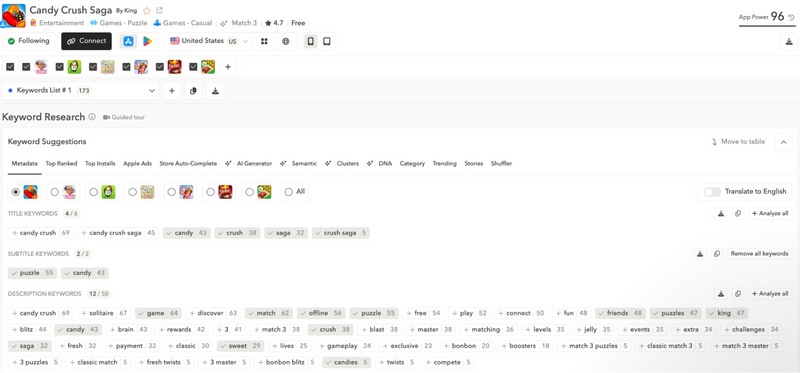
These pickers not only accelerate discovery but also ensure your lists are deeply relevant to your app’s positioning and audience.
Expert Tip
Keyword Clusters are one of the most powerful ways to scale keyword discovery. Instead of looking at keywords one by one, clusters group related terms around a shared intent – like “healthy” – which might surface clusters around “recipes,” “food,” and “meal.” Because clusters showcase user intent by theme, they’re also a goldmine for custom product pages, ensuring you design creatives that directly align with relevant user intent.Competitive keyword discovery with Ad Intelligence
Apple Ads doesn’t show you where competitors are spending, but AppTweak does. With Competitor Keywords, you can identify which terms your direct rivals appear in each market.
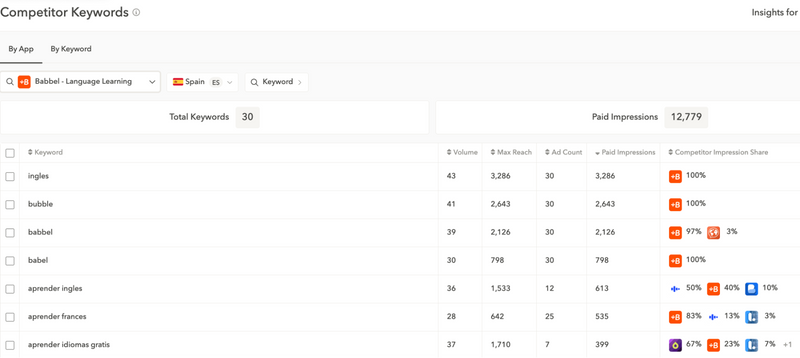
Take the example of language-learning apps in Spain. If you’re managing ads for Babbel, you’ll likely see Busuu competing aggressively on Spanish keywords. With AppTweak’s Competitor Keywords feature, you can pinpoint exactly which terms Busuu is bidding on in this market – and decide whether to counter directly or focus on adjacent opportunities.
Expert Tip
Competitor keyword insights are especially powerful when entering a new market. They show you where established players are already investing, so you can adapt your strategy faster.Exact Discovery Experiments: Full control over keyword discovery
While Search Match and Broad Match are powerful, you only see a keyword’s performance once it brings you more than 10 impressions. That’s why AppTweak built Exact Discovery Experiments – a unique feature that gives you complete control over keyword testing.
When you launch an Exact Discovery Experiment, AppTweak automatically builds a prefilled campaign of exact match keywords tailored to your app and country, powered by Atlas AI.
Each keyword is tracked individually, giving you full transparency into which terms are driving installs:
- Get market-specific keyword lists optimized by AI.
- Test thousands of terms with exact match precision.
- Use built-in automation to pause terms that don’t perform as well.
- In a few clicks, transfer high-performing terms into your core campaigns once validated.
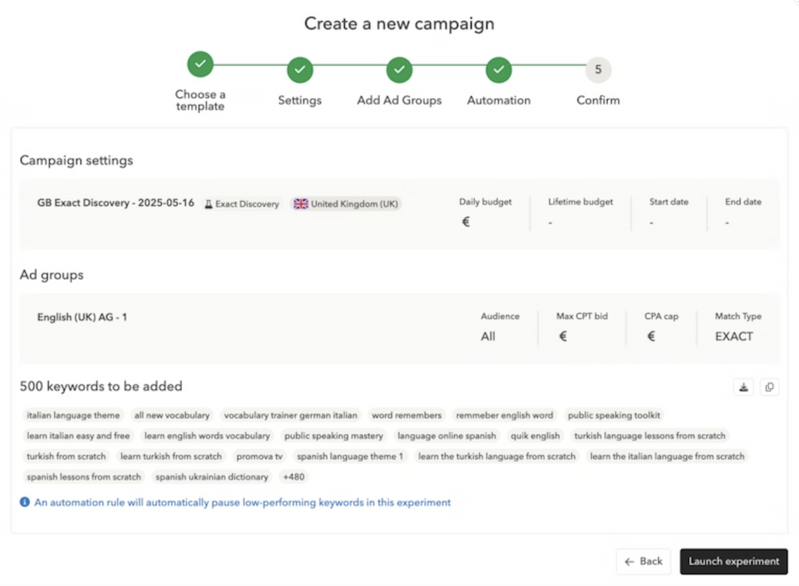
Exact Discovery Experiments are ideal for marketers entering new markets or scaling category campaigns where finding the right generic terms is critical. Instead of relying on manual discovery to surface opportunities, you can proactively test keywords with complete control and visibility.
This level of structured experimentation is something no other Apple Ads solution provides – making it a powerful way to expand reach without sacrificing efficiency.
Expert Tip
Your KPI for discovery campaigns isn’t CPA – it’s the number of new keywords you successfully extract and move into core campaigns. A higher CPA is normal in discovery because its role is exploration, not efficiency.Search Term Automation: Scale discovery with less effort
Search Match and Broad Match surface a wide range of search terms, giving you the chance to uncover unexpected opportunities. Pairing them with AppTweak’s Search Term Automation makes campaign management more efficient by:
- Pausing search terms that don’t perform as well to keep budgets focused.
- Setting terms as negatives to avoid duplication.
- Transferring top performers to stable campaigns with a click.
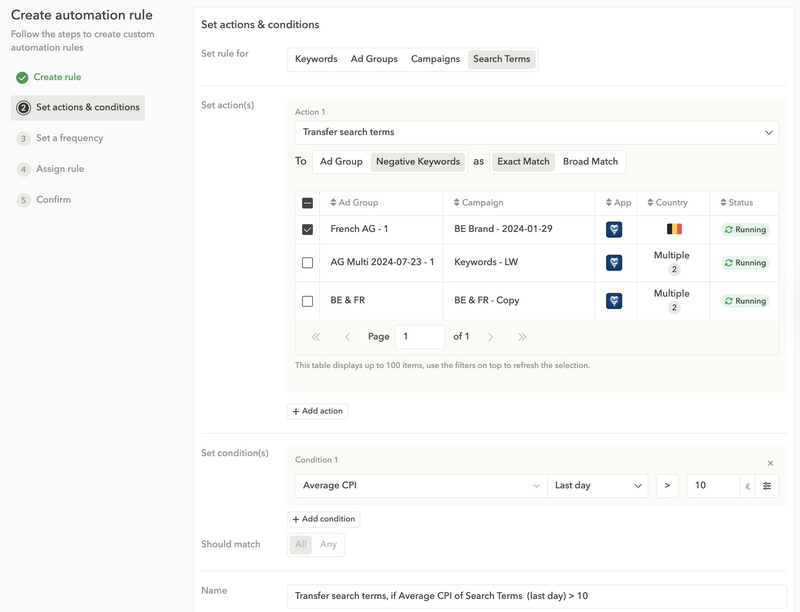
By streamlining these steps, Search Term Automation ensures your discovery campaigns stay efficient – so you can focus on strategy rather than manual monitoring.
Expert Tip
Always exclude branded terms and any keywords you’re already targeting from discovery campaigns. This keeps your discovery budget focused solely on what it should be – discovering new opportunities.Expert tips for effective keyword discovery
To wrap up, here are some best practices from our Apple Ads experts to guide your discovery strategy:
- Always allocate budget to discovery. Even mature campaigns need exploration. As a rule of thumb, we recommend keeping around 10% of your spend for discovery. If you’re already targeting thousands of keywords, this share may be smaller. If you’re entering a new market or still building your base, it should be higher – 20% or more. The key is never letting discovery drop to zero.
- Expect differences by vertical. Discovery doesn’t look the same across industries. In fashion, for example, users often search by brand name, which means discovery campaigns lean heavily on branded or competitor terms. In contrast, music or fitness apps rely more on broad, generic queries like “workout,” “playlist,” or “meditation.” That makes uncovering new generic keywords critical for scale.
- Manage expectations. Discovery campaigns are designed for exploration, not efficiency. They usually deliver a higher CPA than your core campaigns, which is expected because their role is to surface new opportunities. If a discovery campaign is outperforming your core campaigns, it may mean branded terms or already-targeted keywords are slipping in. To keep discovery working as intended, regularly check for overlap and add those terms as negatives so your budget stays focused on uncovering net-new keywords.
- Think beyond your category. Discovery isn’t just about your immediate vertical. Seasonal moments or complementary use cases can unlock new demand. A music app might run discovery on keywords tied to Valentine’s Day playlists, while a travel app could capture summer-related searches like “road trip” or “beach vacation.” By exploring outside your core category, you position your app where user intent overlaps with your value – even if the keywords aren’t obvious at first glance.
- Leverage ASO insights. Paid and organic keywords work best when aligned. A smart tactic is to target organic keywords where your app ranks between positions #4–10 in App Store search. These keywords already show user traction but aren’t yet top of page. Running Exact Match discovery campaigns on them can give your rankings the extra push needed to reach the top three – while also driving more installs through ads. This dual impact helps you maximize both paid efficiency and long-term organic growth.
Conclusion: Unlock the full potential of Apple Ads discovery
Apple Ads gives you the essential tools to expand your reach through keyword discovery. To unlock their full potential, you need a partner that adds precision, control, and efficiency.
AppTweak makes Apple Ads discovery smarter with AI-powered keyword pickers, competitor insights, ASO alignment, and exclusive features like Exact Discovery Experiments and Search Term Automation.
With AppTweak, you don’t just discover more keywords – you discover the right keywords to scale your campaigns.
Ready to see how AppTweak can power your Apple Ads keyword discovery?
FAQ
Here are some of the most frequently asked questions on Apple Ads discovery campaigns:
What is an Apple Ads discovery campaign?
An Apple Ads discovery campaign is a campaign structure designed to find new, high-intent keywords.
Apple Ads discovery campaigns help you find keywords that can later be added to brand, category, or competitor campaigns to scale reach and improve overall Apple Ads performance.
How do Apple Ads discovery campaigns work?
Apple Ads discovery campaigns work by running Search Match and Broad Match campaigns to capture a wide range of user queries.
You can then test curated exact-match keywords (for example, with AppTweak’s Exact Discovery Experiments) to validate which terms drive installs and move those winners into core campaigns.
What’s the difference between discovery campaigns and keyword optimization campaigns?
The difference between Apple Ads discovery campaigns and keyword optimization campaigns is that Apple Ads discovery campaigns focus on finding new keywords, while keyword optimization campaigns focus on refining the performance of existing keywords with bid adjustments and creative optimization.
How can Apple Ads discovery campaigns help me find new keywords for my app?
Apple Ads discovery campaigns help you uncover long-tail keywords, competitor keywords, and untapped user intent you may not have considered.
AppTweak’s tools accelerate this process by suggesting trending keywords, category-specific keywords using AppDNA, and AI-driven keyword clusters to expand your reach even further.
How much budget should I allocate to an Apple Ads discovery campaign?
You should allocate around 10% of your overall Apple Ads budget to discovery campaigns. If you’re entering a new market or building a fresh keyword base, increase this share to 15-20% to collect statistically significant data faster.
What KPIs should I track for Apple Ads discovery campaigns?
The KPIs you should track for Apple Ads discovery campaigns include the number of new keywords promoted to core campaigns, time-to-validation for new keywords, cost per install (CPI), and return on ad spend (ROAS) or lifetime value (LTV) of promoted terms.
How do Exact Discovery Experiments improve keyword discovery?
Exact Discovery Experiments improve keyword discovery by giving you full control and visibility. They test each keyword individually, automatically pause underperformers, and transfer top performers into core campaigns with a single click.
Are Apple Ads discovery campaigns better for new apps or mature apps?
Apple Ads discovery campaigns are powerful for both new and mature apps. New apps can use them to quickly find product-market fit, while mature apps leverage them to defend market share and uncover new long-tail keywords, and capitalize on seasonal or competitive opportunities.
What tools can help optimize Apple Ads discovery campaigns?
Tools that can help optimize Apple Ads discovery campaigns include AppTweak’s Campaign Manager for automation and ASO insights, AppTweak’s Competitor Keywords for competitive insights, and MMP integrations like Adjust and AppsFlyer (which are available in AppTweak) for full-funnel performance tracking.


More articles in Apple Ads

 Micah Motta

 Georgia Shepherd

 Sukanya Sur