
App store seasonality: Trends, strategies, and holiday optimization tips
 by Micah Motta
Senior Content Marketing Manager
— 14 min read
Each year, patterns emerge in how users interact with the App Store. These changes, known as app store seasonality, reflect shifts in user behavior during holidays, back-to-school periods, and other recurring events.
This article explains what app store seasonality is, why it matters, when key trends occur, and which strategies help apps excel during these periods.
Key takeaways
- App store seasonality describes predictable changes in user behavior throughout the year, often linked to holidays or major events.
- Seasonal trends influence search volume, download rates, and keyword rankings in the App Store.
- Recognizing these patterns helps in planning campaigns, optimizing keywords, and updating creatives at the right time.
- Seasonal events like Black Friday, New Year, and back-to-school periods cause spikes in competition and user activity.
- Common mistakes include late campaign launches, generic creative updates, and ignoring post-season analysis.
- Effective preparation involves monitoring store calendars, researching relevant keywords, and testing creatives in advance.
- Case studies show that apps which align their strategies with key seasonal moments often see significant improvements in rankings and downloads.
What is app store seasonality?
App store seasonality refers to recurring patterns in how people search for, download, and interact with apps during specific times of the year. These patterns often follow events such as holidays, school breaks, and annual sales periods.
During seasonal periods, certain types of apps experience changes in visibility, keyword search volume, and download rates. For example, fitness apps may see more downloads in January, while shopping apps often trend during Black Friday.
App store seasonality is observed across all app stores. The timing and impact of these changes can vary by country, app category, and even the type of user. These seasonal trends are tracked and analyzed using app store data, including changes in keyword rankings and app performance metrics.
Why does app store seasonality matter for ASO?
App store seasonality influences how users search for and discover apps during different times of the year. These changes can cause fluctuation in keyword search volumes, which can impact an app’s visibility in search results.
Seasonal trends can affect which keywords become popular and which drop in relevance. For example, keywords like “holiday shopping” or “fitness challenge” often become more common around specific times such as November or January.
App Store Optimization (ASO) relies on understanding what users are searching for and adjusting metadata, such as app titles and descriptions, to match those trends. When seasonality shifts user interest, the most effective keywords and creative elements may also shift.
In addition to keywords, the visual assets on an app’s product page—such as screenshots or icons—may be updated to reflect seasonal events. This alignment with seasonal expectations can make an app appear more relevant to users browsing the App Store during those periods.
Monitoring and responding to app store seasonality is a standard part of ASO, as it helps maintain or improve an app’s ranking and discoverability throughout the year. Seasoned app marketers emphasize that combining ASO with Apple Ads during seasonal events can significantly improve visibility and ROAS, especially when campaign timing, keyword bidding, and creative updates are aligned strategically.
Read more about the top App Store ranking factors.
When do seasonal trends in the app stores happen?
Seasonal trends in the app stores occur at specific times during the year, often connected to holidays, school schedules, and cultural events. These trends influence which apps become popular and which keywords people use to search for apps during these times.
Black Friday and Cyber Monday
Black Friday and Cyber Monday fall in late November. These days are known for major shopping events and sales, which lead to higher search and download activity for shopping apps, deal finders, and retail-related tools. Download spikes often begin the week before Black Friday and can extend through Cyber Monday.
Christmas and New Year
The period between late December and early January includes Christmas and New Year. Many people receive new devices during this time, which causes an increase in app store activity for games, social apps, and utilities. Fitness and habit-tracking apps also see more interest as people set new goals for the upcoming year.
Back to school
Back-to-school season typically occurs from late July through September, depending on the region. Parents, students, and teachers look for educational tools, productivity apps, and organizational resources. Downloads for note-taking, calendar, and classroom management apps often increase during this transition.
Summer travel
The summer months, from June to August in many countries, bring a rise in downloads for travel apps, booking platforms, language learning tools, and navigation aids. Vacation planning and outdoor activity apps also tend to gain visibility during this period.
Other seasonal peaks
Other seasonal trends include tax season, which affects finance and tax preparation apps, and major sporting events, which influence the popularity of sports, streaming, and fantasy league apps. Local and regional holidays, such as Singles’ Day in China or Carnival in Brazil, can also create unique app store activity patterns depending on the audience and market.
How to leverage app store seasonality for growth?
App store seasonality can be used to adjust strategies and timelines so that apps are visible when user demand is highest. Several steps can be taken to align app store optimization with seasonal shifts.
Conduct app keyword research for seasonal queries
Seasonal events can cause changes in which keywords users type into the app store. During certain periods, users may search for app features or topics related to holidays, school, travel, or annual events. Identifying these patterns involves reviewing historical keyword data and monitoring which search terms trend during specific months or weeks.
This process often involves updating keyword lists and tracking volumes for phrases that are relevant for the upcoming season. Adding, removing, or prioritizing keywords according to their seasonal relevance helps the app match current user searches. Check out our step-by-step guide to app store keyword research for more info.
Optimize app creatives and metadata for seasonal appeal
Visual elements on the app’s product page, such as screenshots, icons, and preview videos, can be updated to reflect relevant themes or colors for the season. Metadata, including the app title, subtitle, and description, can also be revised to highlight features or offers tied to seasonal interests.
These updates signal to users that the app is timely and relevant. Making changes before the seasonal event starts allows the app to appear prepared and up-to-date when users begin searching for related content.
Expert Tip
Get inspiration by searching through hundreds of screenshots in AppTweak’s Screenshot Library.
Run seasonal campaigns and promotions
Seasonal periods often see an increase in competition and user activity in the app stores. Time-limited campaigns or in-app promotions linked to holidays, events, or back-to-school periods can help the app stand out.
These campaigns may include special offers, limited-time features, or content updates that are only available during the season. Coordinating paid advertising, social media, and in-app messaging with these seasonal moments increases the likelihood that users will discover and engage with the app during peak interest.
Additionally, incorporating Apple Ads campaign automation and keyword bidding strategies during peak seasonal periods—such as those outlined in the webinar: Turn seasonal events into growth opportunities—can amplify results. Aligning ad spend with search intent during these windows ensures your app appears when users are most likely to convert.
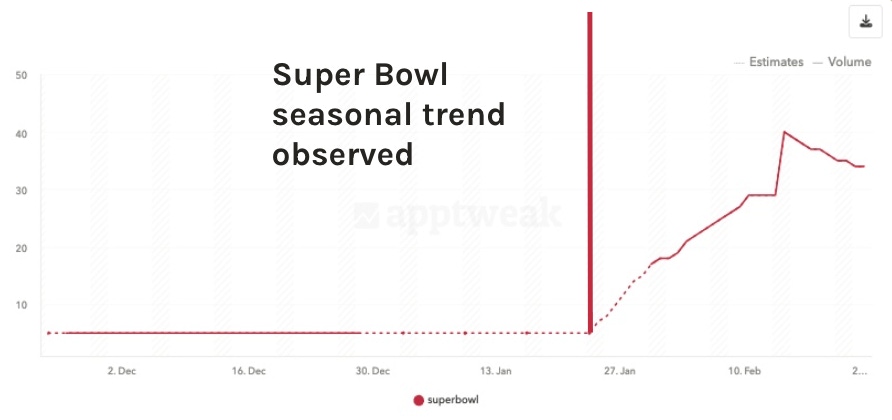
For example, the fantasy sports betting app FanDuel started bidding on the term “Super Bowl” on January 26th, suggesting a timely alignment with seasonal interest. Fanduel even started ranking #1 for Super Bowl for a limited time and eventually dropped down to number 3. This is extremely impressive because this is a very popular term.
Monitor category-specific app store seasonality
Different app categories experience seasonal trends at different times and with varying intensity. Track app store data for the relevant category reveals when demand rises or falls. For example, fitness apps may see an increase in new users in January, while travel apps trend upward during vacation months.
Monitoring these patterns at the category level allows for more precise planning. Comparing current data to previous years helps anticipate when to update keywords, creatives, and campaigns for the next seasonal cycle.
Expert Tip
Go even deeper to your specific sub-category, known at AppTweak as AppDNA, and when peak seasonality is for your app’s niche.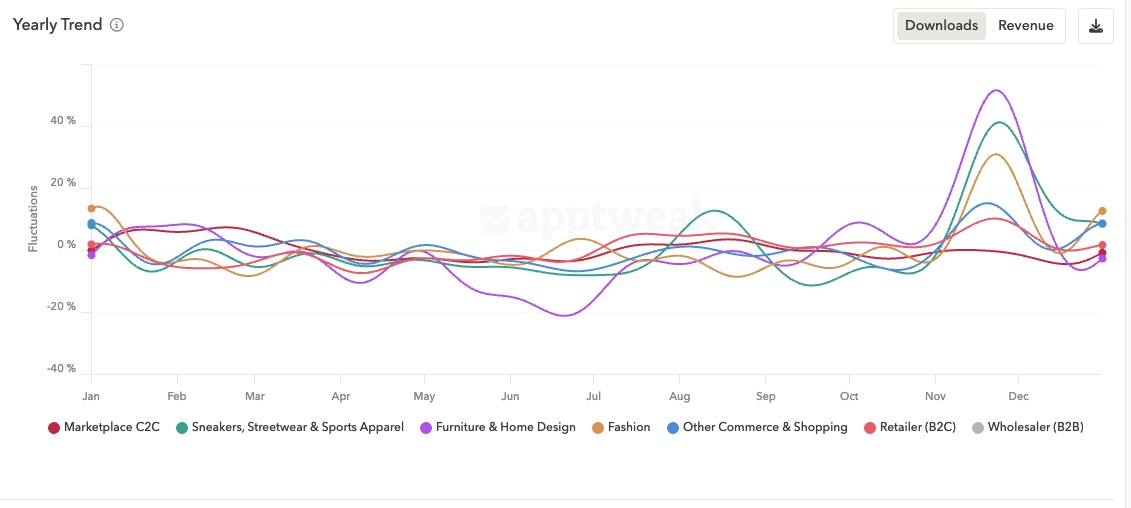
Common mistakes to avoid in app seasonality strategy
Launching seasonal updates too late often results in missing the period when users are actively searching for relevant apps. Timing updates for when trends have already peaked usually leads to less visibility and fewer downloads.
Relying on the same keywords or creative assets year-round does not account for changes in user interest. Seasonal keywords and visuals often shift quickly, so using outdated or generic content can reduce relevance.
Ignoring category-specific trends may cause misalignment between updates and actual user demand. Different app categories respond to seasonality in unique ways, and failing to monitor these differences can result in missed opportunities.
Making large-scale changes to metadata or creatives without testing may cause unexpected drops in rankings or conversion rates. Gradual updates and monitoring help identify what works best for seasonal campaigns.
Neglecting to track performance before, during, and after seasonal periods limits the ability to understand the impact of changes. Without measurement, it is not possible to adjust strategies for future seasonal events.
Overlooking negative keyword trends, such as declining seasonal search terms, can waste resources and lower an app’s ranking. Regularly reviewing keyword performance ensures campaigns remain aligned with current search behavior.
Case study: How Black Friday boosted an app’s rankings
In November, a mobile shopping app, Upside, worked with the digital agency Moburst to prepare for Black Friday. The team started by researching which keywords were trending in the weeks before the holiday. They found that search terms like “Black Friday deals,” “holiday sale,” and “shopping discounts” increased in volume as the event approached.
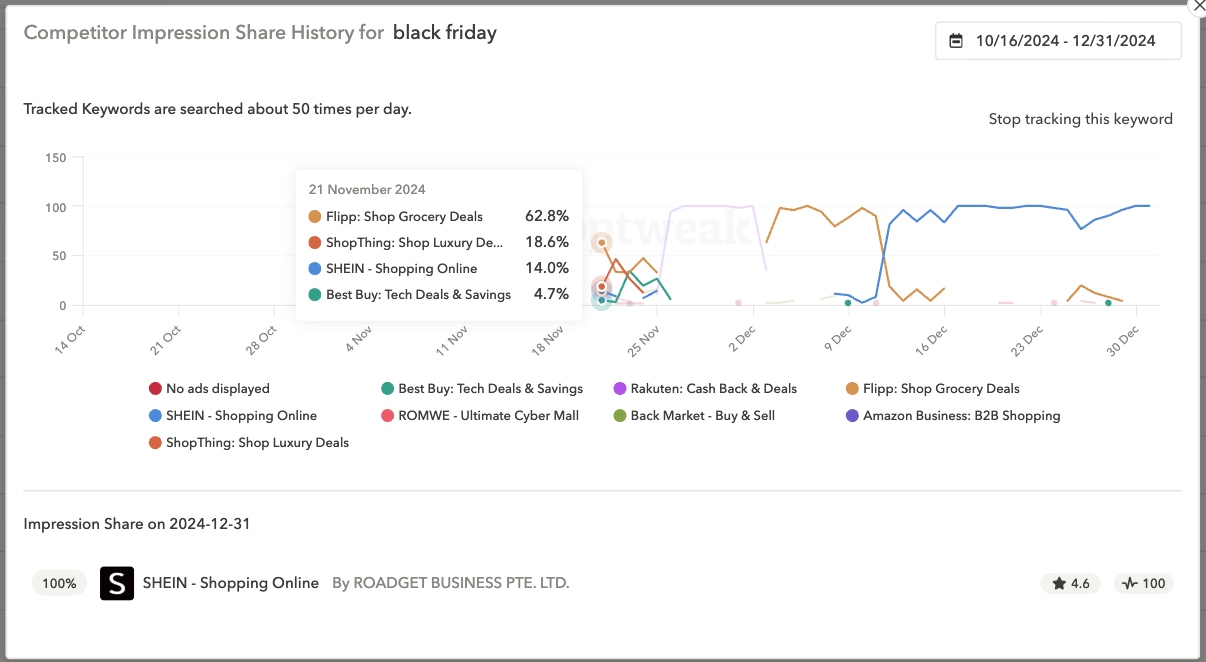
Upside’s developers updated the app’s metadata to include these seasonal keywords. They also created new screenshots for the app’s product page, using banners and colors that matched Black Friday themes. These creative updates were published on the App Store before Black Friday began.
During Black Friday week, the app launched a limited-time promotion inside the app and advertised the event through paid campaigns. The team tracked daily keyword rankings and monitored shifts in downloads and user engagement.
The results: Greater app visibility
After Black Friday, Upside’s ranking for targeted keywords improved. The app appeared higher in search results for terms related to Black Friday and holiday shopping. Downloads and active users increased compared to the same period the year before.
Upside ranked #9 for the term “black friday” and saw a 10% increase in app visibility.
This case shows that adjusting keyword strategy, updating creatives, and coordinating in-app events with seasonal trends can lead to higher visibility and performance during peak periods like Black Friday. Read this Moburst agency case study.
Best practices to prepare for app store seasonality
- Start planning campaigns 2–3 months in advance Seasonal trends in the app stores can be predicted using past data. Preparing campaigns several months before events like Black Friday, Christmas, or summer travel allows time for researching relevant keywords and updating app store assets.
- Align metadata and creatives with seasonal intent
Metadata, such as the app title, subtitle, and description, can be adjusted to include keywords that match seasonal search patterns. Screenshots, icons, and preview videos can reflect themes, colors, or promotions connected to the upcoming event. - Run cross-channel campaigns (ads + social + ASO)
Coordinating marketing efforts across paid ads, social media, and app store optimization (ASO) increases the chances of reaching users. Messaging and visuals can be consistent across all channels to reinforce the seasonal theme. - Refresh screenshots and app previews
Visual assets on the app’s store listing can be updated to match current trends or upcoming holidays. New screenshots or updated app previews can show features, offers, or themes related to the season. - Measure KPIs before and after seasonal campaigns
Tracking key performance indicators (KPIs) such as downloads, keyword rankings, and user engagement before and after a seasonal campaign provides insights into the impact of changes. Comparing this data helps identify what worked and guides future planning. - Sync your Apple Ads with seasonal ASO updates. This coordinated approach, highlighted in AppTweak’s seasonal strategy webinar, helps apps maximize exposure and conversion rates across search and ad channels during peak periods.
Conclusion
App store seasonality refers to the predictable changes in user search and download behavior during specific times of the year. These changes are influenced by holidays, school events, travel periods, and other annual occurrences. Recognizing these periods allows app marketers and developers to adjust their strategies by researching seasonal keywords, updating metadata, refreshing creatives, and planning campaigns in advance.
Monitoring category-specific trends and measuring results before and after each seasonal event helps refine future actions. Each app category can experience seasonality differently, so tracking relevant data for the app’s specific market is important for maintaining visibility and performance throughout the year.
FAQ
Below we answer the top FAQs about app store seasonality.
What is app store seasonality?
App store seasonality describes the predictable changes in user search and download activity during certain times of the year. These changes are often connected to holidays, school schedules, and cultural events, which influence the popularity of specific apps and keywords in the app stores.
How can I prepare my app for seasonal trends?
Preparation involves identifying which events or periods are most relevant to the app’s category. This process includes researching keywords that become popular during those times, updating app store metadata to match seasonal queries, and adjusting visuals and descriptions to reflect seasonal themes.
Why is app store seasonality important for ASO?
App store seasonality affects which keywords users search for and which apps receive more attention. By recognizing these patterns, it is possible to update app store optimization strategies to match current user interests and maintain or improve app rankings.
Which app categories are most affected by seasonality?
Categories such as shopping, travel, fitness, education, and finance often experience strong seasonal trends. For example, shopping apps see increased activity during holiday sales, travel apps gain visibility in summer, and education apps trend at the start of the school year. Learn more in our Q4 shopping seasonality playbook.
How early should I start planning for app store seasonality?
Planning often starts two to three months before a major seasonal event. This timeline allows for keyword research, creative updates, and testing of new content before user interest in the event begins to rise.
Can app store seasonality improve long-term rankings?
Seasonal updates can help apps gain visibility during high-traffic periods, which may result in more downloads and reviews. This increased activity sometimes leads to higher rankings that can last beyond the seasonal event, depending on ongoing user engagement and retention.
How do I set up alerts for keyword rank drops or spikes?
Alerts for keyword rank changes can be set up using app store analytics or ASO tools like AppTweak. These tools allow users to monitor specific keywords and receive notifications when a keyword’s ranking increases or decreases by a set threshold. This helps track the impact of seasonal updates and identify changes in search trends.
How do I prove seasonal campaigns worked to stakeholders?
Use incrementality: compare real results to a predicted “no-campaign” baseline to isolate lift in downloads, revenue, or post-install events. AppTweak offers incrementality analysis to do the work for you!

 Sukanya Sur
More articles in App Market Insights


 Alexandra De Clerck
