Custom store listings (CSLs) are one of Google Play’s most underused features. They let you tailor your store page to different audiences or campaigns. CSLs are how you make the store experience feel tailored so users land on a page that matches what they searched for, clicked on, or expected to see.
In this guide, we’ll cover what CSLs are, how targeting works, when to use them, best practices, and how to measure impact.
Key takeaways
- Custom store listings allow you to show different Play Store pages to different audiences (up to 50 per app).
- CSLs can be triggered by country, keyword, Google Ads campaign, install state, or a dedicated URL.
- CSLs work best when you use them for intent-based personalization (keywords), paid campaign continuity, international expansion, or localized promotions.
- The fastest way to scale CSLs is to start small, build a backlog, and prioritize opportunities with enough traffic to measure impact.
- You can track results in Play Console through store conversion rate and paid metrics like CPI.
- With AppTweak’s Custom Store Listing Explorer you can spy on competitors and top apps’ custom store listings.
What are custom store listings on Google Play?
Custom store listings (CSLs) are alternative versions of your default Google Play store page. Instead of showing the same listing to every visitor, Google Play can serve a different page when a user matches specific targeting rules or arrives via a particular campaign or a unique URL.
Think of custom store listings as landing pages inside Google Play, designed to align your store message with the user’s intent and acquisition context.
You can create up to 50 custom store listings. For each custom store listing, you can customize your app’s name, icon, descriptions (short description and long description), and graphic assets (screenshots, promo video and featured graphic).
Custom store listing targeting options
Google Play gives you several targeting options to decide when a user sees a custom store listing instead of your default page.
1. Country-based custom store listings
Country targeting is often the most practical starting point for custom store listings. It lets you show different store pages to users based on their country, even when they share the same language. This matters because Google Play localization is (mostly) language-based, not country-based, meaning you can’t normally differentiate between, say, Spanish-speaking users in Colombia, Mexico, or Argentina without using CSLs.
Many apps operate in regions where multiple countries share a language but differ in content availability, pricing, regulations, or user expectations. In these cases, a single English, French, arabic or Spanish listing often becomes a compromise that doesn’t fully resonate with any market. Country-specific CSLs allow teams to adapt their message to the specificities of a certain country.
Indrive, a ride-hailing app, for example, has created custom store listings for different countries in Latin America, showing local currencies for each. This increases local appeal by making pricing feel immediately familiar and relevant to users in each market.
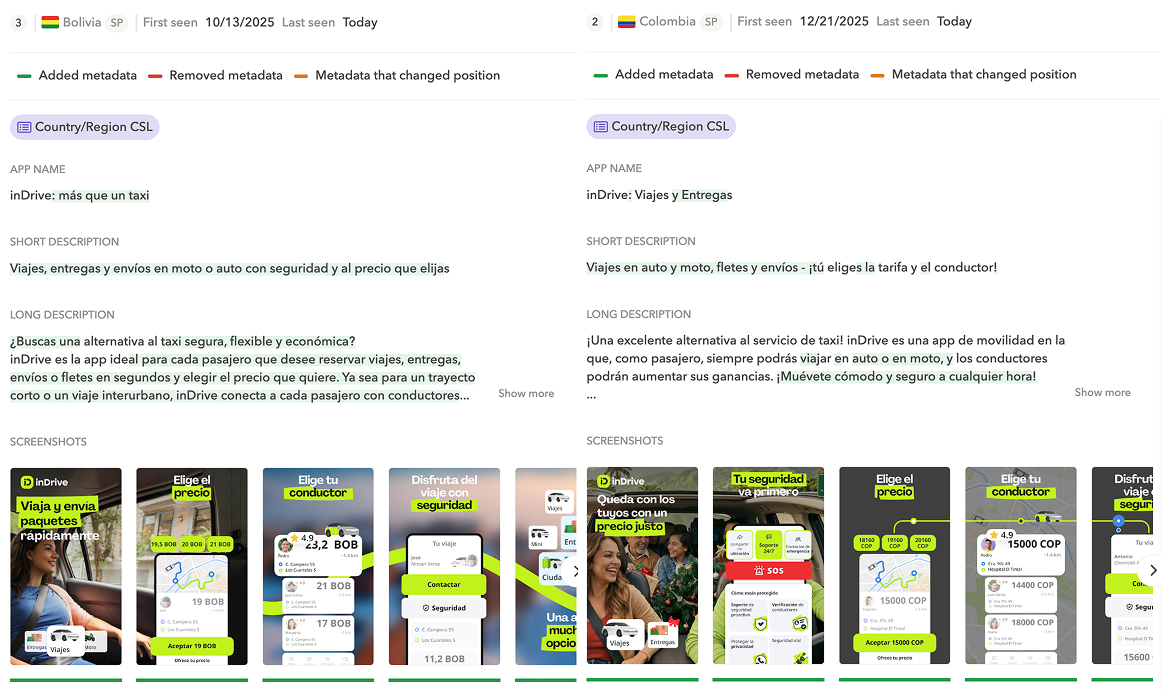
The use cases for country-based custom store listings go far beyond showing local currencies. Imagine, for example, a streaming app operating across Latin America. Colombian users may be more likely to install when a locally popular TV series is featured, while Peruvian users might convert better when a blockbuster movie is highlighted. Without CSLs, the app has a single “Spanish – Latin America” store listing. That means the same screenshots are shown to users in every Spanish-speaking country. By creating a country-specific CSL for Colombia, the app can feature the local TV series in its screenshots for Colombian users, while the default listing continues to highlight the blockbuster movie for the rest of the region. This way, each market sees the content most likely to resonate.
There is one important limitation to understand upfront: each country can only be assigned to one custom store listing at a time. You can include multiple countries in a single CSL, but once a country is part of that listing, it can’t be reused elsewhere. For instance, if you create a CSL targeting the United States and Canada together, you won’t be able to create separate CSLs for the US or for Canada later unless you remove them from the original one.
2. Install-state custom store listings
Install-state targeting lets you show different store listings depending on the user’s relationship with your app. Today, this mainly applies to pre-registered users and, in some cases, inactive users.
For pre-registration, install-state CSLs are particularly useful when launching in new markets. Instead of presenting the same value proposition as your live app listings, you can focus the message on what’s coming, why the app is worth pre-registering for, and what users will get at launch. Meanwhile, your default listing remains optimized for markets where the app is already available.
For inactive users, CSLs open the door to re-engagement messaging. These users don’t need to be convinced that the app exists; they need a reason to come back. Rather than re-explaining core functionality, an inactive-user CSL can highlight what has changed since their last install, such as new features, expanded content, or major product improvements.
3. Campaign-based custom store listings
Google Play also allows you to route users to a custom store listing when they arrive via specific Google Ads campaigns. This is done by linking a CSL to one or more Google Ads ad group IDs. When a user clicks on an ad from one of those ad groups, they’ll land on the dedicated CSL instead of your default store page.
This targeting option is especially valuable when you want to promote a specific feature, use case or promotion via App campaigns.
4. Search keyword–based custom store listings
Keyword-based CSLs are one of the most powerful and underused options available on Google Play. They allow you to show different store listings depending on the search query that led a user to your app.
Instead of trying to convince every searcher with the same screenshots and copy, you can tailor your store message to the intent behind the keyword. For example, a travel app like Booking.com promotes its hotel offering on their default store listing page. They created a custom store listing for the keyword ‘flight‘ to show more relevant content to people searching for flights on Google Play.
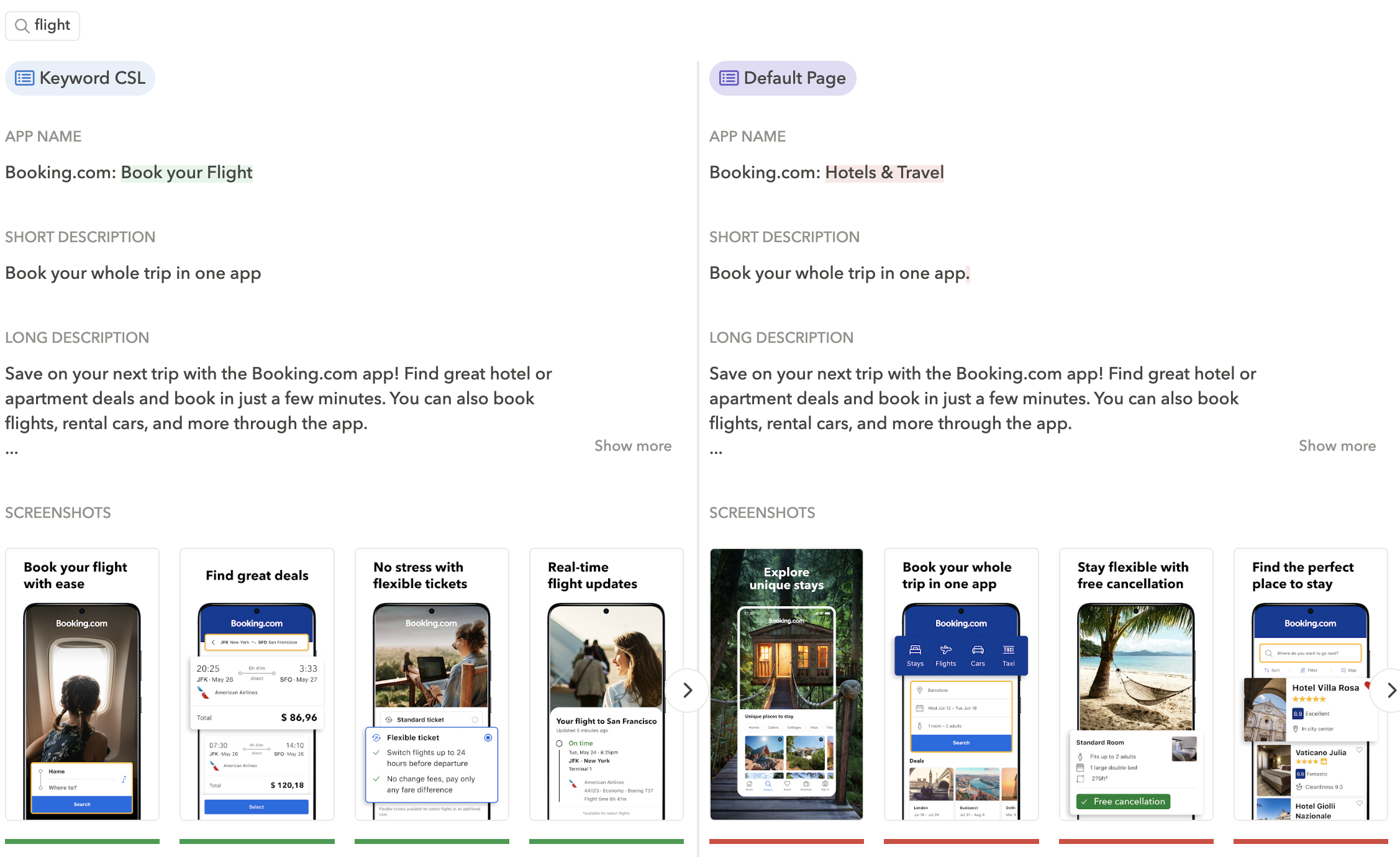
An important nuance is that keyword targeting isn’t always exact and CSLs aren’t shown 100% of the time. In practice, CSLs tend to apply to broader keyword themes or intent clusters, not just a single, isolated term. For this reason, teams usually get better results by grouping related queries under one CSL rather than creating one listing per keyword.
Expert Tip
With AppTweak’s CSL Explorer, you can uncover keyword-level CSLs competitors are running for specific keywords, and compare them side-by-side with their default (or country) listing to instantly see what changed.5. URL-based custom store listings
Finally, Google Play allows custom store listings to be accessed via a dedicated URL. This option is especially useful for traffic that doesn’t come from Play Store search or Google Ads.
Teams often use URL-based CSLs for influencer partnerships, CRM or email campaigns, partner placements, blog posts, or external landing pages. By linking directly to a CSL, you control exactly what users see when they land on your store page, rather than sending all external traffic to a generic default listing. This makes CSLs a practical extension of your broader growth and distribution strategy.
How localization works for custom store listings
Custom store listings support localization, but they don’t behave exactly like your default Google Play listing. This difference is subtle, but important to understand before you start creating CSLs at scale.
When you create a custom store listing, the first thing Google asks you to choose is a default language. This default language is what users will see unless you explicitly add translations to that CSL. Unlike your main store listing, CSLs are not automatically localized based on the user’s device language.
In practice, this means that if you create a CSL targeting multiple countries and only provide one language version, all users in those countries will see that same language, even if their device language is different.
For example, imagine you create a country-based CSL targeting Canada and set English as the default language. If you don’t add a French translation to that CSL, French-speaking users in Canada will still see the English version of the store listing. Google Play won’t fall back to your default listing’s French localization.
This is one of the most common mistakes teams make with CSLs: assuming that existing localizations automatically apply. They don’t. Each CSL has its own set of translations, managed independently from the default store listing.
The good news is that CSL localization is flexible. Within a single CSL, you can add multiple language versions just like you would for your main listing. Once those translations are in place, Google Play will automatically show the correct language version of that CSL based on the user’s device language.
This is why Google recommends adding translations for all major languages spoken in the countries you target with a CSL. If you’re targeting multilingual markets skipping translations can quietly hurt conversion without being immediately obvious.
Why are custom store listings important for ASO?
Custom store listings address the limitations of a single store page. When users arrive from different markets, campaigns, or search queries, the same message won’t convert equally well. CSLs allow teams to adapt store pages to those contexts, with impact across several areas:
- They improve conversion rates by targeting different user segments
Not all users land on your store page with the same expectations. Someone arriving from a generic category search, a feature-led ad, or a specific market is evaluating your app through a different lens. Custom store listings allow you to tailor messaging and visuals to those segments, making the store page more relevant and increasing the likelihood of install.
- They personalize messaging for different countries and languages
Language-based localization alone can’t account for differences in pricing, content availability, regulations, or cultural expectations across countries that share a language. Country-based CSLs give teams more control over how the app is presented in each market, without requiring a completely separate localization setup for every country.
- They drive organic conversion lifts through keyword-based personalization
Many apps already rank for high-volume, non-branded keywords but struggle to convert that traffic because the store page is too generic. Keyword-triggered CSLs allow teams to tailor screenshots and copy to the intent behind specific searches, helping them get more value from existing rankings rather than chasing incremental visibility.
- They make ASO impact easier to measure and explain
Because CSLs are tied to specific segments such as keywords, campaigns, or countries, it becomes easier to isolate their impact. This makes performance changes easier to explain internally and helps ASO teams defend their work with credible, segment-level data.
- They support user acquisition campaigns with dedicated landing experiences
When ad messaging and store messaging don’t match, users drop off after the click and CPI increases. By linking CSLs to Google Ads campaigns or dedicated URLs, teams can ensure that users land on a store page that continues the story started in the ad, improving conversion and making paid acquisition more efficient.
When should you use custom store listings?
Custom store listings work best any time your default store page is forced to be too generic. If different audiences expect different things and you’re sending them all to the same listing, you’re leaving installs on the table. Here are the most common situations where CSLs deliver clear value.
- When your app is global, but you want to highlight local preferences
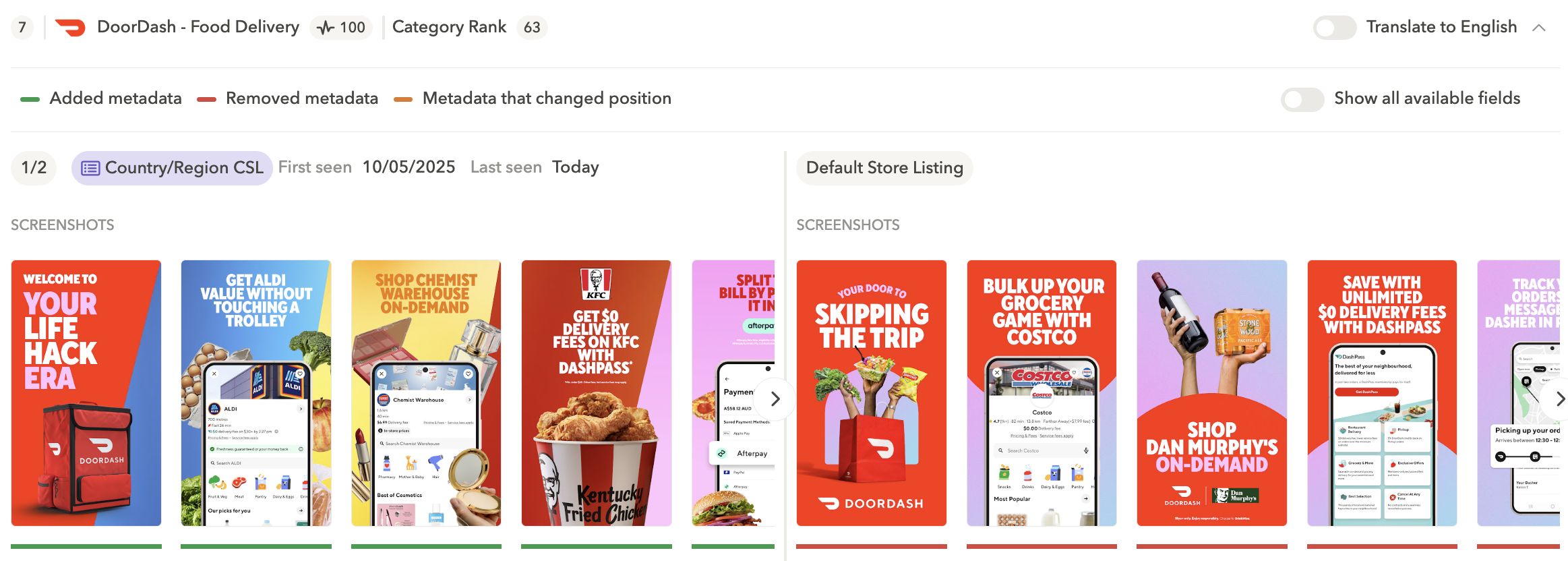
Even when the language is the same, what feels relevant can vary widely by country. Custom store listings let you adapt your screenshots and messaging to local expectations so users land on a store page that feels made for them.Take this example from DoorDash. They created a custom store listing in Australia featuring Aldi, while their default English (US) listing features Costco.
- When running specific promotions or limited-time offers
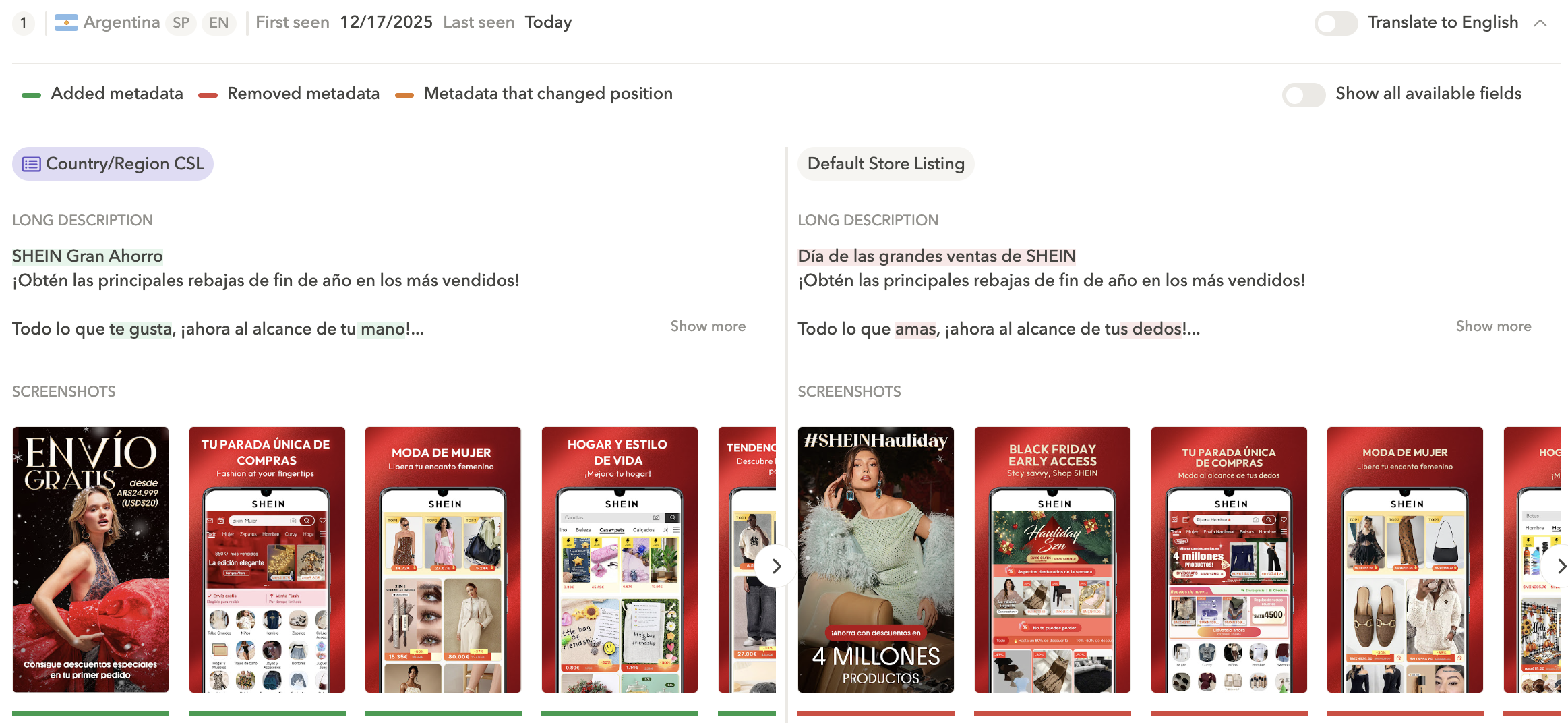
CSLs are one of the best ways to promote a discount or seasonal offer without confusing users elsewhere. Instead of not showcasing a promotion or showcasing it globally and risking negative reviews, you can highlight it only where it applies.Shein created a custom store listing for Argentina that promotes “free shipping,” while keeping its default Spanish (Latin America) listing more generic.
- When launching in a new market
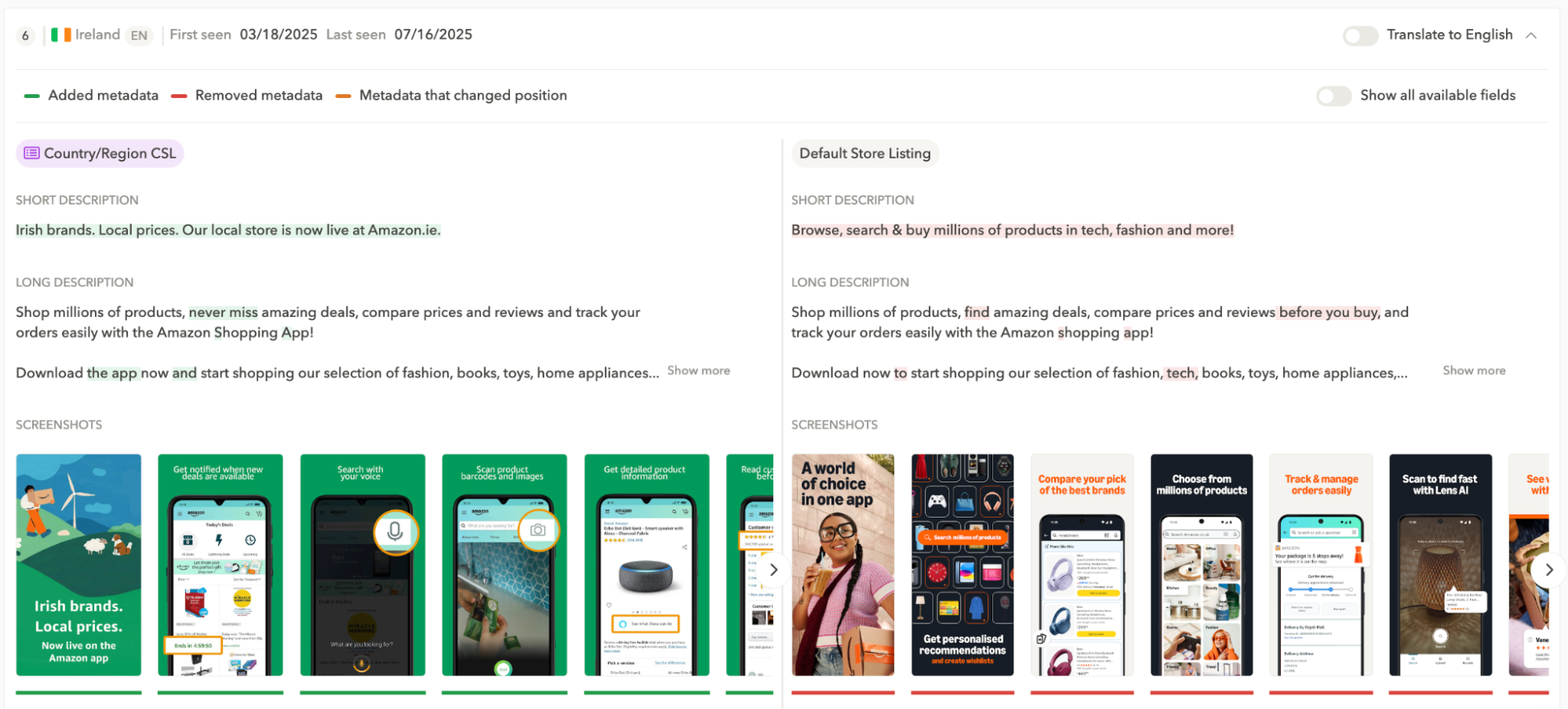
CSLs are especially useful when you’re launching in a new market, rolling out a local version of your product, or introducing country-specific benefits (like local pricing). Instead of sending users to a generic global listing, you can highlight what’s new and why it matters for that market.Here is a great example of Amazon. In 2025, Amazon officially launched Amazon.ie in Ireland, providing Irish customers with a dedicated local marketplace, euro pricing, faster delivery options, and local Irish brands. On Google Play, they created a CSL for Ireland, highlighting the benefits of the new local marketplace.
- When one app serves multiple audiences or use cases
If your app solves more than one core use case, users searching on Google Play will discover it through very different keywords. The challenge is that one default listing can’t highlight every feature without becoming too generic. Keyword-based custom store listings let you tailor your screenshots and messaging to the intent behind each search, so users land on a page that immediately feels relevant and converts better.Canva, for example, created a custom store listing for the keyword “video” that highlights its video editing capabilities, while its default listing stays more general.
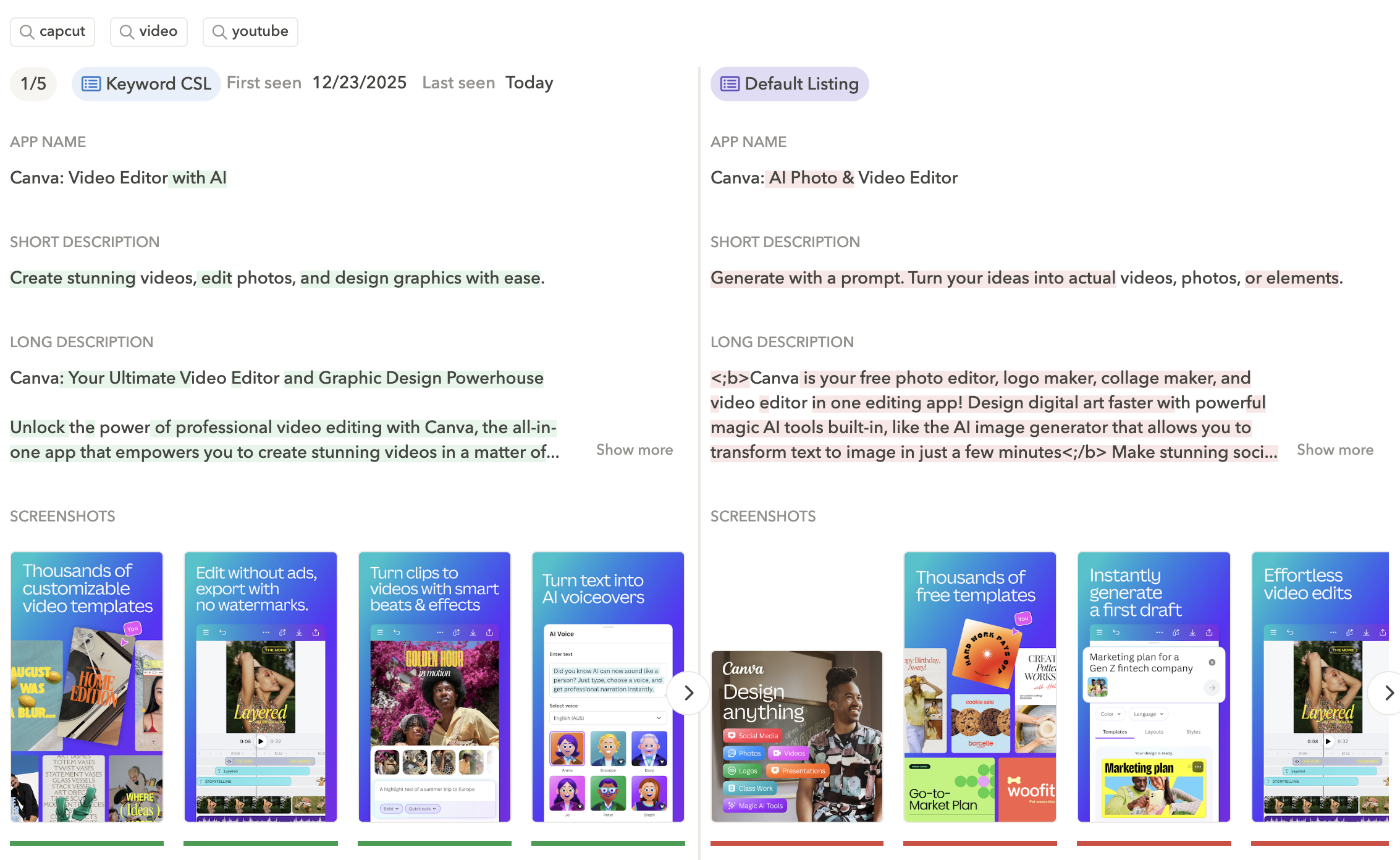
Canva created a custom store listing for the keyword ‘video’. Source: AppTweak
- To stand out against competitors
When someone searches for a competitor on Google Play, they already know what they want. The only way you win that install is if your store page immediately makes it obvious that your app can do the same thing and has a clear advantage. Custom store listings let you highlight the differentiators that matter most in that context, or surface features users didn’t even know you offered, so your app feels like the better choice at a glance.A great example is from Microsoft Copilot. They created a custom store listing for the keyword “Sora” (an AI video generation tool that became widely searched), using screenshots that spotlight Copilot’s AI image generation features. This way, users searching for “Sora” immediately see relevant AI creation capabilities, making the listing feel more aligned with their intent.
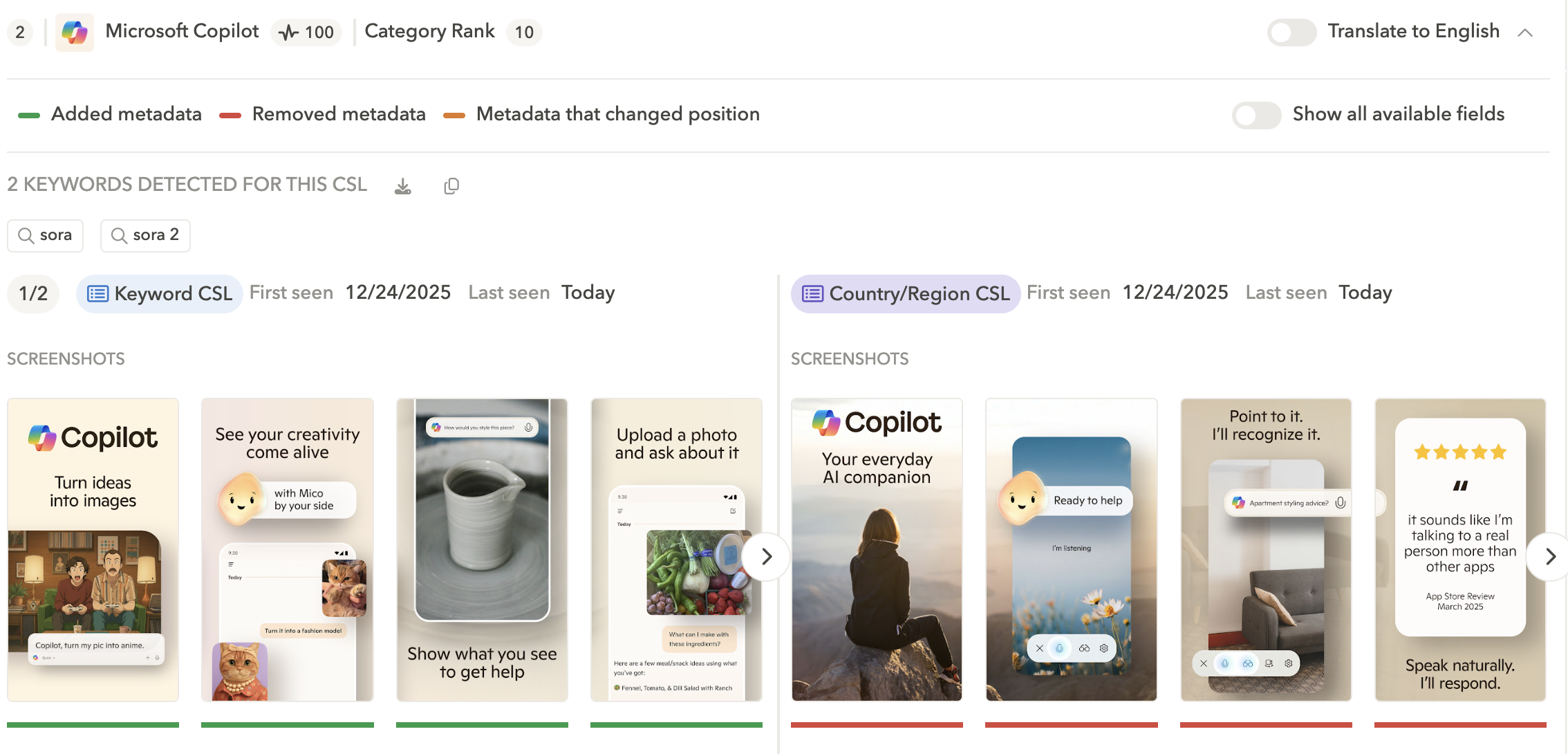
Custom store listing from Microsoft Co-pilot for the keyword ‘Sora’. Source: AppTweak
- When organic search converts below expectations
Sometimes your app ranks well for high-intent keywords but still doesn’t convert as well as it should. This usually happens when users arrive with a clear use case, but your default listing feels too generic or doesn’t address what they came for fast enough. Keyword-based custom store listings help you tailor screenshots and messaging to the intent behind specific searches, so the page feels more relevant and users are more likely to install.Look at Reddit. They created a custom store listing for the keyword “social.” Compared to their default listing, this CSL shifts the messaging and screenshots to emphasize Reddit as a social network, with a subtle jab at the competition with captions like “time well wasted.”
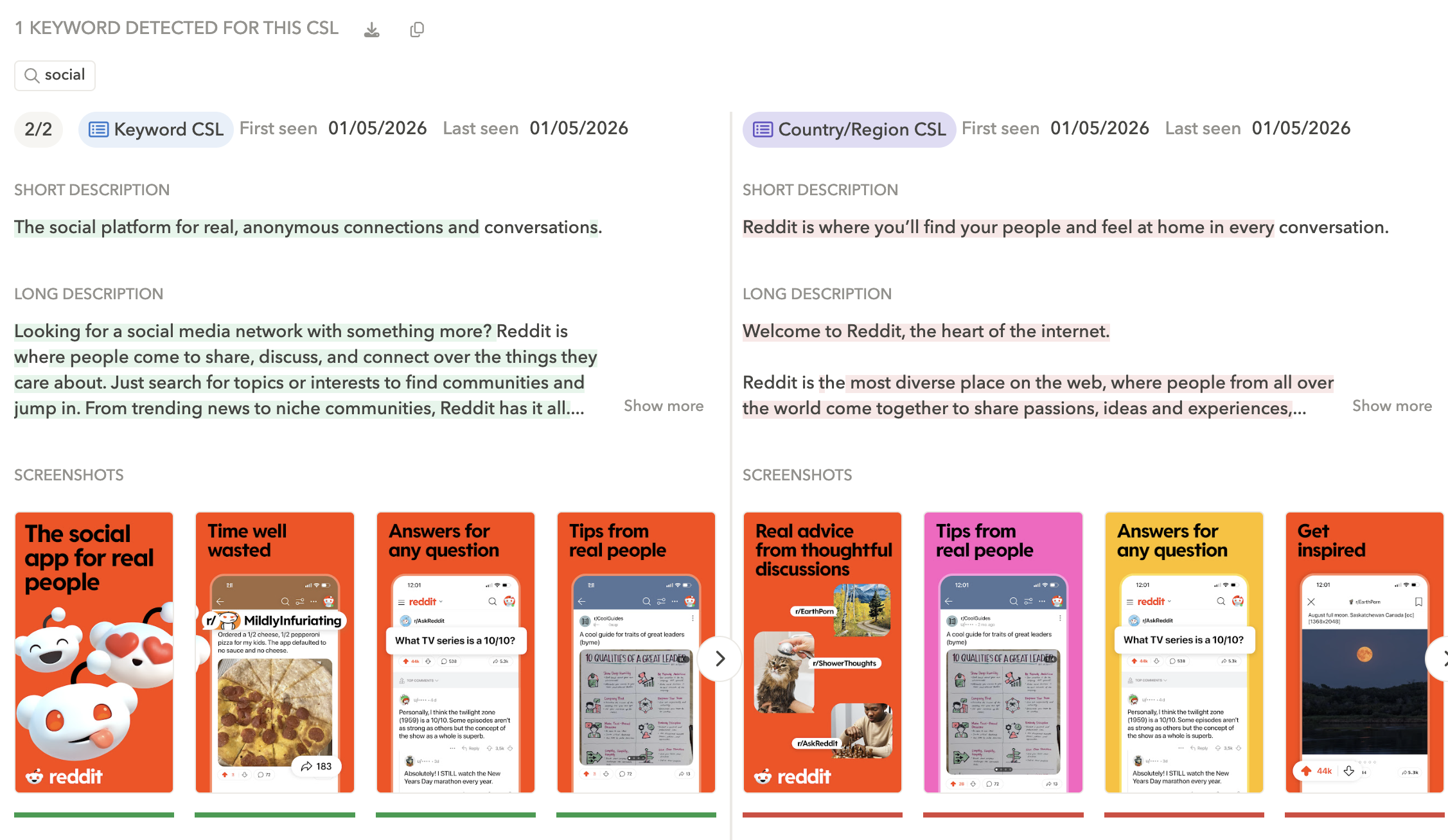
Custom store listing from Reddit for the keyword ‘social’. Source: AppTweak - To match your store listing with ad intent
If users click on ads but drop off on the store page, the issue is often a mismatch between the ad promise and the store experience. A fitness app running ads focused on “at home workout plans,” for instance, may still send users to a generic store page centered on overall fitness tracking. Campaign-based CSLs let teams create store pages that mirror the ad’s message, turning the store into a true landing page and improving CPI without increasing spend.
- When you run partnerships and affiliate programs
Partner traffic converts best when the store page feels like a continuation of what users just saw. If someone clicks an affiliate link expecting a specific benefit like an exclusive offer, membership perk, or tailored use case and lands on a generic default listing, trust drops and so does conversion. URL-based custom store listings let you build a dedicated Play Store page for each partner, with messaging and visuals that match the partner promise. It’s one of the simplest ways to turn partnership clicks into installs without touching your core store listing.
- When you want to test bolder messaging without risking your default listing
Your default store listing is your “safe” version. It has to work for the widest audience and protect your baseline conversion. That makes it hard to test sharper positioning, new feature angles, or more aggressive offers without worrying about unintended drops. Custom store listings give you a clean way to test those ideas in a controlled segment (a specific country, keyword theme, campaign, or URL flow) while keeping your default listing stable. It’s a low-risk way to explore new messaging directions, learn what resonates, and only scale what proves it can lift conversion.
Best practices for custom store listings
Custom store listings are easy to overcomplicate. The best results usually come from keeping things simple: pick the right segment, make a focused change, and scale only when you see lift. Here are the best practices that tend to work across most apps:
- Start with the biggest opportunity, not the most creative idea
Prioritize CSLs where your default listing is clearly not the best fit: high-intent keyword traffic, major paid campaigns, priority markets, or promotions with strong visibility.
- Treat each CSL like a landing page with one job
Every CSL should be built around one audience and one primary promise. If the message becomes too broad, it starts to look like your default listing again and the uplift disappears.
- Use store listing groups
A store listing group lets you build a “base” version once and reuse it across multiple custom listings. This is useful when you’re rolling out the same promotion across several countries, or when multiple CSLs follow the same creative structure. It keeps creatives consistent and saves time as you scale.
- Avoid targeting conflicts
CSL targeting rules can overlap, and it’s easy to accidentally create listings that compete with each other, especially with country-based CSLs, where a country can only belong to one listing at a time. Before launching a new CSL, check whether the same audience is already covered elsewhere.
- Change the minimum viable assets first
You don’t need a full creative overhaul to see lift. Many teams get strong results by adjusting only the first 2–3 screenshots and the short description, especially for keyword- and campaign-based CSLs.
- Keep the brand recognizable across CSLs
Personalization should feel tailored, not inconsistent. Maintain a consistent structure, tone of voice, and visual style so CSLs build trust and don’t look like a completely different app.
- Use CSLs to protect your default listing
Keep your default listing evergreen and broadly relevant. Use CSLs for market-specific offers, campaign-led narratives, and intent-based messaging without affecting everyone else landing on the default page.
- Don’t forget localization: CSLs aren’t automatically translated
Each CSL has its own translations. If you target multilingual markets and don’t add the relevant language versions, users will see the CSL in its default language.
Expert Tip
AppTweak makes it easy to spot competitor CSL usage and identify which keyword intents or markets they prioritize so you can build a CSL backlog based on what’s already working in your category.How to measure the impact of custom store listings
To measure the impact of CSLs, start with comparing the CSL’s conversion rate against your default listing over the same time period. If the CSL is more relevant to the audience it targets, you should see a lift here.
However, make sure you’re comparing apples to apples. A CSL can look like it’s underperforming simply because it’s getting different traffic than your default listing (different channel, different targeting, different intent).
For paid CSLs, don’t stop at CVR also track CPI in Google Ads and your MMP. Better store conversion should translate into lower CPI (or improved downstream performance) from the same click volume.
Finally, don’t judge too early. Conversion rates fluctuate when volume is low, so give CSLs enough traffic and time to stabilize before deciding whether they work. Avoid launching too many CSLs at once if it splits your sample. And when you iterate, keep a simple changelog so you know what actually drove the lift. Review performance regularly—high-traffic CSLs can fatigue over time, and refreshing creatives is often part of keeping results strong
Conclusion
Custom store listings are one of the simplest ways to improve conversion on Google Play. They work best when you start small, focus on high-impact segments, and build a repeatable system you can scale over time. And if you want to accelerate prioritization, AppTweak can help you spot competitor CSL strategies, identify which intents and markets they focus on, and build a backlog based on what’s already working in your category.
FAQs
How many custom store listings can you create on Google Play?
You can create up to 50 custom store listings per app on Google Play. This limit includes all CSL types (country-based, keyword-based, campaign-based, URL-based, and install-state listings).
What can you customize in a Google Play custom store listing?
With custom store listings you can customize most key elements of your Google Play store page, including:
- App name
- Short description and full description
- App icon
- Screenshots
- Feature graphic
- Promo video
Custom store listings do not change your app itself, your ratings and reviews, or other store metadata outside the listing assets and text.
What is the difference between custom store listings and Google Play Experiments?
Custom store listings are used for personalization (different store pages for different audiences). Google Play Experiments are used for A/B testing (testing different versions of the same listing to find what performs best). Many teams use both: CSLs to tailor the message to a segment, and experiments to optimize that segment’s creatives.
What is the difference between custom store listings and Custom Product Pages (CPPs)?
Custom store listings (Google Play) and Custom Product Pages (Apple App Store) both allow alternative store pages with tailored creatives. The key difference is that Google Play custom store listings allow broader customization (including text and app name) and offer more targeting options such as country targeting. CPPs are more constrained and are primarily used for campaign-level and keyword-level routing on the App Store.
Do keyword-based custom store listings improve rankings on Google Play?
No. Keyword-based custom store listings do not influence keyword rankings. They affect what users see after they reach your store page from search. Their value is conversion: they help you tailor the store message to search intent and improve install rate from existing organic visibility.
Can you create a custom store listing for each keyword?
Yes — but you usually shouldn’t. In Google Play Console, a keyword-based custom store listing can target multiple keywords, so you can attach a set of related queries to the same CSL. Most teams get better results by grouping keywords by intent theme (for example, one CSL for “expense tracking” keywords and another for “budget planning” keywords). This keeps your CSL setup manageable, concentrates traffic so results are easier to measure, and avoids creating dozens of low-volume listings that are hard to maintain.
How can you see whether competitors are using custom store listings?
Google Play doesn’t make CSLs obvious from the outside, especially keyword-based and campaign-based versions. Tools like AppTweak help you identify when competitors use custom store listings for keywords or markets, so you can benchmark their strategy and prioritize your own CSL roadmap.
How can I see competitor custom store listings?
To see competitor custom store listings you will have to rely on an ASO tool. AppTweak is today the only ASO platform to provide insights into competitors and top apps’ custom store listings. You can see keyword-level CSLs and country-based CSLs on AppTweak.


More articles in Advanced ASO, Google Play

 Oriane Ineza

 Simon Thillay