Getting your app featured on the App Store and Google Play is one of the most effective ways to boost visibility, credibility, and downloads. With hundreds of millions of weekly visitors across both stores, editorial exposure places your app directly in front of users who are ready to engage. But earning that spot isn’t random. It requires a strong product, strategic timing, and a clear understanding of what Apple and Google look for.
This guide explains how to get featured on the app stores, how featuring works on both platforms, and what teams can do to increase their chances in 2026 and beyond.
Key takeaways
- Getting featured on the App Store or Google Play isn’t random. Quality, timing, and clear storytelling matter most.
- Apple favors strong design, innovation, and apps that align with cultural or seasonal moments; Google prioritizes technical performance and user experience.
- In-app events and promotional content are major visibility drivers when used around meaningful updates or seasonal themes.
- High ratings significantly increase your chances of being featured across both stores.
- Localized listings and region-specific updates help your app stand out to editorial teams.
- Tracking featurings with tools like AppTweak helps you measure impact, understand missed opportunities, and refine your strategy over time.
What are featured apps?
Featured apps are apps and games that receive extra visibility across high-traffic areas of the App Store and Google Play. These placements highlight apps that excel in design, technical quality, storytelling, and user value.
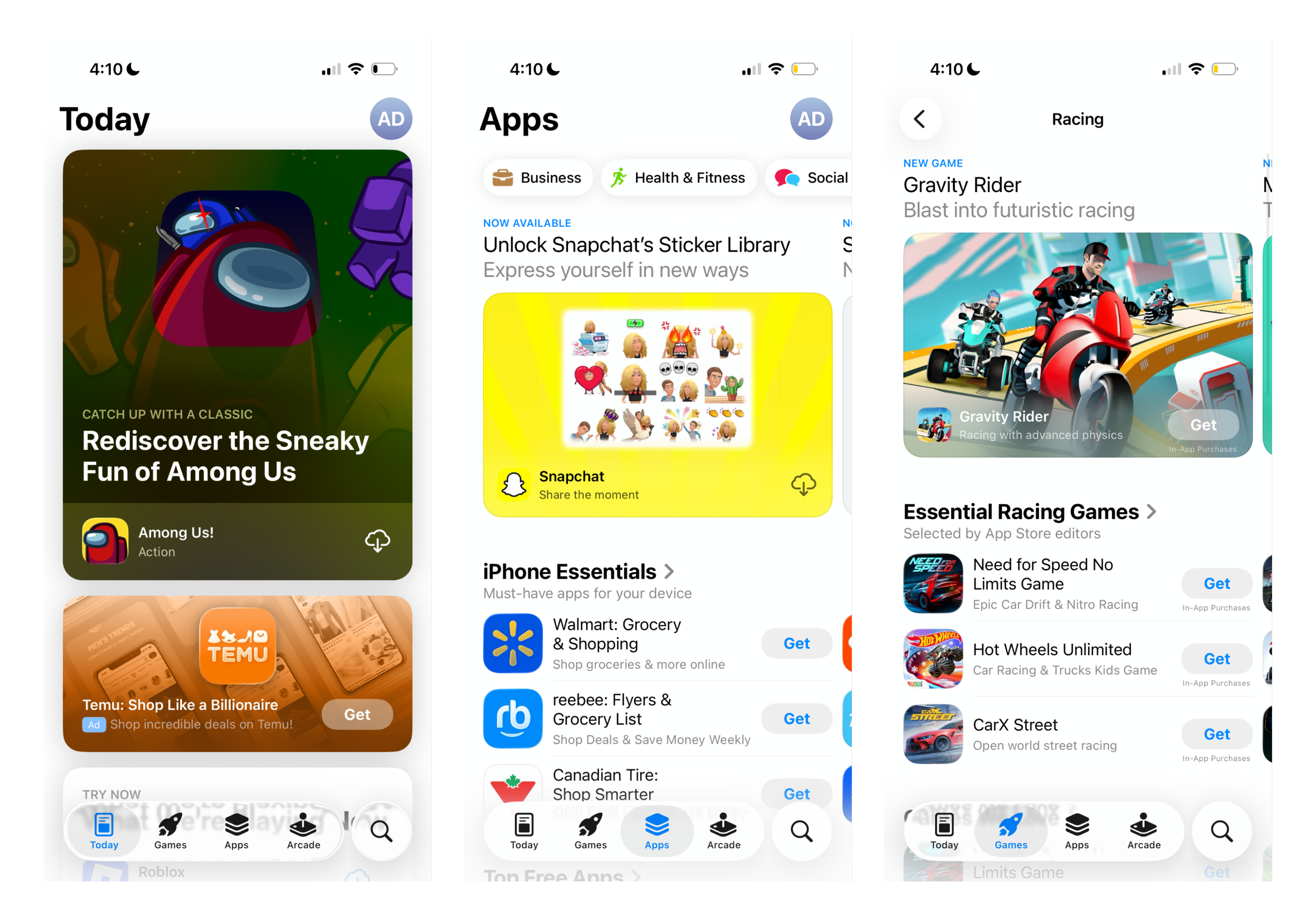
On the App Store, featured apps appear in Today stories, curated collections in the Apps and Games tabs, and special placements in search results. These surfaces help Apple spotlight developers, tell meaningful stories, and showcase apps that stand out.
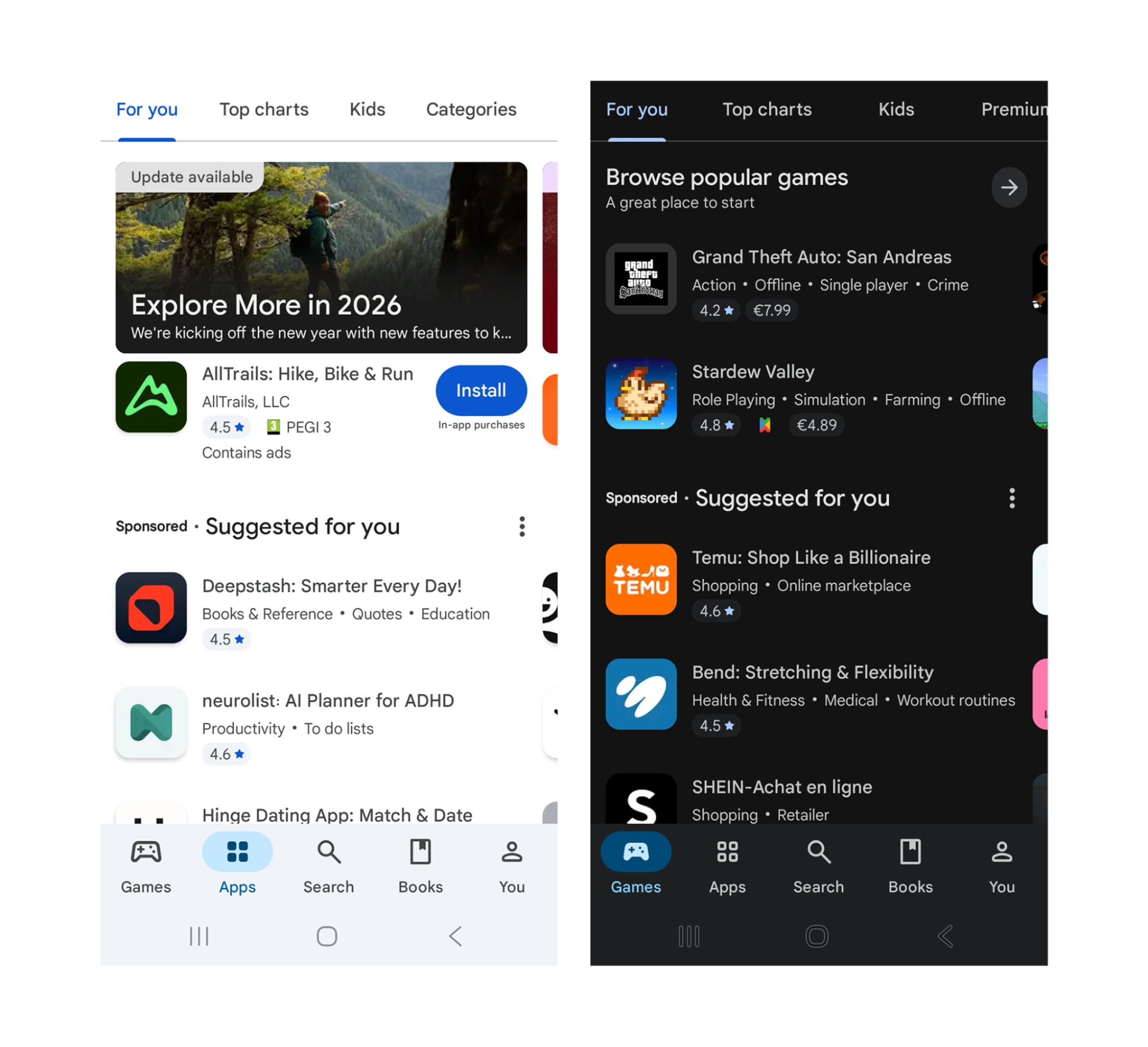
Google Play uses a mix of curated editorial placements and algorithmically personalized surfaces. Featured apps can appear in the Apps and Games tabs, Editor’s Choice, category collections, “For you” recommendations, and special areas like Indie Corner or promotional content. Google aims to highlight apps that demonstrate strong technical performance, solid user experience, and relevant updates.
Featured apps are refreshed frequently on both platforms, giving developers ongoing opportunities to earn visibility throughout the year.
How does app store featuring work?
Apple and Google’s approaches to featuring differ in structure and intent:
On the App Store, Today stories and curated modules are created by Apple’s editorial team. These editors research developers, test apps, explore themes, and build stories around meaningful updates, cultural moments, and apps that align with Apple’s values. Because these placements are carefully crafted, they often spotlight the teams, missions, and creative processes behind the apps. You can submit your app for consideration for a featuring in App Store Connect in the “Promote your app” form.
On Google Play, featured apps appear through a blend of editorial curation and machine-driven personalization. Google’s editorial team selects apps for specific campaigns such as seasonal collections, promotions, or country-specific highlights. At the same time, Google’s recommendation systems factor in each user’s preferences, device type, and engagement to determine which apps appear on their personalized surfaces.
In both stores, high-quality apps with strong performance, ratings, and recent updates have a much better chance of appearing across editorial and personalized placements.
Why does getting your app featured matter?
Getting featured increases visibility in high-traffic areas, strengthens credibility, and can trigger meaningful performance lift in a short time window.
- It improves conversion through stronger perceived trust
A feature acts as third-party validation. Users are more likely to click through and install when an app is highlighted by Apple or Google, especially in crowded categories where many apps look similar.
- It can generate a major uplift in organic installs and revenue
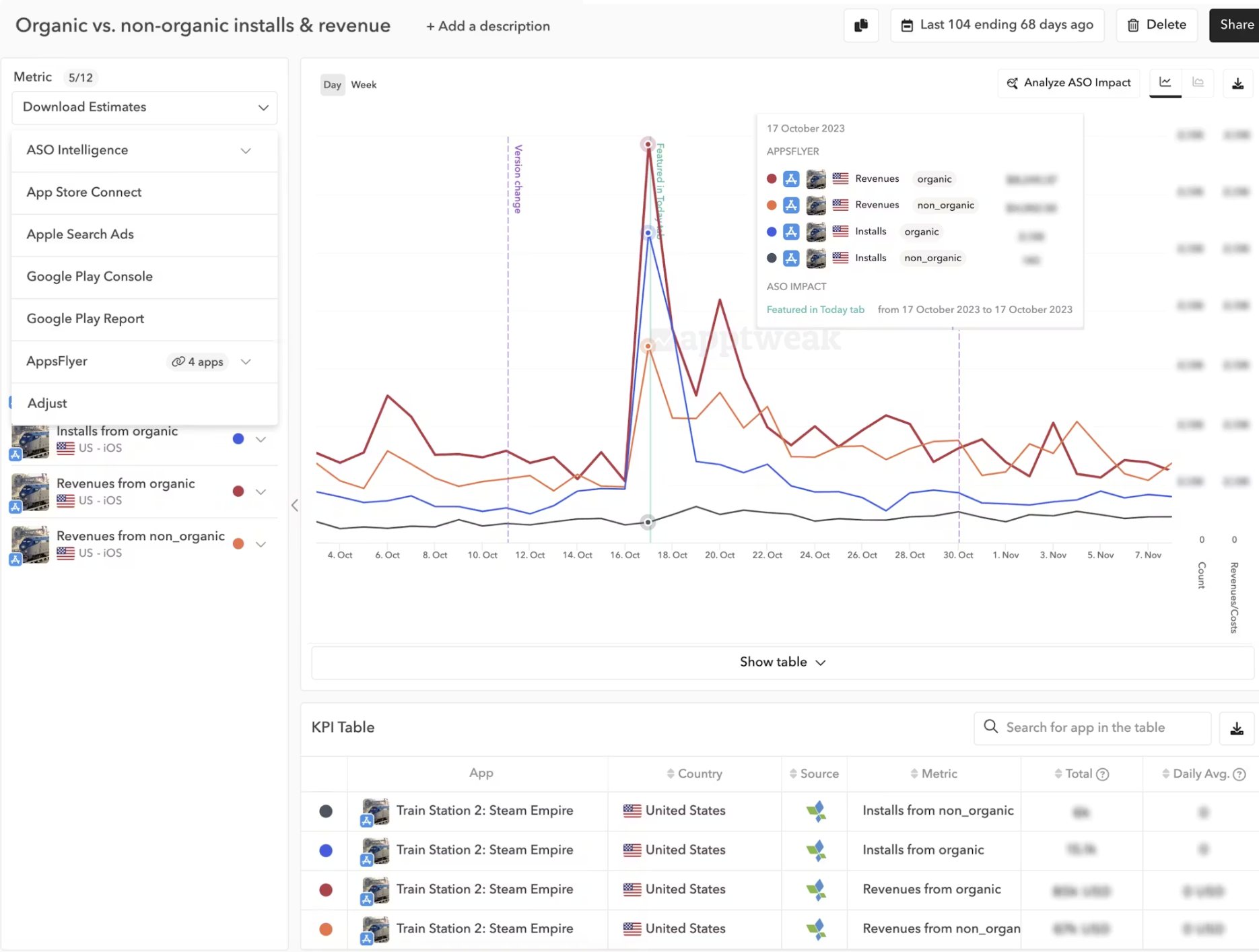
A top featuring placement can change your app’s performance overnight. In AppTweak’s featuring case study with Pixel Federation, Train Station 2 saw a +470% uplift in organic installs after being featured as Game of the Day in the US. The same featuring also drove a +540% uplift in organic revenue, showing that a feature can impact monetization, not just volume.
- It can sustain momentum after the placement ends
Featuring increases install velocity, engagement, and rating volume. These signals can continue influencing visibility across other store surfaces after the feature is over, which is why featuring often creates a compounding effect rather than a one-day spike.
- It can re-engage existing and lapsed users
Featurings are also a powerful way to re-engage your existing user base and win back lapsed users. When your app appears in the Today tab, curated collections, or promotional placements, users who previously downloaded your app but haven’t opened it recently may rediscover it while browsing the store. This is especially effective when the featuring highlights a major update, seasonal event, or new feature that gives users a clear reason to return.
How to get your app featured on the App Store?
Each app has an opportunity to get featured. Apple is always on the lookout to highlight new app and games, feature updates or interesting stories. You can use the Featuring Nominations section in App Store Connect to share your new content, app enhancement, or app launch with the Apple editorial team.
App Store featuring placements
Apps can appear across several surfaces: Today stories, App of the Day, Game of the Day, category collections, seasonal highlights, and curated rows within the Apps and Games tabs. Apple also displays editorial modules in search results, where curated stories or collections appear for certain keywords.
The Today tab is the most prominent placement. Editors create text-based stories that highlight an app’s mission, design philosophy, team, or cultural relevance. These can be personalized or pinned globally for priority content.
Collections tend to focus on specific themes such as education, wellbeing, travel, productivity, or local cultural events. These are often the easiest paths to getting featured.
In-app event placements have grown massively since their launch. IAEs now appear across nearly all major tabs, including their own sections in the Today tab. Apple even picks a “Best Limited-Time Event” weekly — making events one of the highest-priority surfaces in the store.
App Store featuring criteria
Apple’s editors look for high-quality apps that communicate a strong, meaningful story. Quality really matters. Your app should load quickly, run without glitches, and be easy for anyone to understand and navigate. The design should look consistent across every screen, and the experience should feel straightforward from start to finish. These basics need to be in place before an app has a real chance of getting featured.
Editors also evaluate:
- Design, UX, and innovation: Your app needs exceptional UI design, smooth functionality, and outstanding user experience. Apple wants apps that don’t crash, receive frequent updates, and have intuitive, appealing user interfaces.
Expert Tip
Our team of experts have noticed that Apple strongly features teams that adopt new Apple tech early (e.g., apps adopting new iOS 26 UI like “liquid glass” were featured more). Stay up to date with the latest changes coming to the app stores.- Story: Apple wants to highlight the “why” behind the app, not just features. Editors look for apps with a clear narrative. They want to feature apps that have something meaningful to share — whether that’s a creative design philosophy, a mission-driven approach, or an innovation that sets the app apart from competitors. Apps with a strong sense of identity and purpose tend to resonate more strongly with editors.
- Strong product pages: The product page plays a major role. Editors rely heavily on your icons, screenshots, preview videos, and promo text to understand your story quickly. Poor visuals can disqualify an otherwise great app.
- Localization: Apple prioritizes apps that feel relevant to their local market, both in terms of language and cultural timing. This includes localized metadata and assets, as well as timely updates that connect with seasonal or regional events.
How to increase your chances of getting featured on the App Store
To earn editorial attention, it helps to align your development and marketing roadmap with Apple’s needs.
- Use the “Featuring nominations” section in App Store Connect. Make your pitch direct, focused, and easy to understand. Explain what’s new, why it matters now, and which regions you’re targeting. Be concise but narrative-driven, highlighting the human, creative, or innovative aspect behind the update rather than listing features. Apple recommends a lead time of a minimum of two weeks, but for best visibility, submit up to three months ahead for major updates or launches.
- Tailor your pitch depending on the type of content you are submitting. When you submit for a nomination, you’ll choose a “type” e.g. new app/game, update or in-app event. This helps editors slot your submission into the right editorial surface (Today story, collection, event listing, etc.). If your pitch aligns with a seasonal moment, Apple value, or platform launch, call that out directly.
- Ensure your metadata and product page are compelling. Make sure your metadata and product page are as strong as possible. Editors often evaluate your app first on your app store product page. This means your visual assets need to be high-quality and cohesive, including polished icons, clean screenshots, and engaging preview videos. Your description should be clear, easy to read, and localized for the regions you’re targeting.
- Pitch around major events: Editors look for apps that match major seasonal moments such as New Year, Pride Month, Mental Health Month and Back to School or local events such as Diwali, Golden Week, Carnaval, Ramadan, and more. Teams should prepare updates and pitches four to six weeks before major moments.
- Consider adopting new Apple technologies early: Features announced at WWDC such as Apple Intelligence (on-device AI), the new Liquid Glass design system, improved widget capabilities, and new device-specific features often create opportunities to be featured at launch. Being among the first to integrate these technologies can attract early editor interest.
- Connect your app with Apple’s values: The editorial team regularly highlights apps related to Apple’s core values: accessibility, privacy, education, the environment, inclusion, and community impact. These are some of the biggest feature opportunities of the year, often spanning all tabs, newsletters, and even Apple.com.
Expert Tip
App ratings matter significantly for getting featured. According to AppTweak’s ASO Trends & Benchmarks Report 2026, 95% of featured apps on the App Store and 96% of Google Play featured apps maintain average ratings of 4.0 or higher. Both platforms prioritize high-quality apps with strong user satisfaction in their editorial selections. If you want to increase your chances of getting featured, maintaining excellent ratings (ideally 4+) should be a top priority. Apps rated below 3.5 stars have significantly reduced visibility and are rarely considered for editorial placements, regardless of how innovative or well-designed they might be.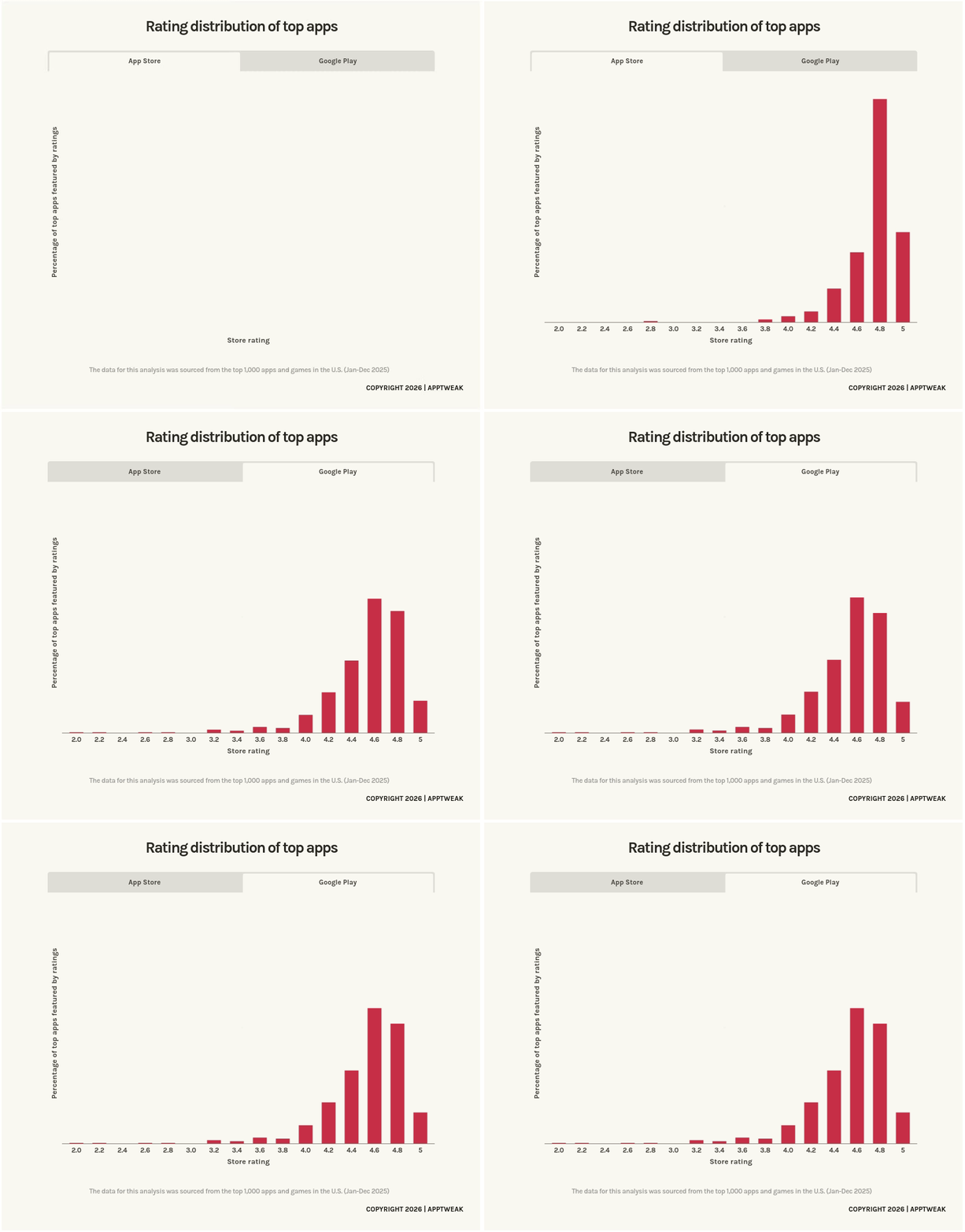
How to get your app featured on Google Play?
Getting featured on Google Play requires a slightly different strategy. While editorial teams still play an important role, Google relies heavily on technical quality and performance indicators when selecting apps to appear in curated and personalized surfaces.
Google Play featuring placements
Google Play features apps and content in a mix of editorial and algorithmic surfaces. These include personalized recommendations on the Home feed, curated editorial collections that highlight themes like wellness, productivity or seasonal events, top charts, category pages, algorithmic suggestion rows, and even search results through modules such as “Recommended for you,” “Similar apps,” or “You might also like.”
Google Play also features promotional content ( in-app events, offers, and big updates) and featured products ( IAPs and subscriptions). These can be shown not only on your app page but also across Home, categories, and search, giving you extra entry points for users to discover your app even after they have downloaded it.
Here is a simple breakdown of where apps and games, promotional content and featured products can appear across the Google Play store:
| Google Play surface | Apps & Games | Promotional content (events, offers, updates) | Featured products (IAPs & subscriptions) |
| Home feed | Personalized recommendations, trending apps, editorial collections | Promotional content cards, seasonal highlights | Featured product cards |
| Apps & Games tabs | “For you” sections, editor-curated rows, new & updated apps/games | Promotional content placements | Featured product modules |
| Category pages | Category rankings, Editor’s Choice, suggested apps | Category-relevant promotional content | Featured products |
| Top charts | Top Free, Top Paid, Top Grossing, Trending, category charts | — | — |
| Search results | Suggested apps, related apps, keyword-triggered editorial rows | Promotional content cards | Featured product cards |
| Other app store pages | Similar apps, “More like this” recommendations | — | Related products |
Google Play featuring criteria
Getting featured on Google Play isn’t about continuously pitching your app to editors or submitting a formal application the way you would with Apple. Instead, Google relies on a mix of quality signals, relevance, and ongoing app health to decide which apps deserve more visibility. Google’s official guidelines state they evaluate every apps across four main pillars: core value, user experience, technical quality, and privacy.
- Core value means your app should solve a real problem or deliver genuine entertainment. Google favors apps that feel practical, helpful, or creatively compelling.
- User experience includes intuitive design, accessible features, and localization for different regions. For games, visual craftsmanship and gameplay quality also matter.
- Technical quality is one of Google’s strictest requirements. Apps with poor Android vitals such as high crash rates or poor ANR performance are automatically excluded from promotion on those devices. Even a strong app with compelling features can be disqualified if technical performance dips.
- Privacy and security expectations continue to rise. Google prioritizes apps that handle data responsibly, avoid unnecessary permissions, and provide accurate information through the data safety form.
Editorial features such as curated collections, seasonal highlights, and cultural spotlights are selected by Google Play’s editorial team. These human-curated placements favor apps that excel across all four pillars and also fit a specific theme, moment, or story. Editors look for clean visual design, cohesive storytelling, strong branding, and a delightful overall experience, which is why high-quality screenshots, videos, and localized assets matter so much.
Beyond editorial placements, most discovery on Google Play is driven by algorithmic featuring. This includes the personalized app recommendations users see on the Home feed, the Apps and Games tabs, search suggestions, and “Similar apps” modules. These placements rely on machine-learning systems that interpret your metadata, your engagement signals, user behavior patterns, and the freshness of your updates. Clear app descriptions, structured metadata, a strong keyword footprint, good retention, and low crash rates all help Google understand who your app is for and whether it should be shown to them.
Performance-based placements such as Top Charts and Trending sections are determined solely by measurable metrics such as install velocity, revenue performance, uninstall rates, ratings, and long-term engagement. These aren’t influenced by editors or personalization, your app earns them by outperforming competitors.
[pro tip] While Google does not accept ongoing editorial pitches like Apple, they do allow developers to submit newly launched apps and games for featuring consideration through the “Featuring Nomination” form. This process is only available for new games and apps (launched within the last four months) that meet Google’s quality requirements, follow Android design guidelines, achieve a minimum rating of 3.0 for apps and 3.8 for games, and launch simultaneously across platforms. In addition to this launch-focused path, Google also runs program-based collections like the Indie Games Corner and Apps Innovation Corner, which allow eligible indie developers to apply for editorial consideration if they meet requirements around team size, app freshness, ratings, and market location by submitting this form.
How to increase your chances of being featured on Google Play
Because algorithms play such a significant role in Google Play discovery, you can’t just pitch your way to visibility the way you might on the App Store. Instead, you need to consistently optimize the signals that algorithms use to evaluate and recommend apps. Every improvement to your crash rate, every metadata refresh, every thoughtful update, and every positive rating feeds into Google’s recommendation systems. This makes featuring on Google Play more accessible in some ways since you’re not solely dependent on catching an editor’s attention, but it also requires sustained attention to both technical excellence and user satisfaction.
Here are a few extra tips to increase your chances of getting featured:
1. Build a high-quality store listing. Use strong, on-brand screenshots, a clear value-driven description, and a compelling preview video if relevant. Make sure your visuals reflect what users will experience inside the app. Google prioritizes listings that feel honest, well-designed, and easy to understand. Localizing your listing for your key markets signals that you’re investing in a global user experience.
2. Keep your app fresh with regular updates and feature releases. Google favors apps that evolve. Regular updates show you’re paying attention to user needs, improving performance, and actively maintaining your product. Update your store listing alongside new releases to help Google interpret what’s new and relevant about your app.
3. Submit strong promotional content. Promotional content is one of the most powerful discovery tools on Google Play. By submitting well-timed promotions such as major feature releases, limited-time offers, or seasonal events you create new chances for your app to be featured. If you offer in-app purchases or subscriptions, showcasing them through featured products can give those items visibility of their own. The key is quality: clean visuals, clear and value-driven copy, and messaging that explains why this update or product matters right now. Apps that consistently share meaningful promotional updates tend to appear more often across Google Play’s discovery surfaces.
4. Improve engagement and retention. Google’s algorithms pay close attention to how users behave after downloading. The more your users stick around, explore the app, and return over time, the more Google interprets your product as genuinely valuable. Strong retention signals can unlock far more algorithmic visibility on the Home feed, “Similar apps” modules, and search.
5. Drive positive ratings and reviews. Ratings are critical on Google Play, not just for editorial consideration but for algorithmic visibility. According to AppTweak’s ASO & Apple Ads trends and benchmarks report 2026, 96% of featured apps maintain ratings of 4.0 or higher, and apps rated below 3.5 stars have significantly reduced visibility across all discovery platforms. To maintain strong ratings on Google Play:
- Encourage reviews strategically: Prompt users at moments of high satisfaction, such as after completing a task, reaching a milestone, or using a feature they clearly enjoyed.
- Respond to reviews with tools like AppTweak: Google’s algorithms factor in developer responsiveness. Users who see their concerns addressed are more likely to update their ratings.
- Fix issues quickly: Monitor reviews for complaints and prioritize fixes. Communicate these improvements in your release notes and follow up with users who reported problems.
6. Lean into themes and seasonal moments. Google’s editorial team regularly curates collections around themes: wellness, back-to-school, productivity, travel, gaming categories, and more. Aligning a product update or promotional campaign to match these moments, it increases your relevance for both editorial and algorithmic placement.
How to measure the impact of featurings with AppTweak
Knowing how to get featured is only part of the story. Understanding when and where your app appears and how featuring influences performance is equally important. AppTweak offers detailed visibility into App Store and Google Play featurings, helping teams measure real impact and identify new opportunities.
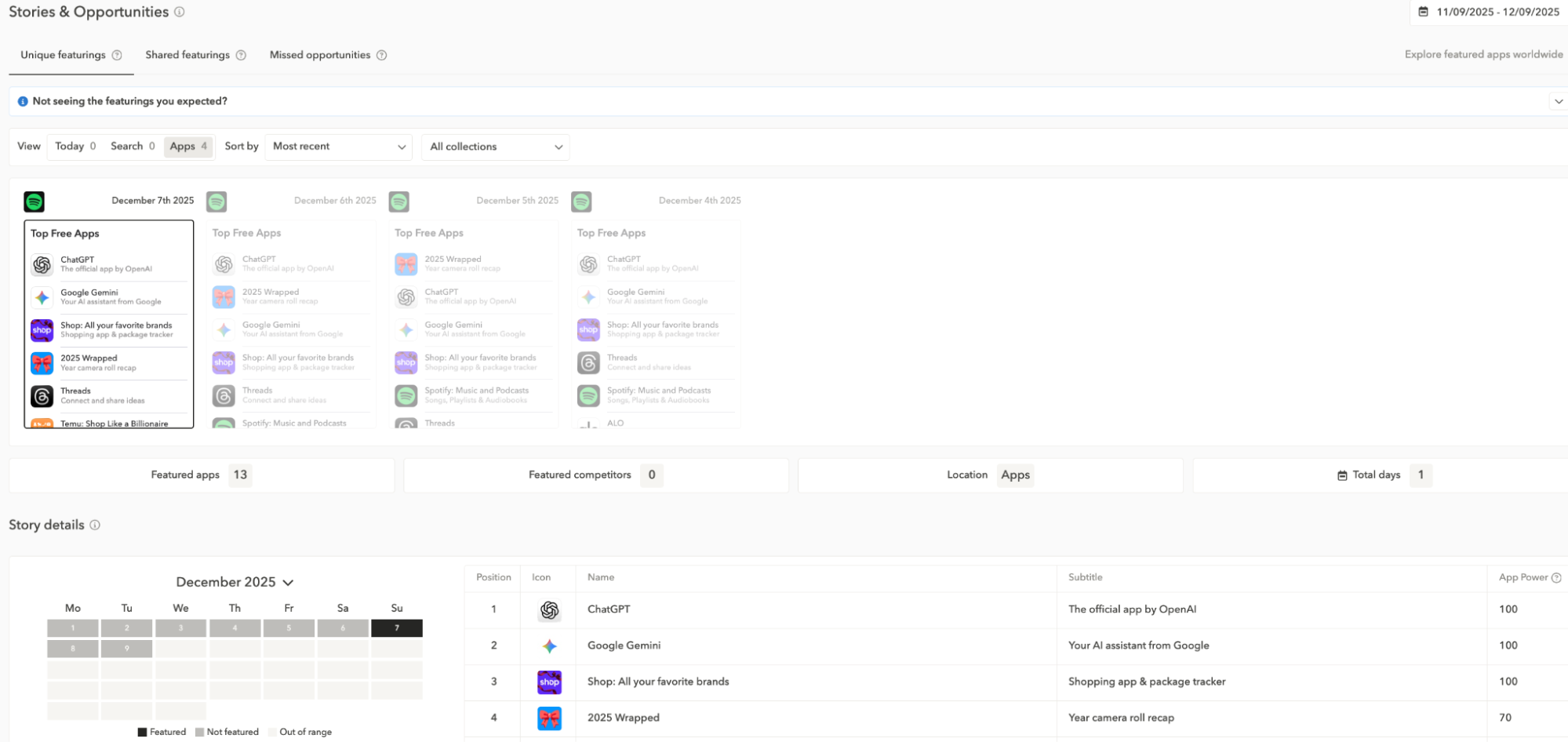
- Discover when and where your app was featured on the App Store and Google Play. Because Apple and Google rarely notify developers about featuring placements, a sudden spike in browse or explore traffic can be hard to explain on your own. ASO tools like AppTweak help fill that gap. With AppTweak, you can see exactly when and where selected apps were featured across both stores. The platform highlights total and daily featuring occurrences broken down by Today, Apps, and Games tabs so you can quickly understand featuring patterns, volatility, and the surfaces that drove the biggest impact.
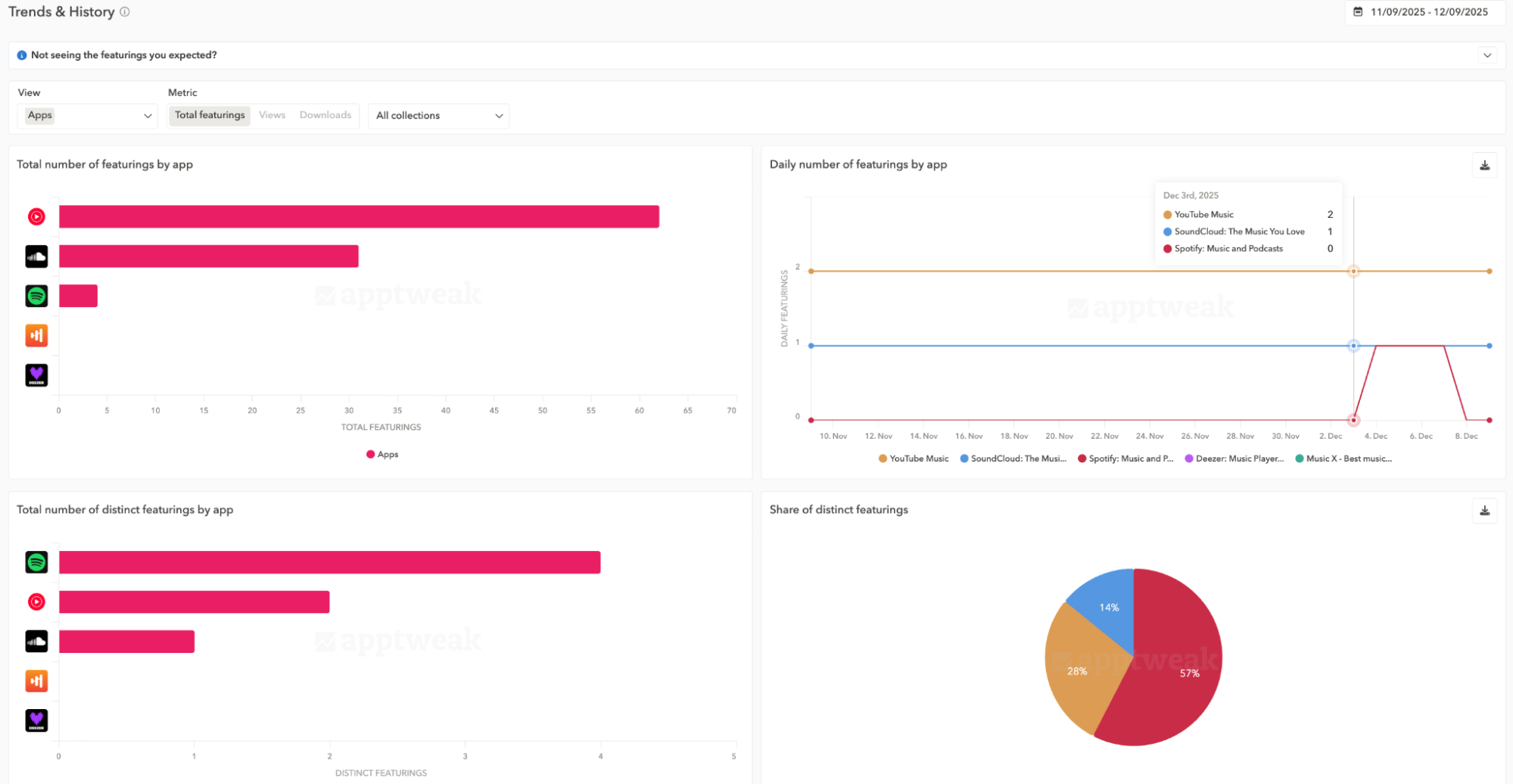
2. Analyze the impact of your featurings. AppTweak helps you estimate how those features translated into real performance. Its impact charts show your app’s browse and explore traffic (downloads, product page views, and impressions) with clear markers for each featuring date. By comparing median daily metrics with the values on featuring days, AppTweak calculates uplifts tied to each featuring event. This makes it possible to see not just that a spike happened, but how big an influence a specific featuring had on your visibility.
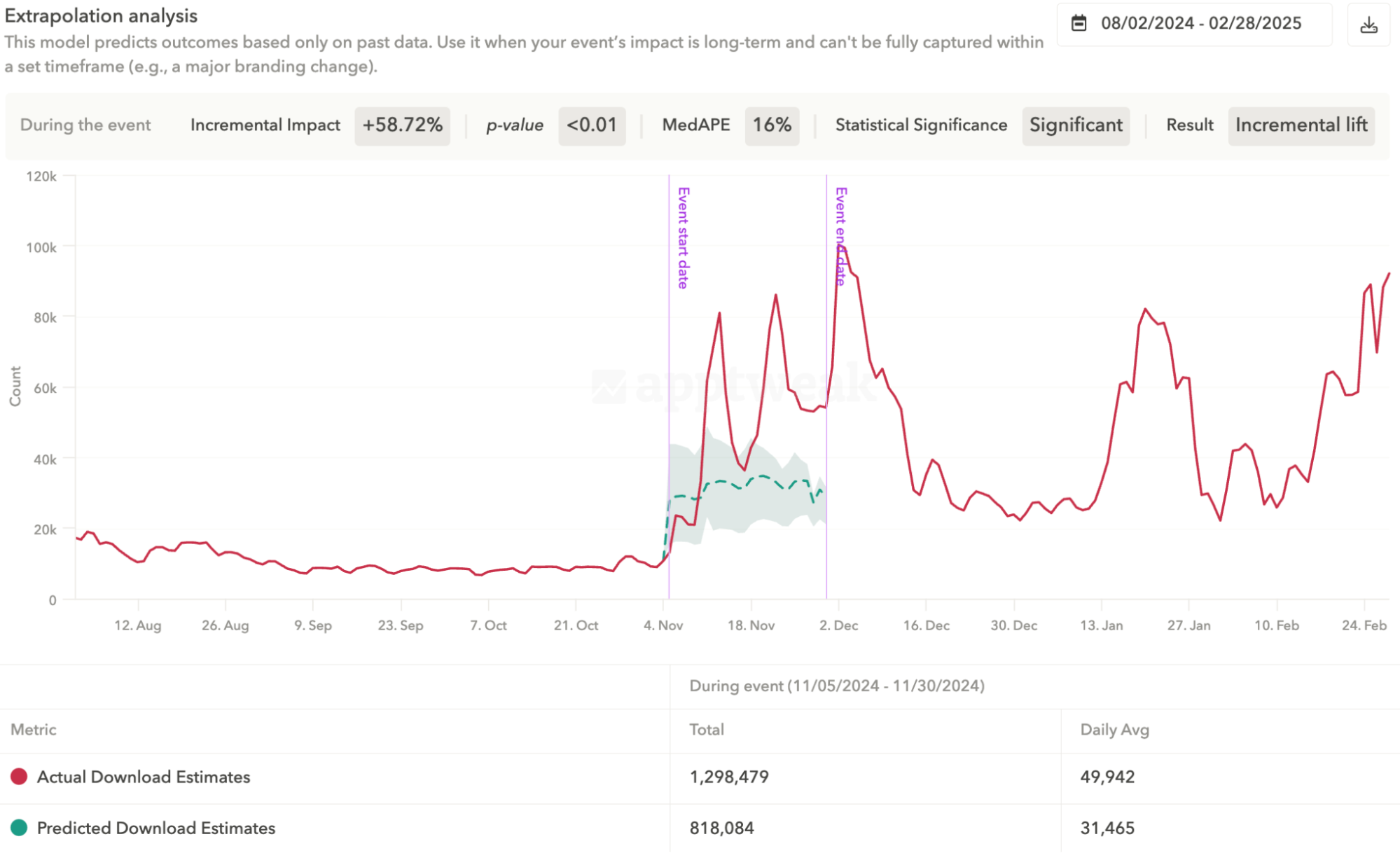
3. Measure the incremental impact of featurings. AppTweak’s Incrementality feature (available for Enterprise clients) helps you isolate the real lift generated by a featuring by estimating how your app would have performed without it. Instead of relying on simple before-and-after comparisons, the model creates a baseline that accounts for seasonality, organic trends, and external noise. The difference between this baseline and your actual performance reveals the net new impressions, page views, or downloads directly attributable to the featuring. This makes it easier to understand which featurings truly moved the needle and which surfaces or markets deliver the highest return — helping you prioritize future launches, updates, and promotional moments with much more confidence.
Cheat sheet: Do’s and don’ts for getting featured on the App Store and Google Play
Getting featured is an opportunity given to very few apps. The ones that make it are the apps that consistently deliver quality, tell a clear story, and give editors something genuinely worth spotlighting. Here are the dos and don’ts to help you focus on what actually matters.
To get your app featured, do:
- Do focus first on product quality. Stability, speed, and intuitive design are essential for both stores. High crash rates, inconsistent performance, and negative reviews reduce your chances immediately.
- Do maintain excellent ratings and actively manage reviews. 95% of App Store featured apps and 96% of Google Play featured apps have ratings of 4.0 or higher. Respond to user feedback, address common complaints in updates, and encourage satisfied users to leave reviews. Strong ratings are key to increasing your chances of featuring on both stores.
- Do plan your biggest releases around cultural and seasonal moments. Holidays, sports seasons, and local events can create strong editorial opportunities and make your updates more relevant.
- Do give editors a clear story. Whether you’re releasing a major feature, launching a collaboration, or responding to a seasonal moment, communicate why it matters and how users benefit.
- Do treat promotional content and in-app events as core features. Cards should be visually clear, time-bound, and genuinely interesting to users.
To get your app featured, don’t:
- Don’t pitch your app if your performance metrics aren’t strong. Google and Apple both prioritize quality, and apps with weak vitals or poor ratings are unlikely to be promoted.
- Don’t use clickbait or keyword stuffing. Editors reject apps with spammy metadata or misleading messaging.
- Don’t rely on generic or low-effort promotional content. Users and editors both look for meaningful updates, not vague or generic announcements.
- Don’t expect repeated featuring automatically. One successful spotlight doesn’t guarantee future placements. You need to keep shipping high-quality updates that feel timely and relevant.
- Don’t build your entire growth strategy around featuring. It’s a valuable boost, but lasting growth depends on strong ASO, retention, and product value.
Conclusion
Getting featured on the App Store or Google Play in 2026 requires more than good luck. Apple’s editorial team looks for apps that combine design quality, clear storytelling, and alignment with cultural or seasonal moments. Google Play focuses heavily on technical performance, user value, and trustworthy data practices.
If you want to increase your chances, start with quality. Build updates that matter, connect with meaningful moments, and use promotional content strategically. To support your efforts, use tools like AppTweak to track featurings, understand their impact, and refine your approach.
With the right preparation and timing, getting featured can become a powerful moment in your app’s growth.
FAQ
Here are some frequently asked questions when it comes to getting featured on the app stores:
Does Google Play have an editorial team like the App Store?
Yes, Google Play has an editorial team, but it works differently from Apple’s. Apple’s featuring is mostly editorial and story-driven, while Google mixes editorial curation with algorithmic recommendations and performance-based rankings. Google’s editors curate themed collections and programs like the Indie Games Corner, but much of the visibility on Google Play also comes from relevance, engagement, and technical quality rather than purely editorial selection.
How to submit a request or pitch to be featured on the App Store?
To submit a request or pitch to be featured on the App Store, use the “Featuring nomintions form in App Store Connect. Share your app’s story, major updates, unique features, seasonal relevance, and regions to target. Submitting your pitch 4-6 weeks before key launches improves your chance of being featured.
How to submit a request or pitch to be featured on Google Play?
Google Play doesn’t accept ongoing editorial pitches the way Apple does, but developers can submit newly launched apps and games for featuring consideration using the “Featuring Nomination” form. This applies only to titles launched within a specific timeframe (usually 120 days) that meet Google’s strict quality, design, rating, and localization requirements. Google also offers submission opportunities for certain curated programs, such as the Indie Games Corner and Apps Innovation Corner, for eligible indie developers. Updated apps cannot be pitched for featuring and should use Promotional Content instead.
What types of apps typically get featured?
Apps that typically get featured on the App Store or Google Play offer exceptional design, strong performance, and meaningful updates. Stores often highlight apps with high ratings, great onboarding, seasonal relevance, innovative features, strong accessibility, or use of the latest iOS or Android capabilities. Story-driven, mission-led, and high-engagement apps are also frequently featured.
How often do the App Store and Google Play refresh featured apps?
The App Store and Google Play refresh featured apps regularly. The App Store often updates Today tab stories and collections daily or weekly, depending on the region. Google Play updates collections, Editor’s Choice, and promotional placements frequently, especially around seasonal events and major global moments.
Does getting my app featured improve visibility on both stores?
Yes, getting featured improves visibility on both the App Store and Google Play. Being featured drives more impressions, installs, and engagement, which can positively influence ASO performance. Higher impressions and stronger user signals help increase long-term visibility across categories, keywords, and curated collections.
What’s the difference between being featured on Apple vs Google Play?
The difference between being featured on Apple vs Google Play comes down to approach and criteria. Being featured on the App Store is more editorial and storytelling-driven, focusing on design, updates, and iOS features. Google Play featuring is more performance-driven, with strong emphasis on Android Vitals, device compatibility, and engagement metrics. Both increase visibility, but the selection criteria and placements differ across stores.


More articles in Advanced ASO, App Market Insights, Google Play

 Simon Thillay

 Micah Motta

 Pierre-Antoine Roy