Custom store listings (CSLs) on Google Play are alternative versions of your app store page tailored to a specific audience or intent.
They’re widely used by top apps to improve conversion, especially when targeting keywords tied to specific features, use cases, or competitors.
With CSL Explorer, you can browse custom store listings from apps and games across Google Play – for any keyword, competitor, and market.
In this article, we share common CSL use cases with real examples, all of which can be explored directly in AppTweak.
Key takeaways
- Custom store listings on Google Play allow you to show alternative store pages to users based on targeting, such as app store keywords, country or language, install state, or campaigns.
- Keyword-based custom store listings align your app store messaging and visuals with search intent, which helps improve relevance and conversion from Google Play search.
- With CSL Explorer in AppTweak, you can browse custom store listings by app store keyword, competitor, category, and market, and compare them with default listings.
- Top apps use keyword-based CSLs to highlight specific features, reframe value on competitor keywords, and improve conversion on broad app store keywords.
What are custom store listings (CSLs)?
On Google Play, custom store listings are alternative versions of your app page that can be targeted by keyword, country/language, install state, Google Ads campaign, or URL.
When a user matches that targeting, they see a customized version of your store listing instead of the default one.
Keyword targeting is one of the most impactful CSL strategies, as it allows apps to align their store listing with search intent at the moment of discovery.
Read the full guide on custom store listings
What is CSL Explorer?
With AppTweak’s CSL Explorer, you can browse custom store listings across apps and games on Google Play. You can:
- Browse keyword-targeted and market-based custom store listings in one place
- Explore CSL usage across categories, countries, apps, and keywords
- Compare CSLs with default listings to see exactly what changed
This makes it easier to prioritize CSL opportunities and understand how top apps adapt their listings for different intents.
When to use keyword-based custom store listings
Below, we break down common CSL use cases with real examples, all available in AppTweak.
1. Map different features to search intent
Many apps offer multiple core features, but users search with a specific job in mind.
Since a single default listing can’t communicate all use cases equally well, keyword CSLs allow you to highlight the most relevant feature immediately, without overloading the main store page.
This approach works best when a feature is strong enough to compete on its own and search intent is clear and consistent.
Example: Brave (US) – keyword “vpn”
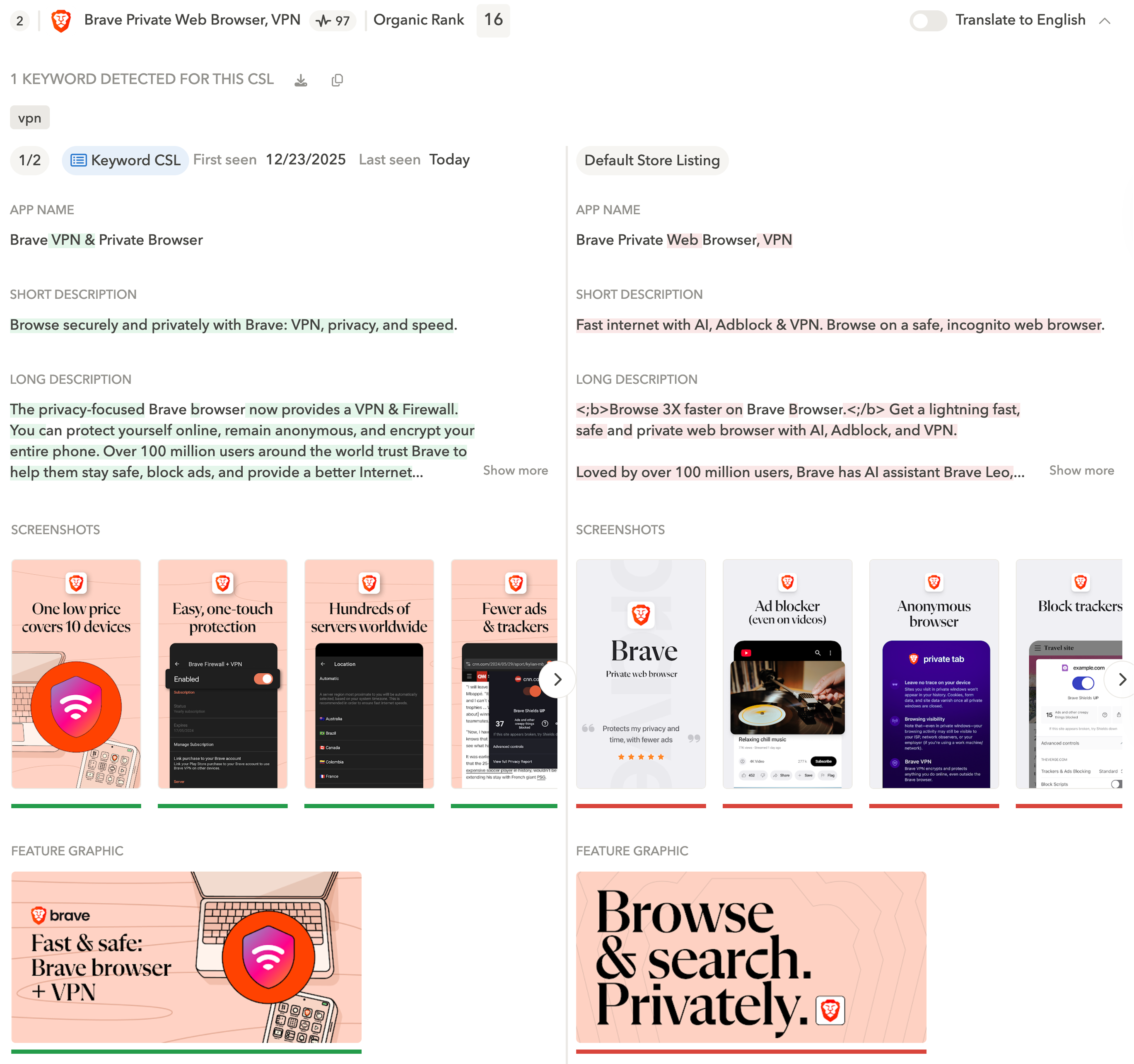
For example, Brave offers private browsing, security tools, and a VPN.
For the keyword “vpn,” Brave runs a CSL that:
- Puts the VPN feature front and center across the app name, short description, screenshots, and feature graphic
- Emphasizes speed, price, and safety as core value themes
-
Keeps the default listing focused on broader ‘browsing’ use cases
Example: Trip.com (UK) – keyword “flights”
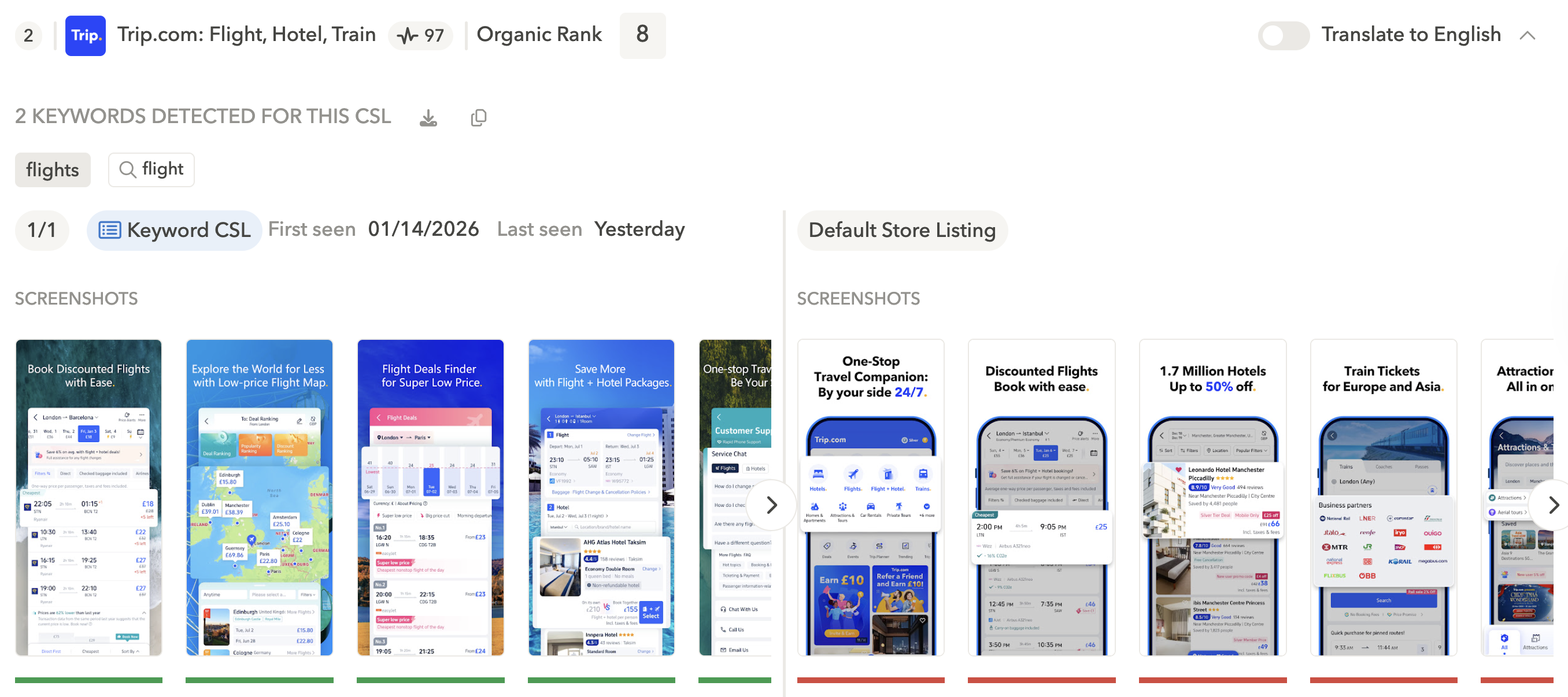
In the travel category, CSLs are widely used because many apps cover multiple use cases, such as flights and hotels.
For example, Trip.com runs a CSL for the keyword “flights” that:
- Replaces its broader “travel companion” positioning, which promotes both hotels and flights
- Highlights “discounted flights” in the first screenshot to match users looking for cheaper flight options
With CSL Explorer, you can easily compare how other travel apps adapt their store listings when targeting the same keyword.
Expert Tip
Keep note of which keywords competitors consistently target with CSLs and identify high-intent keywords with lower competition.2. Compete on competitor keywords by reframing value
On competitor and comparison-focused keywords, users arrive with expectations shaped by other apps. CSLs allow you to align messaging to those expectations.
Example: Reddit – competitor keywords
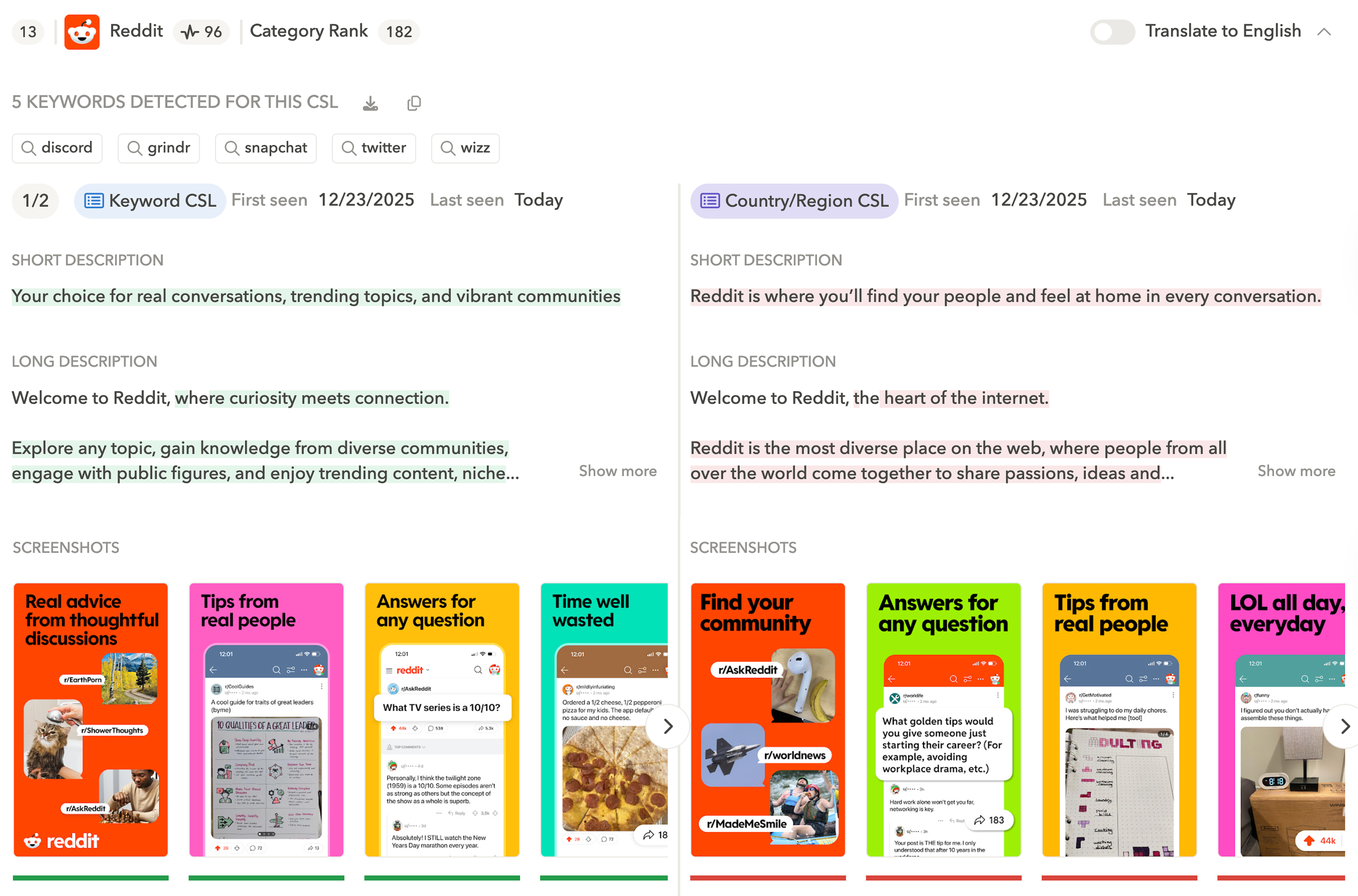
For keywords such as “discord” and “twitter,” Reddit runs CSLs that shift its messaging from “Find your community” to “Real advice from thoughtful discussions.”
This approach:
- Highlights Reddit’s differentiation directly from search
- Makes the listing feel more relevant in a comparison context
The goal isn’t always to replace a competitor outright, but to position the app as a credible alternative worth trying too.
CoinSwitch boosted conversion rates by +400% with custom store listings. Learn how
Some apps also run CSLs on their own branded keywords, where users’ intent to install is high. This is a great way to reinforce trust and reassurance at the moment of decision.
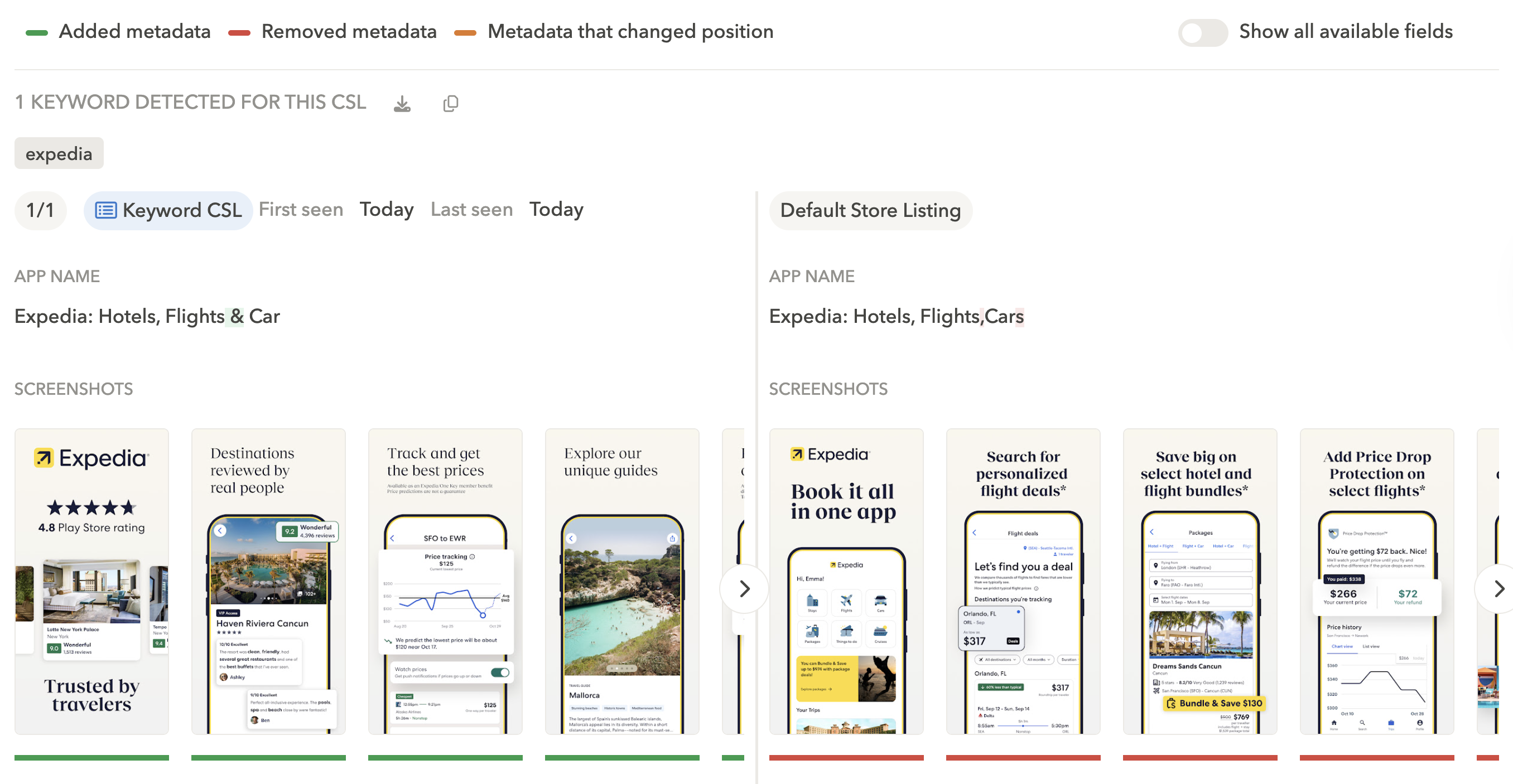
For example, when searching for the keyword “expedia,” users see a CSL highlighting:
- Social proof (4.8 Play Store rating)
- Reliability (“Trusted by travelers,” “Reviewed by real people”)
- And price (“Track and get the best prices”)
Because screenshots appear directly in branded search results, this approach helps reduce friction before users reach the store page.
Expert Tip
Check which apps run CSLs on your branded keywords and what messaging they prioritize for deeper competitive analysis.3. Improve conversion on broad generic keywords
Broad keywords often attract mixed intent.
Even when an app ranks well, conversion can underperform if all users land on a store page that doesn’t reflect what they’re looking for.
Keyword-based CSLs help anchor these searches around one clear angle.
Example: Audible – keyword “podcast”
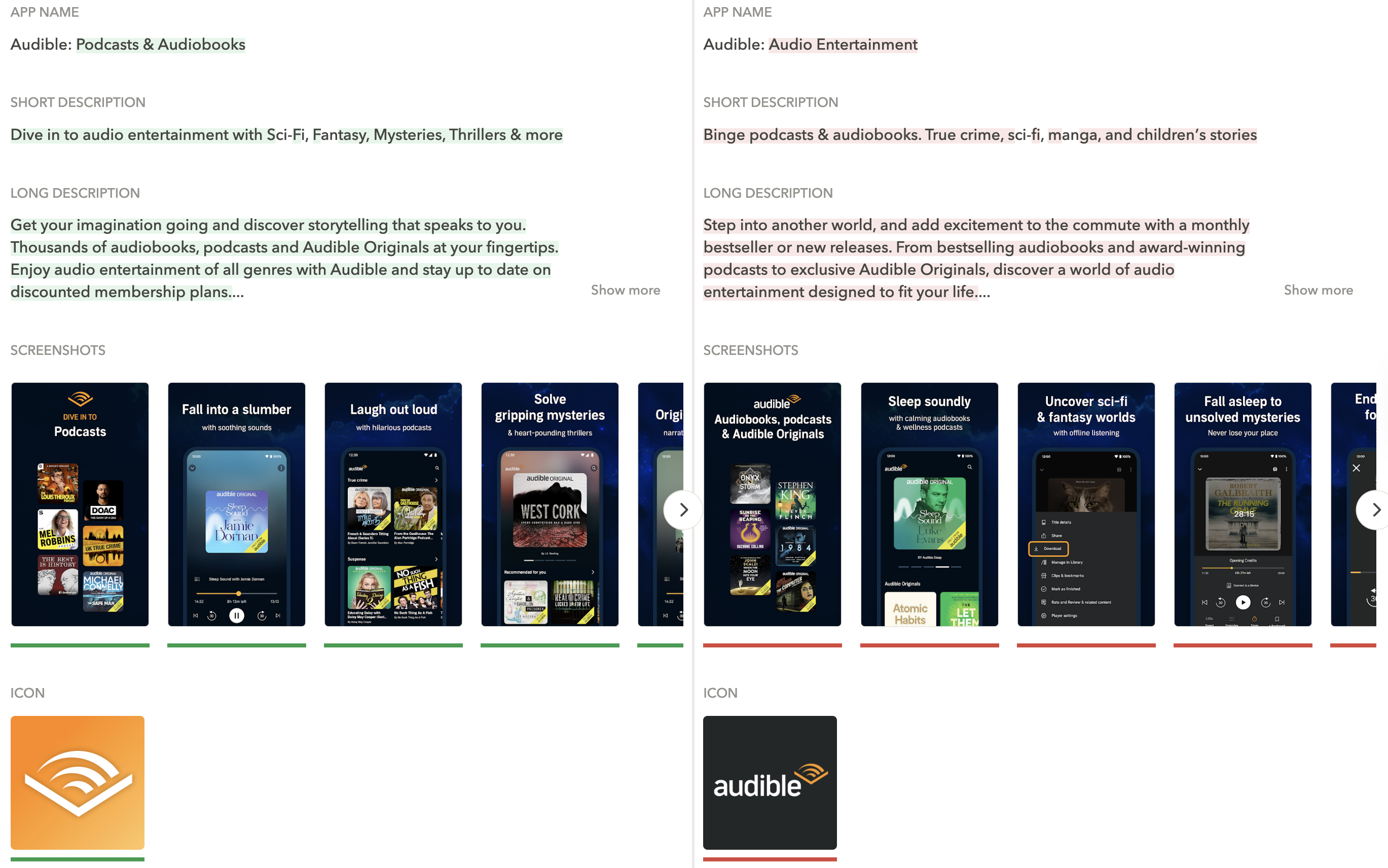
Above, we see Audible running a CSL for the keyword “podcast” that:
- Foregrounds podcast content over audiobooks
- Adapts screenshots and app name to reflect that intent
- Changes the app icon to improve recognition in search results
Expert Tip
Start with keywords where visibility is already strong, such as top-ranked terms or high-install keywords. These are often the best candidates for improving conversion with CSLs.Beyond keywords: Market-based CSLs
CSLs can also replace the default store listing for an entire country and language.
By leveraging market-based CSLs, you can:
- Adapt visuals and copy to reflect local language, culture, or expectations
- Emphasize market-specific value propositions or pricing cues
- Support time-bound campaigns, promotions, or seasonal moments
Example: inDrive – Mexico
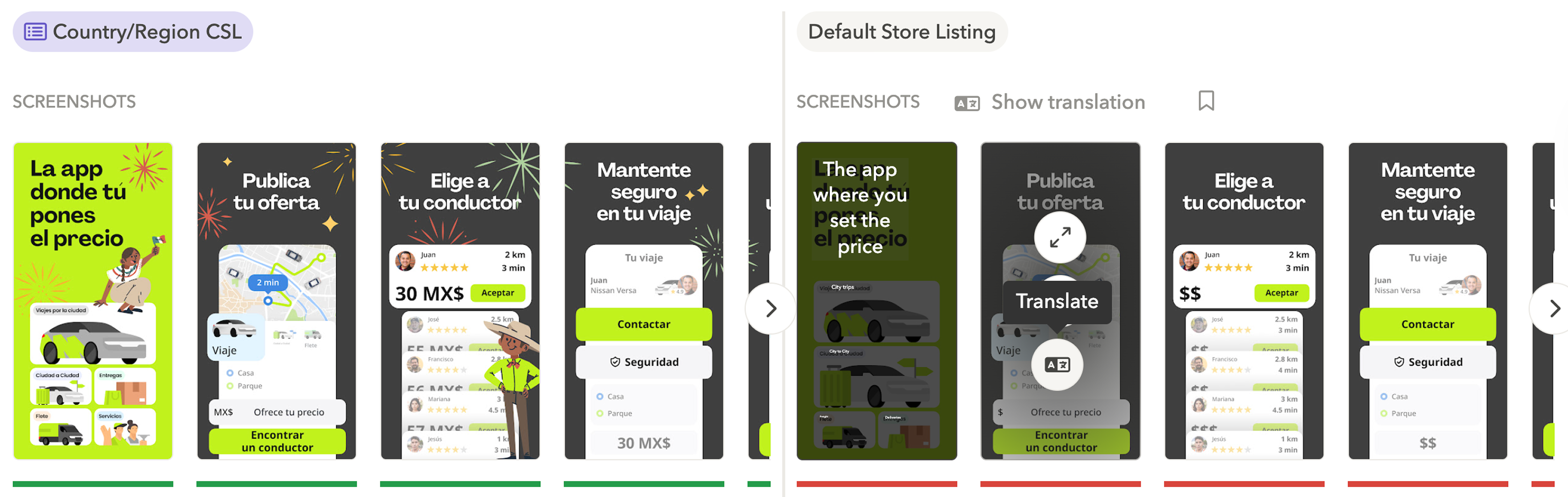
In Mexico, inDrive ran a market-based CSL during the Christmas period that updated screenshots to highlight the festive season and culturalized creatives to better resonate with local users.
This example shows how CSLs can be used beyond keyword search to support localization and relevance at the market level.
Conclusion
CSL Explorer provides keyword- and market-level visibility into how custom store listings are used across Google Play.
For teams investing in CSLs, this allows for much clearer prioritization – revealing which keywords, countries, and listing elements competitors are actively targeting.
Want to research CSL strategies across your main keywords, competitors, and markets?
FAQ
What are custom store listings on Google Play?
Custom store listings are alternative versions of an app’s Google Play Store page that are shown based on specific targeting conditions. Instead of displaying a single default listing to all users, Google Play allows apps to tailor store pages (app name, screenshots, icons, videos, and more) based on factors such as app store keywords, country or language, install state, campaigns, or referral URLs.
How do keyword-based custom store listings work?
Keyword-based custom store listings show a tailored app store page when a user searches for a specific keyword on Google Play. The app team selects a keyword and associates it with a custom version of the store listing instead of the default one. This enables apps to:
- Highlight a specific feature or use case
- Adjust screenshots and copy to match search intent
- Reframe value for competitor or comparison keywords
Keyword-based custom store listings are typically used when an app already has strong visibility for a keyword but wants to improve relevance and conversion from search results.
What is CSL Explorer in AppTweak?
CSL Explorer is a feature in AppTweak that lets app marketing teams browse and analyze custom store listings across Google Play. It provides visibility into how apps and games use CSLs in practice.
With CSL Explorer, you can:
- Browse custom store listings (keyword CSLs and market CSLs) across any category, competitor, or keyword
- Identify which keywords apps actively support with CSLs
- Compare custom store listings with default listings to see exactly what changed
Why is CSL research important before creating custom store listings?
CSL research helps teams prioritize the right keywords and avoid investing in low-impact or misaligned listings. Creating custom store listings requires design, copy, and validation effort, and not all keywords justify that investment.
Research helps your team:
- Identify keywords where competitors consistently use CSLs
- Understand which elements are commonly adapted, such as screenshots or value propositions
- Spot gaps where high-intent keywords lack tailored listings
By analyzing existing CSL usage across the market, you can make more informed decisions about where custom store listings are most likely to improve app store conversion.
How do apps use custom store listings for competitor keywords?
Apps use custom store listings on competitor keywords to reframe their value proposition in a comparison context. When users search for an alternative app, expectations are shaped by the competitor they have in mind.
In these cases, CSLs often:
- Focus the listing on what the app does differently, rather than trying to match competitor features
- Change the screenshots and copy to speak to users who are comparing similar apps
- Make it clear why this app is a better fit than the competitor they searched for
This approach allows apps to remain relevant in competitive searches without changing their default store listing or explicitly naming competitors.
How are market-based custom store listings different from keyword-based ones?
Market-based custom store listings replace the default app store page for an entire country or language, rather than being triggered by a keyword. They are typically used to adapt messaging and visuals at the market level. You can see both market CSLs and keyword CSLs in AppTweak.
Common use cases for market CSLs include:
- Adapting visuals and copy to local language and cultural expectations
- Emphasizing market-specific value propositions
- Supporting regional campaigns, promotions, or seasonal moments
Unlike keyword-based CSLs, market-based listings apply broadly to all eligible users in that market, regardless of search intent (when no keyword CSLs are active).
Which ASO tools allow teams to analyze custom store listings on Google Play?
Currently, AppTweak is the only ASO tool that provides visibility into custom store listings on Google Play.
The feature is designed for competitive and market research, and helps app marketers understand how CSLs are applied in practice across Google Play rather than relying on isolated examples or assumptions.


More articles in Product Updates

 Antoine Bentin

 Georgia Shepherd