Standing out in the App Store isn’t just about having a great product; it’s about showing up in the right place, at the right time, with the right message. Enter Apple Ads, one of the most powerful user acquisition channels for app marketers. With high-intent placements across the App Store and a conversion rate that consistently outpaces other platforms, it’s well-worth your efforts.
To truly maximize your return on investment, your campaigns need structure, data-driven decisions, and continuous optimization. In this guide, we’ll walk through the essential Apple Ads best practices to help you scale smarter, spend more efficiently, and drive real impact.
Key takeaways
- A clean, goal-driven Apple Ads campaign structure sets the foundation for scalable growth and easier optimization.
- Use a mix of keyword match types and regularly refine your keyword list to improve targeting and cost efficiency.
- Custom product pages boost ad relevance and conversion by aligning creatives with user intent.
- Optimize your bidding strategy using intent-based segmentation, performance data, and automation rules.
- Track key Apple Ads KPIs—like TTR, CPT, and ROAS—to guide smarter decisions and budget allocation.
- Avoid common pitfalls like keyword overlap, budget misallocation, and skipping negative keywords.
- Align your Apple Ads and ASO strategies to strengthen both paid performance and organic visibility.
- Use tools like AppTweak’s Campaign Manager to streamline campaign management and automation.
What are Apple Ads?
Apple Ads is Apple’s advertising platform for promoting apps directly within the App Store. It enables marketers to drive visibility and installs by placing targeted ads across key App Store placements. These placements include the Today tab, Search tab, product pages, and search results.
Using Apple Ads, app developers can reach users at different points in their App Store journey, whether they’re browsing, searching, or discovering new apps.
Campaigns can be created through Apple Ads Basic (automated setup with minimal control) or Apple Ads Advanced (manual setup with full control over keywords, creatives, and bidding). Read more about Apple Ads Basic and Advanced.
With placements aligned to user context, and performance metrics like tap-through rate, cost-per-tap, and conversion rate, Apple Ads offers marketers a measurable way to scale app growth on the App Store.
Ultimate Apple Ads best practices to maximize ROI
So, ready to set up your Apples for success? Get the most out of your Apple Ads campaigns by applying these top 10 Apple Ads best practices.
1. Set up a strong Apple Ads campaign structure from the start
A well-organized Apple Ads campaign structure is the foundation for scalable, data-driven growth. When your structure aligns with your app’s user funnel and business goals, it becomes easier to manage budgets, analyze performance, and apply learnings across markets.
Start by breaking down campaigns based on goals, audiences, or regions.
For example, you might have one campaign for brand protection (targeting your app name), another for competitor conquesting, and a third for discovery (generic keywords). Use ad groups to test ad variations, using different match types or custom product pages.
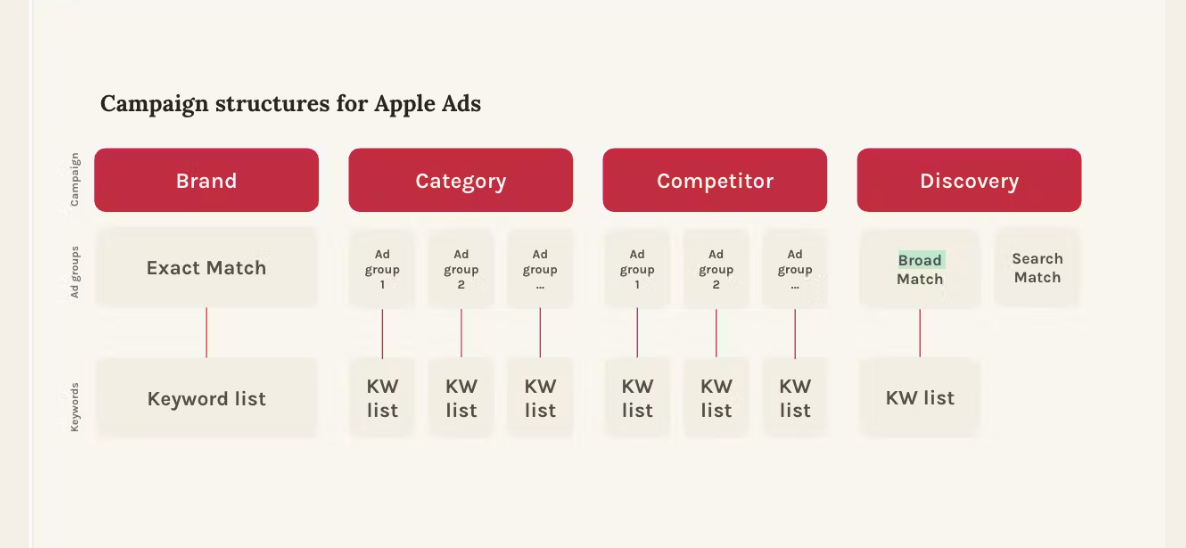
Best practices for Apple Ads search results campaigns structure
- Separate brand, generic, and competitor keywords into distinct campaigns for clearer reporting and budget control.
- Align ad groups with specific keyword themes and creative sets to ensure relevance.
- Allocate budget proportionally based on campaign goals and expected return.
A clean campaign structure not only makes optimization easier, but also enables better automation and smarter bidding.
Expert Tip
For apps targeting multiple geos, consider creating country or storefront-specific campaigns to account for differences in language, seasonality, and user behavior.2. Master keyword strategy with match types and negatives
Selecting the right keywords should be a major part of your Apple Ads strategy as, when done well, they can significantly impact your Apple Ads performance.
Start by focusing on high-intent keywords. These are terms that are closely related to your app’s core functionalities or value propositions. Pairing high-intent terms with exact match helps ensure your ads show only when there’s a strong likelihood of relevance, which can drive better tap-through and conversion rates.
Tips for effective keyword setup:
- Use exact match for your most valuable, high-intent keywords.
- Use broad match or Search Match to explore new keyword opportunities.
- Regularly analyze search term reports to add converting queries and exclude under-performers.
Learn more about match types and Apple Ads keywords.
3. Utilize custom product pages to boost ad relevance
On the App Store, you can create up to 35 alternative App Store product pages tailored to different user intents. These alternative pages are called custom product pages and rank highly as one of the top Apple Ads best practices. Custom product pages are a powerful way to increase the relevance and effectiveness of your Apple Ads search results campaigns.
In Apple Ads, you can link a custom product page to a specific ad group. This ensures that when a user taps your ad, they land on a page that’s highly aligned with their intent, whether it’s a particular use case, seasonal offer, or geographic relevance. This seamless experience from ad to landing page often results in higher engagement and stronger conversion rates.
AppTweak studies have shown that custom product page ad variations raise conversion rates almost 6%.
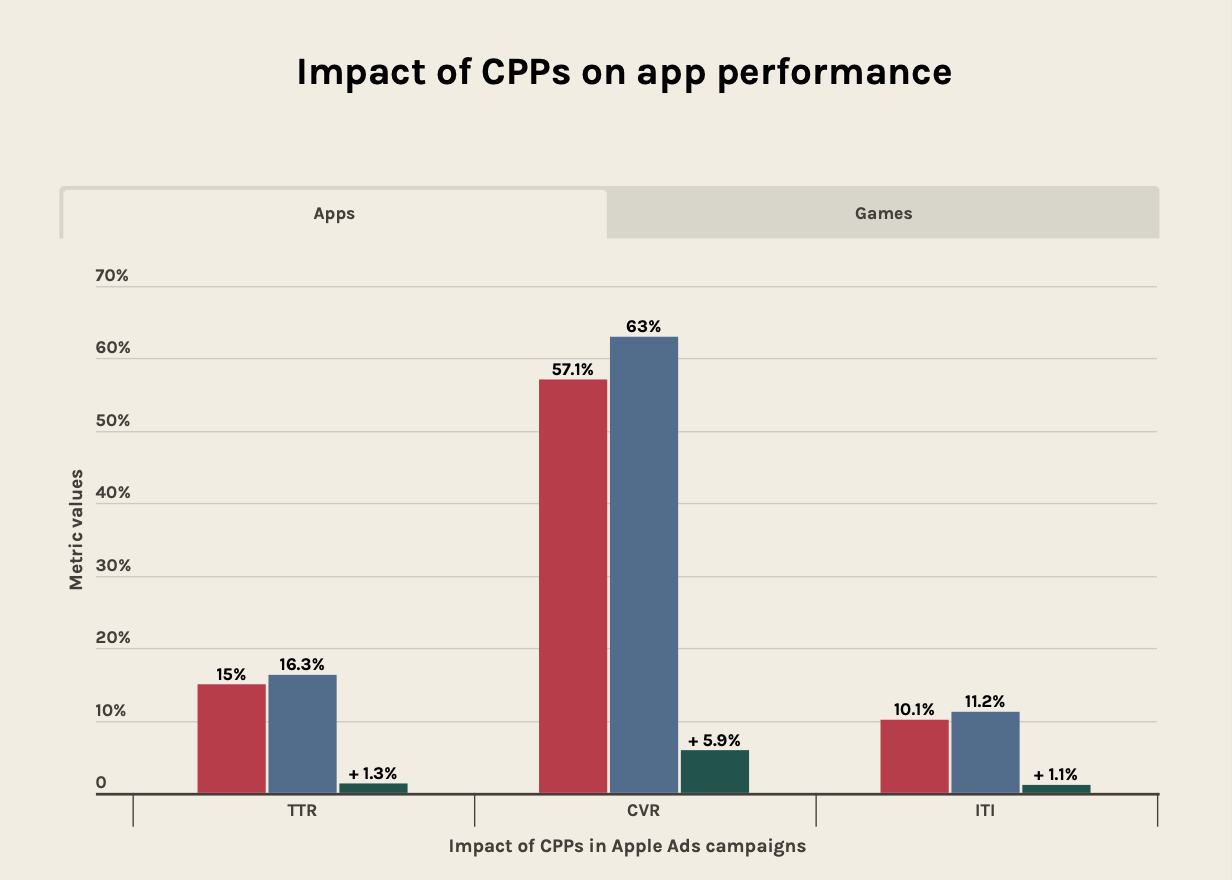
Apple Ads best practices for custom product pages
If you’re specializing in Apple Ads optimization, print out this list.
1. Whatever you do, don’t forget to align with user intent
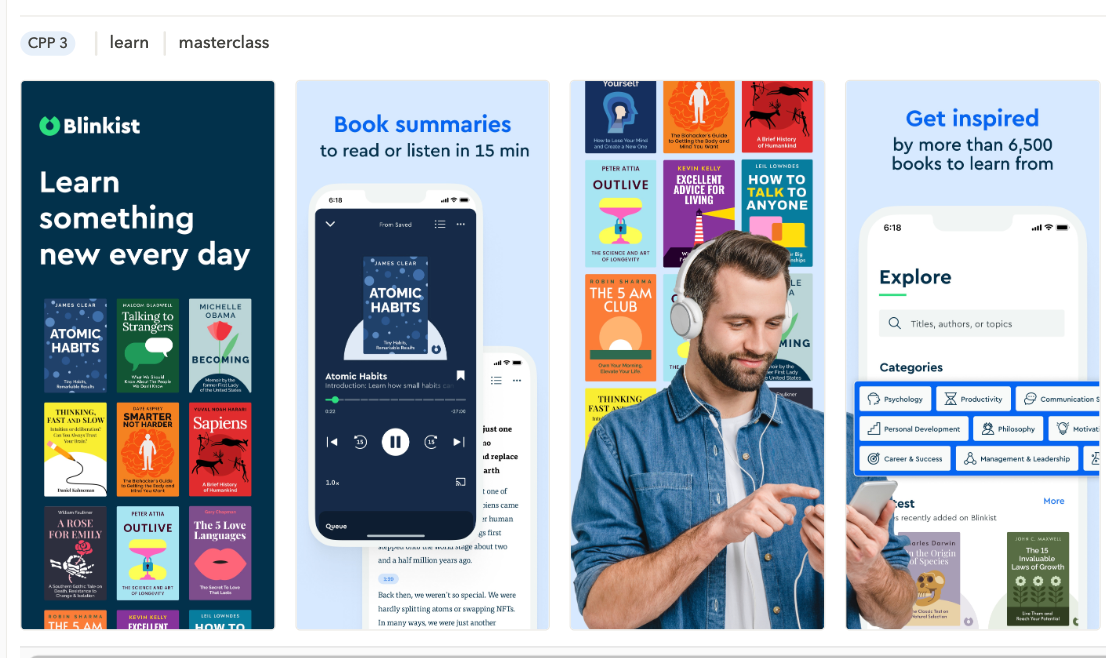
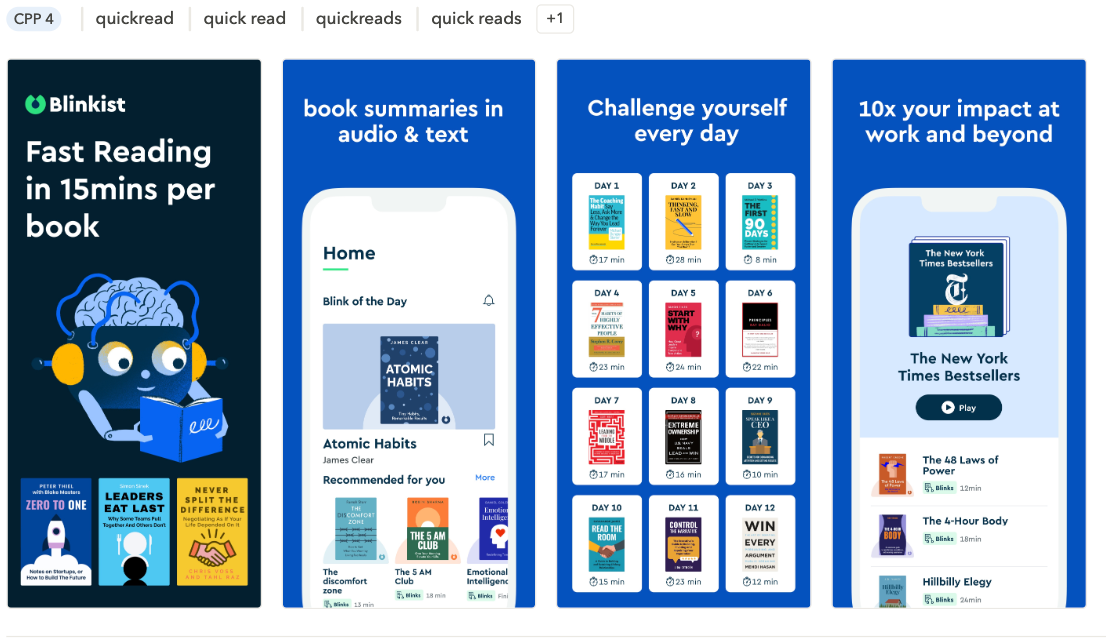
The purpose of custom product pages is to match the different needs of your audience. Take the time to ensure each of your custom product pages matches the user segment you’re pursuing, from the copy to the creatives.
In the two examples below sourced from AppTweak’s CPP Explorer, the app Blinkest has tailored each of its custom product pages’ screenshots to the user’s search terms.
2. Utilize ASO data to flesh out your user personas
Use ASO tools like AppTweak to get insights like which keywords are trending for your category as well as which ones users use the most when downloading your app.
3. Your custom product page must match your ad
No one likes to click on an ad only to discover it was click-bait. Your custom product page should be a follow-through of your ad by providing more context in addition to your ad. Inconsistency risks losing brand trust and ultimately, conversion.
4. Get inspiration from your competitors
See which types of creatives competitors use in AppTweak’s CCP explorer.
5. Monitor your performance metrics
By looking at Apple Ads performance metrics like tap-through rate and conversion rate for your different variations, you can better optimize your campaigns.
4. Optimize bidding strategy for efficient ad spend
A strategic bidding approach is essential to get the most out of your Apple Ads investment. Rather than applying a flat cost-per-tap across all keywords, effective campaigns tailor bids based on user intent, keyword performance, and regional opportunities.
Segment your bids by intent
Not all keywords carry the same value. Branded keywords typically signal strong user intent and can justify higher bids. Category or feature-focused terms may require moderate bids, while discovery and competitor keywords should start with more conservative bids until proven effective.
Adjust bids based on performance data
Key metrics like tap-through rate, conversion rate, and cost per install should inform your bidding decisions. Raise bids on high-performing keywords to improve visibility and volume. Conversely, lower bids or pause spend on keywords with low conversion efficiency.
For example: If the keyword “budget planner app” consistently converts at a low cost per install, increasing the cost per tap can help secure more impressions. In contrast, broader terms like “finance tools” may require tighter bid controls to stay efficient.
Use automation to scale your bidding strategy
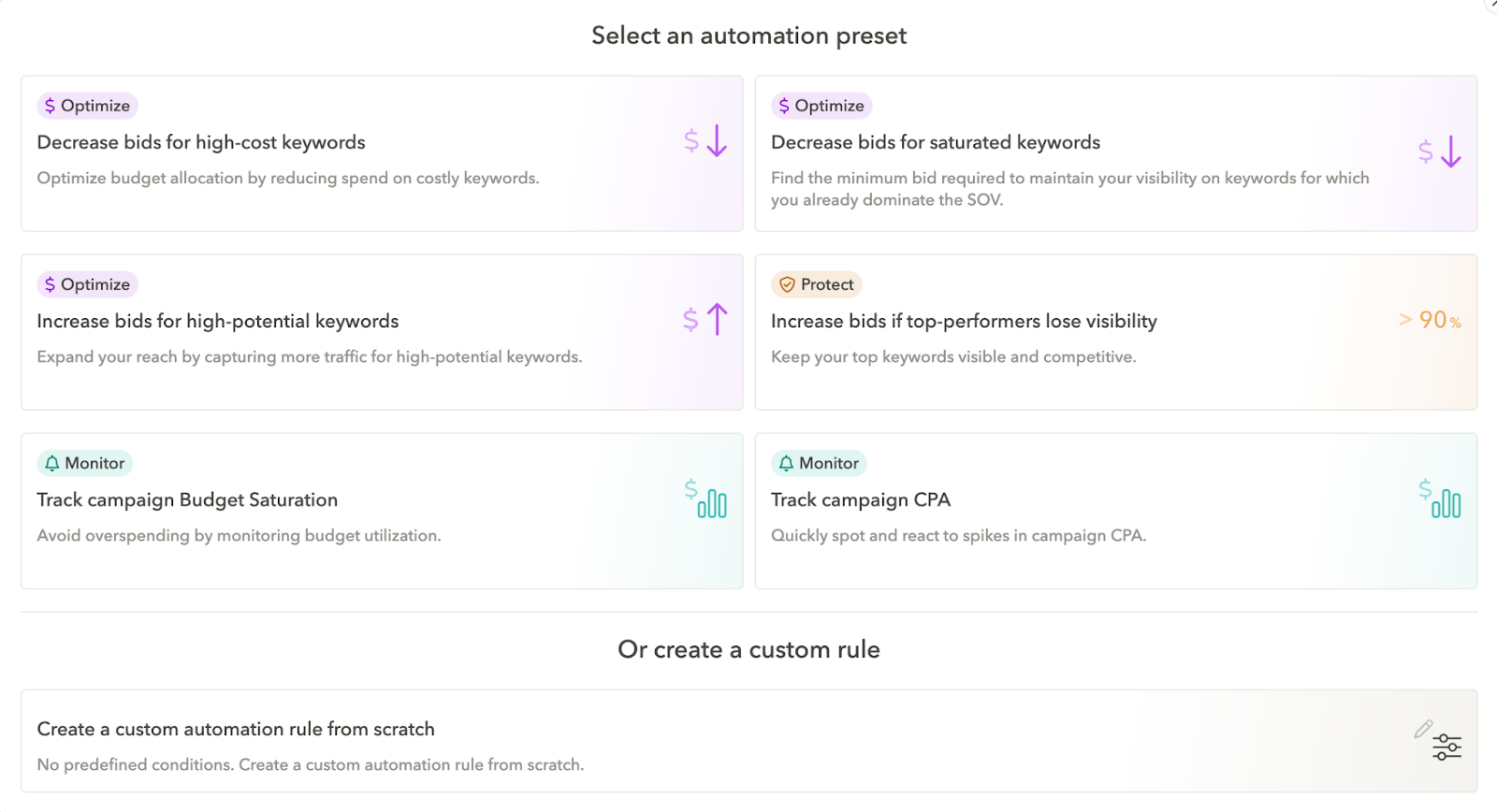
As campaign complexity increases—across geographies, match types, and objectives—manual bid adjustments can become time-consuming. Using tools like AppTweak’s Campaign Manager, you can automate bid changes based on performance thresholds, such as lowering bids when cost per install exceeds a set limit or reallocating budget to high-ROAS keywords.
Adapt bids for different regions
Performance can vary significantly across markets. To maximize ROAS, increase bids in high-performing regions and reduce spend in areas with lower efficiency. Tailored bidding by country or storefront ensures that your budget is optimized for regional dynamics.
By combining intent-based segmentation, real-time data analysis, automation, and geographic optimization, you can build a bidding strategy that scales efficiently and drives sustained performance.
5. Track the right KPIs to guide optimization
Successful Apple Ads campaigns are built on smart decisions and that starts with tracking the metrics that truly matter. To understand performance and optimize for better results, focus on both campaign-level key performance indicators and keyword-level trends.
Core Apple Ads KPIs to monitor:
- Tap-through rate (TTR): Indicates how engaging your ad is in the search results.
- Tap-to-install conversion rate: Measures how well your ad and landing page convert users post-click.
- Cost per tap (CPT): Shows how much you’re paying for each user interaction.
- Cost per install (CPI): Reveals how efficiently you’re acquiring users.
- Return on ad spend (ROAS): Helps assess campaign profitability, especially when paired with attribution insights from your mobile measurement partner (MMP), which help track in-app behavior and revenue.
Expert Tip
With AppTweak’s Campaign Manager, you can monitor all of these Apple Ads metrics at the campaign, ad group, and keyword level for maximum Apple Ads optimization. Our dashboard also lets you filter by region, track performance trends over time, and set automation rules to act on KPIs in real time.6. Avoid common Apple Ads mistakes
We’ve spoken to AppTweak Apple Ads experts and these are the top pitfalls they recommend you avoid when managing your Apple Ads campaigns.
Overlapping keywords across campaigns
A common mistake in Apple Ads campaign management is letting the same keywords appear in multiple campaigns or ad groups. Doing so divides the spend for the same keywords among different campaigns, making it difficult to determine performance and optimize effectively.
This is especially critical in discovery campaigns. These campaigns are designed to help uncover new, untested keywords. If your discovery campaign is still bidding on terms already performing well in your brand, category, or competitor campaigns, it defeats the purpose and causes internal cannibalization.
To avoid this, it’s important to move proven keywords out of discovery campaigns and into your core strategy once they’ve demonstrated strong results. Those same keywords should then be excluded from discovery via exact match negatives to prevent double bidding. In Campaign manager, you can monitor keyword duplication and apply negatives in bulk across campaigns to preserve campaign clarity.
Additionally, establishing clear boundaries between brand, category, and competitor campaigns can help maintain campaign focus and simplify performance tracking. Conducting regular keyword audits can go a long way in ensuring your structure stays clean and purposeful, especially as your campaigns scale.
Putting all your budget into discovery campaigns
As the name suggests, discover campaigns are about helping you uncover new keyword opportunities. So, driving downloads to your app is not the top goal of a discovery campaign.
Finding these new keywords is still quite important though, so to start, we recommend spending 20% of your overall Apple Ads budget on discovery campaigns. The other 80% can be for your brand, competitor, and generic campaigns that are more performance-based.
Overcorrect bids on keywords at one time
Rather than making all your bid adjustments at the same time, only increase or decrease your keyword bids by about 20% at one time. This will help you better assess the performance of your keywords depending on how much money you spend on them. It’ll also help you avoid over or under-spending on select keywords.
Confusing ROI with ROAS
While booth return on investment (ROI) and return on ad spend (ROAS) can be relevant to your Apple Ads reporting, don’t mix up the two metrics.
ROI calculates the profit gained from an advertising campaign by taking into consideration all the marketing efforts made for this campaign (employee salary, training, spend, etc.). In contrast, ROAS calculates how much money you made for each dollar you spent for this campaign.
ROAS is better used to measure the performance of a specific acquisition channel, for instance Apple Ads, whereas ROI measures the overall performance of your marketing campaigns.
Forgetting to add negatives
Apple Ads allows you to define negative keywords, which are terms you don’t want your ads to appear for. Skipping this step can lead to your ads being triggered by irrelevant queries, resulting in wasted budget, lower conversion rates, and skewed performance data.
Without negative keywords, your discovery or broad match campaigns may compete with brand or high-performing keyword groups, causing internal cannibalization and inflating your CPT unnecessarily.
What to do instead:
- Add high-performing keywords from your core campaigns as exact match negatives in discovery campaigns to prevent overlap.
- Exclude low-quality or irrelevant queries based on actual search term reports (e.g., “free,” “for kids” if not applicable).
- Continuously refine your negative keyword list as your campaigns scale and new patterns emerge.
7. Combine Apple Ads with ASO for full-funnel growth
Apple Ads and app store optimization (ASO) are most effective when used together as part of a unified app growth strategy. When these two channels are aligned, they create a performance loop that improves both paid efficiency and organic visibility. In fact, as ASO and Apple Ads experts, this might be one of our top number one Apple Ads best practices.
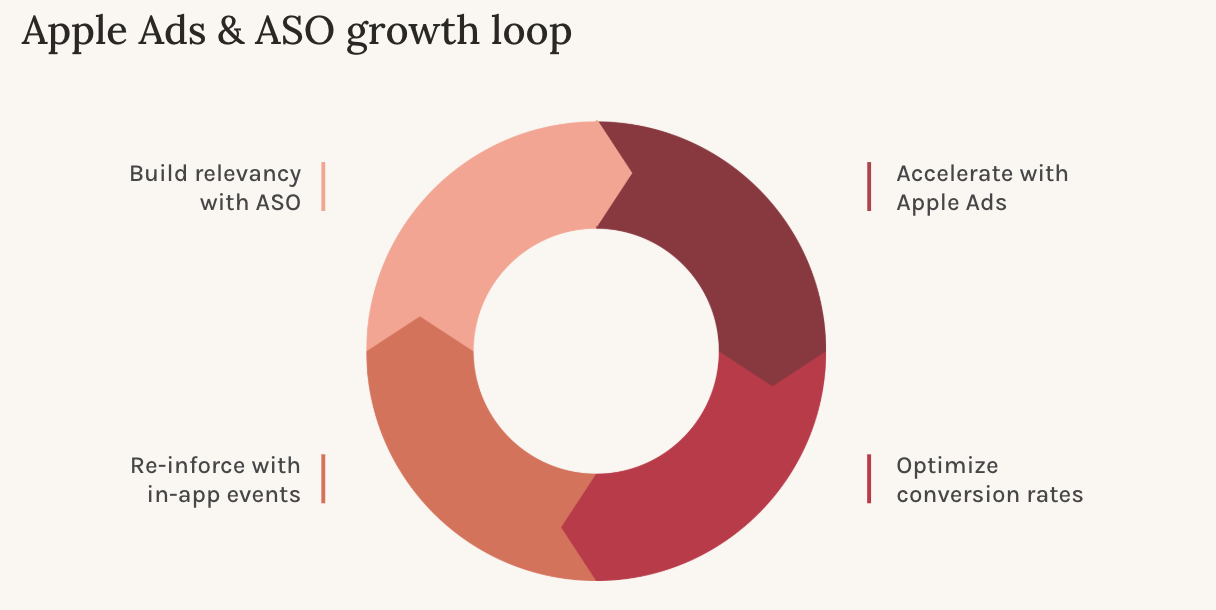
The ASO and Apple Ads growth loop
High-performing keywords from Apple Ads can inform updates to your ASO metadata, such as your app title, subtitle, keyword field, and screenshots. When these keywords begin converting through paid campaigns, reinforcing them in your metadata can help improve organic rankings.
Improved conversion rates from aligned creative assets and messaging also help Apple Ads campaigns win more auctions and drive installs at a lower cost per tap and cost per install. As your organic visibility grows, you benefit from a lower blended acquisition cost.
Check out our blog on the ASO and Apple Ads growth loop.
Ensure consistency across creative assets
Aligning the messaging and visuals in your ad creatives, custom product pages, and app store assets creates a seamless user experience. This consistency reinforces user expectations and can lead to higher tap-to-install conversion rates.
3 benefits of integrating ASO with Apple Ads
These are the top 3 reasons we recommend to clients to align their ASO efforts with that of their Apple Ads campaigns.
- Use Apple Ads to discover new high-intent keywords to add to your ASO strategy.
- Reinforce paid keywords in your metadata to boost relevance and performance.
- Maintain creative alignment between ads, product pages, and app store listings to improve conversions.
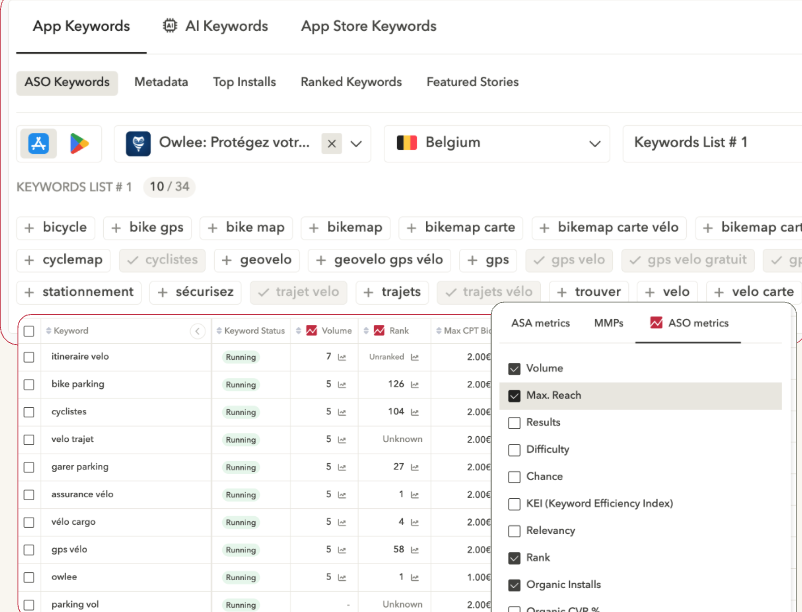
With AppTweak, you can manage both ASO and Apple Ads performance in a single platform, track KPIs across both channels, and automate updates based on integrated insights.
8. Use the right tools and resources to stay ahead
It’s essential to have the best Apple Ads tools on hand to maximize your success on the App Store.
Apple Ads built-in tools
Apple Ads offers native UI with campaign optimization and cost-per-tap pricing, so you can determine the most you’re willing to pay per tap. Apple Ads’ built-in campaign reporting, data visualizations, and attribution features lets app marketers start right away launching their Apple Ads.
Enhance your Apple Ads strategy with AppTweak’s integrated tools
Apple Ads offers a powerful suite of features to help you manage, measure, and grow your campaigns on the App Store. To complement these capabilities, AppTweak provides purpose-built tools that help marketers scale efficiently, uncover deeper insights, and drive long-term growth.
Campaign Manager for Apple Ads
Manage all your Apple Ads search results campaigns in one place. AppTweak’s dashboard supports campaign-level automation, performance tracking by storefront and keyword, and integrations with leading mobile measurement partners (MMPs).
Keyword Intelligence
Uncover keyword opportunities, monitor paid and organic visibility, and benchmark against competitors to continuously refine your keyword strategy.
CPP Explorer
Explore how top apps use custom product pages by keyword and region. Identify new opportunities to improve ad relevance and conversion with targeted landing pages.
Automation rules
Create rule-based automations to adjust bids, pause underperforming keywords, or reallocate budget based on custom performance thresholds.
Localization Insights
Optimize for regional performance by tracking storefront-level trends. Identify high-opportunity markets and tailor creatives and bidding strategies to local behavior.
Real-life win in Apple Ads with AppTweak: SoundCloud
The world’s biggest music and audio platform, SoundCloud, utilized AppTweak to optimize its Apple Ads campaign.The brand optimized keyword discovery, focused on ROAS, and expanded to new markets.
After successfully implementing these measures, SoundCloud saw ROAS increase by 190%, allowing the brand to double its budget for Apple Ads. Read the SoundCloud success story for more details.
Advanced Apple Ads strategies for 2026
Artificial intelligence and automation are playing an increasingly central role in Apple Ads strategy. As campaigns scale across storefronts and user segments, the ability to make timely, data-driven decisions has become essential.
Marketers are using machine learning tools to analyze historical campaign data and forecast performance trends. These systems help advertisers automatically adjust cost-per-tap bids based on evolving conditions, such as changes in keyword competitiveness or fluctuations in conversion rate. Rather than relying on daily manual bid updates, automation allows campaigns to stay agile and efficient, particularly across geographies and product variations.
AppTweak enhances this approach by providing rule-based automation within Campaign Manager. Users can set custom conditions that trigger changes to bids, budgets, or keyword status based on specific performance thresholds.
For example, if the cost per install in a given market exceeds a defined limit, AppTweak can automatically reduce the bid or pause underperforming terms. This kind of intelligent automation not only saves time but also ensures that campaigns remain aligned with your return goals.
Retargeting to catch the ones that got away
Retargeting in Apple Ads enables advertisers to re-engage users who have previously interacted with their app or product page but didn’t convert, churned, or failed to complete desired in-app actions.
This can include:
- Users who tapped your ad but didn’t install
- Users who uninstalled your app
- Existing or lapsed users who haven’t completed a key milestone, such as an in-app purchase, registration, or level completion (particularly relevant for gaming or subscription apps)
With this retargeting capability, advertisers can refine their messaging and creatives to match the user’s prior interaction. For instance, you might direct users who dropped off after registration to a custom product page that reinforces app value or showcases premium features.
Use custom product pages to tailor re-engagement
Custom product pages play a key role in retargeting. You can create ones that are specific to user segments or behavioral triggers.
For example:
- A user who dropped off after onboarding could be shown a custom product page emphasizing ease of use or support.
- A churned paying user might see a custom product page focused on new features or time-sensitive promotions.
By aligning your custom product page content with the user’s previous experience, you increase the chances of re-engagement and conversion.
Localizing for global reach
Performance on Apple Ads often varies greatly from one storefront to another. A campaign that performs well in the United States may not deliver the same results in Japan, Brazil, or Germany. This is why localization is a critical strategy for advertisers aiming to grow their presence globally.
Effective localization goes far beyond translating text. It involves tailoring every aspect of your campaign to reflect local behaviors, preferences, and expectations. This includes adjusting your visuals to align with regional design trends, referencing culturally relevant events or holidays, and modifying your messaging to resonate with local audiences.
Even bidding strategies should be adapted based on country-level performance indicators, such as the average cost per install or tap-through rate in each market.
AppTweak’s Localization Insights feature shows how top competitors are adapting their store assets in each region, helping you identify gaps and opportunities in your own strategy. Learn how you can translate app screenshots for new localization insights with AppTweak.
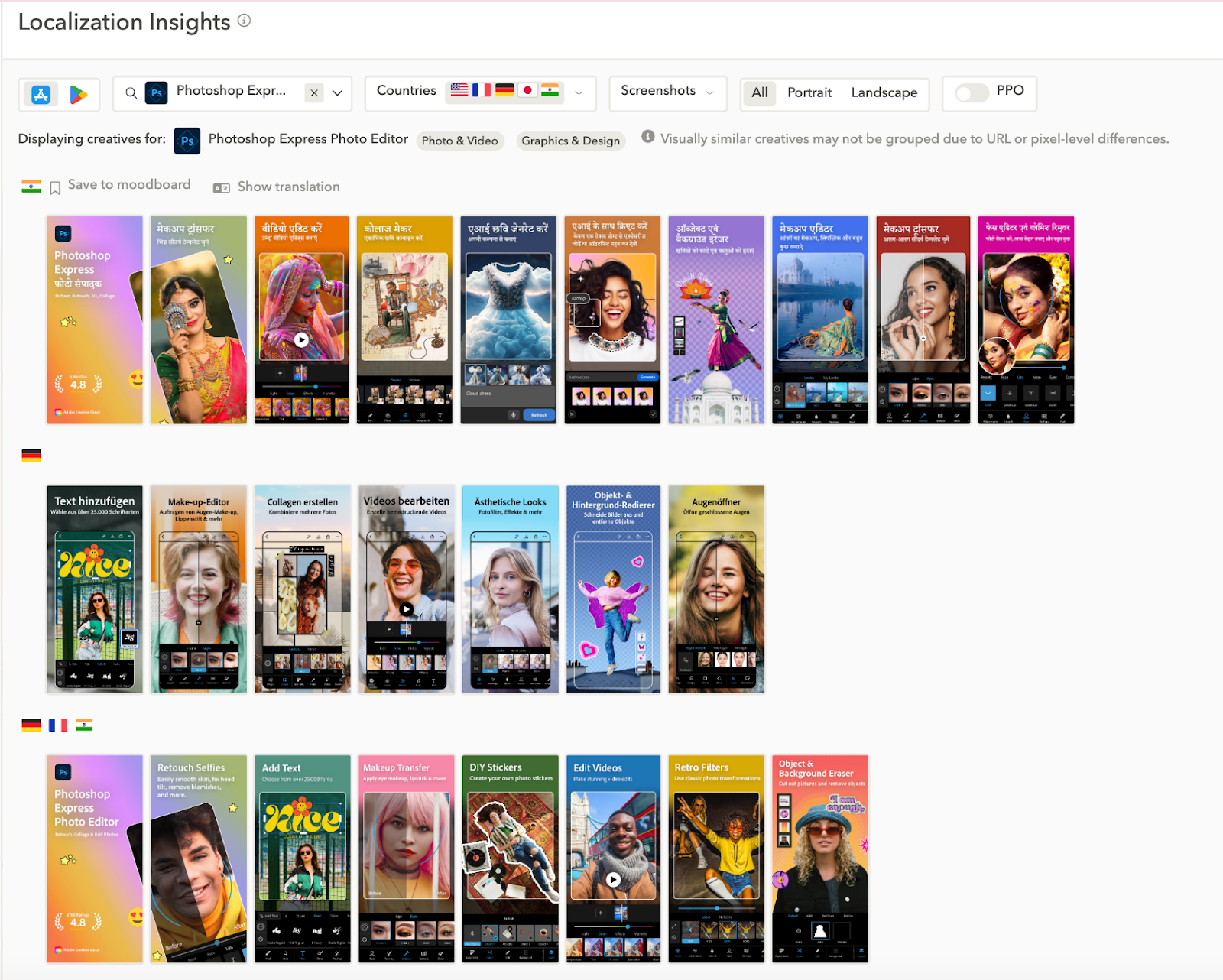
Seasonal and trend-based campaigns
High-impact Apple Ads campaigns often align with what users are already thinking about. Whether it is Black Friday, Valentine’s Day, or a spike in wellness interest every January, timing matters. Seasonal and trend-based campaigns let you capture attention when intent is naturally higher.
But success depends on planning ahead. Top advertisers update their metadata, adjust bids, and launch custom product pages before demand peaks. This ensures their ads and App Store presence are ready when users start searching.
With AppTweak, you can track keyword seasonality and rising trends across storefronts, so you know exactly when to act. Campaign Manager also lets you automate bid changes and budget shifts, so you never miss a moment.
Smart marketers are moving away from reactive tactics and building campaigns around real-time data. With the right insights and timing, seasonal moments become performance drivers, not missed opportunities.
Conclusion: Implement these Apple Ads best practices with AppTweak
Mastering Apple Ads requires more than just running campaigns; it means building a structure that adapts, scales, and evolves. From foundational best practices to advanced tactics like automation, retargeting, and localization, success depends on continuous learning and Apple Ads optimization.
Advertisers who stay ahead of seasonal shifts, align paid and organic efforts, and use the right tools to automate and analyze performance will be best positioned for long-term growth.
With AppTweak’s Campaign Manager for Apple Ads, you can simplify campaign management, act on real-time data, and uncover insights that help you grow faster. Whether you’re optimizing a single storefront or scaling globally, now is the time to refine your approach and lead the curve.
FAQs on Apple Ads optimization
Below we answer your top questions about Apple Ads.
What are Apple Ads, and how do they work?
Apple Ads (previously called Apple Search Ads) promote your app across the App Store four ad placements, including search results, the Today tab, product pages, and the Search tab.
How does Apple Ads impact ASO?
Apple Ads can boost visibility and downloads, which may improve organic ranking and support ASO when aligned with your metadata strategy.
How do I optimize my Apple Ads campaign?
Structure campaigns by intent, use custom product pages, monitor key metrics, and adjust bids based on performance and storefront data.
How do I optimize keywords for Apple Ads?
Using high-intent, relevant keywords with a mix of match types is a top Apple Ads best practice. Exclude low-performing terms and update based on real-time search data.
What is the difference between Apple Ads Basic and Advanced?
Apple Ads Basic automates targeting and bidding. Apple Ads Advanced offers full control of keywords, creatives, bids, and segmentation for deeper optimization.
Are Apple Ads effective?
Yes. Apple Ads reach high-intent users directly on the App Store, helping apps grow through precise targeting and measurable performance.
How do I measure the success of my Apple Ads campaign?
Track tap-through rate, conversion rate, cost per install, and return on ad spend to assess impact and guide ongoing optimization for your Apple Ads campaigns.
What is a good TTR or CR for Apple Ads?
A good tap-through rate for a search results ad is between 5-10%. Strong conversion rates for search results ads vary by category but according to AppTweak data, the average conversion rate for Apple Ads globally is 55%.


More articles in Apple Ads

 Micah Motta

 Georgia Shepherd

 Sukanya Sur