For a growing number of app teams, ASO has started to feel less predictable. Adding the “right” keywords to your app metadata seems to no longer guarantee the same level of visibility it once did. Search results appear more fragmented, and discovery feels harder to anticipate or influence. And AI is often cited as the reason, even when it’s unclear what exactly changed.
The reality is more nuanced. AI is not rewriting the app stores overnight. But it is quietly changing how user intent is inferred and interpreted, and that has meaningful implications for how ASO works today.
This article breaks down how AI is changing the way app stores interpret relevance and intent, and how ASO teams should adapt their strategies in response.
Key takeaways
- AI is not radically changing app stores through visible features, but through incremental improvements in how language, context, and user intent are interpreted.
- App store relevance is shifting from exact keyword matching toward semantic relevance, where multiple signals work together to communicate intent.
- Natural language processing enables app stores to interpret a single query as representing multiple possible user intents, shaping which apps are surfaced across different intent paths.
- Keywords, creatives, reviews, and store pages are increasingly evaluated as connected signals rather than isolated optimization levers.
- Winning visibility increasingly depends on aligning app messaging with inferred user intent across search, discovery, and conversion surfaces.
- ASO success in 2026 increasingly relies on intent-informed keyword clustering, intent-specific store pages, and creative assets that clearly communicate use cases and problems solved.
Don’t make AI the scapegoat for ASO performance
AI has become a catch-all explanation for almost every shift in digital marketing of late. In app marketing, it’s often cited when organic performance dips or rankings feel less predictable, even when the underlying causes are more complex.
But most AI-related changes in the app stores are not dramatic feature launches. They are incremental system improvements that affect how language, meaning, and intent are processed.
For ASO teams, the challenge is not to “optimize for AI,” but to understand how these systems influence discovery and conversion—and adjust accordingly.
What we actually mean by “AI” in the app stores
AI in the app stores goes well beyond headline features, shaping how queries, content, and intent are interpreted during discovery.
From long-standing machine learning to semantic systems
Machine learning, natural language processing, and embeddings have been used for years to classify apps and categories, analyze review sentiment, and cluster keywords based on similarity and relevance. These techniques helped app stores model relationships between apps and queries, but did so largely through statistical patterns rather than explicit intent understanding.
What’s different now is the scale and maturity of semantic systems, particularly natural language processing, which enables systems to analyze patterns in text and interpret meaning and context at scale. Rather than matching queries to keywords verbatim, app store search systems can increasingly connect related phrasing, context, and signals to infer what the user is actually looking for.
In short, traditional machine learning laid the groundwork for relevance, while modern semantic systems are improving how intent is inferred and evaluated. This shift doesn’t replace ASO fundamentals, but it does change how they’re evaluated, from isolated keyword optimization toward broader relevance and alignment with inferred user intent.
Why this matters for ASO teams
Today, the key impact of AI in the app stores is not automation or content generation. AI is acting as the enabler of semantic interpretation: how stores understand what users mean when they search, and how apps align with that intent.
As a result, ASO performance will be increasingly shaped by how well an app’s metadata, creatives, and user signals work together to communicate relevance—not by any single keyword or asset in isolation.
The real shift in ASO: from keyword matching to semantic relevance
Rather than a single update, semantic relevance is emerging through a series of system-level changes in how app stores interpret language, content, and context across search and discovery
How semantic interpretation is changing app store search
Search in the app stores is becoming more semantic. Instead of matching queries to keywords as exact strings of characters, platforms are getting better at interpreting what users actually mean.
In this context, natural language processing (NLP) refers to how search systems analyze and interpret text to understand meaning, rather than matching exact keywords.
This enables:
- broader interpretation of natural language queries
- mapping a single query to multiple possible intents
- more nuanced ranking logic
Evidence suggests this shift is rolling out unevenly across languages and markets, with stronger signals in English. Search behavior changes observed in 2025, particularly in the U.S., are plausibly linked to NLP model updates, but these are best treated as informed hypotheses rather than confirmed facts.
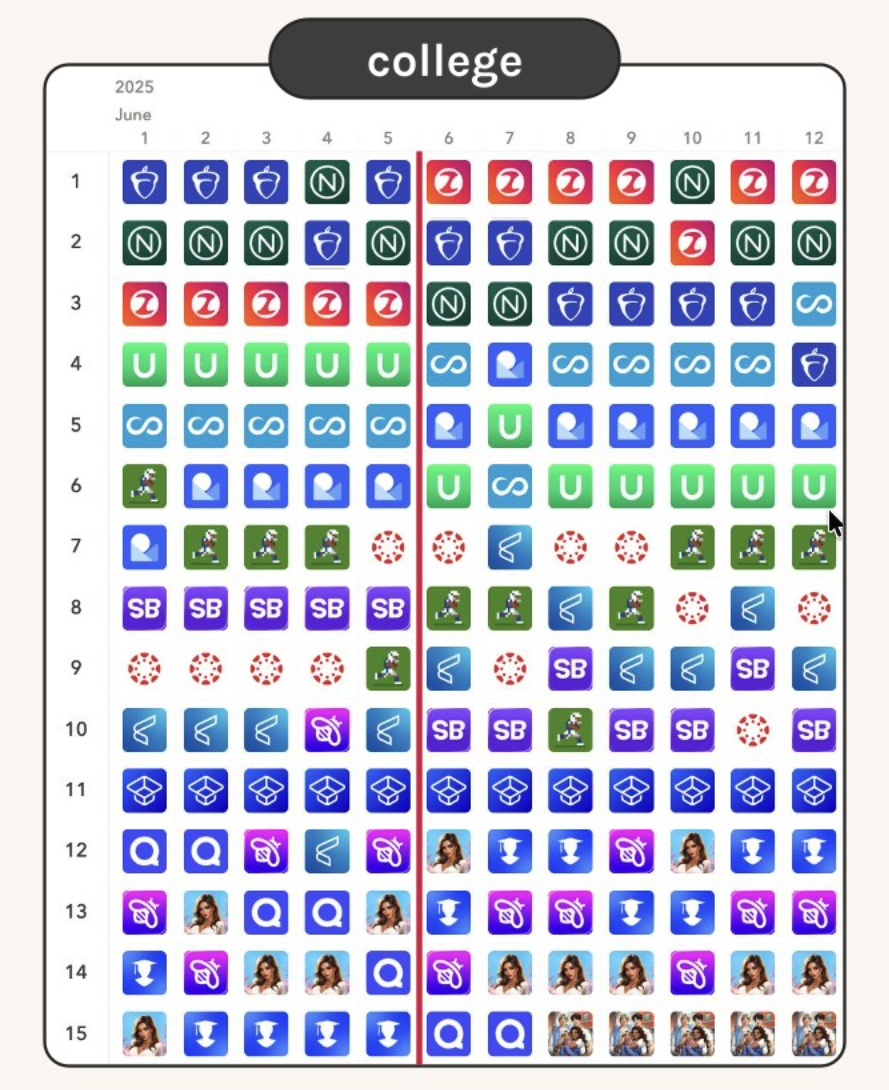
One illustrative example of this shift appears around a major iOS App Store search algorithm change detected by AppTweak on June 5, 2025, as highlighted by Simon Thillay in his 2026 ASO trends article. Following the update, search results for certain queries began surfacing a broader mix of app types earlier in rankings.
For example, the query “college” in the U.S. App Store shifted from prioritizing a single dominant intent to displaying apps aligned with different user motivations side by side. This reflects a broader move toward balancing multiple plausible intents within the same semantic space.
Does Apple index screenshots now?
There is no conclusive proof that Apple directly indexes screenshot text as a ranking factor. However, Apple clearly has the technical capability to extract text from images, as demonstrated elsewhere across iOS (Think: live text, text recognition in photos, accessibility features, etc.)
Screenshots are one of the first elements users engage with in search results and product pages. When the language used in screenshots clearly mirrors user intent—features, use cases, problems solved—it reinforces relevance, reduces ambiguity, and improves decision-making.
From a practical ASO standpoint, the conclusion is simple:ASO teams should assume screenshots contribute to semantic interpretation, not because they are confirmed ranking inputs, but because screenshots increasingly shape how an app’s purpose and value are understood at a glance.
Even if screenshot text is not used for ranking, using clear, user-language phrasing in screenshots improves intent alignment and conversion, which is the outcome that ultimately matters.
Text and visuals increasingly work together to communicate meaning—to users first, and potentially to algorithms as well. Get started now and optimize your app screenshots with these best practices.
Guided Search turns broad queries into intent-driven discovery paths
Google Play introduced Guided Search in 2025 as a discovery mechanism to help users refine broad searches into more specific intent paths. Rather than leaving users to interpret a long, static results list, the store actively nudges them toward clarifying what they’re actually looking for.
Guided Search surfaces refinement options directly in the search experience, encouraging users to move from a general term to a more specific use case or sub-genre. Each refinement represents a different intent and often leads to a different competitive set.
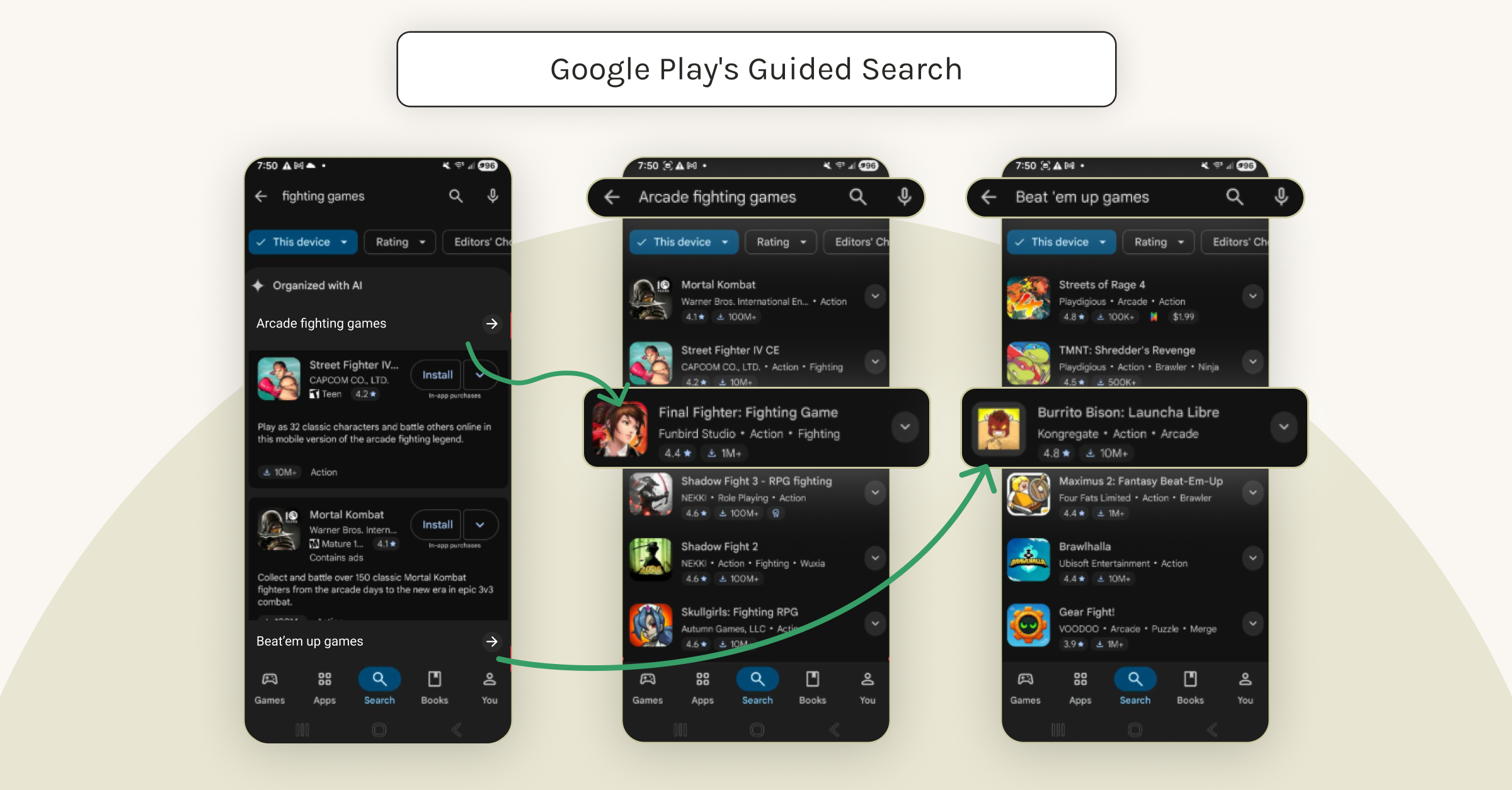
For example, a user who starts with a broad query like “fighting games” may be guided toward refinements such as “arcade fighting games” or “beat ’em up games.” While these terms may look closely related, they reflect distinct expectations around gameplay style, pacing, visuals, and nostalgia. As a result, the apps that feel relevant — and convert well — can differ significantly across each path.
Guided Search doesn’t replace rankings, but it changes how users arrive at rankings. Instead of competing for a single head term, apps increasingly need to be competitive across the intent variants users are funneled into during this refinement process.
The practical ASO implication: winning one broad keyword is no longer enough. Visibility depends on whether your app shows up and resonates across the specific intent paths users are guided toward.
A new mental model for ASO
ASO used to be primarily about being seen for specific keywords. Today, it’s increasingly about how well your app is understood as relevant to the intent behind a keyword.
Intent is expressed by users and inferred by platforms. What ASO teams can influence is how clearly their app’s language and signals support those inferred intents.
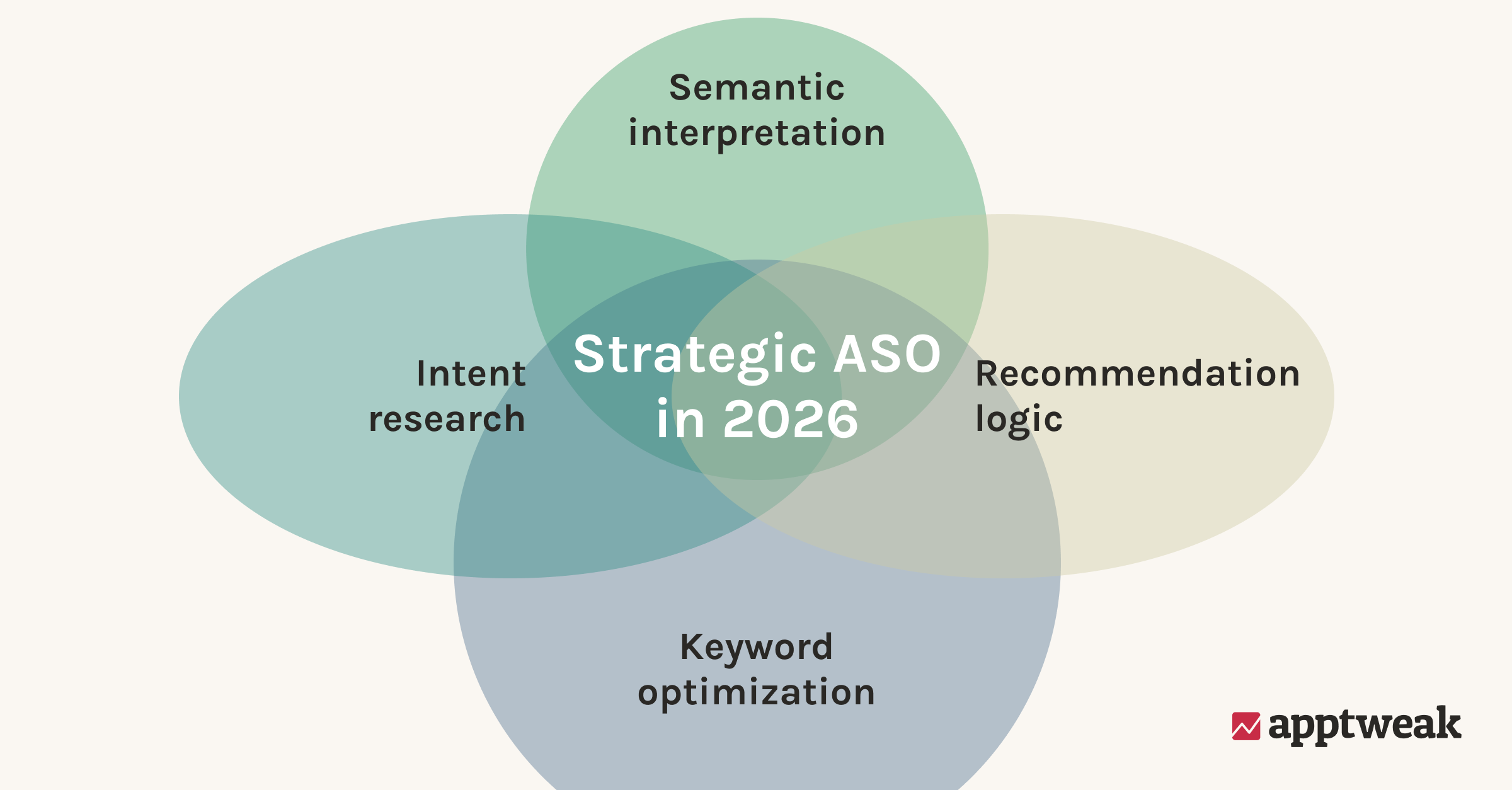
In practice, modern app discovery (and by extension ASO) sits at the intersection of:
- Keyword optimization: Researching, prioritizing, and managing relevant search terms across an app’s store presence
- Intent research: Understanding what users are trying to accomplish and why (not just what they search)
- Semantic interpretation: How app stores process language and signals to infer meaning
- Recommendation logic: how platforms surface apps across search, browse, and other discovery surfaces, including personalized, contextual, and AI-mediated recommendations
Search is no longer the only decision layer. It’s part of a broader process that includes discovery, evaluation, and conversion—often unfolding across multiple surfaces before a user ever installs an app.
While keyword rankings remain a foundational metric, modern app marketing increasingly demands a deeper alignment with how platforms interpret and resolve inferred user intent. In this context, search is no longer the only decision layer and is part of a broader process that spans discovery, evaluation, and conversion.
Why this matters for the future of app discovery
This shift is also visible beyond the app stores. Users increasingly encounter apps through AI-assisted interfaces, where discovery is mediated by systems interpreting signals to infer user intent rather than explicit queries, and often before they ever reach a store. In this vein, the question isn’t “what keyword did the user type,” but “what problem are they trying to solve?”
As organic visibility is increasingly shaped before users ever engage with in-store search, ASO is no longer just about matching keywords to queries. It’s about ensuring an app’s positioning, language, and signals clearly communicate relevance to the intent a user is trying to satisfy—across discovery surfaces, not just within a single search results list.
What intent-informed ASO looks like in practice
Intent-informed ASO starts by rethinking how keywords are grouped and evaluated, treating them as expressions of different user motivations rather than isolated terms.
Build semantic clusters around user intent
Many high-volume keywords represent multiple motivations. Treating them as single targets limits visibility and relevance.
As search becomes more semantic and intent-aware, keywords are most effective when interpreted together rather than optimized in isolation.
To best make sense of this shift, it helps to separate two closely related concepts: semantic clustering and user intent.
Semantic clusters describe what a search is about at a topic or theme level. For example, the semantic theme “music” may include keywords like “music,” “songs,” or “playlists.”
Intent adds an additional layer: why the user is searching. Two users searching within the same semantic theme may have very different intents, depending on context, expectations, and awareness.
For instance, a user searching for “music streaming app” is likely solution-aware and comparing platforms, while a user searching for “listen to songs” may simply be looking for a way to play music, without a specific app in mind. Meanwhile, a query like “2025 podcasts” belongs to a different semantic cluster altogether, even though it may surface some of the same apps.
Effective ASO strategies in 2026 will group related keywords into semantic clusters informed by intent and decide which user motivations the app is best positioned to satisfy.
How to research and define intent-informed clusters
To make this more concrete, here’s an example using Spotify that shows how semantic themes, keyword clustering, and intent decisions translate into real ASO actions.
Step 1: Uncover your semantic themes
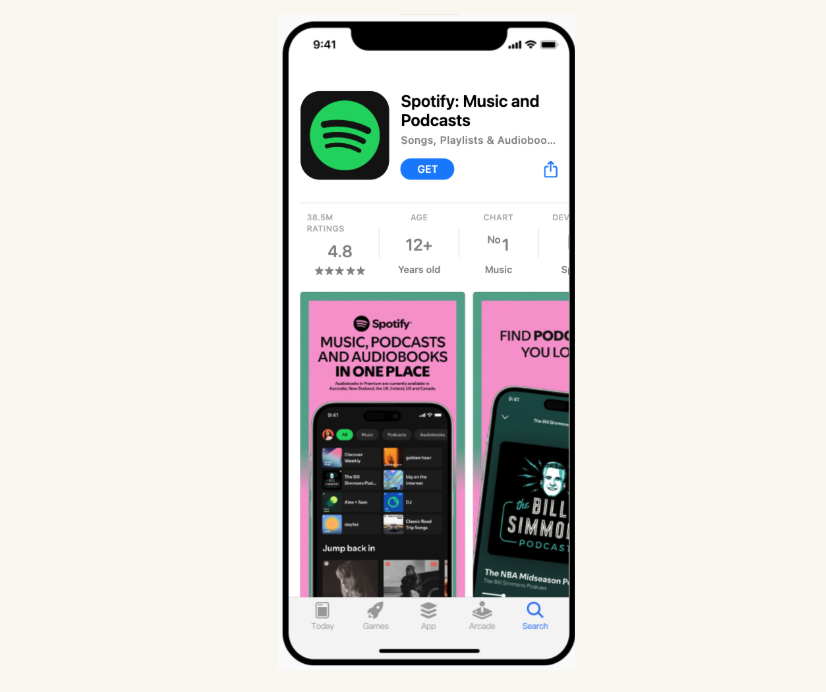
Start by looking at your app’s store page to identify its core themes. At this stage, you are not defining keyword clusters yet, but high-level semantic themes that describe what your app offers.
(AppTweak clients can go to ASO Intelligence —> Metadata —> App Page Preview to start their semantic theme research.)
For example, reviewing Spotify’s title, subtitle, and screenshots clearly surfaces three semantic themes: music, podcasts, and audiobooks. These themes represent topic areas the app covers, not how users search for them yet.
Bonus tip: Also look at your competitors’ app store pages and custom store pages for relevant themes using competition monitoring tools.
Step 2: Validate and build keyword lists per theme
Once your core semantic themes are defined, the next step is to validate them through keyword research and build semantic keyword clusters for each theme. In practice, these semantic keyword clusters are usually managed as keyword lists inside ASO tools, but conceptually they represent groups of keywords tied to the same topic.
The objective here is to map how users search within a given theme, not to interpret intent yet.
Using Spotify as an example, take the semantic theme music. In AppTweak, this means starting a keyword search around that theme (for example, entering “music” or “music app”) and exploring the related keywords users actually search for. This typically surfaces terms such as “listen to music,” “music streaming,” “offline music player,” or “songs app.”
All of these keywords belong to the same semantic theme of music: they describe the same topic space, even though they reflect different user needs.
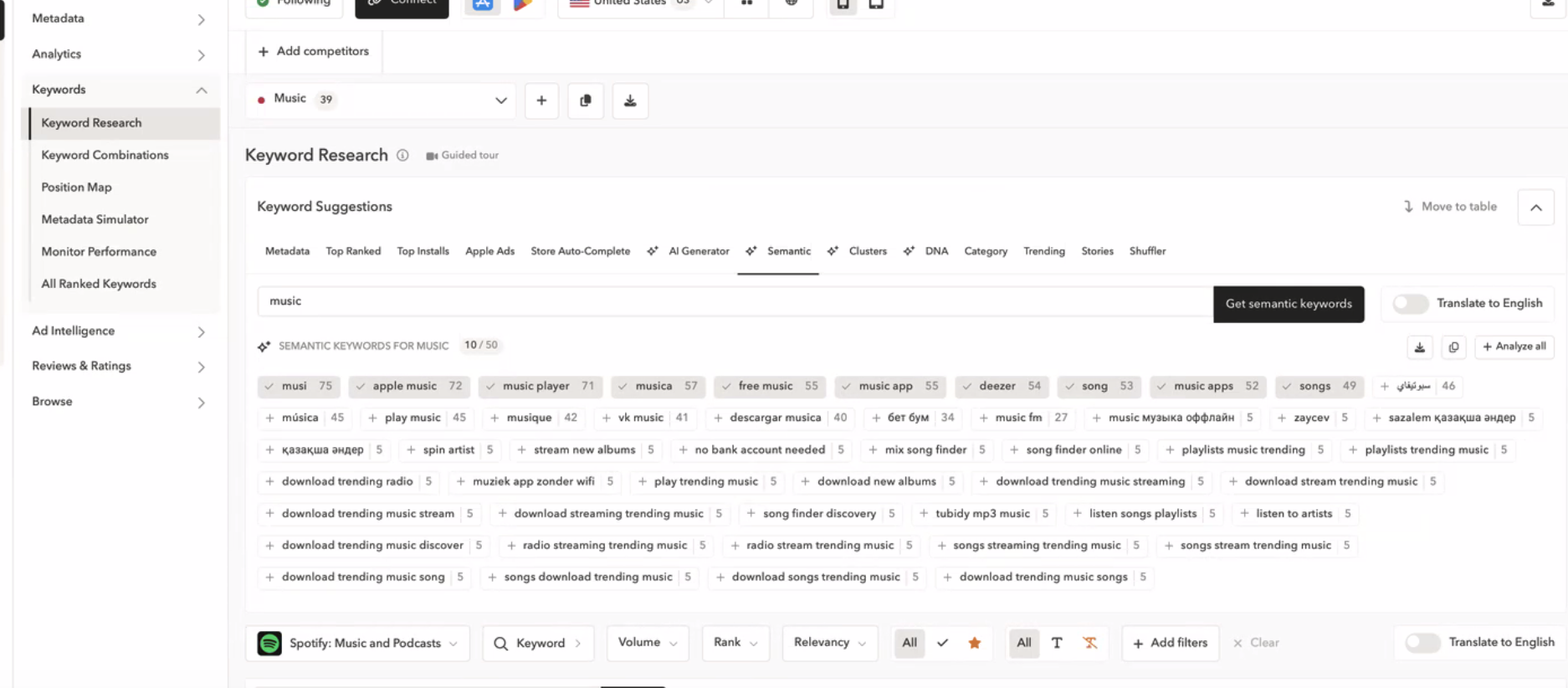
At this stage, keywords are grouped into a keyword list per semantic theme—one list for music, another for podcasts, another for audiobooks. Each list contains keywords that are semantically related to that theme and relevant to the app’s offering.
(AppTweak clients can perform their research by exploring keyword suggestions from Semantic and Clusters within our Keyword Research section.)
Expert Tip
Avoid selecting keywords with low search volume, as this can make intent assessment unreliable in the next step.It’s important to note that these lists are intentionally semantic rather than intent-based. They organize keywords by what the search is about, not why the user is searching. This structure is what enables intent analysis in the next step.
Step 3: Identify and prioritize user intents within each semantic theme
Once semantic keyword lists are in place, the next step is to identify the distinct user intents that exist within each theme. This is where semantic clustering begins to inform real ASO decisions.
Within a single semantic theme like music, not all keywords reflect the same motivation. For example, searches such as “music streaming app” suggest a user comparing platforms, while queries like “offline music player” indicate a user with a specific constraint or context. Although these searches belong to the same semantic theme, they represent different intents.
To surface these differences, ASO teams review each keyword list and look for recurring words or constraints that change what the user is trying to accomplish—such as “offline,” “free,” “streaming,” or time-based qualifiers like “2026.” These modifiers often signal distinct intents within the same semantic theme.
The final part of this step is prioritization. Not every intent uncovered is equally valuable or actionable. Performance indicators such as average ranking and overall reach help teams assess which intents are already performing, which represent growth opportunities, and which may not align with the app’s strengths.
Once priority intents are defined, they directly inform ASO execution. Teams use these intent decisions to determine which themes and motivations deserve explicit representation in:
- Metadata (title, subtitle, keyword fields, long description)
- Store messaging and positioning
- Screenshots and other visual assets
At this stage, semantic keyword lists move beyond research and become decision tools, guiding which user motivations an app chooses to compete for and reinforce across store assets.
Use CPPs and CSLs to support intent variations
The default store page still plays a central role. It sets brand expectations and reassures users arriving from many different entry points.
However, users don’t arrive with the same intent context. Search, browse, ads, and referrals each bring different expectations and motivations at the moment of discovery.
This is where custom product pages and custom store listings allow teams to:
- Tailor messaging to specific intents
- Align creatives with acquisition sources
- Reduce friction between discovery and conversion
These pages help teams align store messaging with different user intents, rather than relying on a single store page to convert everyone.
Use creatives to reinforce intent
As mentioned above, screenshots and icons often act as the first interpretation layer for users. They communicate meaning faster than text and across multiple surfaces.
Effective creatives reinforce:
- The primary use case or user need the app is positioned around
- The problem it solves
- The audience it serves
Creatives help users quickly understand what an app is for and whether it matches their needs. They may, over time, also contribute supporting signals that app store algorithms use to interpret relevance, even if they are not direct ranking factors. Check out our tips to create high-converting screenshots.
Treat reviews as an intent feedback loop
User reviews reflect how people describe the app in their own words. Patterns in review language reveal unmet expectations, misunderstood positioning, and strong value drivers.
Unlike metadata or creatives, reviews capture unprompted language, making them a useful signal for understanding how users interpret an app’s purpose and value.
Review analysis should inform not just replies, but messaging, creatives, and page structure.
As ASO becomes more intent-aware in 2026, understanding how users describe an app at scale becomes increasingly important. Reviews offer one of the clearest sources of user intent language, but only when recurring themes are analyzed beyond individual comments. Tools like AppTweak’s App Reviews Manager help teams analyze review themes at scale and feed those insights back into store page and messaging decisions.
Conclusion: AI is reorganizing how intent works in the app stores
AI is reshaping how intent is inferred, surfaced, and evaluated across the app stores.
The most meaningful shift isn’t new features or visible automation. It’s the expansion of relevance beyond exact keyword matching, toward broader semantic interpretation and intent alignment across search, discovery, and conversion surfaces.
For ASO teams, this doesn’t mean abandoning fundamentals. It means treating keywords, creatives, reviews, and store pages as connected signals that work together to communicate meaning and context. Teams that adapt their strategies around meaning, context, and intent will be best positioned as app store discovery continues to evolve.
FAQs (Frequently asked questions)
How is AI changing relevance in app store search?
AI is changing how relevance is evaluated in app store search by moving beyond exact keyword matching toward greater semantic interpretation of user intent. Instead of relying primarily on whether a query exactly matches an app’s metadata, app stores increasingly analyze meaning, context, and related phrasing to infer what users are trying to accomplish.
Does keyword optimization still matter for ASO?
App keyword optimization remains foundational to ASO and continues to play a central role in how app stores understand, categorize, and surface apps.
What has evolved is how keywords are interpreted and contextualized within the broader search system:
- Keywords are increasingly evaluated in groups rather than as isolated terms
- High-volume keywords often represent multiple user intents and use cases
- Ranking stability is increasingly influenced by whether other signals reinforce the same meaning and positioning
Effective ASO today builds on strong keyword optimization by pairing it with intent research, ensuring that keywords, creatives, and messaging consistently communicate the same semantic meaning across the store presence.
Are app store screenshots used as ranking factors?
There is no confirmed evidence that app store screenshots are directly indexed as ranking factors. However, app stores have the technical ability to extract and understand text from images, and screenshots play a major role in how users interpret app relevance.
From an ASO perspective, screenshots matter because they:
- Communicate an app’s purpose faster than text alone
- Reinforce intent alignment during decision-making
- Reduce ambiguity about features, use cases, and audience
Even if screenshots are not direct ranking inputs, clear, user-language messaging in visuals improves conversion and strengthens overall relevance perception.


More articles in App Keyword Research, App Marketing, Artificial Intelligence (AI)

 Pierre-Antoine Roy