In today’s highly competitive app ecosystem, visibility alone isn’t enough, relevance is what drives installs. Building Custom Store Listings (CSLs) tailored to the right audience allows developers to meet users where they are, with messaging that speaks directly to their needs and increase conversion rates.
In this article, we provide a step-by-step framework that our team at AppTweak used to build and validate a high-performing CSL strategy for a global ride-sharing and delivery app to maximize organic reach and conversion rates across global markets.
Key takeaways
- Custom store listings increase conversion rate by aligning app store messaging with specific audience segments and keyword intent rather than relying on a single default listing.
- Segment definition must combine user motivation, search behavior, and use case differences, such as drivers seeking income versus riders seeking safety and affordability.
- Keyword validation should prioritize high search volume and top 10 ranking positions to ensure sufficient traffic and measurable conversion rate impact.
- Creative execution must reinforce semantic intent across visuals, copy, and localization to prevent relevance gaps between metadata and conversion assets.
- Controlled measurement requires running a CSL with default assets first, then custom assets under identical targeting conditions, and evaluating CVR, store listing visitors, and store listing acquisitions over comparable timeframes.
- Over-segmentation, low-traffic markets, and translation without cultural localization are the most common reasons CSL strategies fail to produce statistically significant growth.
Step 1: Define Your core segments
The first step in developing effective CSLs is understanding who your users are.In this case, we analysed a ridesharing and delivery app connecting drivers, couriers, and riders within a single platform. This diversity created both opportunity and complexity, each segment uses the app differently, searches differently, and responds to unique creative triggers.
Through an initial brainstorming session, we mapped the main audience segments and their potential search behaviors:
- Drivers – motivated by flexibility, autonomy, and income opportunities.
- Delivery – focused on on-demand groceries and food delivery.
- Riders – seeking fast, safe, and affordable transport.
Step 2: Benchmark the Competition
Next, we conducted a competitive review to validate our hypotheses and benchmark best practices.By examining how competitors structure their store listings and creatives across key regions, a clear pattern emerged:
Most competitors either had a separated app for drivers or were optimizing their default store listing for riders, while drivers and couriers remained largely underrepresented in their app store messaging.
This gap revealed an opportunity, creating dedicated CSLs targeting drivers and delivery personnel could increase visibility and conversion rates within these high-intent user groups.
Expert Tip
Use AppTweak’s CSL Explorer to visualize your competitors’ default vs. custom listings side-by-side across markets and keywords. It makes spotting positioning gaps immediate.Step 3: Validate hypotheses with data
Once the potential was identified, we turned to AppTweak’s keyword intelligence to validate it with data.
We analyzed visitors, acquisitions, and search volume for all keywords generating impressions across the main countries to determine where each segment offered the highest organic opportunity. At this stage, two key factors guided our decisions:
- Keyword popularity: High search volume ensures sufficient audience reach.
- Ranking potential: Only keywords where the app ranked within the top 10 results were considered impactful for conversion rate (CVR).
The insights were clear:
- Organic CSLs by keyword targeting Driver-related terms generated substantial traffic and installs in Egypt showing strong potential for segment-specific CSLs to increase CVR.
This validation step transformed initial hypotheses into a data-backed roadmap, helping prioritise markets and segment-specific keyword strategies.
While this case focused on a ride-hailing platform, the same intent-alignment principles are visible across high-performing CSL strategies in other categories.
Step 4: Translate Data into Creative Strategy
With keyword and market priorities in place, the next step was creative execution. Here, data meets design.
Key design principles for CSLs with examples
Below we cover top design tips for CSLs.
Align visuals with keyword intent
When targeting high-intent keyword clusters, your first screenshot should immediately confirm the user’s intent and remove ambiguity.
For example, for Flo’s pregnancy-focused CSL, the first screenshot prominently features a visibly pregnant woman. The creative speaks directly to users searching within pregnancy-related keyword clusters. In contrast, Flo’s default store listing takes a broader positioning showcasing its full suite of tools, including period tracking, ovulation, and pregnancy features.
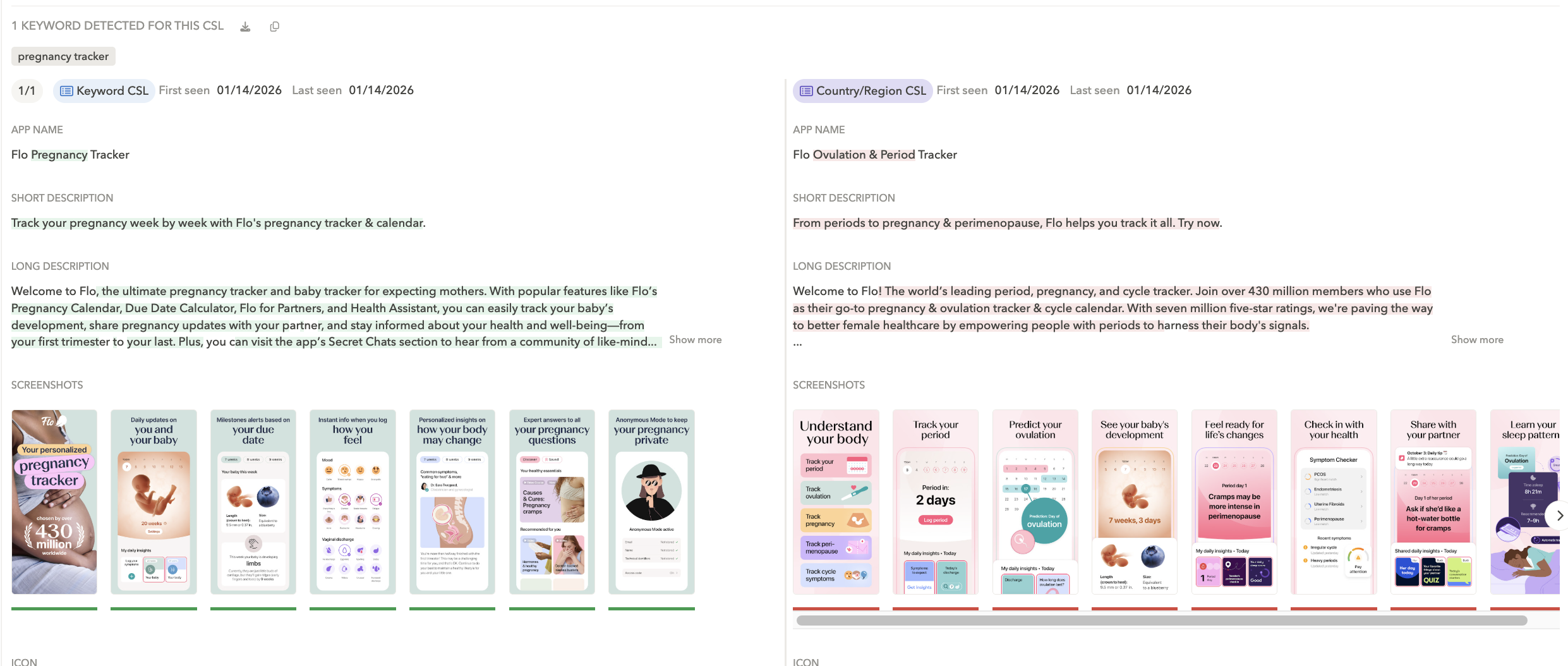
As seen in AppTweak’s CSL Explorer, Flo’s pregnancy-focused CLS compared to the default are tailored to a pregnancy intent.
By narrowing the visual focus in the pregnancy-specific CSL, Flo reduces friction. A user searching for pregnancy support immediately sees themselves reflected in the creative. The default listing communicates breadth; the CSL communicates relevance.
As discussed in our article on How AI is changing relevance in app store search, grouping keywords into semantic clusters is only step one. Once you define a pregnancy-related cluster, your creatives must reinforce that specific user intent. Otherwise, the semantic alignment built in metadata breaks at the conversion stage.
Reflect the user’s motivation in the copy
Visual confirmation is powerful, but the supporting copy should reinforce the user’s goal just as clearly.
When targeting driver-related keyword clusters, messaging such as “Become a driver” or “Gain money as a driver” speaks directly to the underlying motivation: flexibility and income autonomy. The language mirrors what users are trying to accomplish, not just what the app does.
This is where many CSLs fall short. They adapt visuals, but keep generic headlines. If your semantic cluster represents a specific use case or life stage, the copy must reinforce that same intent signal. Otherwise, relevance weakens between search and install.
Localize messaging beyond language translation
Localization goes beyond translation. It adapts the message to the cultural and contextual expectations behind a query.
For example, when targeting train-related keywords in Italy, Omio runs a rail-focused custom store listing that references local brands like Italo and Trenitalia. The creative is clearly centred on train travel, whereas the default listing takes a broader approach, showcasing multiple transport modes and a more general homepage view.
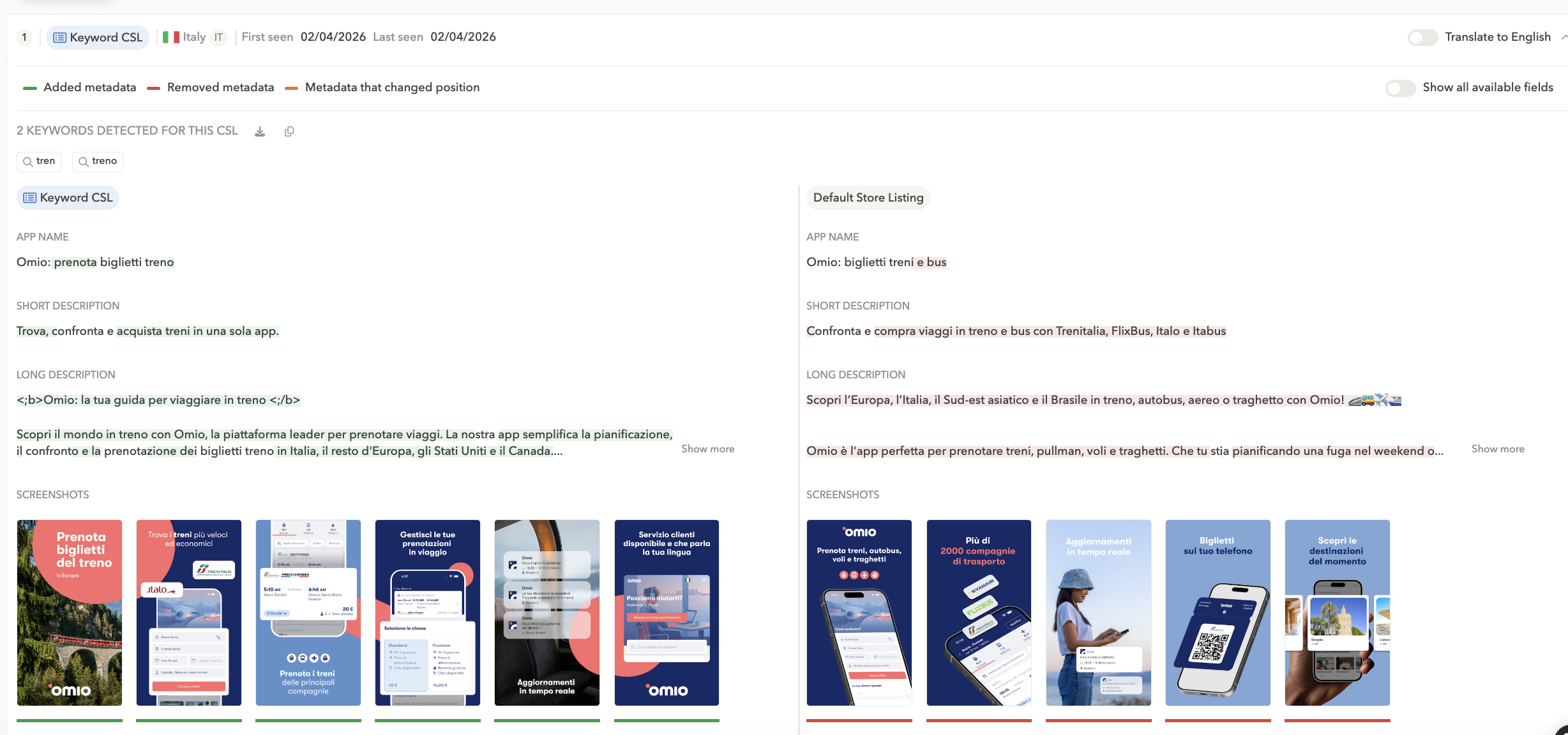
In AppTweak’s CSL Explorer, we can see Omio’s train-focused CLS targets Italian keywords relevant to this intent.
The CSL narrows the value proposition to match the transport-specific intent behind the query, and does so in the local language and context. The result is clearer relevance and reduced friction at the point of decision.
This localization-first design approach made each listing not only visually appealing but also contextually resonant, ultimately driving stronger conversion outcomes.
Step 5: Implement, Measure, and Iterate
To accurately measure the impact of a new CSL, we recommend a two-phase approach:
- Launch the CSL using default assets and metadata first.
Run this initial setup until you have enough data to draw a conclusion, at least one week to avoid weekly seasonality (longer if traffic is low). - Switch to the custom assets you’ve designed.
Keep the targeting and placement consistent, and run the customized assets for at least one week, ideally during seasonally similar weeks to the control, to minimize external variability.
This method enables a clear comparison of conversion rate performance between the CSL running with default assets vs the CSL running with customized assets, using the same placement conditions. For analysis, we focus only on CSL page traffic (not overall traffic), and track three performance indicators: CVR (conversion rate), SLV (store listing visitors), and SLA (store listing acquisitions).
Results: CSL performance lift vs. default listing
After one week of running the CSL with custom assets, we compared performance between both setups (default vs custom) for CSL traffic and observed:
- +3.76% CVR
- +31.03% SLA, while overall SLA on the default listing was decreasing
- +18.69% SLV, while overall SLV on the default listing was increasing, but at a slower pace.
Measurement only matters if it leads to action. Next, we should roll this out across similar markets, where the effort will be lower, since we can reuse the same approach and strategy.
Common CSL mistakes that kill performance
Even strong segmentation strategies can fail if execution lacks discipline. These are the three most common mistakes we see:
1. Launching CSLs in low-traffic markets
If a market doesn’t generate enough CSL page visits, you won’t reach statistical significance.
No data = no decision.
Before launching:
- Validate keyword search volume
- Confirm you rank top 10
- Estimate minimum CSL traffic required to measure CVR change
2. Over-segmenting your keyword strategy
Creating one CSL for “car drivers” and another for “moto drivers” sounds smart, until neither gets enough volume to move the needle.
Cluster keywords by intent, not semantics.
Aim for:
- One CSL per high-volume intent cluster
- Enough keyword coverage to generate meaningful CSL traffic
Precision matters, but fragmentation kills scale.
3. Translating instead of localizing
Translation changes words. Localization changes persuasion.
We’ve seen conversion lift come not from literal translation, but from:
- Currency formatting
- Local earning expectations
- Cultural trust signals
- Social proof relevance
If your visuals look imported, your CVR will suffer.
Conclusion
This research shows how a segment-driven approach can transform app store conversion and performance.By identifying key user segments, validating their organic potential, and tailoring store listings accordingly, developers can achieve sustained growth beyond paid acquisition.
In the dynamic app economy, customization isn’t just aesthetic, it’s strategic.
Effective CSLs bridge the gap between audience intent and app value, ensuring every impression counts.
FAQs
How do custom store listings improve conversion rate?
Custom store listings improve conversion rate by reducing the gap between search intent and on-page messaging. When a user searches for a specific use case, a CSL can directly confirm that intent in the first screenshot and headline.
Conversion rate increases when:
- Visuals immediately reflect the searched keyword cluster
- Copy mirrors the user’s motivation
- Localization matches cultural expectations and context
Without alignment, semantic relevance built through metadata weakens at the conversion stage. CSLs ensure consistency between keyword targeting and creative execution.
How do you decide which keyword clusters deserve a dedicated CSL?
A keyword cluster deserves a dedicated CSL when it combines high search volume with strong ranking potential. Both traffic scale and top 10 rankings are required to generate measurable conversion impact.
A validation process typically includes:
- Analyzing keyword search volume by market
- Filtering keywords where the app ranks in the top 10
- Evaluating visitors and acquisitions generated by those terms
If traffic is too low, statistical significance cannot be reached.
How does AppTweak support custom store listing strategy?
AppTweak supports CSL strategy through keyword intelligence, market-level performance data, and CSL comparison capabilities. The platform enables teams to validate segmentation hypotheses before investing in creative execution.
AppTweak allows marketers to:
- Analyze search volume, visitors, and acquisitions by keyword and market
- Filter opportunities based on top 10 ranking positions
- Visualize default versus custom listings across markets (for both your app and key competitors)
This structured approach transforms CSL development from creative experimentation into a data-backed growth strategy.


More articles in App Marketing, Google Play

 Simon Thillay

 Micah Motta