To succeed on the App Store, you need to consider a myriad of factors: from building a high-quality, user-centric app to continuously monitoring market trends, staying ahead of competitors, optimizing paid acquisition and, of course, constantly refining your ASO strategy.
In this blog, we’ll focus on the latter: how to boost your App Store rankings, which App Store ranking factors matter most, and where to direct your efforts for the biggest impact. You’ll also learn how Apple’s ranking signals differ from those on Google Play, effective ways to monitor algorithm updates, and tips to boost your app’s visibility and climb higher in organic search results.
Key takeaways
- Metadata and keyword relevance are critical App Store ranking factors. Your app’s title, subtitle, and keyword field play a major role in discoverability. Craft them carefully and update regularly based on performance and trends.
- Avoid duplicating the same keywords in the title and subtitle.
- Explore the newly-introduced AI-driven app tags on the App Store. Draw inspiration for your keywords and metadata.
- While the app description isn’t part of App Store ranking factors, it plays a crucial role in converting users and thus, impacts App Store rankings.
- The App Store now indexes in-app events and considers their relevance to user queries.
- Some screenshot captions are now factored for the App Store rankings. Grab this opportunity and optimize the screenshots: add action-driven text with keywords.
- Performance signals outside the App Store listing also impact an app position in search.
- Running Apple Ads can grow visibility and install velocity for your app.
- Custom product pages are a powerful tool to enhance relevance and personalization, and consequently boost app ranking. Now, you can assign distinct keywords for each localization of a single custom product page.
- App Store ranking algorithms evolve frequently, often without official announcements. Make sure to be in the loop: monitor shifts, adopt new features, test and adjust to new App Store ranking factors.
What is the App Store ranking algorithm?
The App Store ranking algorithm is the system Apple uses to determine the visibility and placement of apps in search results, top charts, and featured sections within the App Store. This algorithm is crucial for your app’s discoverability.
There are several App Store ranking factors built into the App Store ranking algorithm that have the biggest impact on app store rankings. These include how well your app’s title, subtitle, and keyword field match user search queries and how relevant they are to your app. Apple emphasizes the importance of using clear, descriptive metadata that reflects the app’s core purpose and functionality. (You can learn how to do app store keyword research here) The App Store ranking algorithm also takes into account downloads, conversion metrics, and user engagement.
Key App Store ranking factors
To grow your app on the App Store, you should implement app store optimization ranking factors. Below are the most influential on-metadata App Store ranking factors.
App title and subtitle relevance
The app title and subtitle are the most heavily weighted text fields for keyword relevance on the App Store. They help the App Store algorithm to understand the core purpose of your app and match it to user queries. Both title and subtitle are limited to 30 characters. Keep in mind that longer titles and subtitles may be truncated on smaller devices, especially in search results.
For optimal results, place the most important keywords at the beginning of the title and subtitle.
Tip: Avoid repeating the same keywords in both the title and subtitle. Repeating keywords in these fields will not improve ranking, and creates a less user-friendly experience.
Gym Workout App & Fitness Plan smartly leverages its title and subtitle to highlight key features. The app title emphasizes core functionality, such as workouts and fitness planning, while the subtitle supplements it by showcasing additional benefits, like weight loss support.
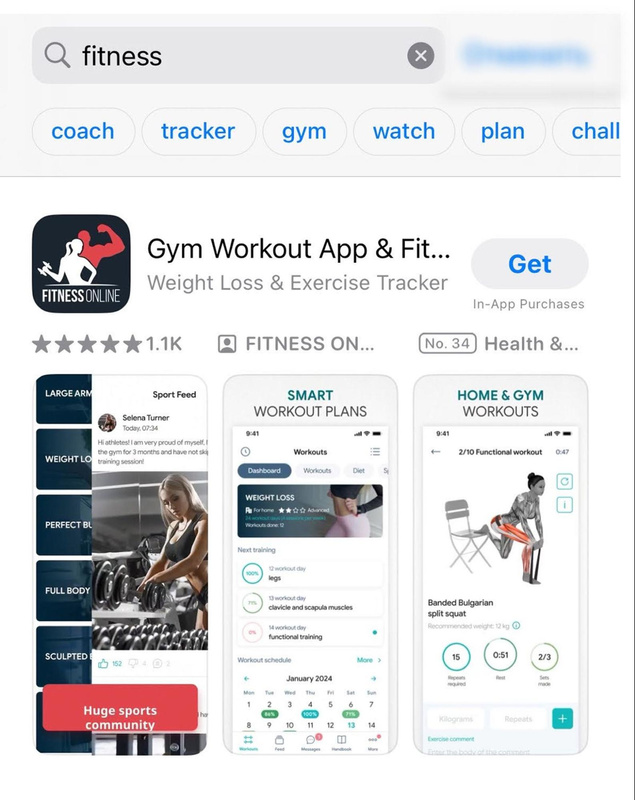
ProFit: Workout Planner, another app in the Health & Fitness category, features a clear and effective title that conveys the core purpose of the app. However, the subtitle feels somewhat limited in scope compared to the app’s broader functionality. According to its description, the app supports workouts both at home and in the gym. Yet the current subtitle may unintentionally suggest it’s designed solely for gym-goers, potentially discouraging and cutting off users who prefer to exercise at home.

Keyword field usage
Keywords are one of the most essential parts of ASO. For example, if you have a messenger app, your goal is to rank first in the App Store search results when users type “messenger” as their search query.
Read how Park+ organically reached the #1 position in its category with the help of AppTweak’s keyword research tools.
The 100-character keyword field in App Store Connect allows you to specify additional search terms that aren’t visible to users but influence search rankings.
Here are best practices for boosting your App Store rankings by effectively leveraging the keyword field.
- Avoid repeating keywords already in your app’s title or subtitle.
- Separate keywords with commas, no spaces.
- Skip articles and prepositions.
- Avoid long-tail phrases: for example “best language learning app for free”. Instead, break this into “language, lessons, free”.
- Don’t use competitor brand names: Apple prohibits this and may reject your app.
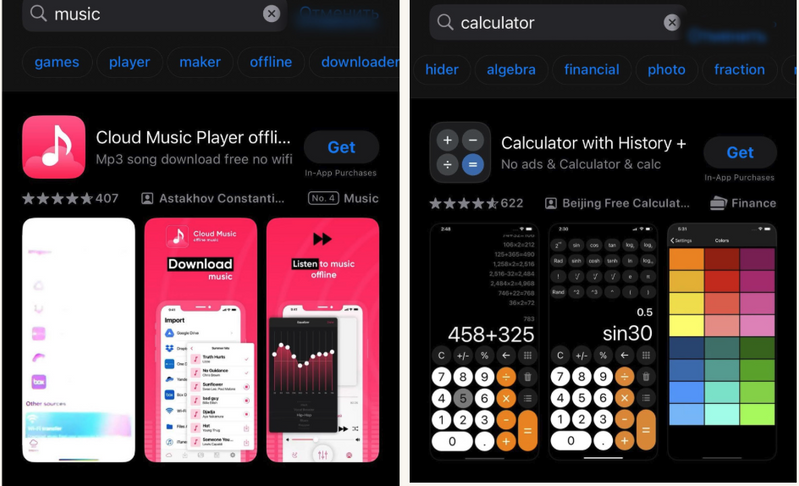
Tip 💡: Apple has introduced AI-generated tags on the App Store to improve app discoverability. These tags can offer valuable insights into how your app is categorized and found by users. You may draw inspiration from these tags and compare them against the keywords in your current metadata to identify optimization opportunities.
Below are examples of AI tags for some of the app categories – Finance and Music.
App description
While the app description isn’t part of App Store ranking factors, it plays a crucial role in converting users. Unlike the title and subtitle, which offer limited space, the description allows you to introduce your app in more depth, clearly explaining its core functionality and benefits. That’s why it should be written for real people (your target users), be clear, readable, and relevant.
A well-crafted description can significantly boost conversion metrics such as downloads and user retention. These behavioral signals, in turn, can positively influence your App Store rankings.
Top 4 tips to improve your App Store description
Here are four easy ways you can improve your App Store description.
- Show the user your app’s value
When writing your App Store description, it’s important to focus on the benefits your app delivers to users instead of just listing the features. Highlight how your app solves problems, makes tasks easier, entertains or adds value to their daily lives. Users are more likely to convert when they clearly understand what’s in it for them.
2. Make it readable
Make your description easy to read by using short paragraphs, bullet points, and clear headings. Most users will skim the content, so structure it in a way that allows them to quickly grasp the key points.
3. Utilize a CTA early on
Be sure to include a strong call to action at the beginning of the description,ideally within the first three lines, since description appears “above the fold” on the App Store.
4. Be culturally considerate when localizing
For international markets, go beyond simplistic translation. Go for app localization: take time to translate your message with cultural and linguistic context for each region. A properly localized description can significantly improve conversions.
Real-life examples of App Store descriptions
FARFETCH takes the bull by the horns with its app description. It starts with a call to action, is well-structured, and includes bullet points and highlighted features.

Tip: Don’t forget to include from one to three most meaningful keywords with the highest volume and lowest competition into your App Store description.
SimCity provides a great example of description for a mobile game. It’s not only enriched with keywords, naturally integrated into the copy, but also engaging and written in a way that captions the attention of the target users.

In-app events and custom product pages
Apple indexes in-app events and considers their relevance to user queries. This makes it a promising App Store ranking factor and opens up new opportunities to rank for seasonal, promotional, or niche content.
In-app events, such as livestreams, tournaments, or challenges, can appear in search results, editorial content, and user feeds.
To make the most out of your in-app events, use strong titles, event badges, and metadata to align with keywords and user interests.
Custom product pages are a powerful tool for mobile marketing, enabling you to create up to 70 tailored versions of your App Store page, each designed to resonate with specific audience segments or marketing campaigns. By aligning visuals, messaging, and features with user intent, custom product pages enhance relevance and personalization, and consequently, impact conversion rates and boost App Store rankings.
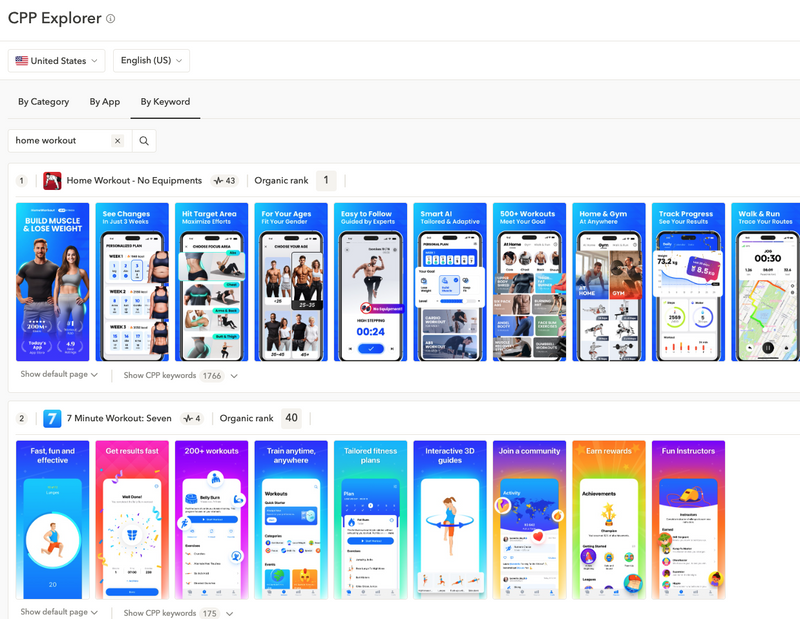
At WWDC 2025, Apple recently enhanced this tool by introducing keywords for custom product pages (CPPs). This enables you to surface the most relevant version of your App Store page in organic search results based on a user’s specific intent. When users type a query with a keyword you’ve assigned to a certain custom product page, that particular CPP will be shown instead of the default page. Now, you can assign distinct keywords or a set of keywords for each localization of a single custom product page. This allows you to target region-specific search intents more precisely. For example, below we can see the app Home Workout optimizing the U.S. version of a CPP for “home workout” while tailoring the U.K. version for “gym tracker,” all while utilizing the same custom product page.
In July 2025, Apple introduced a major change, allowing CPPs to show in organic App Store search results! How does that work? You assign multiple keywords from your keyword field to a CPP, and when your app ranks for one of the assigned keywords, the matching CPP can appear instead of your default product page in search results. With this, the keyword field becomes a powerful new visibility lever to pay careful attention to. Learn more about leveraging organic custom product pages.
Additionally, you won’t need to submit your custom product page for review when updating keyword targeting alone. This makes it much easier and faster to test and refine localized campaigns without disrupting your live product pages.

Tip: Pair custom product pages with Apple Ads to improve relevance and conversion.
Use different screenshots, keywords, CTAs and feature highlights depending on the user segment.
Key factors outside of your App Store listing that impact rankings
Optimizing your metadata is just one piece of the puzzle. The App Store also evaluates key performance signals outside of your listing to determine your app’s visibility and ranking.
While your App Store listing plays a crucial role in App Store optimization ranking factors, there are also several external factors that significantly impact your position in search results and overall visibility.
Download volume and velocity
A high number of downloads, especially over a short period, shows strong user interest and can boost your App Store ranking. Total downloads and velocity (downloads over time) are strong ranking signals.
Conversion rate from search
How many users install your app after seeing it in search results? A strong conversion rate tells the algorithm that your app is relevant, and this will most likely improve your App Store ranking.
User ratings and reviews
Ratings and reviews influence both your app’s credibility and ranking.
Apps rated under 3.5 stars have significantly reduced visibility, while apps rated above 4.0 correlate with higher keyword rankings and search discoverability. Consistently positive feedback reflects high quality of your app and user satisfaction. Find ASO benchmarks for ratings and reviews in our ASO report.
The North Face increased its app ratings from 3.68 to 4.23 with AppTweak. Want to enhance your app ratings? Start a free trial now
Retention and engagement signals
The App Store prioritizes apps that users keep and engage with as these signal user satisfaction. Metrics like session length, churn rate, daily active users, and uninstall rate all play a role for App Store rankings.
App updates and release cadence
Frequent, quality updates show ongoing support and responsiveness to user feedback, which are rewarded by the App Store algorithm. Crash rate, and general performance issues, such as loading time, impact visibility. A poorly performing app may be penalized and moved lower in search results.
By addressing bugs and providing new features and content, you’re improving app performance and likely engagement. This in turn, can lead to improved rankings.
New: Text on the screenshots
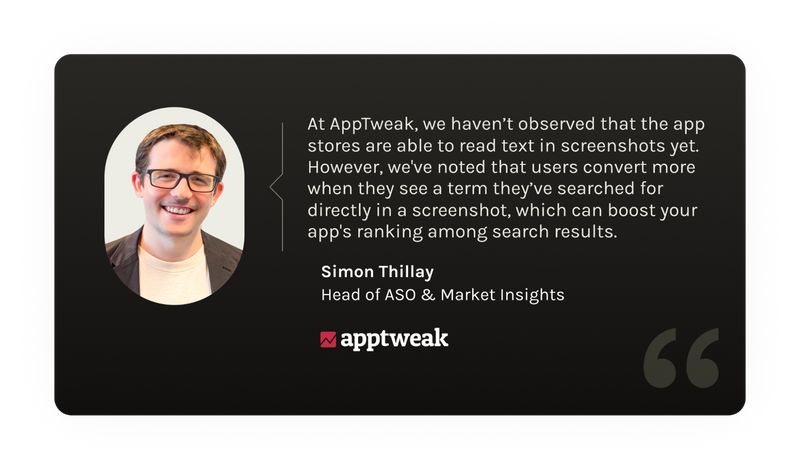
Since June 2025, there’ve been discussions in mobile marketing communities suggesting that text on screenshots might have become one of the App Store ranking factors.
However, there has been no official confirmation from Apple that text on screenshots is factored into App Store search rankings. That said, as one of the most important visual elements of an App Store product page, screenshots’ design, the clarity and relevance of captions and CTAs have a direct impact on the conversion rate.
Example: Use screenshot text to match users’ search intent
Prequel, a Photo & Video app, ranks at the top of the search results for the keyword “photo”. This could be attributed to strong ASO, particularly well-optimized keyword usage. But the app also reinforces relevance by featuring the word “photo” in the first two screenshots, which might amplify the effect.
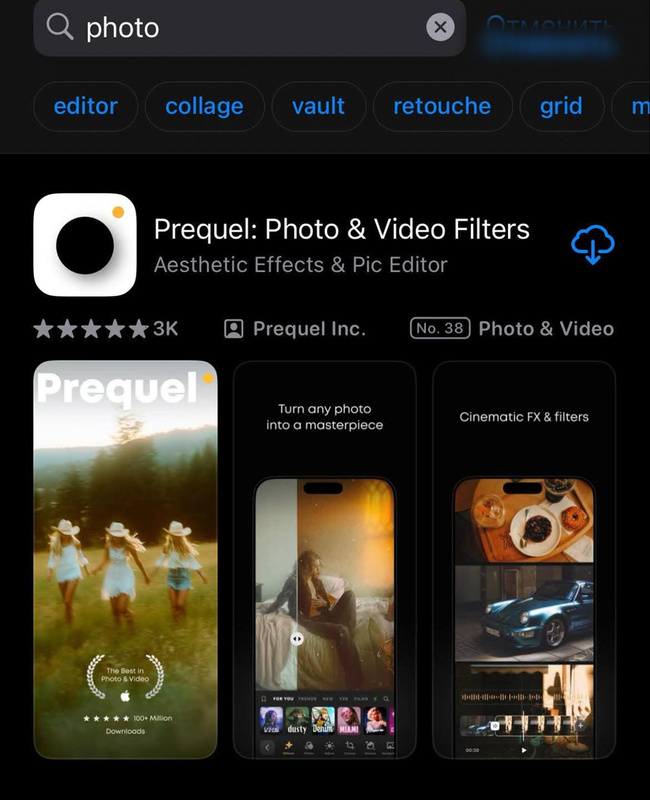
Tip: Replace passive or generic screenshot captions with more engaging, action-oriented copy that includes clear calls to action.
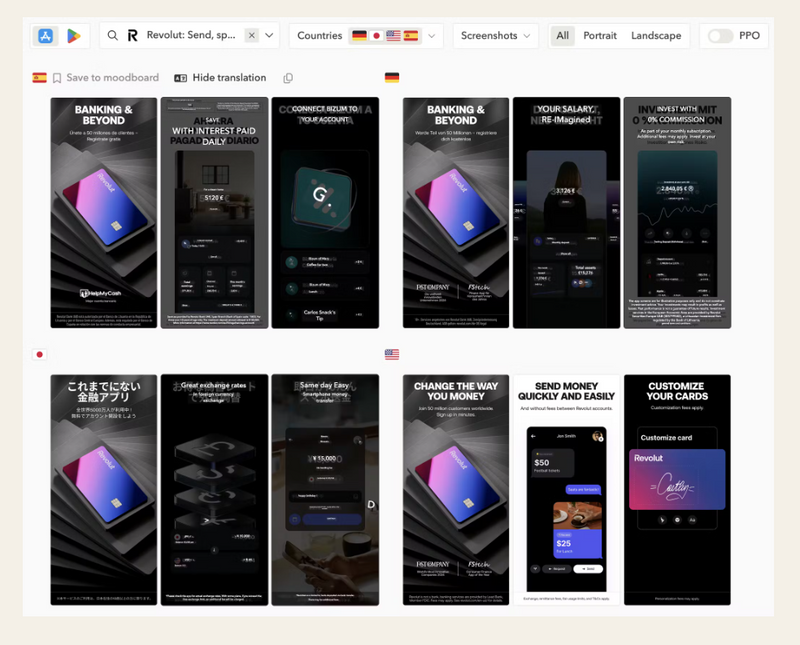
AppTweak’s Screenshot Translations will help you localize screenshot captions for various markets. Learn more about how you can Translate app screenshots for new localization insights.
Additional factors influencing App Store visibility and performance
To ensure you’ve covered all of your bases, check out these other factors that can impact your App Store rankings and conversion.
Apple Ads impact
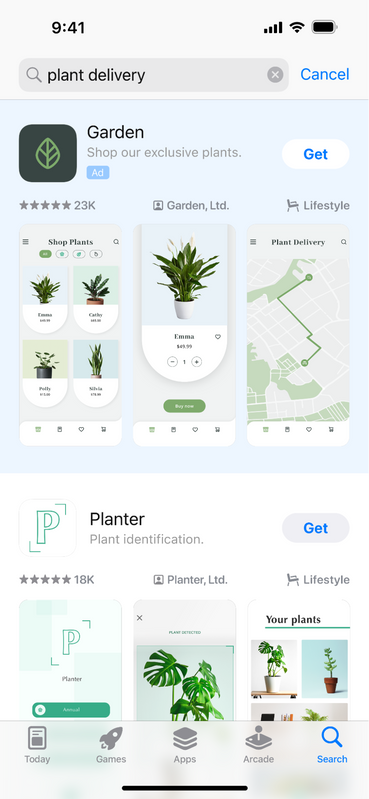
If you run Apple Ads, you basically increase the chances of occupying the top spots and not leaving a chance for competitors.
Running Apple Ads can grow visibility and install velocity for your app, indirectly boosting organic App Store rankings. In a nutshell, when you run an Apple Ads campaign, you increase the chances of occupying the top spot in the search results. Learn more how Apple Ads can boost your organic keyword ranking.
Featuring and editorial curation
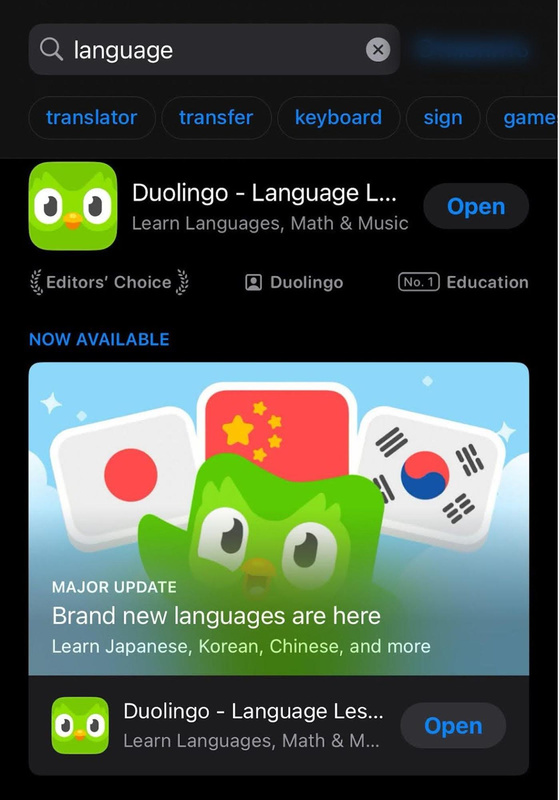
Being featured by Apple significantly increases downloads and improves ranking signals. Focus on design, innovation, and new great features to increase your chances. Remember, as features are curated by humans (and not algorithms), earning a featuring means your app appears innovative and matches Apple’s guidelines.
For example, Duolingo introduced new languages, an important and valuable update that rightly earned the app a spot in the Editor’s Choice.
App localization and regional ranking
Localizing your App Store product page, including title, subtitle, metadata, and visuals, boosts discoverability in specific regions.
Pro tip: Use AppTweak’s brand new feature and translate text on app screenshots at lightning speed to get insights, identify high-impact markets, and optimize region-specific keywords.
App size, performance, and compliance
Smaller app sizes often lead to higher conversion rates, especially in regions with limited storage or bandwidth.
Other factors influencing your app’s ranking on the App Store include consistent performance and strict compliance with the App Store guidelines are essential for app visibility and high App Store rankings.
What’s the difference between App Store and Google Play Store ranking factors?
Although the App Store and Google Play both aim to showcase the best, most relevant apps to users, their ranking algorithms function quite differently as we highlight in the article ASO differences between the App Store and Google Play.
One major difference lies in how they handle keywords. The App Store uses a dedicated keyword field of 100 characters, and places heavy emphasis on keywords in the app’s title and subtitle. Google Play indexes keywords throughout the app’s full description, especially the first few lines, making it more similar to traditional web SEO.
Metadata indexing also differs between the two platforms. On the App Store, keyword visibility is limited to the title, subtitle, keyword field, and now also keywords on the screenshots. Google Play Store ranking, however, depends on the entire app description and scans it for keywords, so it’s essential to strategically place them throughout the text.
App performance plays a critical role in both stores, but Google Play is often more rigorous. Both platforms consider crash rates, app responsiveness, and battery usage, but Google Play is especially sensitive to performance issues like Application Not Responding errors.
While both stores factor in reviews and ratings, favoring apps with frequent, high-quality feedback, Google Play may also consider the responsiveness of developers to user reviews.
Find more details in our blog Which factors influence app rankings on Google Play?
How to monitor and respond to ranking algorithm changes
App Store ranking algorithms evolve frequently, often without formal announcements. To stay competitive, it’s essential to proactively monitor shifts and adapt your strategy accordingly.
Start by tracking keyword performance and visibility on a regular basis. Use ASO tools like AppTweak to monitor keyword rankings, category positioning, and competitor movements. A sudden drop or spike may indicate an algorithm update.
App Store Algorithm Change Detector by AppTweak
Also, be part of the mobile marketing community. Check your LinkedIn feed, follow blogs, official App Store news, and ASO-focused channels where changes are often spotted and discussed early.
Conclusion
When it comes to App Store rankings, holding a top spot doesn’t mean it’s time to relax. The App Store algorithms and market trends are constantly in flux, and there’s always room to grow. Stay proactive: roll out meaningful feature updates, monitor and respond to user reviews, and update your app to reflect some of the overlooked App Store ranking factors mentioned above. Adopt and test Apple’s latest features, and adapt quickly to algorithm changes. Reaching the top of the App Store is just the beginning. Continuously ranking on the top of the App Store is an ongoing , evolving journey that requires patience and ongoing effort.
FAQ
What are the main App Store ranking factors?
App Store rankings are primarily influenced by keyword relevance, metadata, download volume and velocity, user ratings and reviews, app performance, and retention. Regular updates and strong conversion rates are also among top App Store ranking factors.
Does Apple use downloads to rank apps?
Yes, downloads do play a role in app rankings, particularly for the Top Charts. However, Apple emphasizes that downloads are just one of many signals. The algorithm considers quality and engagement metrics as well, such as retention rate, ratings and reviews, and crash history, to ensure that high-ranking apps aren’t just popular, but also provide value to users. This rewards apps that deliver consistent, long-term performance.
How do reviews affect App Store rankings?
Reviews impact App Store rankings by influencing your app’s overall rating, trustworthiness, and conversion rate. Positive reviews can lead to higher visibility and better placement in search and category results.
Manage and analyze App Store reviews through AI and automation in AppTweak.
Does Apple Ads affect organic rankings?
Yes, Apple Ads can indirectly influence organic rankings. While paid campaigns don’t directly affect your position in organic search, increased visibility and downloads from ads can improve key performance metrics, like install velocity and conversion rate, which are factored into the App Store ranking algorithm. In this way, well-optimized Apple Ads campaigns can positively impact your organic growth over time.
How often should I update my app to maintain rankings?
Aim to update your app every 2–4 weeks. Regular updates signal active development, help fix bugs, improve performance, and keep your app aligned with user expectations. Even small updates can positively impact visibility and user trust.


More articles in Advanced ASO

 Pierre-Antoine Roy