
Downloads. Revenue. And now, active users.
Monthly active users (MAU) data is here. A new value every day, for every app and game in Market Intelligence.
See the true size of a competitor’s audience, then the ASO and Apple Ads moves behind its growth, without ever leaving AppTweak.
- AppTweak Market Intelligence now estimates monthly active users (MAU) for every app and game it covers on the App Store and Google Play, as an add-on to Market Intelligence Enterprise plans.
- AppTweak calculates a new MAU value every day, instead of one value after the month has closed like most providers, so teams can see when a competitor’s active audience grew and how quickly it fell back.
- AppTweak’s MAU uses the same rolling windows as App Store Connect and Google Play Console, so teams can check its trend against their own app’s console data.
- AppTweak combines market data with ASO, Apple Ads and AI visibility in one platform, so marketers can act on MAU data without ever switching tools.
What MAU tells you about your market
Downloads measure reach. MAU measures the audience an app actually has. Of all the numbers you report, it’s often the one leadership asks about first.
How big is a competitor, really? Two apps can have similar downloads and very different audiences. MAU shows which one people use, so you can size competitors for a business case based on their real audience.
Did their efforts work? When a competitor runs a campaign, ships a feature or enters a new market, a download spike is only half the answer. MAU shows whether their active audience grew with it, and whether it was back to where it started a few weeks later.
“For years, our customers asked us for active user data, and many of them kept a separate tool just for that.
Now they can follow an app’s MAU every day, right in AppTweak, instead of waiting for one number once the month has closed. That’s the detail growth decisions need, and no other tool offers it.
Adding MAU is one of the biggest steps we’ve taken in Market Intelligence. I’m proud it’s built to the standard our customers trust.”
– Olivier Verdin, Co-CEO and Co-Founder of AppTweak
Two apps, two metrics, two winners: downloads vs. MAU
To see the difference, take the official apps of two major US sports leagues: Major League Baseball (MLB) and the National Football League (NFL). Their seasons give fans very different reasons to open the app.
Baseball teams play almost every day from late March to late September, with the playoffs in October. The NFL season starts in early September, with one game a week per team, mostly on Sundays.
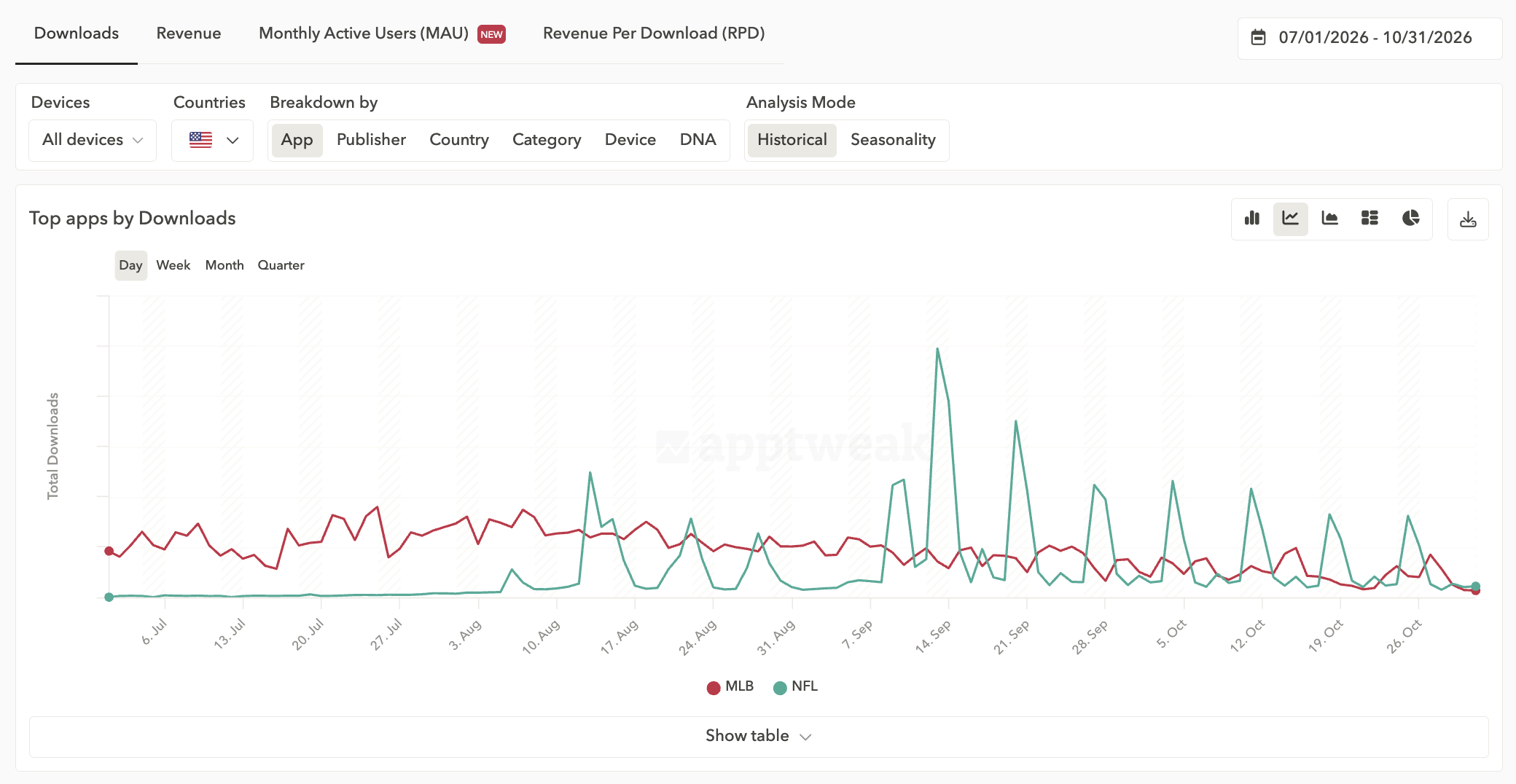
Look at downloads, and the NFL app pulls ahead. From late summer, its installs spike around every game weekend, peak on the season’s opening weekend and overtake MLB. Meanwhile, MLB’s downloads fall away as baseball’s regular season ends.
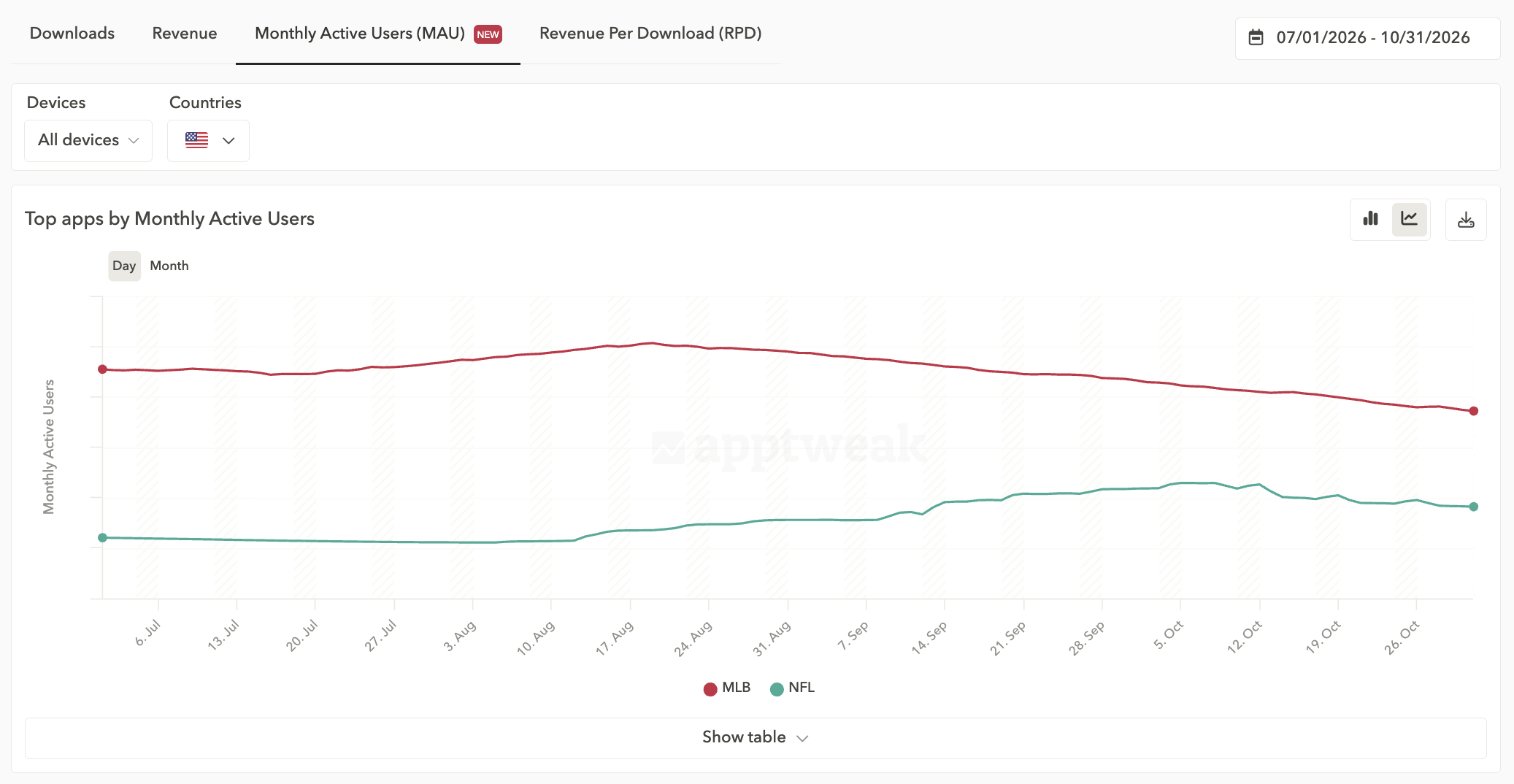
Now look at MAU. The MLB app keeps the bigger active audience the whole time, while the NFL app’s audience grows through September without catching up. Daily games likely give baseball fans a reason to open the MLB app every day; weekly games bring NFL fans back in bursts.
Downloads alone make the NFL look like the winner. Add MAU, and the picture is complete: the NFL app is winning new users, while the MLB app has the bigger audience.
MAU you can monitor as it moves
Two things make AppTweak’s MAU different: how often it updates, and how directly you can compare it with your own data.
No waiting for month-end
AppTweak gives you a new MAU value every day, the same way the app store consoles do. Other providers make you wait until the month is over for a single value.
But one value per month can’t show how an app’s audience changed along the way. With MAU reported daily, you see when an app’s audience started growing after a launch or a campaign, how far it went and how quickly it dropped back, while you still have time to act.
Check it on the app you know best
We could tell you how accurate we think our MAU is. We’d rather you see for yourself. Since AppTweak reports MAU using the same rolling windows as your app store consoles, you can put our MAU next to your own app’s data, day by day. Once you’ve seen how it trends for you, you’ll know how to read it for every competitor.
Market Intelligence shows who’s growing. AppTweak shows you how.
Here’s what you can do in AppTweak’s Market Intelligence, now with MAU:
- Size any market: see the top apps by MAU, downloads or revenue in any country, store category or DNA subcategory (200+ for apps, 70+ for games).
- Find your real competitors: filter apps and publishers by downloads, revenue, growth, MAU, release date, HQ and more.
- Benchmark your performance: save competitors as a group and track their downloads, revenue and MAU against yours over time.
- Map a publisher’s entire portfolio: see every app they own and how each one performs on downloads, revenue and MAU.
- Time your moves: understand when download demand peaks in your market, and plan launches and campaigns ahead of it.
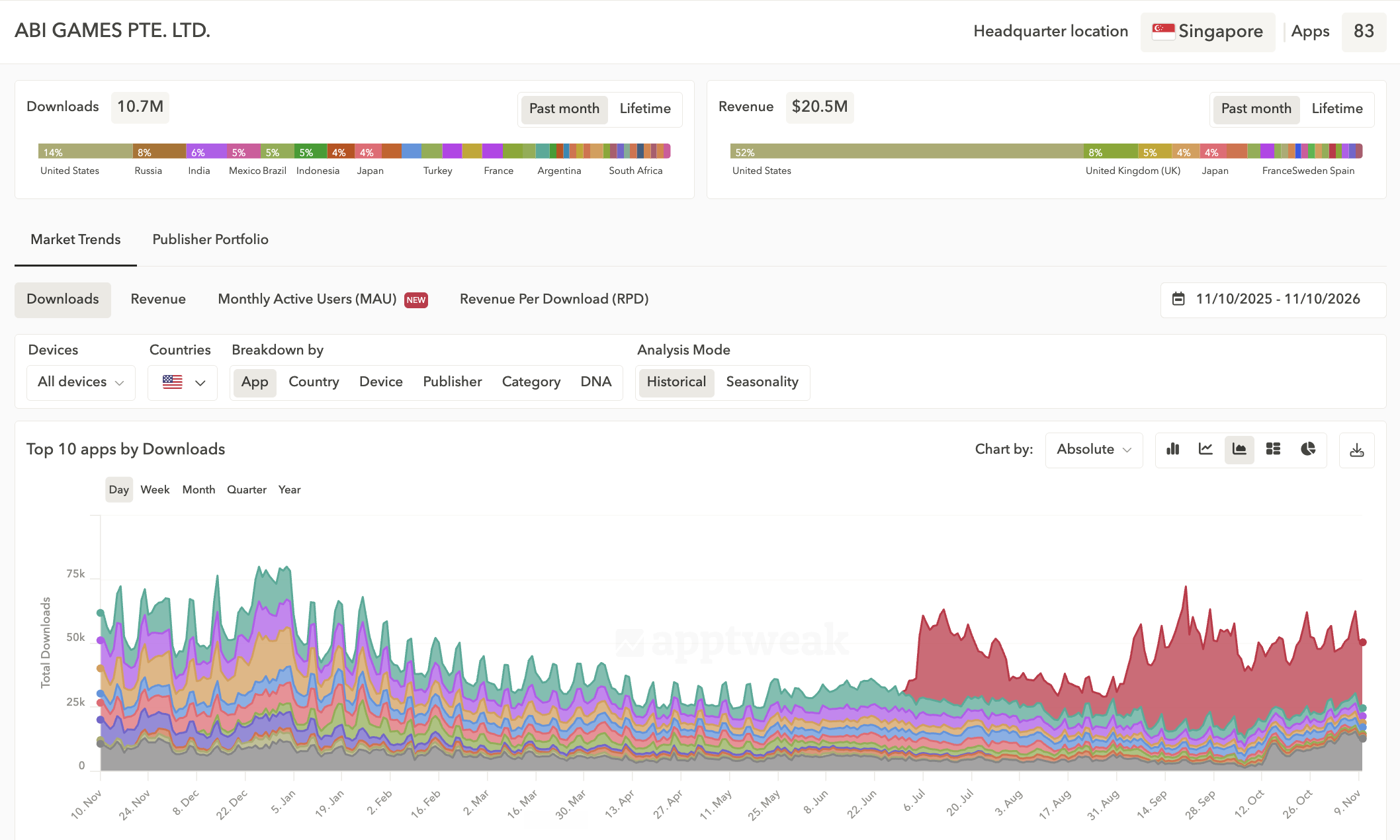
Once you’ve spotted who’s growing, you can act on it from the same platform:
- ASO Intelligence: uncover the keywords, creatives, in-app events and A/B tests behind a competitor’s app store growth.
- Campaign Manager for Apple Ads: find non-branded keywords, automate your campaigns and A/B test custom product pages.
- AI Visibility for Apps: monitor how your app shows up when people ask AI assistants which app to download, built on real app store data.
- Consulting Services: when you want hands-on help, AppTweak experts can find your next market, plan your expansion and run it end to end.
See MAU on your own app
MAU is now available in AppTweak, as an add-on to Market Intelligence Enterprise.
Which of your competitors has the biggest audience, and is it growing? Book a demo to find out. We’ll also show you MAU for your app, so you can compare our trend with your own console data.
FAQs
How can I see a competitor app's monthly active users (MAU)?
AppTweak Market Intelligence estimates monthly active users (MAU) for every app and game it covers on the App Store and Google Play, so you can see any competitor’s active audience. App Store Connect and Google Play Console only report MAU for apps you own.
In AppTweak, MAU sits next to app download and revenue estimates, so you can rank apps by MAU in any country or category, filter by it, and benchmark competitors against your own app over time. AppTweak’s MAU data is available as an add-on to Market Intelligence Enterprise plans.
Why track a competitor’s MAU and not just its app downloads?
App downloads show how many people installed an app. MAU shows how many people still use it: the unique users active at least once in a rolling 30-day window.
Two apps with similar downloads can have very different active audiences. MAU lets you size a competitor by its real audience, and shows whether a launch or campaign kept users active or only drove installs.
AppTweak Market Intelligence shows downloads, revenue and MAU side by side for every app it covers, so teams can compare all three without switching tools.
How often is app MAU data updated?
Most app market data providers report MAU as one value per month, available only once the month has closed, while AppTweak calculates a new MAU value for every app each day. AppTweak uses the same rolling windows as App Store Connect (30 days) and Google Play Console (28 days).
With a daily value, you see when a competitor’s active audience started growing after a launch, campaign or market entry, how far it grew, and how quickly it fell back, while you still have time to act.
How can I check the accuracy of AppTweak’s MAU?
Compare AppTweak’s MAU with your own app’s data in App Store Connect or Google Play Console. AppTweak’s MAU uses the same rolling windows as the consoles (30 days on the App Store, 28 days on Google Play), so you can put the two side by side day by day. You can’t do that with one MAU value per month.
Focus on the direction and timing of changes rather than exact values. AppTweak can show you MAU for your own app in a demo.


More articles in App Store Marketing Blog

 Georgia Shepherd

 Pierre-Antoine Roy

