Custom product pages are one of the most effective download levers in Apple Ads.
In AppTweak’s 2026 ASO & Apple Ads Benchmarks Report, Apple Ads campaigns with custom product pages saw 5.7% higher tap-to-install conversion rates on average. Match your page to the intent behind a user’s search, and more taps turn into installs.
The marketers who get the best return from Apple Ads treat custom pages as experiments to run, not just pages to build. With CPP A/B Testing, you can turn your existing Apple Ads spend into incremental installs by running those experiments directly in AppTweak.
- Custom product pages improve Apple Ads conversion rates, but only a controlled test shows which page converts best for your own audience.
- A reliable custom product page test runs each page at the same time on the same Apple Ads traffic, so uneven traffic and seasonality affect both equally.
- CPP A/B Testing in AppTweak lets mobile marketers test two pages on live traffic without putting existing campaigns at risk, then apply the winner with one confirmed action.
- Winning custom product pages should inform your next CPP designs as well as your organic creatives, so each test improves your wider App Store strategy.
What is CPP A/B Testing?
Mobile marketing teams put real work into custom product pages: the concept, creative, copy, and cross-country localization. Understanding which of those pages converts your audience best is harder to prove.
Without a dedicated test, advertisers can be left guessing, comparing ad groups that don’t run under the same conditions, or reading from organic tests (product page optimization, PPO) that measure a different audience.
CPP A/B Testing lets you prove which custom product page converts best with your actual audience, so you can scale spend behind the winner.
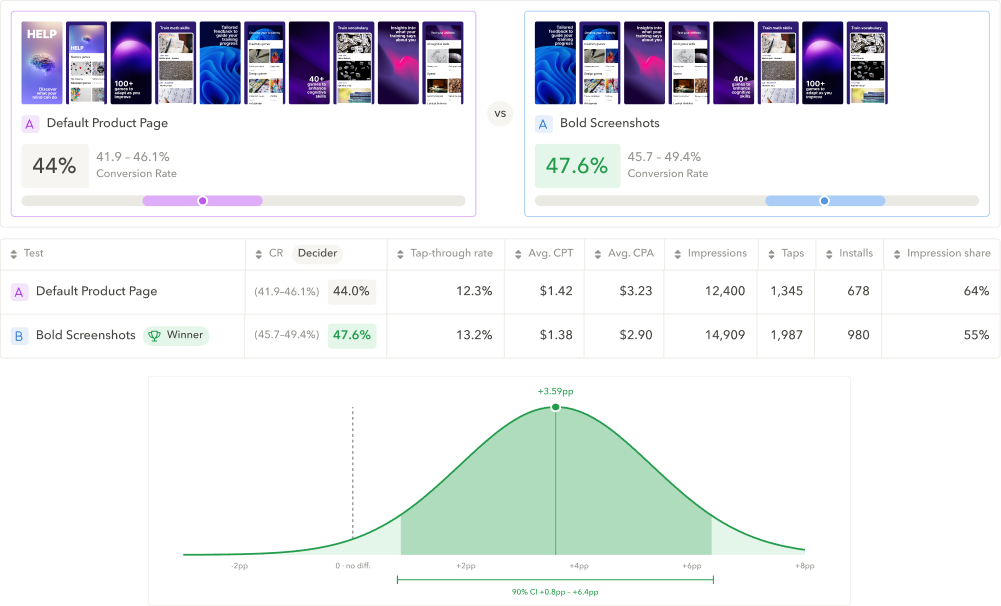
We shaped CPP A/B Testing with our internal experts who specialize in Apple Ads and manage campaigns for some of the largest Apple Ads accounts. It’s built around three things that make an experiment worth acting on:
- Safe. You can trial new creatives on real traffic, without putting your campaigns at risk.
- Fair. Both pages run under the same conditions, so the result reflects the creative itself.
- Conclusive. A winner is named only when the difference is meaningful, rather than day-to-day noise.
Read our complete guide to custom pages that convert
A/B test your custom product pages in AppTweak
With AppTweak, you can put two custom product pages head-to-head, or put your default product page against a custom product page. Both go live on real Apple Ads traffic under the same conditions, and tap-to-install conversion rate decides the winner.
Setting up a test takes about a minute:
- Choose the ad group, and set how big a difference is worth detecting (the minimum detectable effect). This sizes the test.
- Pick the two pages you want to compare. Two at a time keeps the comparison clean, and gives each page enough traffic to reach a reliable result.
- Review and launch. You’ll see upfront how long the test needs, and how confident the result will be. If an ad group doesn’t have enough traffic to reach a result, the test won’t start.
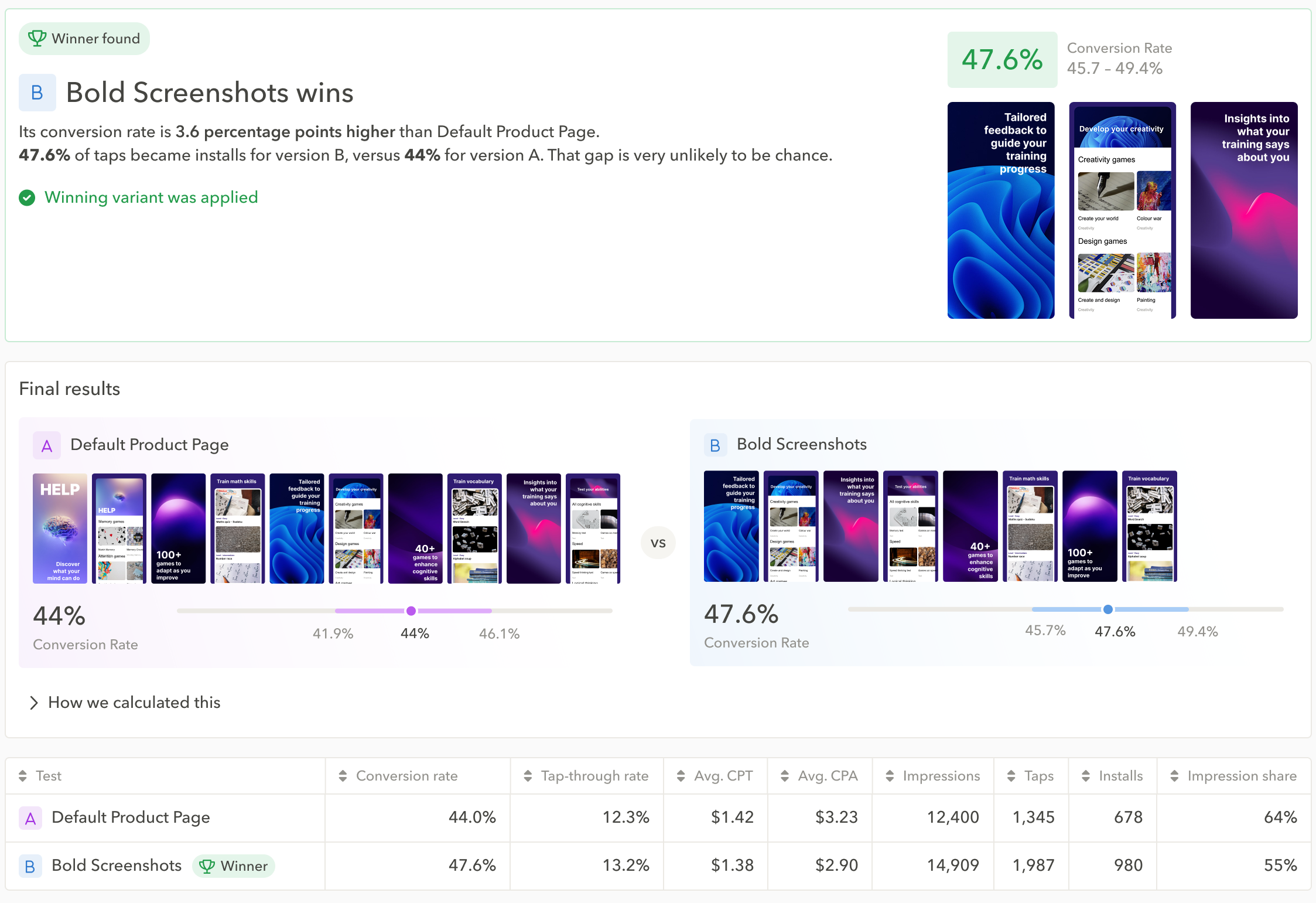
Once your test is live:
- Your live setup stays intact. Your ad group is duplicated and the original paused, so you can return to it at any time.
- Both pages get a fair shot. They run over the same period under matched settings, so seasonality and traffic swings affect them the same way.
- You know where it stands. You can see whether there’s a statistically significant result and whether to trust it, with the stats interpreted for you.
- You apply the winner. When conversion rate points to a clear page, you can set it live with one confirmed action. When two pages perform the same, you know that too. Nothing is ever applied automatically, and you can stop a test anytime.
Best practices for CPP A/B tests you can rely on
How your experiment is set up decides how clean the result is. Keep these best practices in mind when testing your custom product pages for Apple Ads:
- Change one variable at a time. Testing two pages head-to-head gives you a clean read on what actually moved conversion.
- Start in search results, then branch out. Today tab ads are built entirely from a custom product page, and Search tab ads can point to one too. If you’ve only tested in search results, additional ad placements are your next move.
- Check organic before you spend paid budget. Custom product pages now surface organically in App Store search. See how a page performs there first; it tells you whether the creative is worth validating with paid traffic at all.
- Match the message, not just the design. The keyword that triggers your ad and the page it lands on should tell the same story. Test for relevance, not just which screenshots look better.
- Test by audience. If your ad groups target new and returning users separately, test each one. The page that converts first-time users may not be the one that wins back returning users.
- Act on every result. Move budget to the winning page, and treat inconclusive tests as a signal too: they usually mean the two pages were too similar to matter.
Best practices for Apple Ads custom product page A/B tests
Where CPP A/B Testing fits in your Apple Ads workflow
A/B testing is one stage of building custom product pages that convert. You can now run every stage in AppTweak, from choosing keywords to scaling the winning page:
- Target the right keywords. Build ad groups and variants by intent or topic cluster, and easily add semantically related keyword clusters with AppTweak’s keyword research tools.
- Research what works. Study competitors’ custom product pages, and spot the creative patterns and localized messaging that work for top apps in your category and countries.
- Learn from competitors’ tests. See the A/B tests competitors run organically (PPO) in the ASO Timeline, and know which creatives convert before you build your own.
- Create, tailor, and localize your pages. Save creative inspiration for designers in Moodboards, then build a page per intent and country or region, as per AppTweak’s CPP framework.
- Prove which page wins with CPP A/B Testing.
- Scale the winners, retire the rest, and feed what you learned back into your strategy: your next round of custom pages, your organic creatives, and future tests.
For growth teams who want to prove what converts
CPP A/B Testing is built for app growth, UA, and performance marketers who want to drive better results with Apple Ads. It’s especially valuable for teams in fast-moving categories like gaming and fintech, where creative moves fast and every page has to earn its place.
The payoff from strong, tailored custom product pages is well documented across verticals:
- Binance increased global yearly installs by 95,000 with localized custom product pages for high-priority keywords.
- SoundCloud improved tap-to-install conversion rate by 58% and cut cost-per-install by 39% with custom product pages built from insights mined in user reviews.
- The Economist gained 44% more app downloads with custom product pages matched to content-theme intents, paired with automation rules.
You no longer have to guess which creative your users prefer. Now you can measure it on your own audience, without risking the performance you already have.
Get started with CPP A/B Testing
In our experience, creative does much of the heavy lifting in Apple Ads, especially during peak seasons and high-traffic events. When you’re putting budget behind a page, it’s worth knowing it’s the right one.
CPP A/B Testing is available for Enterprise Campaign Manager clients, and sits alongside exclusive tools to scale Apple Ads campaigns with deep App Store data: AI keyword discovery, automation, and ad intelligence.
Ready to see which custom product page earns the most from your Apple Ads traffic?
FAQs
What is CPP A/B testing for Apple Ads?
CPP A/B testing for Apple Ads is a controlled experiment that shows which custom product page converts taps into installs best, by running two pages on the same Apple Ads traffic at the same time. In AppTweak, you can compare two custom product pages, or your default product page against a custom product page.
Because both pages run under the same conditions, the result reflects the creative itself rather than changes in traffic, seasonality or keyword mix. Apple Ads teams use CPP A/B testing to decide which page deserves their budget before scaling spend behind it, instead of relying on best practices or internal opinion.
How do you A/B test custom product pages for Apple Ads?
To A/B test custom product pages for Apple Ads reliably, run two pages at the same time on matched copies of the same ad group, and act only when the difference in tap-to-install conversion rate is statistically significant. A reliable custom product page test in Apple Ads needs:
- The same conditions for both pages: same period, same settings, traffic and budget split evenly
- One clear difference between the pages, such as the message or offer, so you know what caused the result
- Enough taps to reach a statistically significant result before you pick a winner
Manual setups, such as two hand-built ad groups or before-and-after comparisons, usually miss at least one of these. CPP A/B Testing in AppTweak’s Campaign Manager handles the conditions and the statistics for you: it duplicates your ad group, runs both pages under matched settings, and sizes the test before launch.
How is CPP A/B testing different from product page optimization (PPO)?
Product page optimization (PPO) tests your default product page on organic App Store traffic, while CPP A/B testing compares custom product pages on Apple Ads traffic. The two measure different audiences, so a PPO result does not show which custom product page converts best in your Apple Ads campaigns.
The main differences between PPO and CPP A/B testing are:
- Which pages are tested: PPO tests variations of your default product page only and cannot test custom product pages. CPP A/B testing compares two custom product pages, or a custom product page against your default product page
- Traffic: PPO runs on organic App Store visitors. CPP A/B testing runs on Apple Ads taps
- Where it runs: PPO runs in App Store Connect. CPP A/B testing runs in AppTweak’s Campaign Manager
Read AppTweak’s guide to product page optimization for how PPO tests work.
What should you test on a custom product page?
The custom product page tests most likely to move tap-to-install conversion rate test the message, not only the design: whether the page speaks to the intent of the keywords in the ad group. A page that shows exactly what a user searched for usually beats a page that only looks better.
Change one variable per test, such as the first screenshot’s message, the feature highlighted or the offer shown, so you know what caused the difference. Prioritize ad groups where it matters most: keywords that struggle to convert, or high-value keywords where you already perform well. If your ad groups target new and returning users separately, test each one, since they may respond to different messages.
To find directions worth testing, look at what competitors already do: AppTweak’s CPP Explorer shows the custom product pages competitors run and the keywords each page targets, and the ASO Timeline shows the PPO tests they run organically and which variant won.
How long should a CPP A/B test run?
A CPP A/B test should run until it has enough taps to detect the difference you care about, which depends on your ad group’s traffic and the minimum detectable effect you set. The minimum detectable effect is the smallest difference in conversion rate worth detecting: the smaller it is, the more traffic and time the test needs.
Ending a test early because one page looks ahead often produces a false winner. In AppTweak, CPP A/B Testing shows the expected duration and confidence before launch, and does not start a test on an ad group that lacks the traffic to reach a reliable result.
What does an inconclusive CPP A/B test mean?
An inconclusive CPP A/B test means the two custom product pages converted at statistically similar rates, which usually indicates the pages were too similar to change user behavior. An inconclusive result is still useful: it tells you that variable is not what drives installs for that audience, so your next test should try a bolder change.
AppTweak’s CPP A/B Testing names a winner only when the difference in tap-to-install conversion rate is statistically significant, and reports a no-difference result when there is none. Tap-through rate and cost-per-tap are shown for context, but conversion rate decides.
Is it risky to A/B test custom product pages on live Apple Ads campaigns?
A/B testing custom product pages on live Apple Ads campaigns is low risk when the test runs on copies of your ad group rather than on the ad group itself. In AppTweak, CPP A/B Testing duplicates the ad group and pauses the original, which stays intact as a rollback point. Safeguards built into CPP A/B Testing include:
- The duplicate ad groups run with a combined budget that matches the original
- Stopping a test returns you to your pre-test setup with no manual cleanup
- Applying the winner keeps the original ad group’s performance history
- Nothing is applied without a confirmed action from you


More articles in Apple Ads

 Thomas Tierney

 Micah Motta

 Georgia Shepherd