App store optimization (ASO) is the process of improving a mobile app’s visibility and conversion rate in app stores such as the App Store and Google Play. ASO involves optimizing keywords, metadata, screenshots, ratings, and reviews so an app ranks higher in store search results and generates more organic downloads.
In this ASO guide, we’ll break down how app store optimization works, why it matters for mobile growth, and the key strategies that help apps rank higher and drive more downloads.
Key takeaways
- Search is the primary app discovery channel: Apple reports that 65% of App Store downloads follow a keyword search, making keyword and metadata optimization the highest-leverage ASO activity
- App store optimization covers three distinct pillars — keyword rankings, conversion rate optimization, and discoverability through features and in-app events — and all three must be managed continuously, not as a one-time setup
- The App Store and Google Play use different ranking signals: the App Store does not index the long description for keywords, while Google Play does and rewards keyword density of 2–3% in that field
- App store localization requires adapting keywords, descriptions, and visual assets per market, not just translating text; this is because search behavior and visual preferences vary significantly by region
- Apps with a rating below 4 stars are significantly less likely to be featured on the App Store; AppTweak’s ASO & Apple Ads trends & benchmarks report shows that around 95% of featured apps maintain a rating of 4 stars or above
- AI and natural language processing are reshaping how both stores interpret search queries; metadata written in natural, intent-aligned language now outperforms keyword-stuffed metadata engineered purely for density
By adopting these strategies and leveraging powerful app store optimization tools, you can ensure your app remains visible, competitive, and successful in the ever-changing app ecosystem.
For a more detailed breakdown – read on!
What is app store optimization (ASO)?
Definition of app store optimization
App store optimization (ASO) is the continuous process of improving a mobile app’s visibility and conversion rate inside app stores, primarily the App Store and Google Play. It covers keyword optimization in metadata, creative asset design (icons, screenshots, videos), and performance signals (ratings, reviews, download velocity). The primary goal is more organic installs at a lower acquisition cost.
People new to mobile marketing often refer to ASO as “SEO for the app stores“. But, while both ASO and SEO aim to increase visibility and drive organic traffic, the two have very different ecosystems, requiring distinct approaches.
App store optimization focuses on three main areas:
- Keyword optimization: Improving your app’s organic rankings in the search results by selecting and optimizing relevant keywords. This helps your app show up at the top of search results when users are looking for similar apps.
- Conversion optimization: Optimizing the appearance of your app store product page. By improving elements like the app icon, screenshots, videos, and descriptions, you can make your app more attractive to users and increase the chances they’ll download it.
- Discoverability: Getting more eyes on your apps and games through app featurings and in-app events or promotional content. By leveraging these opportunities you can significantly boost your app’s visibility and attract a wider audience.
By optimizing these elements, ASO helps apps stand out in a crowded marketplace and attract a larger audience.
The evolution of app store optimization
App store optimization has undergone significant change since the launch of the app stores (App Store & Google Play) in 2008. Initially, the focus was mostly on keyword optimization within app titles, subtitles, and descriptions. Over time, it has evolved into a comprehensive strategy that encompasses creative optimization, localization, and competitor analysis. Today, as the app ecosystem continues to grow more competitive and sophisticated, ASO is expanding to encompass a variety of strategies not only aimed at improving app visibility but also user engagement. For instance, features such as “Collections” provide curated app content directly on users’ devices, aimed at boosting app interaction and retention.
From individual tactic to organizational function
App store listings are now a shared asset across marketing, growth, and product teams, because every download, regardless of acquisition channel, passes through the app store. A paid social campaign, an influencer partnership, or an Apple Ads placement all route users to the same product page. This makes the listing a conversion asset for every team, not just ASO. Today, UA teams rely on ASO expertise to build custom product pages and custom store listings that align store messaging with specific campaigns, search queries, and audience segments.
From generic listings to personalised experiences
The evolution of app store optimization also reflects the growing importance of personalization. Google Play now leverages advanced tools, including custom store listings that support keyword-level targeting and inactive user retargeting, allowing app marketers to create personalized app experiences. Similarly, new deep-linking capabilities within Apple’s custom product pages and expanded audience targeting options empower ASO teams to align their efforts with the evolving needs of app users. This development highlights a shift from generic optimization to context-aware and intent-driven engagement strategies.
From keyword matching to semantic relevance.
Both Apple and Google are increasingly using AI and Natural Language Processing to interpret user intent rather than match exact keyword strings. Apple’s NLP now interprets conversational, intent-based queries; Google’s Guided Search organises results into categories based on user goals. The practical implication: metadata that sounds natural and human, written around how users describe their needs, now outperforms metadata engineered purely for keyword density. If AI drafted that copy, an AI detector can help you spot stock phrasing and rewrite it.
From in-store to beyond the store.
Apple’s App Intents framework now makes apps discoverable through Siri, Spotlight, and widgets — surfaces outside the App Store entirely. ASO’s scope has expanded accordingly: optimising an app’s presence now means thinking beyond the product page to every surface where the app can be found and understood.
With constant innovations from the stores, ASO has become a multi-faceted discipline that not only drives app discovery but also plays a critical role in retention and user satisfaction, solidifying its position as a cornerstone of app marketing strategies.
Main ASO ranking factors
App stores use several signals to rank apps in search results:
- App title and keyword relevance
- Install volume and growth velocity
- Ratings and reviews
- User engagement and retention
- App metadata quality
- Update frequency
While these are the main signals that influence app store rankings, the exact weighting differs between platforms. For a deeper dive, explore our guides on App Store ranking factors and Google Play ranking factors.
Why is app store optimization important?
App store optimization is a vital strategy for app developers and marketers in today’s highly competitive mobile ecosystem. With millions of apps vying for attention on the App Store and Google Play, app store optimization ensures your app doesn’t just exist, but stands out. By driving visibility, boosting appeal, and securing downloads, app store optimization lays the foundation for sustainable app growth.
#1: Search is the primary discovery channel for apps & games
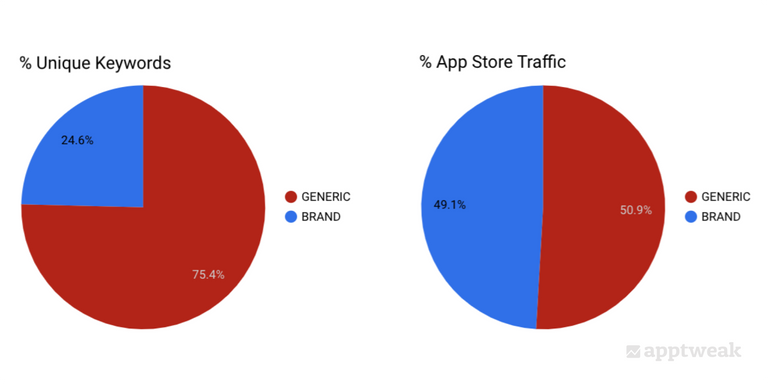
Search is the predominant way users discover apps and games. According to Apple, 65% of all downloads on the App Store happen after a keyword search. In addition, research from AppTweak shows that over 50% of app store searches use generic keywords, such as “fitness tracker” or “budget planner”, highlighting the importance of optimizing apps for relevant category keywords.
By developing a robust keyword strategy and optimizing every aspect of your app’s metadata and visuals, you ensure your app appears in search results and attracts relevant users.
#2: ASO is the cornerstone of any user acquisition strategy
App store optimization acts as the foundation of an effective user acquisition (UA) strategy. Everyone who wants to download your app – in the app stores or through social media ads, native ads, or any other channel – has to come through the app stores. This makes your app store listing a prime asset that needs to be optimized to encourage people to hit that download button.
By optimizing your app store page (including any custom product pages), you can boost conversion rates and reduce the Cost per Install (CPI) of your ad campaigns. As a result, your investment in paid acquisition efforts yields more value.
#3: ASO for building brand awareness and user engagement
The app stores are more than acquisition channels, they are platforms for reinforcing your brand and re-engaging with users. A thoughtfully designed app page, complete with high-quality visuals and descriptions, conveys trustworthiness and quality, strengthening your brand identity. Features like in-app events on the App Store or promotional content on Google Play further allow you to showcase new updates, seasonal offerings, or exciting features, keeping users engaged. This dual focus on attracting new users and retaining existing ones makes app store optimization a holistic marketing tool.
Even well-known brands should not overlook the power of a well-optimized app store presence in strengthening their brand and message via featurings and in-app events or promotional content. According to AppTweak’s ASO & Apple Ads trends & benchmarks report (2026), 95% of featured App Store apps have a rating of 4.0 or above.
#4: ASO as a source of first-party data
The app stores are a rich source of insights, offering unique data insights to fuel growth strategies. By analyzing app download trends, keyword performance, and user feedback, you can unlock insights into your audience. Use these insights to fine-tune your ASO efforts and improve your app. Tools like custom product pages and A/B testing unlock new ways to optimize your app’s appeal. Competitive analysis (monitoring rivals’ keywords, visuals, and user engagement strategies) provides valuable benchmarks, helping you stay ahead in a crowded market. With app store optimization, you’re not just enhancing visibility; you’re leveraging data to refine and innovate.
ASO differences between the App Store and Google Play
The App Store and Google Play use different algorithms, index different metadata fields, and display results differently. A strategy built for one platform will not automatically work on the other.
| Element | App Store | Google Play |
| Keyword fields indexed | Title, subtitle, keyword field (100 chars) | Title, short description, long description |
| Keyword repetition | No value — each term only needs to appear once | Strategic repetition matters — keyword density (2–3%) is a ranking signal |
| Long description | Not indexed for search | Indexed for search |
| Screenshots in search results | Shown for all searches (3 portrait or 1 landscape) | Only shown on branded searches |
| Backlinks | Not a ranking factor | Influence ranking strength |
| A/B testing | Product Page Optimisation | Store Listing Experiments |
Difference in search results on each app store:
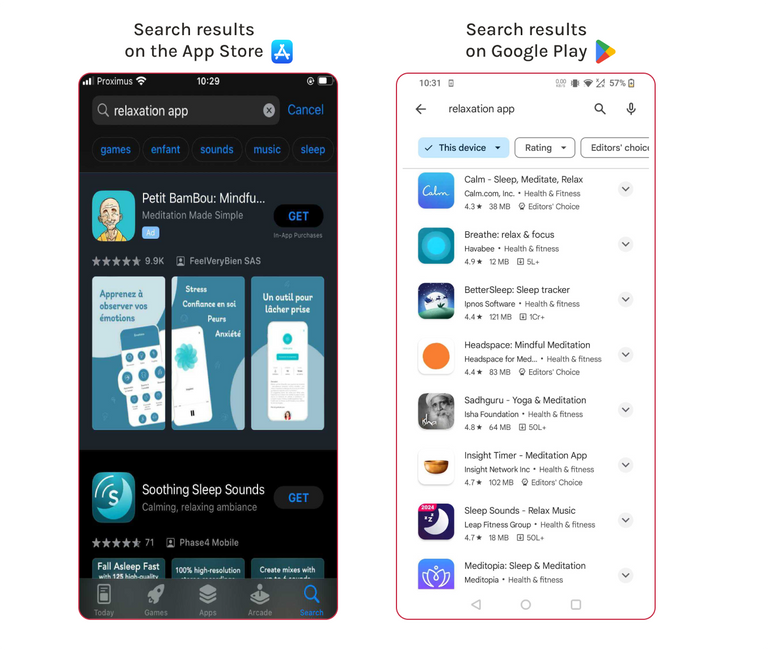
For a full platform-by-platform breakdown, see our complete guide on ASO differences between the App Store and Google Play.
How do app store algorithms work?
App store algorithms play a critical role in determining how apps are discovered and ranked within search results. Two primary factors influence app rankings across both the App Store and Google Play: Keyword Relevancy and Ranking Strength. Here’s a breakdown of how each factor works in both stores:
Keyword relevancy
Keyword relevancy measures how well your app’s metadata matches a user’s search query. Relevancy depends on where and how keywords are placed within the app metadata.
| Element | App Store | Google Play |
| Fields indexed | Title, subtitle, keyword field (100 chars) | Title, short description, long description |
| Keyword weight | Title carries more weight than subtitle or keyword field | Keyword density in long description matters, target 2–3% |
| Keyword repetition | No value — algorithm only needs the keyword to appear once across all fields |
Strategic repetition across title, short description, and long description improves relevancy
|
| Localization | Keywords must be localised per region to rank in different markets | — |
| Semantic understanding | — |
Machine learning interprets synonyms, related terms, misspellings, and slang. Apps can rank for keywords not explicitly in metadata
|
Ranking strength
Once the app stores have identified which apps are relevant to certain search queries, they will turn to other ranking signals to refine the search results. Ranking strength evaluates the performance and authority of an app to determine its position within search results.
| Element | App Store | Google Play |
| Downloads | Download velocity is key — a high rate of downloads in a short period boosts ranking, even for new apps |
Total download volume since launch matters — Google is less reliant on pure velocity than Apple
|
| Conversion rate | Apps converting a high percentage of page visitors into downloads are rewarded | — |
| Retention and engagement | — |
Long-term user behaviour matters — apps with high retention rates and frequent use rank higher
|
| Ratings and reviews | Consistent ratings of 4 stars or above and positive reviews improve ranking strength | — |
| In-app events | Events indexed by Apple can help apps rank for additional keywords related to event metadata | — |
| Android Vitals | — | Crash rates, battery usage, and responsiveness directly impact rankings |
| Backlinks | Not a ranking factor | Historically a sign of authority — but weighted less than the factors above |
Key benefits of app store optimization
ASO delivers measurable advantages that go beyond increased downloads. It builds a strong foundation for long-term success and app profitability.
1. Increased visibility
ASO ensures your app ranks higher in relevant searches by targeting high-volume keywords and optimizing metadata. Creative assets such as eye-catching visuals and preview videos further enhance discoverability, attracting more users.
Localization plays a vital role in expanding visibility, enabling apps to tap into global markets by tailoring content for non-English-speaking users. Features like in-app events and promotional content increase exposure by showcasing your app in curated collections and special sections.
2. More downloads and revenue
Improved visibility directly translates into more downloads and higher revenue. With better rankings in search results, your app becomes the top choice for users, reducing reliance on paid campaigns.
3. Higher conversion rates
An engaging app page with compelling visuals, informative descriptions, and optimized metadata increases conversion rates. Features like custom product pages and A/B testing allow you to tailor your app’s presentation to maximize user interest and drive downloads.
4. Lower acquisition costs
An optimized app store product page yields higher conversion rates which in return can lead to lower Cost per Installs (CPI), improving the ROI of paid campaigns. An optimized app page ensures that the traffic generated by your marketing efforts converts efficiently.
5. Enhanced user engagement and retention
Featurings, in-app events and promotional content can help re-engage users and showcase new features, keeping your app relevant and increasing long-term user loyalty.
What is the impact of app store optimization?
ASO has consistently proven to drive measurable improvements in app downloads, conversion rates, and visibility. The examples below come from AppTweak client success stories — real apps, real strategies, measurable results.
They clearly demonstrate the measurable impact of ASO across different app categories and strategies.
IE Business School success story: ASO drives a 12% average increase in app downloads
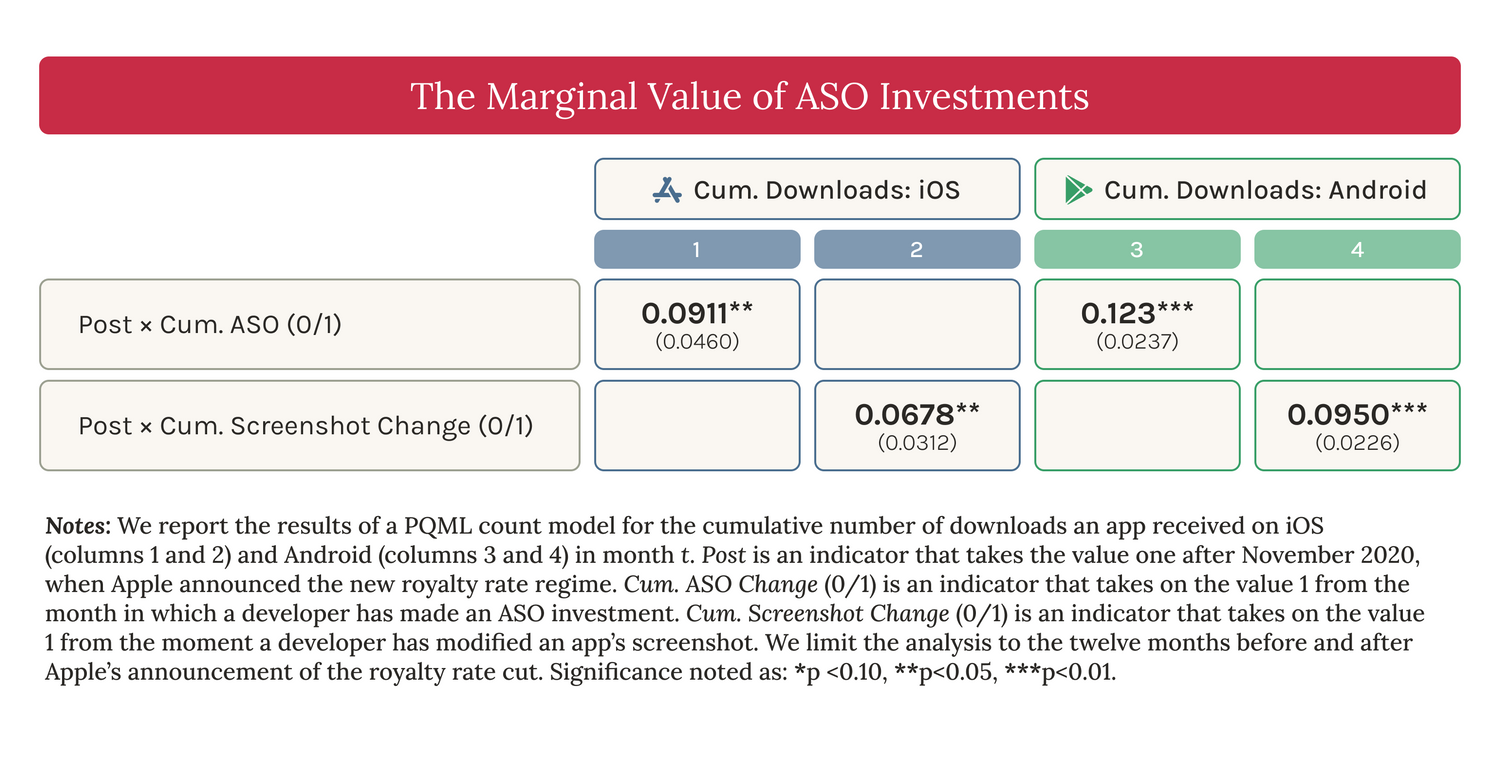
On average, ASO results in 9-12% boost in app downloads, as demonstrated by a recent IE Business School study utilizing AppTweak data.
In the largest independent study of ASO impact to date, IE Business School analysed 16,897 game apps using AppTweak data. Apps implementing effective ASO strategies experienced:
- +9% increase in downloads on the App Store
- +12% increase in downloads on Google Play
IE Business School’s study also shows that apps that updated their screenshots saw a substantial increase in downloads (+6% on iOS and +9% on Google Play), underscoring the important role of visual elements in attracting users.
Superscale success story: +450% organic app downloads on Google Play
Superscale implemented a comprehensive ASO strategy on Google Play, achieving:
- Targeted ASO keyword research and metadata optimisation
- App store content aligned with user search intent
- +450% increase in organic app downloads
Wix success story: #1 rank for top 3 target keywords
Wix optimised its app metadata and keyword strategy, achieving:
- #1 rank for its top three target keywords
- Significantly increased organic discoverability in search results
AppQuantum success story: +21% increase in app downloads through creative optimisation
AppQuantum focused exclusively on visual asset optimisation, achieving:
- Creative A/B testing of icons, screenshots, and preview videos
- Higher conversion rate from store page visitors to downloads
- +21% increase in app downloads
Read all AppTweak client success stories.
Key elements of a successful ASO strategy
A well-executed ASO strategy requires a clear roadmap, integration with broader marketing efforts, and a commitment to ongoing optimization. When developing your ASO strategy, keep the following steps in mind:
1. Set ASO goals & KPIs
Setting clear objectives is the cornerstone of a successful ASO strategy. Start by identifying your primary goals, whether it’s boosting visibility, increasing brand awareness, enhancing user retention, or driving revenue growth.
Monitor relevant key performance indicators (KPIs) such as keyword rankings, conversion rates, and organic downloads to measure your progress effectively. Regularly reviewing performance data ensures your efforts remain aligned with your objectives and enables continuous optimization.
2. Integrate ASO with your overall marketing strategy
ASO works best when integrated with other marketing channels, creating a unified strategy that maximizes impact. Insights from paid campaigns, SEO, and social media can refine your keyword targeting and messaging for greater effectiveness – and the other way around.
Promotional content and in-app events help drive traffic and engagement. Make sure to align these initiatives with overall marketing and communication campaigns. Consistent branding across all platforms reinforces recognition and builds trust, ensuring your overall marketing efforts work together seamlessly.
3. Optimize continuously for sustainable results
ASO is a continuous process that demands regular optimization to stay effective. Frequent ASO keyword research helps you adapt to evolving user trends and competitor strategies, ensuring your app remains discoverable.
A/B testing app titles, descriptions, and creatives allow you to continuously refine your app store listing for maximum impact. Additionally, actively monitoring reviews and ratings while addressing user feedback enhances your app’s reputation and fosters higher engagement.
How does app store optimization work?
App store optimization (ASO) is a dynamic, continuous process that improves your app’s visibility, ranking, and appeal within app store search results. It involves refining app store listings, targeting relevant user searches, and optimizing for store-specific algorithms to maximize downloads and user engagement. Here’s a breakdown of how ASO works in practice:
1. How to identify competitors and analyze their ASO strategies
Before optimizing your own app, you need a clear picture of the competitive landscape you’re operating in. Not all competitors require the same analysis approach, which is why the first step is classification.
- Direct competitors target the same audience with a similar solution (a rival fitness tracker competing for the same keywords).
- Indirect competitors solve the same problem differently (a fitness coaching app that appears in the same search results).
- Aspirational competitors are category leaders whose keyword strategies, visual assets, and ratings benchmarks are worth studying even if you’re not yet competing with them directly.
Each type informs a different decision: direct competitors tell you where keyword battles are fiercest; indirect competitors reveal intent variants you may be missing; aspirational competitors set the benchmark for what “good” looks like in your category.
Once you’ve classified your competitive set, track how their metadata evolves over time. AppTweak’s ASO Timeline shows competitor metadata updates: title changes, keyword field revisions, screenshot refreshes. This feature in Apptweak’s ASO Intelligence enables you to identify what they’re testing and benchmark your own update frequency against theirs.
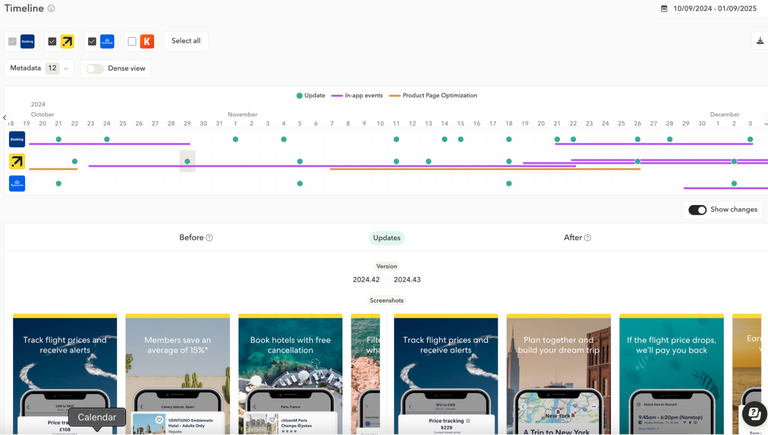
Read our detailed app competitor analysis guide to dig in deeper this topic.
2. How to audit your current metadata performance
Before changing anything in your metadata, you need to answer three questions:
- Which keywords are you ranking for that you didn’t explicitly target? These are opportunities the algorithm has already spotted, and you may be leaving ranking potential on the table by not reinforcing them in your metadata.
- Which keywords in your metadata are driving actual installs? High rank doesn’t always equal high traffic. A keyword in your title might rank #3 but generate negligible downloads if search volume is low.
- Are you cannibalising your own metadata? Repeating the same keyword across your title, subtitle, and keyword field wastes character space that could be used to target additional terms.
A metadata audit answers all three before you write a single new word of copy. In AppTweak, start with the Metadata Keyword Picker to map every keyword currently in your metadata to its ranking and performance data. Then use the All Ranked Keywords view to surface terms your app ranks for that aren’t in your metadata at all. These are the highest-priority additions for your next update cycle.
The goal of an audit is not to start from scratch, it’s to protect what’s working and surgically improve what isn’t.
Expert Tip
With AppTweak’s All Ranked Keyword Performance, you can see all the keywords for which your app ranks. Powerful metrics such as “volume” help you understand how often this keyword is searched for. The “organic installs” metric shows an estimation of how many downloads each of these keywords brings to your app.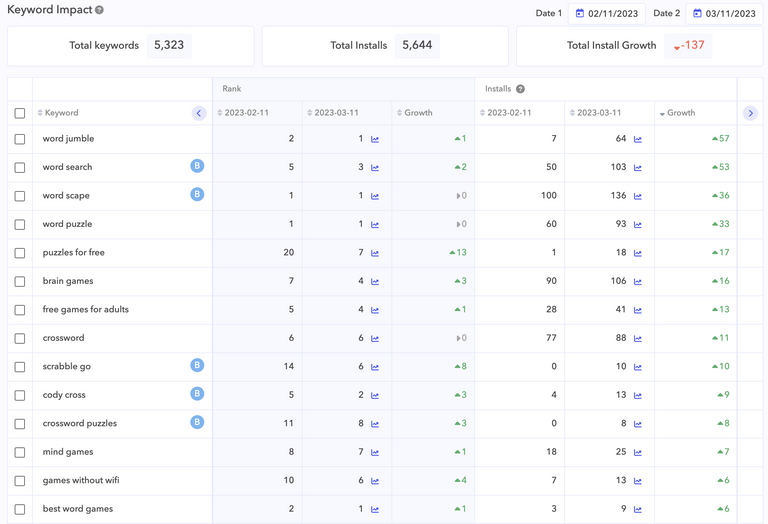
3. How to conduct keyword research and optimization
App store keyword research is the foundation of ASO: it determines which searches your app can realistically compete for and where ranking gains will actually translate into downloads. Here’s how to approach it systematically.
Build a comprehensive keyword list
Start with brainstorming keywords that reflect your app’s core features, use cases and benefits. Think about how users would search for a solution like your app.
You can also expand your list using ASO tools. For example, AppTweak’s AI-generated keywords and Review Sentiment Analysis help uncover relevant terms directly from user feedback and competitor apps.
Aim to compile a list of 150–200 relevant keywords, considering a wide range of terms related to your app, including:
- Feature-based keywords (e.g., “step counter”, “habit tracker”)
- Category keywords (e.g., “budget app”, “photo editor”)
- Long-tail keywords that reflect specific use cases
- Keywords used in competitor titles and subtitles
This broad keyword pool will serve as the foundation for your ASO strategy.
Map keywords to intent, not just volume
This is where modern app store keyword research diverges from the pre-2025 model. App store algorithms now interpret queries semantically: a single search term can represent multiple user intents simultaneously, with each intent surfacing a different competitive set.
Take the keyword “college”: it can attract users looking for note-taking apps, scheduling tools, or campus social networks all at once. If your app serves one of those intents clearly and consistently, you may rank for the term even without exact metadata matches, but only if your metadata, screenshots, and reviews all signal the same specific use case.
On Google Play, Guided Search (introduced 2025) makes intent clusters explicit: broad queries are broken into refinement paths, each leading to a different competitive set. Winning the head term “fighting games” is less valuable than being competitive across the specific refinements “arcade fighting games” or “beat ’em up games” that your actual users are funnelled into.
When prioritising your keyword list, group terms by the job-to-be-done they represent, not just topic similarity. This gives you a map of intent clusters to own rather than a flat list of keywords to stuff.
Read our blog on how AI is changing app store search, or watch our webinar reply:
Prioritize keywords strategically
Not every keyword will generate meaningful results. The goal is to identify keywords that are both relevant to your app and realistically achievable to rank for.
Evaluate each keyword based on three core criteria:
- Relevancy – how closely the keyword matches your app’s functionality
- Search volume – how often users search for the keyword
- Competition or difficulty – how hard it is to rank for the keyword
Tools like AppTweak help simplify this analysis. For example, AppTweak’s Relevancy Score and Difficulty metrics indicate how well a keyword fits your app and how competitive it is.
Focus on keywords that offer the best balance between search demand and ranking opportunity.
Expert Tip
AppTweak’s Relevancy Score, which ranges from 0 to 100, indicates how well a keyword matches your app.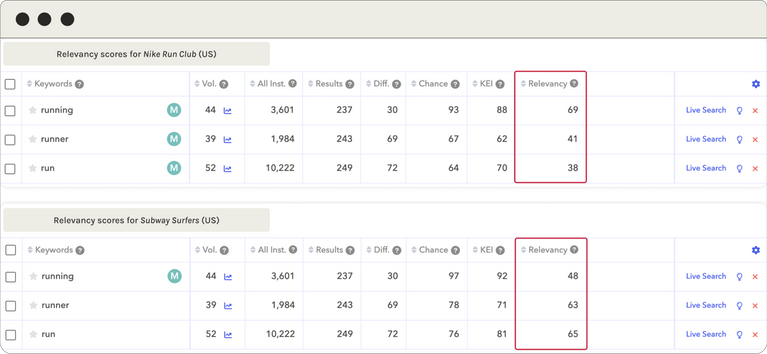
Optimize your app store metadata
Once you’ve selected your priority keywords, integrate them into your app store metadata.
Place your most important keywords in high-impact fields, including:
- App title
- Subtitle (iOS)
- Keyword field (iOS)
- Short and long descriptions (Google Play)
Ensure that keywords are incorporated naturally and strategically. Overloading metadata with too many keywords can reduce readability and negatively affect conversion rates.
Monitor performance and refine
ASO keyword optimization is an ongoing process. Rankings, competition, and search behavior change frequently, so it’s important to track performance and refine your strategy over time.
Monitor key metrics such as:
- keyword rankings
- visibility trends
- keyword impact on installs
Tools like AppTweak’s Visibility Score and Keyword Impact can help you evaluate which keywords drive the most discoverability and downloads. Use these insights to continuously refine and expand your keyword strategy.
4. How to optimize your app store listing
Your app store listing is the conversion layer of your entire ASO strategy. Ranking means nothing if users don’t download once they land on your page. There are five elements to optimise: metadata, visual assets, app description, localization, and A/B testing.
App title and subtitle
To optimize your app title and subtitle, use a concise, descriptive title with high-value keywords. The subtitle (App Store) or short description (Google Play) should highlight your app’s unique value proposition and include relevant keywords.
Visual elements
Visual elements are crucial for App store optimization on both the App Store and Google Play, with users spending an average of just 3 seconds per app listing. This brief window is your golden opportunity to capture the attention of your intended audience. So take the time to design well-thought screenshots, icons, and videos.
Follow these best practices for each creative asset to make the most of that three-second window:
| Creative asset | Best practices |
| Screenshots | • Convey your app’s essence and highlight its key features• Maintain simplicity — avoid suggesting complexity, which can put off potential users• Use concise yet powerful captions to grab attention while maintaining readability |
| App icon | • Keep it simple, focusing on one element to communicate your app’s purpose• Incorporate familiar brand elements if they resonate with your audience• A/B test to understand user preferences |
| Preview / promo video | • Accurately reflect actual usage of your app or game• Avoid time-sensitive content to stay relevant over time• Tailor to the language and cultural nuances of your target market |
| A/B testing | • Use Google Play’s Store Listing Experiments and Apple’s Product Page Optimisation to identify the most effective visuals• Establish separate timelines for keyword and creative updates to accurately measure each change’s impact |
Check out AppTweak’s detailed ASO best practices for app creatives stand out from the competition.
App description: indexed differently on each store
This is one of the most consequential differences between the two platforms, and one of the most frequently overlooked.
- On Google Play, the long description is a direct ranking factor; keywords you include here are indexed by the algorithm. Keyword density matters: AppTweak recommends targeting a 2–3% density for your primary keywords and 1–2% for secondary keywords across the full 4,000-character limit. Place your most important keywords in the first two to three sentences, as these carry more weight in the algorithm. Repeat keywords naturally. Google’s NLP algorithms read contextually, so keyword stuffing will hurt both your ranking and conversion rate.
- On the App Store, the long description is not indexed for keyword rankings; Apple does not take keyword density into account here. Its sole job is conversion: convincing a user who is already on your page to download. Use this space to explain your app’s features and purpose, and to make a compelling argument for why users should install. Unlike on Google Play, repeating keywords in your App Store description is a waste of valuable space.
Read more about app store description best practices for both app stores.
App store localization: beyond translation
Localizing your app is crucial for increasing your app’s visibility around the world. This involves adapting your app’s metadata, keywords, and visuals to cater to different languages and cultures, significantly boosting your app’s presence in non-English speaking markets like Japan or China.
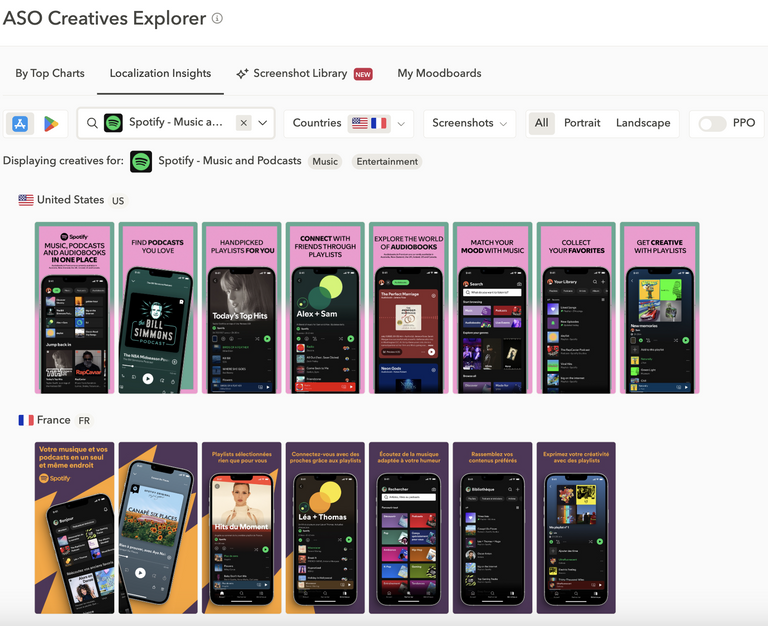
Localization isn’t just translation; it requires understanding and integrating local search behaviors and preferences into your app’s metadata and visuals. In Japan, for instance, app screenshots often feature dense text and intricate details, reflecting local tastes. Games might incorporate anime or manga characters to appeal to the local audience.
To dig deeper, read our complete guide to app store localization (Google Play and the App Store).
5. How to leverage reviews & ratings
App reviews and ratings influence your app in three 5. distinct ways: they affect your ranking strength in the algorithm, your conversion rate on the product page, and your eligibility for featuring. Managing them actively, rather than reactively, is one of the highest-ROI activities in ASO.
Encourage positive app reviews
A strong review strategy starts with encouraging satisfied users to leave feedback. The best time to ask for a review is after a positive in-app experience, such as completing a level, achieving a milestone, or making a purchase.
Use subtle, non-intrusive prompts to request ratings, and ensure they comply with App Store and Google Play guidelines. In addition, providing effective in-app support channels helps resolve issues early and prevents frustrated users from leaving negative reviews.
For more strategies to increase review volume while respecting app store guidelines, read our guide tips to get more app reviews.
Respond to user feedback
Engaging with reviews is just as important as collecting them. Responding to both positive and negative feedback shows users that their opinions are valued and that the app team is actively improving the product.
- Thank users for positive reviews to strengthen loyalty
- Address negative reviews by acknowledging the issue and providing a solution
- Use feedback to identify recurring user pain points
User reviews often reveal valuable insights that can help improve both your product experience and your ASO strategy.
Learn why engaging with user feedback is essential and discover best practices in our article why and how to reply to app store reviews.
Use app reviews to improve conversion and ratings
Review prompts can significantly improve app ratings and conversion rates when implemented at the right moment in the user journey.
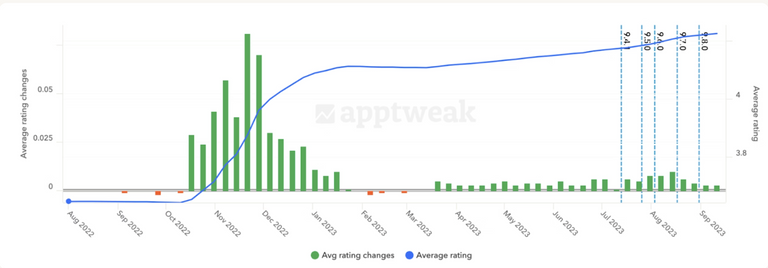
For example, under recommendation of AppTweak consultants, The North Face increased its App Store rating from 3.68 to 4.23 after introducing a review prompt following successful checkouts. This improvement led to a 59.06% increase in conversion rate on the App Store in 3 months time. On Google Play, the brand’s app rating increased by 22.25%, rising from 3.71 to 4.54.
Why app ratings matter for visibility
App ratings and reviews also influence how apps perform in the store algorithms and whether they are eligible for editorial featurings.
AppTweak data has shown that around 95% of apps featured on the App Store have a rating of 4 stars or higher. Apps with ratings below this threshold are significantly less likely to be featured, making app review management a critical component of ASO.

6. How to get featured in the app stores
Being featured on the App Store or Google Play can skyrocket your app’s visibility. To increase your chances of getting featured, focus on meeting technical and policy standards: ensure your app is bug-free, adheres to all store policies, and scores highly on Google Play’s Android Vitals. Quality also plays a critical role. A polished user interface, intuitive navigation, and engaging content can make your app stand out. For the App Store, innovation, localization, and accessibility are highly valued.
Apple and Google have made the process of getting featured even easier. The Apple App Store and Google Play Store now allow you to nominate your app for featuring via a form.
Apple even integrated the application form directly into App Store Connect and simplified it, making it easier to showcase why your app deserves to be featured. You can also link to an in-app event within the form, which might increase your chances of being featured, much like on Google Play.
When your app gets featured, Apple will send you a notification through App Store Connect, helping you keep track of your app’s exposure and its effects.
Remember that regular updates are another essential strategy for getting featured. Frequent improvements indicate to app stores that your app is active and evolving. Additionally, create engaging in-app events or promotions that the stores can showcase to users.
7. How to monitor ASO performance
App Store Optimization is a continuous process that demands regular monitoring. Key performance metrics to track include keyword rankings, downloads, conversion rates, retention, and user feedback. App store algorithms update regularly, competition shifts constantly, and user search behaviour changes over time, making consistent monitoring essential to maintaining visibility.
Core ASO metrics to monitor and act on:
- Keyword rankings: track weekly to detect algorithm shifts or competitive displacement
- Conversion rate: a drop with stable rankings signals a creative problem, not a keyword problem
- Organic downloads: monitor the organic vs. paid split to measure ASO’s direct contribution to growth
- Retention and engagement: particularly on Google Play, where these directly influence ranking strength
- App ratings and review sentiment: a declining rating affects both algorithm ranking and featuring eligibility
- Competitor metadata: benchmark update frequency and keyword changes against your own cadence
None of these should be tracked in isolation. A conversion rate drop with stable rankings could point to a creative problem. A rankings drop with stable conversion rate could point to a metadata or algorithm problem. Both dropping simultaneously usually signals a new competitor has entered your space with a stronger listing.
Advanced app store optimization tips
Once the basics of app store optimization (ASO) are in place, advanced strategies can further refine your approach and unlock additional growth opportunities. These tactics go beyond metadata and keywords to leverage platform-specific features that drive both new user acquisition and re-engagement.
Here are some expert tips to elevate your ASO efforts:
Tip 1: Leverage in-app event & promotional content
App stores aren’t just acquisition channels where people download new apps, they are dynamic platforms for re-engaging current and lapsed users. A great way to do this is through well-planned in-app events (App Store) and promotional content (Google Play).
What are in-app events and promotional content?
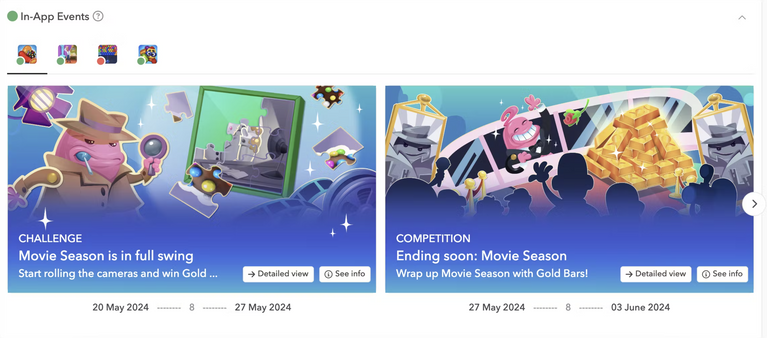
In-app events and promotional content are live events happening inside apps that can be promoted on the app stores via event cards. These event cards contain basic information about the in-app event, such as the event name, a short description, and an image or video. Users are then able to tap through to an event details page with more information.
How to get the most from in-app events?
- Target specific audiences: create events tailored to regions or user groups, such as competitions, challenges, or major app updates
- Align with seasonal or thematic moments: holidays, collaborations, and time-sensitive campaigns generate user excitement and increase store visibility
Update metadata and visuals to reflect the event, maximising its impact on search and browse surfaces
Tip 2: Customize your listing with custom store listings and custom product pages
Custom store listings (CSLs) on Google Play and custom product pages (CPPs) on the App Store allow app developers to target specific user groups with tailored app store experiences. These tools improve user engagement, boost conversions, and align messaging with campaign goals.
| Feature | App Store (CPPs) | Google Play (CSLs) |
| Max variations | 35 custom pages | 50 unique listings |
| Linked via | · Unique URLs · Apple Ads ad groups |
· Google Ads campaigns · Country targeting · Keyword matching |
| Use cases | · Match pages to specific Apple Ads · Highlight features for different audiences · Test creative messaging |
· Target by country · Highlight regional offers · Tailor listings to search keywords · Connect listings to Google Ads campaigns |
Tip 3: Boost discoverability with backlinks (Google Play only)
Backlinks from authoritative websites can enhance your app’s ranking on Google Play. When reputable sites link to your app listing or mention your brand, they send signals that can strengthen your app’s authority and support your overall ASO strategy.
According to AppTweak, high-quality backlinks and brand mentions can enhance app credibility and visibility, complementing key Google Play ranking factors.
Focus on earning backlinks from relevant sources such as tech blogs, app directories, press coverage, and industry websites that align with your app’s audience.
Note: Apple does not use backlinks as a ranking factor in the App Store algorithm.
Tip 4: Monitor and improve Android Vitals (Google Play only)
Maintaining strong Android Vitals (e.g., crash rate, battery usage, responsiveness) is essential for app visibility and user satisfaction on Google Play. Address technical issues promptly to avoid negative reviews and improve performance metrics, which impact rankings.
What kind of tools should I invest in for app store optimization?
App store optimization is a multifaceted process, requiring specialized tools to research, implement, and track your strategy. The right tool for your team will depend on your objectives, budget, and whether you need native platform features or third-party intelligence.
Here’s an overview of the essential app store optimization tools you need:
| Tool type | Key capabilities |
| App keyword research tools |
App keyword research is the cornerstone of effective App Store Optimization, enabling you to discover the exact search terms potential users rely on to find apps similar to yours. By leveraging powerful app store keyword research tools, you can identify high-traffic and relevant keywords that boost your app’s visibility and drive downloads.AppTweak’s ASO Intelligence take this a step further by offering advanced app keyword suggestions, multilingual support, and performance tracking across global markets, giving you a competitive edge in optimizing your app for success.
|
| A/B testing tools |
Experimenting with different variations of app icons, app descriptions, and screenshots is key to uncovering what resonates most with your audience and drives higher conversions. A/B testing tools play a crucial role in fine-tuning your app’s visual and textual elements, enhancing user engagement, and boosting download rates.Both Google Play Console (for Android) and App Store Connect (for iOS) provide built-in A/B testing capabilities, making it easier to optimize your app’s presentation and performance.
|
| App market research tools |
Staying ahead in the app market requires a deep understanding of competitors and emerging trends. App market research tools are essential for identifying opportunities, monitoring competitor strategies, and refining your approach for sustained growth.AppTweak’s Market Intelligence provides valuable insights into app competitor performance, app market trends, and strategic data, empowering you to make informed decisions and maintain a competitive edge.
|
| ASO reporting tools |
Monitoring and analyzing ASO performance is essential for measuring success and continuously improving your strategy. App marketing reporting tools simplify this process by centralizing your data, enabling you to evaluate the impact of your efforts and make informed, data-driven decisions.AppTweak’s Reporting Studio streamlines performance tracking by integrating data from Google Play Console and App Store Connect, allowing you to create custom dashboards tailored to your specific needs.
|
The ideal ASO tool will also vary depending on your objectives, team, and budget.
Explore the best ASO tools of 2026 to optimize your rankings
Common mistakes in ASO
Avoiding these common ASO mistakes is as important as implementing best practices. Each one directly reduces visibility, conversion rate, or ranking strength.
1. Absence of ASO cross-localization
Failing to localize app metadata restricts your app’s reach, especially in non-English-speaking markets. Localization goes beyond simple translation: it requires cultural adaptation of keywords, descriptions, and visuals to resonate with target audiences. For example, keywords that perform well in one language or region may not be effective in another.
Use tools that provide insights into regional keyword trends and ensure all creatives, including screenshots and videos, reflect localized user expectations. Ignoring this step can lead to missed opportunities in high-growth markets.
2. App keyword duplication in metadata
Repeating the same keyword across your title, subtitle, and keyword field wastes character space and adds no ranking value. Instead, use that space to target additional terms: synonyms, long-tail variants, and related category keywords.
For instance, if your app is a fitness tracker, include terms like “activity monitor,” “workout logger,” or “calorie counter” to broaden discoverability. Proper app store keyword research tools can help identify untapped, high-potential keywords.
3. Underutilized titles and subtitles character limits
Both the App Store and Google Play title fields have a 30-character limit. Leaving characters unused means leaving ranking potential on the table. Your title should include your primary keyword while reflecting your app’s core value proposition. Your subtitle should cover a secondary keyword and an additional benefit not expressed in the title.
4. Targeting the wrong keywords
Using irrelevant, generic, or overly competitive keywords can reduce your app’s visibility rather than increase it. It’s essential to regularly evaluate keyword performance and adapt to shifts in user behavior and competitor strategies. The right keywords balance relevance, search volume, and difficulty levels your app can realistically compete at given its current app download velocity and ratings.
5. Poor-quality visual assets
Poorly designed icons or unengaging screenshots fail to capture user attention and directly reduce conversion rates. Visual elements should not only be aesthetically appealing but also strategically communicate your app’s core value. For instance, use screenshots to demonstrate key features, with captions or annotations that highlight benefits. Videos should have clear, concise messaging and showcase dynamic use cases. Always A/B test visual assets to determine what resonates most with your audience.
A brochure maker can help turn static app documentation into an engaging flipbook with interactive screenshots, videos, and annotations. These visuals should clearly showcase key features and benefits, while A/B testing helps identify the assets that best capture attention and drive conversions.
6. Weak app ratings and reviews management
Apps with ratings below 4 stars often struggle to gain traction, in both rankings and featuring eligibility. Actively manage user feedback by engaging with them; thanking users for positive reviews and addressing negative ones constructively. Use automated tools to monitor and respond to reviews at scale, and create in-app prompts to encourage satisfied users to leave reviews. Don’t forget to address recurring issues in updates to demonstrate responsiveness and improve your app’s reputation.
Emerging trends in ASO
App store ecosystems continue to evolve as Apple and Google introduce new discovery surfaces, creative formats, and ranking signals. Understanding these trends helps marketers adapt their ASO strategies to maintain visibility and drive installs.
Personalized acquisition with custom store pages
Both Apple and Google now allow developers to create alternative versions of their app store listing tailored to different audiences or acquisition campaigns.
- Custom Product Pages (App Store) allow up to 35 variations of an app’s product page, each with unique screenshots, promotional text, and preview videos.
- Custom Store Listings (Google Play) allow up to 50 listing variations that can be targeted by country or linked to Google Ads campaigns.
These features help marketers align store page messaging with specific user segments, campaigns, or search queries, improving conversion rates.
The growing role of AI in app discovery
Artificial intelligence is becoming a major force shaping how users discover apps. AI-powered search systems and recommendation engines are increasingly able to understand user intent, app functionality, and contextual relevance.
For ASO teams, this shift means optimizing for semantic relevance and app value, not just individual keywords.
According to AppTweak, AI is already influencing several areas of app discovery:
- AI-powered search and recommendation systems help users discover apps based on intent rather than exact keyword matches.
- Large language models (LLMs) are beginning to influence how apps are surfaced across search engines, AI assistants, and discovery platforms.
- AI tools are transforming ASO workflows, enabling marketers to generate metadata, analyze reviews at scale, and identify keyword opportunities more efficiently.
Learn more on app discoverability in the era of AI and LLMs.
AI-powered tools for ASO and Apple Ads
AI is changing how marketers manage ASO and user acquisition.
AI-powered assistants can now help teams:
- identify keyword opportunities faster
- analyze large volumes of app reviews and sentiment
- generate metadata suggestions
- optimize Apple Ads campaigns
For example, AppTweak’s AI Agents help automate parts of ASO and Apple Ads strategy while keeping marketers in control of decision-making.
Learn more about AppTweak’s AI Agents for ASO and Apple Ads.
Conclusion
By following these strategies and staying updated on the latest trends, you’ll ensure your app achieves sustained visibility and growth in 2026. Implementing a data-driven and user-centric ASO strategy is your key to standing out in a competitive market.
FAQs
How does ASO work?
ASO works by improving both app store visibility and conversion rate. In practice, that means helping your app appear for more relevant searches and giving more users a reason to install once they land on the product page. ASO combines keyword optimization, metadata structure, visual asset optimization, localization, and ratings and review management.
AI tools are increasingly used to support ASO workflows. AI systems can analyze large volumes of keyword data, identify emerging search trends, and extract keyword opportunities from app reviews. Some platforms also provide AI assistants that recommend metadata updates, highlight ranking opportunities, or automate parts of Apple Ads optimization. For example, AppTweak’s AI Agents are designed to assist ASO teams by surfacing insights and suggesting optimizations across app store keyword research, review analysis, and campaign management.
How long does ASO take to show results?
ASO usually shows results in stages. Ranking changes can appear within days, but most metadata updates need around 3–4 weeks to show measurable impact, and broader organic download gains often take 2–3 months of consistent optimization. As a working cadence, App Store changes are often evaluated over 2–4 weeks, while Google Play changes may need 4–6 weeks to stabilize, especially in competitive categories.
How do I choose the best keywords for my app?
The best app keywords are terms that match your app’s core use case, reflect real user intent, and offer realistic ranking opportunities.
Start with a broad list built from features, category terms, problem-based phrases, competitor metadata, and long-tail searches. Then prioritize keywords using three filters: relevance to your app, expected search demand, and ranking difficulty.
Modern ASO keyword research increasingly focuses on user intent rather than isolated keywords. App store algorithms now interpret search queries semantically, meaning multiple keywords can represent the same user goal. For example, searches like “budget planner,” “expense tracker,” and “money manager” may represent the same intent cluster. ASO teams therefore group keywords by intent and optimize metadata, screenshots, and messaging around the user problem being solved. AI-powered tools such as AppTweak’s Atlas AI can help identify these intent clusters by analyzing search trends, competitor metadata, and app reviews.
How do I increase organic app downloads?
To increase organic app downloads, improve both discoverability and conversion in the app stores. Rank for more relevant searches through keyword optimization and better metadata, then increase installs by improving screenshots, icons, videos, descriptions, and ratings. Localization, A/B testing, and regular ASO updates help sustain download growth, especially in competitive or international markets.
What is the impact of app ratings on ASO?
App ratings affect ASO because they influence both user trust and store performance signals. Strong ratings can improve conversion and may support better visibility, while weak ratings can reduce install likelihood and make your listing less competitive. Apple explicitly includes ratings and reviews among App Store search factors, and AppTweak’s 2025 benchmarks report notes that most featured App Store apps have ratings of 4.0 or above.
Can ASO reduce my paid acquisition costs?
Yes, ASO can reduce paid acquisition costs by improving conversion on the page where paid traffic lands. No matter whether a user comes from Apple Ads, social campaigns, influencer content, or another paid channel, that user still has to convert on the app store product page.
A higher-converting listing means more installs per click, directly lowering your Cost per Install (CPI). AppTweak client success stories show that optimising listings routinely can improve conversion rates by 20–60%, compounding the ROI of every paid channel.
What tools do I need for app store optimization?
Most teams need 4 tool categories for ASO: app store keyword research, creative testing, review management, and reporting. The exact stack depends on whether your goal is to improve rankings, raise conversion, manage reviews at scale, or prove ASO impact internally.
AI-powered assistants are also becoming part of the ASO toolkit. These systems help teams process large volumes of data and surface actionable insights faster. For example, AI tools can automatically detect keyword opportunities, cluster reviews by topic or sentiment, generate metadata suggestions, and monitor competitor updates. Platforms like AppTweak combine app store intelligence with AI capabilities such as Atlas AI and AI Agents to help ASO teams analyze data, identify optimization opportunities, and automate parts of their workflow.
How is AI changing app store optimization?
AI is transforming ASO by helping app marketers analyze data faster, understand user intent, and automate optimization workflows.
AI enables teams to:
- detect keyword opportunities
- cluster keywords by intent
- analyze review sentiment
- generate metadata suggestions
- optimize Apple Ads campaigns
Platforms such as AppTweak incorporate AI capabilities like Atlas AI and AI Agents to help app marketing teams identify opportunities, analyze app store data, and automate parts of their optimization workflow.


More articles in Start ASO

 Lucas Trinquet

 Georgia Shepherd

 Sukanya Sur